
In the interconnected world of technology, understanding time zones isn’t merely a matter of geography; it’s a foundational skill crucial for seamless collaboration, robust system design, and impeccable data integrity. While many focus on the global standard of Coordinated Universal Time (UTC), the practical realities of domestic operations often hinge on regional distinctions. Among the most frequently encountered are Eastern Time (ET) and Central Time (CT), representing a significant operational and technical divide within North America. For tech professionals, grasping the nuances of this one-hour difference is paramount, impacting everything from meeting schedules and release deployments to server logs and user experience.

The Fundamentals of Time Zones: ET vs. CT
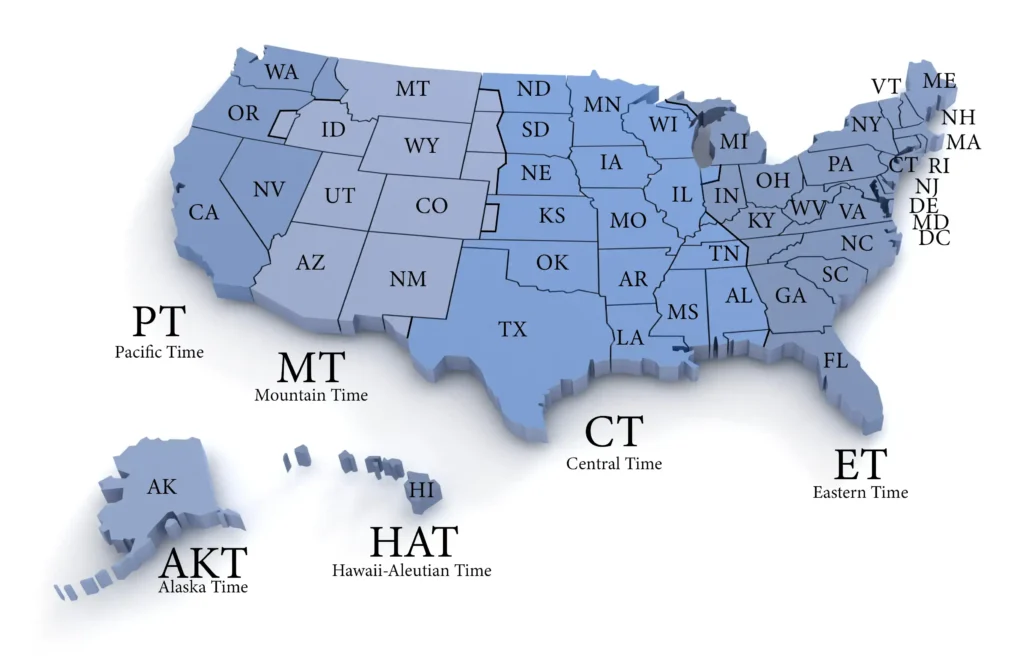
To effectively navigate the complexities of a multi-time zone environment, a clear understanding of the core definitions is essential. Eastern Time and Central Time are two of the four primary time zones observed in the contiguous United States and Canada, each encompassing a distinct geographical band and adhering to specific daylight saving rules.
Defining Eastern Time (ET)
Eastern Time (ET) primarily covers the eastern third of the United States and Canada, along with some Caribbean and South American nations. During standard time, it is referred to as Eastern Standard Time (EST), which is UTC-5. This means EST is five hours behind Coordinated Universal Time. When Daylight Saving Time is in effect, from mid-March to early November, it switches to Eastern Daylight Time (EDT), which is UTC-4. This advancement of one hour makes EDT only four hours behind UTC. Key tech hubs and major financial centers like New York City, Washington D.C., Boston, Atlanta, and Miami operate within the Eastern Time zone, making it a critical reference point for many industries.
Defining Central Time (CT)
Central Time (CT) encompasses the central band of the United States and Canada, situated immediately to the west of the Eastern Time zone. During standard time, it is known as Central Standard Time (CST), which is UTC-6. This places CST six hours behind Coordinated Universal Time. When Daylight Saving Time is observed, it becomes Central Daylight Time (CDT), which is UTC-5. Similar to EDT, CDT is five hours behind UTC. Major cities operating under Central Time include Chicago, Dallas, Houston, New Orleans, and St. Louis. Many vital agricultural, manufacturing, and logistical operations, including significant data centers and tech infrastructure, reside within this zone.
The One-Hour Difference Explained
The fundamental difference between Eastern Time and Central Time is precisely one hour. Eastern Time is always one hour ahead of Central Time.
- When it’s 10:00 AM EST, it’s 9:00 AM CST.
- When it’s 2:00 PM EDT, it’s 1:00 PM CDT.
This consistent differential means that a clock in the Eastern Time zone will always display a time that is one hour later than a clock in the Central Time zone. This seemingly simple difference has profound implications for scheduling, synchronization, and communication, particularly within tech organizations that often operate across these boundaries.
Operational Impact on Global Tech Teams and Development
The one-hour differential between ET and CT might seem minor compared to global time zone spans, but its consistent and often overlooked nature can lead to significant operational challenges for tech teams. Effective management of this difference is crucial for maintaining productivity, fostering collaboration, and delivering on commitments.
Synchronizing Distributed Workforces
Many modern tech companies leverage distributed or remote workforces spanning multiple time zones, including ET and CT. A failure to account for the one-hour shift can result in missed meetings, delayed responses, and fragmented communication. For instance, a daily stand-up scheduled for 9:00 AM ET will start at 8:00 AM CT. Without clear communication and appropriate tooling, Central Time participants might log in late, or Eastern Time participants might miss the full engagement from their Central colleagues. This extends to collaborative coding sessions, peer reviews, and brainstorming meetings, all of which require precise synchronization to be effective.
Managing Release Schedules and Deployments
Software releases, system updates, and infrastructure deployments are often tightly scheduled events. Announcing a production release for “3:00 PM” without specifying the time zone can cause chaos. A 3:00 PM ET deployment means 2:00 PM CT. If a team member in the Central Time zone responsible for monitoring or validation believes it’s at their local 3:00 PM, they will be an hour late, potentially missing critical early warning signs or delaying post-deployment checks. Conversely, an early deployment can catch other systems or teams off guard. Precise time zone specification is non-negotiable for minimizing downtime, ensuring smooth transitions, and coordinating rollback strategies if necessary.
Customer Support Across Time Zones
For SaaS companies, e-commerce platforms, or any tech service with a customer base spanning ET and CT, understanding this time difference is vital for effective customer support. Stating “support is available from 9 AM to 5 PM” without a time zone creates ambiguity. A customer in the Central Time zone contacting support at their 9 AM might find that the Eastern Time support team doesn’t begin until an hour later. This leads to frustration, extended wait times, and a negative user experience. Clearly defining support hours with specific time zones (e.g., “9 AM – 5 PM ET / 8 AM – 4 PM CT”) or using a common reference like UTC helps manage customer expectations and optimize staffing.
Technical Implementation: UTC, Databases, and APIs
Beyond operational considerations, the handling of time zones is a fundamental aspect of software development and system architecture. Incorrect time zone management can introduce subtle yet pervasive bugs that are notoriously difficult to diagnose and fix, impacting data integrity, system behavior, and user interactions.
The Role of Coordinated Universal Time (UTC)

For any system dealing with multiple time zones, Coordinated Universal Time (UTC) serves as the indispensable universal reference. It is the primary time standard by which the world regulates clocks and time. Tech best practices dictate that all internal system timestamps (e.g., in databases, log files, event queues) should be stored in UTC. This provides a single, unambiguous point of reference, eliminating the complexities of daylight saving changes and regional time shifts. When displaying time to a user, the UTC timestamp is then converted to the user’s local time zone, which can be inferred from their system settings, IP address, or explicit user preference. This “store UTC, convert for display” approach is the gold standard for robust time zone handling.
Best Practices for Time Zone Handling in Software
- Standardize on UTC for Internal Storage: As mentioned, all timestamps recorded in databases, logs, and internal messages should be UTC. This prevents issues when an application or service needs to aggregate data from different regions or when team members from different time zones are analyzing logs.
- Explicit Time Zone Conversions: When converting between UTC and local time zones (e.g., ET, CT), always use explicit, well-tested libraries and functions that correctly handle daylight saving rules for historical and future dates. Avoid manual offsets, which are prone to errors.
- User Preference and Detection: For user-facing applications, allow users to set their preferred time zone or automatically detect it based on their browser/system settings. This ensures that displayed times are relevant and comprehensible to them.
- API Design: When designing APIs, clearly specify the expected time zone for any time-related parameters, or ideally, mandate that all inbound and outbound times are in UTC. Misinterpreting a
datetimestring because of an unspecified time zone is a common source of integration bugs.
Avoiding Common Time-Related Bugs
Ignoring time zones or implementing them incorrectly can lead to a variety of insidious bugs:
- Off-by-one-hour errors: The most common, often occurring during daylight saving transitions or when assuming local time without converting from UTC.
- Incorrect ordering of events: If events are logged in different local times and then compared without conversion to a common reference (like UTC), their chronological order can appear incorrect.
- Scheduling glitches: A scheduled task might run an hour early or late if the server’s time zone or the task’s specified time zone is misunderstood.
- Data corruption: In rare cases, complex systems that heavily rely on synchronized timestamps (e.g., distributed ledgers, financial transaction systems) can suffer data integrity issues if time zones are not handled meticulously.
- Reporting discrepancies: Business intelligence and analytics reports can show inaccurate trends or counts if underlying timestamps are inconsistently interpreted across different time zones.
Strategic Advantages of Time Zone Awareness in Tech
Beyond avoiding pitfalls, a sophisticated understanding and implementation of time zone management offer strategic advantages, enhancing efficiency, user satisfaction, and data reliability within tech organizations.
Optimizing Resource Allocation
For globally distributed development, operations, and support teams, time zone awareness enables optimized resource allocation. For example, a development task initiated by an ET team can be handed off to a CT team (or further west) at the end of their workday, allowing for continuous progress. This “follow the sun” model, while often associated with larger global shifts, can also be applied effectively across ET and CT, minimizing idle time and accelerating development cycles. Similarly, scheduling critical system maintenance during off-peak hours can be tailored more precisely when the time zone of the user base is well understood.
Enhancing User Experience
A seamless user experience often hinges on precise and intuitive time displays. An application that accurately reflects event times, deadlines, or historical data in the user’s local time zone feels more personalized and trustworthy. Imagine a user in Dallas (CT) receiving a notification about a webinar starting at “2 PM” without any time zone context, only to find it actually started at 2 PM ET (their 1 PM). Such discrepancies breed confusion and diminish confidence. Conversely, an application that correctly adjusts for time zones, including daylight saving shifts, provides a smoother and more professional experience, minimizing user effort in conversions.
Ensuring Data Integrity and Compliance
In regulated industries, particularly those involving financial transactions or critical personal data, time zone accuracy is not just a best practice but often a compliance requirement. For instance, audit trails and transaction logs must show precise, unambiguous timestamps, typically in UTC, to meet regulatory standards. Incorrect time zone handling can lead to records that are out of sequence or misaligned with actual events, potentially compromising investigations or compliance audits. By strictly adhering to UTC for internal data and performing conversions only for display, tech systems can maintain a robust and legally defensible record of events.
Tools and Technologies for Time Zone Management
Modern technology stacks offer a robust array of tools and features to simplify time zone management, enabling developers and system administrators to build resilient and accurate systems.
Integrated Scheduling Platforms
Platforms like Google Calendar, Microsoft Outlook, and dedicated project management tools (e.g., Jira, Asana) have built-in time zone features. When creating an event, users can specify the time zone for the event, and the platform will automatically convert it for attendees based on their respective time zone settings. This significantly reduces scheduling conflicts for meetings and collaborative sessions spanning ET and CT.
Time Zone Conversion Utilities and APIs
Programming languages, operating systems, and external libraries provide powerful utilities for time zone conversions.
- Programming Languages: Python’s
datetimemodule withpytzorzoneinfo, Java’sjava.timepackage, JavaScript’sIntl.DateTimeFormat, and C#’sDateTimeOffsetall offer sophisticated capabilities for handling time zones, daylight saving rules, and UTC conversions. - APIs: Dedicated time zone APIs (e.g., Google Time Zone API, World Time API) can provide geographical time zone lookups, current time zone offsets, and historical daylight saving data, which are invaluable for applications needing to determine a user’s local time zone or perform complex historical conversions.
Operating System and Programming Language Features
Most operating systems allow users to set their local time zone, and applications can leverage this setting to display times correctly. Server operating systems should ideally be configured to use UTC, simplifying development and reducing potential confusion. Database systems (like PostgreSQL, MySQL, SQL Server) also offer TIMESTAMP WITH TIME ZONE or similar data types that store time along with its time zone offset, though storing pure UTC remains the most flexible and recommended approach. The consistent application of these features across the tech stack is what truly underpins a robust time-aware system.