
A ZIP compressed file stands as one of the most ubiquitous and foundational technologies in digital data management. For decades, it has served as an indispensable tool for individuals and enterprises alike, streamlining everything from email attachments to large-scale software distributions. At its core, a ZIP file is a data container that uses a form of lossless data compression, allowing users to consolidate one or more files and directories into a single archive, simultaneously reducing their overall size. This seemingly simple functionality underpins a vast array of efficiencies in computing, making digital interaction faster, more organized, and more economical in terms of storage and bandwidth.

Understanding Data Compression: The Core Concept
To fully appreciate the utility of a ZIP file, it’s essential to grasp the principles of data compression. In essence, data compression is the process of encoding information using fewer bits than the original representation. This reduction in size is achieved by identifying and eliminating redundancies within the data.
Why Compress Files?
The motivations behind compressing files are multifaceted, driven by both practical limitations and the pursuit of efficiency.
- Saving Storage Space: Perhaps the most immediate benefit, compression allows more data to be stored on physical media (hard drives, SSDs, USB drives) or within cloud storage services, deferring the need for upgrades and reducing costs.
- Faster Transfer Speeds: Smaller files transmit across networks—whether the internet or a local area network—significantly quicker. This translates to faster email attachments, quicker downloads, and more efficient synchronization with cloud services, saving valuable time and bandwidth.
- Improved Organization: A single ZIP file can encapsulate an entire project folder containing various documents, images, and sub-folders. This consolidation simplifies file management, making it easier to share, backup, and locate related information.
- Enhanced Data Integrity: By bundling multiple files, the risk of losing or misplacing individual components of a larger collection is reduced, ensuring that all necessary elements are transferred or stored together.
Lossless vs. Lossy Compression
Compression methods are broadly categorized into two types: lossless and lossy. The distinction is critical when discussing formats like ZIP.
- Lossless Compression: This method ensures that absolutely no data is lost during the compression and decompression process. The original data can be perfectly reconstructed from the compressed data. ZIP files exclusively use lossless compression algorithms. This makes them ideal for archiving documents, executables, spreadsheets, and any data where integrity is paramount, as even a single bit of alteration could render the file unusable or incorrect.
- Lossy Compression: In contrast, lossy compression permanently removes some data that is deemed less critical to human perception. While this achieves significantly higher compression ratios, the original data cannot be perfectly restored. This technique is commonly employed for media files like images (e.g., JPEG), audio (e.g., MP3), and video (e.g., MP4), where minor imperfections are often imperceptible to the human eye or ear, and the size reduction is a higher priority.
The Mechanics of a ZIP File
The robust functionality of a ZIP file stems from sophisticated algorithms and a well-defined structure that allows for efficient bundling and retrieval of data.
How ZIP Achieves Compression
The primary compression algorithm used in most ZIP implementations is called DEFLATE. DEFLATE is a lossless data compression algorithm that combines two distinct techniques:
- LZ77 Algorithm (Lempel-Ziv 1977): This component works by identifying repeated sequences of bytes (strings) within the data. Instead of storing the repeated string multiple times, it replaces subsequent occurrences with a pointer back to an earlier instance of that string. This pointer specifies the length of the string and its distance (offset) from the current position. For example, if “the quick brown fox” appears multiple times, only the first instance is stored fully, and subsequent identical phrases are replaced by a short code indicating “repeat the string found X bytes ago, of length Y bytes.”
- Huffman Coding: After the LZ77 stage has reduced redundancy by replacing repeated strings, Huffman coding is applied. This is a variable-length encoding scheme that assigns shorter bit codes to characters or byte sequences that appear more frequently, and longer codes to less frequent ones. This optimizes the final size by using the most efficient bit representation for the most common patterns.
The combination of LZ77 and Huffman coding makes DEFLATE highly effective for a wide range of data types, particularly text and executable files, where repetition is common.
The Anatomy of a ZIP Archive
A ZIP file is not merely a concatenation of compressed files; it possesses a specific internal structure that enables easy management and access.
- Local File Headers: Each file within the archive has its own header, containing information like the file name, original file size, compressed size, compression method used, and CRC-32 checksum (for integrity verification).
- File Data: Immediately following its local header is the compressed data for that specific file.
- Data Descriptors: Optionally, after the compressed data, a data descriptor can be present, especially if the file’s exact size or CRC-32 wasn’t known at the time the local file header was written.
- Central Directory: Crucially, a ZIP file contains a “central directory” located at the end of the archive. This directory acts as a master index for all the files within the ZIP. It lists every file, its attributes, and its exact offset (location) within the archive. This allows a ZIP utility to quickly scan the contents of the archive and locate specific files without having to read through the entire compressed data sequentially.
- End of Central Directory Record: This small record marks the very end of the ZIP file, providing the location of the central directory.
This structured approach is what makes ZIP files so resilient and versatile, allowing for random access to individual files within the archive.
Multiple Files in One Archive
One of the most powerful features of the ZIP format is its ability to bundle multiple files and even entire directory structures into a single file. This “packaging” capability is invaluable for:
- Distribution: When sharing a collection of related documents, images, or software components, compressing them into a single ZIP file ensures that no item is inadvertently omitted and that the recipient receives the entire set in its intended structure.
- Backup: Creating a ZIP archive of critical folders simplifies the backup process, as only one file needs to be copied or stored.
- Organization: It provides a clean way to keep related files together, reducing clutter and simplifying navigation through a file system.
Practical Applications and Benefits in the Digital Age
The impact of ZIP compression extends across virtually every facet of digital interaction, from personal computing to enterprise-level data management.
Efficient File Transfer
In an age of ever-increasing data volumes, the ability to transfer information quickly and reliably is paramount.
- Email Attachments: Many email providers have size limits for attachments. ZIP files often allow users to send larger collections of files by reducing their collective size, thus staying within these limits.
- Cloud Storage and Synchronization: When uploading or downloading data to cloud services, compressed archives reduce bandwidth usage and accelerate transfer times, making syncing more efficient.
- Web Downloads: Software installers, document packs, and media collections are frequently offered as ZIP archives on websites, ensuring faster downloads for end-users.
Archiving and Backup
For long-term storage and disaster recovery, ZIP files offer a straightforward and effective solution.
- Long-term Storage: Archiving old projects, completed financial records, or cherished photo collections in ZIP format saves space and keeps them neatly organized.
- Data Integrity: The CRC-32 checksums embedded within the ZIP structure allow for basic integrity checks, helping to detect if a file has been corrupted during storage or transfer. While not a substitute for robust error correction, it provides an initial layer of verification.
Encryption and Security
Modern ZIP implementations often include capabilities for password protection and encryption, adding a layer of security to sensitive data.
- Password Protection: Users can encrypt the contents of a ZIP file with a password, requiring anyone who wishes to access the enclosed files to provide the correct credentials. This is particularly useful for sharing confidential documents or backing up personal data.
- Encryption Algorithms: While older ZIP encryption (ZipCrypto) is known to be weak, modern tools support stronger algorithms like AES (Advanced Encryption Standard) with 128-bit or 256-bit keys, offering robust protection against unauthorized access.
Software Distribution
ZIP files play a crucial role in the distribution of software, especially for smaller applications or updates.
- Installers: Many software installers are themselves self-extracting ZIP archives, containing all the necessary files and scripts to set up an application.
- Portable Applications: Applications designed to run without installation are often distributed as ZIP files. Users simply extract the contents to a folder and can run the program directly.
Working with ZIP Files: Tools and Best Practices
Interacting with ZIP files is a common computing task, facilitated by a wide array of tools and integrated operating system features.
Creating ZIP Files
Most modern operating systems offer native support for creating ZIP archives.
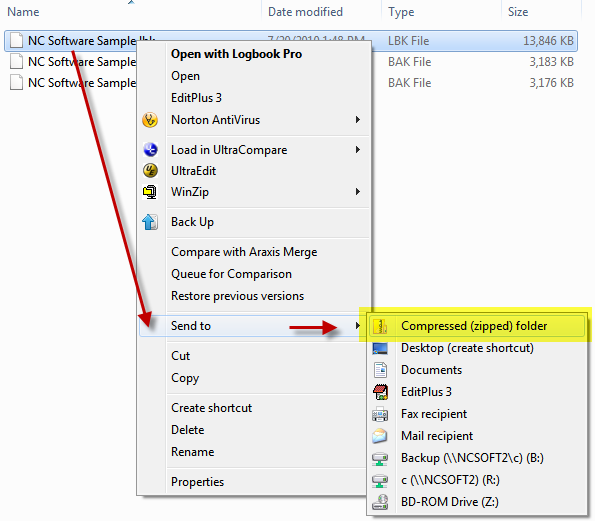
- Windows: Users can select one or more files/folders, right-click, choose “Send to,” and then “Compressed (zipped) folder.”
- macOS: Similar functionality is available by right-clicking selected items and choosing “Compress ‘X’ Items.”
- Third-Party Software: Dedicated archiving tools like WinZip, 7-Zip (open-source and highly versatile), and WinRAR provide more advanced features, including stronger encryption, different compression levels, split archives, and support for a wider range of formats. These tools often offer a more granular control over the compression process.
Extracting ZIP Files
Decompressing or “unzipping” a ZIP file is just as straightforward.
- Built-in OS Features: Double-clicking a ZIP file in Windows or macOS will typically open it as a virtual folder, allowing users to drag and drop contents or use an “Extract All” option.
- Third-Party Utilities: These tools offer similar extraction capabilities, often with better handling of large archives or corrupted files.
Common Issues and Troubleshooting
While generally robust, users might occasionally encounter issues with ZIP files.
- Corrupted Files: If a ZIP file becomes corrupted during transfer or storage, some or all of its contents may be unextractable. This can sometimes be mitigated by using specialized repair tools available in advanced archiving software.
- Forgotten Passwords: Encrypted ZIP files are highly secure, but this means a forgotten password renders the contents permanently inaccessible. It underscores the importance of secure password management.
- Insufficient Disk Space: Extracting a large ZIP file requires enough free space on the drive to accommodate the decompressed contents, which will always be equal to or larger than the ZIP file itself.
Beyond ZIP: Other Compression Formats
While ZIP is dominant, other compression formats serve specific niches or offer different advantages:
- RAR: A proprietary format known for generally achieving higher compression ratios than ZIP, especially for solid archives (where all files are compressed as a single block of data). It also features advanced error recovery. Requires WinRAR or compatible software.
- 7z: The native format of 7-Zip, offering very high compression ratios (often superior to ZIP and RAR) due to advanced algorithms like LZMA. It’s open-source and supports strong encryption.
- GZ and BZ2: Commonly used in Unix-like systems, often for compressing single files. They are frequently combined with
tar(Tape Archive) to createtar.gzortar.bz2archives, which bundle multiple files and then compress the resulting singletarfile.
The Future of File Compression
Despite the rise of cloud computing and ever-cheaper storage, file compression, and specifically the ZIP format, continues to evolve and maintain its relevance.
Continued Relevance in Cloud Environments
Cloud storage and services rely heavily on efficient data handling. ZIP compression plays a vital role by:
- Optimizing Bandwidth: Reducing data size before transmission to and from cloud servers cuts down on transfer times and bandwidth costs, particularly important for large datasets or in regions with limited internet infrastructure.
- Reducing Storage Footprint: While cloud storage is scalable, reducing the physical storage needed still translates to cost savings and environmental benefits for data centers.
- Streamlining Syncing: Faster data transfer means quicker synchronization across devices and collaborative platforms.
Integration with Modern Systems
The simplicity and widespread adoption of ZIP make it a natural fit for integration into modern software and automated workflows.
- APIs and Libraries: Developers frequently utilize libraries and APIs that support ZIP functionalities for packaging assets, generating reports, or managing data within their applications.
- Automated Workflows: In server environments, scripts often compress log files, backup data, or bundle deployment packages into ZIP archives automatically, ensuring efficient management without manual intervention.

New Algorithms and Efficiency
The quest for more efficient compression algorithms is ongoing. While DEFLATE remains a standard, research continues into new methods that can achieve even higher compression ratios or faster compression/decompression speeds. The principles established by formats like ZIP, however, continue to inform these advancements, ensuring that the fundamental concept of bundling and reducing data remains a cornerstone of digital technology.
In conclusion, the ZIP compressed file is far more than just a convenient way to shrink files. It is a testament to ingenious computational engineering, offering a robust, flexible, and universally supported solution for managing, transferring, and archiving digital information. Its continued evolution and integration into modern systems underscore its enduring importance in the technological landscape.
aViewFromTheCave is a participant in the Amazon Services LLC Associates Program, an affiliate advertising program designed to provide a means for sites to earn advertising fees by advertising and linking to Amazon.com. Amazon, the Amazon logo, AmazonSupply, and the AmazonSupply logo are trademarks of Amazon.com, Inc. or its affiliates. As an Amazon Associate we earn affiliate commissions from qualifying purchases.