
The desire to transform photographs into painterly masterpieces has captivated artists and enthusiasts alike, leading to a vibrant ecosystem of software and applications dedicated to this specific form of digital artistry. No longer solely the domain of skilled painters, sophisticated algorithms and artificial intelligence (AI) now empower anyone to imbue their captured moments with the brushstrokes and textures characteristic of various artistic styles. The journey from a static photograph to a dynamic, expressive painting is facilitated by an array of powerful tools, each offering unique approaches and creative control.
The Evolution of Digital Artistry: From Filters to AI
The transformation of photographic imagery into art has undergone a significant evolution, driven by advancements in computational power and artificial intelligence. What began as simple digital filters has blossomed into complex AI-driven engines capable of profound artistic interpretation.

Early Innovations: Basic Filters and Stylization
Initially, photo editing software introduced basic filters that could mimic artistic styles. These often involved applying broad adjustments to color, contrast, and sharpness, sometimes combined with rudimentary texture overlays to simulate canvas or paper. Tools like Photoshop’s “Artistic Filters” menu provided options such as “Oil Paint,” “Watercolor,” and “Poster Edges,” offering a quick, albeit often superficial, aesthetic shift. While these early tools provided a taste of artistic transformation, they lacked the nuanced understanding of form, light, and brushwork that defines traditional painting. The results were often generic, lacking the unique stylistic fingerprints of specific art movements or individual artists. They were more about applying a blanket effect rather than intelligently reinterpreting the image.
The AI Revolution: Deep Learning and Neural Style Transfer
The real paradigm shift arrived with the advent of artificial intelligence, particularly deep learning and neural style transfer (NST). Neural Style Transfer, pioneered by Gatys et al. in 2015, became the cornerstone of modern photo-to-painting applications. This revolutionary technique works by separating the “content” of one image (your photograph) from the “style” of another image (a painting by a master artist, for example). It then intelligently reconstructs the content image in the artistic style of the reference painting, applying characteristic brushstrokes, color palettes, and textural patterns while preserving the core elements of the original photo.
AI models trained on vast datasets of artistic images can now understand and replicate intricate stylistic elements with remarkable fidelity. This isn’t merely overlaying a texture; it’s an intelligent re-rendering of the image’s pixels based on learned artistic principles. Modern AI tools can emulate everything from the impasto techniques of Van Gogh to the delicate washes of watercolors, opening up an unprecedented range of creative possibilities that were previously unimaginable with simple filters. This technological leap democratized complex artistic stylization, making it accessible to users without deep technical or artistic knowledge.
Leading Desktop Software for Professional Conversions
For serious artists, designers, and photographers seeking maximum control, high-resolution output, and a rich feature set, dedicated desktop software remains the gold standard. These programs often leverage sophisticated algorithms and offer extensive customization options.
Adobe Photoshop & Plugins: The Industry Standard
Adobe Photoshop, while primarily a photo editor, offers powerful tools and an extensive plugin ecosystem for transforming photos into paintings. Its built-in “Oil Paint” filter, for instance, allows for considerable control over brush size, detail, and lighting. Beyond its native capabilities, Photoshop truly shines when paired with third-party plugins.
Topaz Studio / Topaz Impression: Artistic Rendering
Tools like Topaz Studio (which includes the functionality of the older Topaz Impression) are specifically designed to mimic various painting styles. They analyze the image and apply intelligent brushstrokes, textures, and color shifts to achieve realistic artistic renderings. Users can choose from hundreds of presets inspired by impressionism, cubism, sketch art, and more, or delve deep into manual controls to fine-tune every aspect, from stroke size and direction to canvas texture and color palette. This level of granular control makes it a favorite among professionals.
Actions and Brushes: Custom Workflows
Photoshop’s ability to record “Actions” allows users to automate complex sequences of filters and adjustments, effectively creating custom painting effects. Additionally, its vast library of digital brushes, both default and third-party, enables artists to manually “paint over” their photo transformations, adding personalized touches or refining areas where the automated process might fall short.
Corel Painter: Dedicated Digital Painting Powerhouse
Corel Painter is arguably the most renowned software specifically designed for digital painting, often referred to as the benchmark for natural media simulation. While it excels at creating art from scratch, it also features powerful cloning and photo-painting tools.
Cloning and Auto-Painting Features
Painter’s “Cloning” features allow users to paint directly onto a blank canvas using a source photograph as a reference, picking up colors and details from the image. Its “Auto-Painting” panels can intelligently apply brushstrokes based on chosen styles and brushes, transforming a photo into a painting with surprising realism. Painter’s strength lies in its unparalleled brush engine, which realistically simulates the behavior of traditional media like oils, watercolors, pastels, and charcoal, reacting to pressure, tilt, and velocity with a digital tablet. This makes it an ideal choice for artists who want to bridge the gap between photography and traditional art.
Exposure Software X7: Creative Photo Editing and Stylization
Exposure X7 (and its subsequent versions) is a non-destructive RAW photo editor that excels in creative effects and stylization, including a robust suite of tools for turning photos into paintings. While not solely a painting program, its strength lies in its extensive collection of artistic presets and powerful editing capabilities.
Extensive Artistic Presets and Overlays
Exposure offers hundreds of beautifully crafted presets that can transform images into various artistic styles, from impressionistic paintings to vintage film looks. Its layering system allows users to combine multiple effects, including brushstrokes, textures, and light effects. The program intelligently analyzes the image to apply these effects in a way that often feels more nuanced than simple overlays. Its non-destructive workflow means users can experiment freely without altering the original image data, making it a safe and flexible option for creative exploration.
Affinity Photo: Budget-Friendly Professional Alternative
Affinity Photo has emerged as a formidable challenger to Photoshop, offering a comprehensive set of professional-grade photo editing and manipulation tools at a one-time purchase price. While it may not have dedicated “painting” filters as extensive as Corel Painter or Topaz, its robust layer capabilities, powerful brush engine, and diverse filter library allow for sophisticated photo-to-painting transformations.
Layering and Brush-Based Techniques
Users can employ Affinity Photo’s Live Filters, blend modes, and extensive brush collection to manually or semi-automatically transform photos. Techniques often involve duplicating the image, applying various artistic filters (like gaussian blur, median blur, then sharpening or adding noise), and using blend modes to create painterly textures. Its powerful selection tools and masking capabilities also enable precise application of effects to specific areas, mimicking an artist’s selective brushwork. For those seeking a powerful, cost-effective alternative with a steep learning curve but immense potential, Affinity Photo is a strong contender.
Accessible AI-Powered Web and Mobile Applications
Beyond professional desktop software, a multitude of web-based platforms and mobile applications have made photo-to-painting conversion more accessible than ever, often leveraging advanced AI for instant, impressive results. These tools are characterized by their ease of use, speed, and often, their reliance on subscription models for full features.
Prisma: Instant Artistic Transformations on Mobile
Prisma was one of the first mobile applications to popularize AI-powered neural style transfer for a mass audience. It allows users to quickly select a photograph and apply a wide range of artistic styles inspired by famous painters and art movements.
Ease of Use and Diverse Style Library
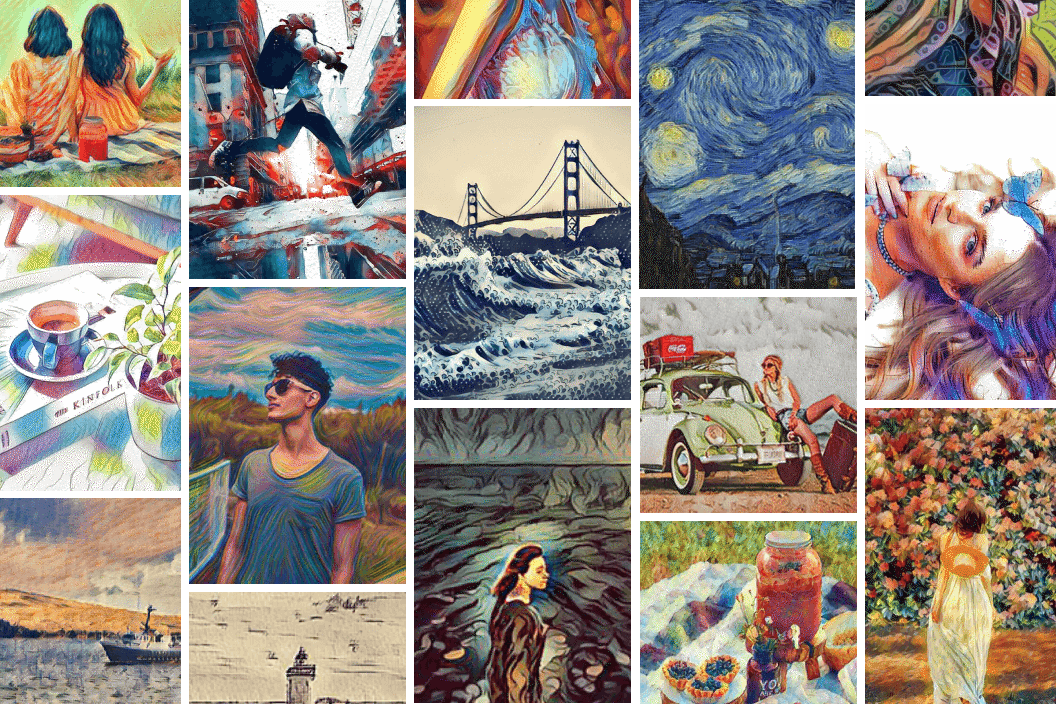
With a simple tap, Prisma can transform a photo into a Van Gogh-esque landscape or a Picasso-like portrait. Its strength lies in its user-friendly interface and a constantly updated library of artistic filters, making high-quality stylistic transformations achievable in seconds directly on a smartphone. While lacking the granular control of desktop software, Prisma excels in delivering quick, aesthetically pleasing results for social media sharing and casual artistic exploration.
Lensa AI & Similar Apps: Advanced Stylization and Portrait Enhancement
Apps like Lensa AI have taken AI-powered stylization a step further, often specializing in portrait enhancement and generative AI effects. While Lensa became famous for its “Magic Avatars,” its underlying technology can be applied to create highly stylized, painterly versions of photos.
Generative AI for Unique Interpretations
These apps often utilize more advanced generative adversarial networks (GANs) or diffusion models to not just apply a style but to intelligently “re-imagine” the subject in a particular artistic context. This can result in more unique and sometimes more dramatic transformations, particularly for human subjects, where the AI might generate new elements or subtly alter features to fit the chosen artistic style more cohesively.
Deep Dream Generator: Experimental AI Art
Deep Dream Generator, inspired by Google’s Deep Dream project, offers a more experimental and often surreal approach to AI art. It allows users to upload an image and apply various “dream” styles, which often result in intricate, pattern-rich, and sometimes psychedelic transformations.
Unique and Often Surreal Artistic Interpretations
Unlike apps that aim for a traditional painterly look, Deep Dream Generator pushes the boundaries of AI interpretation, often revealing hidden patterns or generating unexpected textures and forms. It’s a fantastic tool for those interested in exploring the more abstract and non-conventional side of AI art, creating images that are truly one-of-a-kind.
Fotor & PicsArt: All-in-One Photo Editors with Painting Effects
Many general-purpose photo editing apps for mobile and web, such as Fotor and PicsArt, have integrated robust photo-to-painting capabilities alongside their broader suite of editing tools.
Broad Feature Sets and Integrated Workflows
These platforms offer a balance of comprehensive editing features (retouching, filters, collages) with dedicated artistic filters and AI-powered effects. Users can take a photo, enhance it, and then apply a painterly style all within the same application. While their painting effects might not be as specialized as those in a dedicated AI art app or professional desktop software, they provide a convenient all-in-one solution for many users, offering a good blend of utility and creative potential.
Key Considerations When Choosing a Photo-to-Painting Program
Selecting the right program depends heavily on individual needs, artistic goals, and technical proficiency. Several factors should guide your decision.
Artistic Styles and Customization Options
Evaluate the range of artistic styles offered and the degree of control you have over them. Do you want to mimic specific artists (e.g., Van Gogh, Monet) or simply achieve a general painterly look? Professional software often provides granular controls over brush size, texture, color fidelity, and stylistic intensity, while mobile apps prioritize ease of use with pre-defined styles.
Performance and System Requirements
Desktop software, especially those utilizing complex AI algorithms, can be resource-intensive, requiring a powerful computer with a good GPU and ample RAM. Web and mobile apps are more accessible but may rely on cloud processing, which can sometimes introduce delays or require an internet connection. Consider your hardware capabilities and typical workflow.
User Interface and Learning Curve
Some programs, like Corel Painter or Photoshop, have steep learning curves due to their extensive feature sets, while mobile apps are typically designed for intuitive, tap-and-go operation. Decide if you’re willing to invest time in learning a complex interface for professional results or prefer instant gratification.
Pricing Models: Subscriptions vs. One-Time Purchases
Software licensing varies significantly. Adobe products typically follow a subscription model, while Corel Painter and Affinity Photo offer one-time purchases. Many mobile apps operate on a freemium model, offering basic features for free but gating advanced styles or high-resolution output behind a subscription. Factor in your budget and long-term usage.
Output Quality and Resolution
For professional printing or large-format display, high-resolution output is crucial. Dedicated desktop software generally provides superior output quality and supports larger image dimensions. Mobile and web apps might sometimes cap resolution or compress images, which can be sufficient for social media but problematic for print. Always check the maximum output resolution supported by the program.
Best Practices for Transforming Photos into Art
Regardless of the program chosen, a few best practices can significantly enhance the final artistic output.
Selecting the Right Source Image
The quality and composition of your original photograph are paramount. Images with good lighting, clear subjects, strong composition, and interesting textures often translate into more compelling paintings. Avoid overly busy or underexposed photos, as the artistic filters can sometimes exacerbate flaws. High-resolution source images will always yield better results.
Understanding Artistic Styles
Before applying a filter, take a moment to understand the characteristics of the style you’re emulating. A highly detailed photo might not suit a loose impressionistic style, just as a minimalist landscape might not benefit from dense impasto. Experiment with different styles to see how they interact with your image’s content.
Iteration and Experimentation
Digital art transformation is often an iterative process. Don’t settle for the first result. Tweak parameters, try different styles, and combine effects. Many programs allow for layering, enabling you to blend multiple artistic interpretations or refine specific areas.
Post-Processing and Refinement
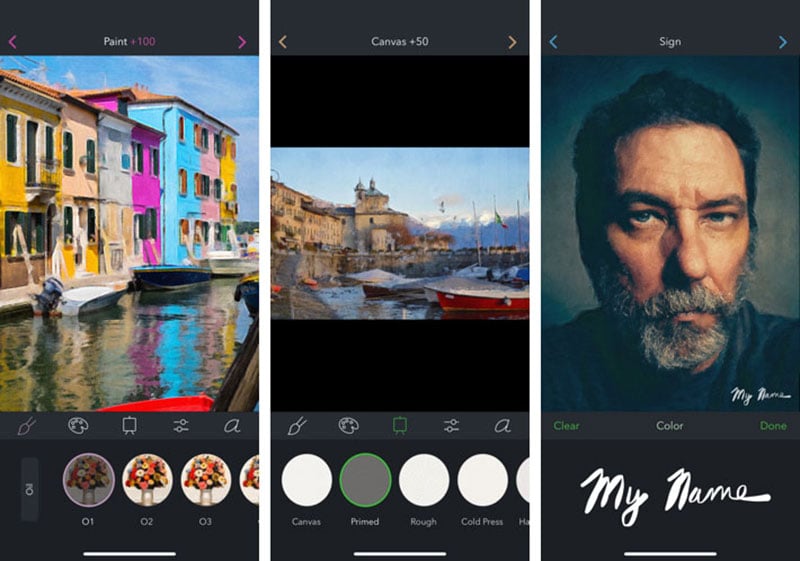
Even after the initial transformation, further post-processing in a standard photo editor (like Photoshop, Lightroom, or even built-in mobile editors) can elevate the artwork. Adjustments to color, contrast, sharpness, and the addition of subtle textures can enhance the painterly feel. Sometimes, selectively masking areas or manually painting over certain parts can add that crucial personal touch that truly makes it your own.
aViewFromTheCave is a participant in the Amazon Services LLC Associates Program, an affiliate advertising program designed to provide a means for sites to earn advertising fees by advertising and linking to Amazon.com. Amazon, the Amazon logo, AmazonSupply, and the AmazonSupply logo are trademarks of Amazon.com, Inc. or its affiliates. As an Amazon Associate we earn affiliate commissions from qualifying purchases.