
A portable monitor represents a significant evolution in personal computing peripherals, offering users the flexibility and expanded screen real estate typically associated with a traditional desktop setup, but in a highly mobile form factor. At its core, a portable monitor is a secondary display designed to be lightweight, compact, and easily transportable, allowing individuals to extend their digital workspace beyond the confines of a fixed location. This innovation has been driven by the increasing demand for versatility in an era dominated by laptops, smartphones, and tablets, empowering users to enhance productivity, enjoyment, and collaboration regardless of their physical surroundings.

The Evolution and Core Concept
The concept of a portable monitor stems from the fundamental human desire for more visual information simultaneously. For decades, multi-monitor setups have been a staple in professional environments, proven to boost productivity by minimizing the need for constant tab-switching and window management. However, these setups were historically tethered to static workstations due to the size, weight, and power requirements of traditional monitors.
Portable monitors emerged to break this tether. Unlike their desktop counterparts, which prioritize screen size and robust stands, portable monitors emphasize minimal thickness, lightweight materials (often aluminum or durable plastics), and low power consumption. Many models can draw power directly from the host device (e.g., a laptop or smartphone) via a single USB-C cable that also transmits video, eliminating the need for an external power brick. This seamless integration is a cornerstone of their design philosophy, enabling true plug-and-play functionality in diverse environments, from coffee shops and co-working spaces to airplanes and hotel rooms. They are not merely smaller screens; they are intelligently engineered companions built for the modern, mobile professional and tech enthusiast.
Key Technical Specifications and Features
Understanding the technical nuances of portable monitors is crucial for appreciating their capabilities and making informed choices. These devices pack advanced display technology into their slender profiles:
Display Technology
- Panel Types: The majority of portable monitors utilize IPS (In-Plane Switching) panels. IPS technology is favored for its wide viewing angles and excellent color accuracy, making it suitable for graphic design, video editing, and general productivity where visual fidelity is paramount. Less common are TN (Twisted Nematic) panels, which offer faster response times often sought by competitive gamers, albeit with sacrifices in color reproduction and viewing angles. Emerging OLED (Organic Light-Emitting Diode) panels offer superior contrast, true blacks, and vibrant colors, but typically come at a premium price point.
- Resolution: Full HD (1920x1080p) is the most prevalent resolution, offering a good balance between clarity and power efficiency. For users requiring greater detail, such as designers or those working with intricate data, QHD (2560x1440p) and 4K UHD (3840x2160p) options are available, though they demand more processing power from the host device and consume more battery.
- Screen Size: Portable monitors typically range from 10 to 17 inches, mirroring common laptop screen sizes. The ideal size balances portability with the practical screen real estate needed for tasks.
- Refresh Rate: Most portable monitors operate at a standard 60Hz refresh rate, sufficient for productivity and casual media consumption. However, higher refresh rate models (e.g., 120Hz or 144Hz) are increasingly available, targeting gamers who benefit from smoother motion.
- Brightness and Color Accuracy: Measured in nits, brightness levels impact visibility in various lighting conditions. For creative professionals, specifications like sRGB, Adobe RGB, or DCI-P3 color gamut coverage are critical indicators of color accuracy.
Connectivity
- USB-C: The most transformative connectivity option, USB-C with DisplayPort Alternate Mode (Alt Mode), allows a single cable to transmit video, audio, and power between the monitor and a compatible host device. This simplifies setup dramatically and minimizes cable clutter.
- HDMI: A common video input standard, often in a Mini-HDMI form factor on portable monitors. While reliable for video, it typically requires a separate USB connection for power, adding a second cable.
- Mini DisplayPort: Less common than HDMI but offers high-resolution video transmission.
- Wireless: Some advanced models incorporate wireless display technologies (e.g., Miracast or Wi-Fi Direct), offering ultimate cable freedom but sometimes introducing latency or requiring a dedicated power source.
Power Source
- USB-C Powered: The most convenient, drawing power directly from the host laptop or smartphone.
- Internal Battery: Select models include an integrated battery, allowing them to function independently without draining the host device, or even to charge the host device via reverse charging.
- External Power Adapter: Some larger or higher-resolution portable monitors may include or require an external power adapter for optimal brightness or sustained usage, especially when connected to devices with limited power output.
Design and Build
- Weight and Thickness: Crucial for portability, with many models weighing under 2 pounds and measuring less than half an inch thick.
- Integrated Stand/Case: Many portable monitors come with a smart cover that doubles as a protective case and a multi-angle stand, enhancing convenience and preventing damage during transit.
- Touchscreen Functionality: For enhanced interactivity, particularly useful for creative work, presentations, or use with Windows 10/11 or Android devices.
- V-ESA Mount Compatibility: While less common, some models offer VESA mounting holes, allowing them to be attached to monitor arms for more permanent, ergonomic setups.
Practical Applications Across Industries
The versatility of portable monitors has led to their adoption across a wide array of professional and personal use cases, profoundly impacting productivity and entertainment.
Remote Work and Productivity
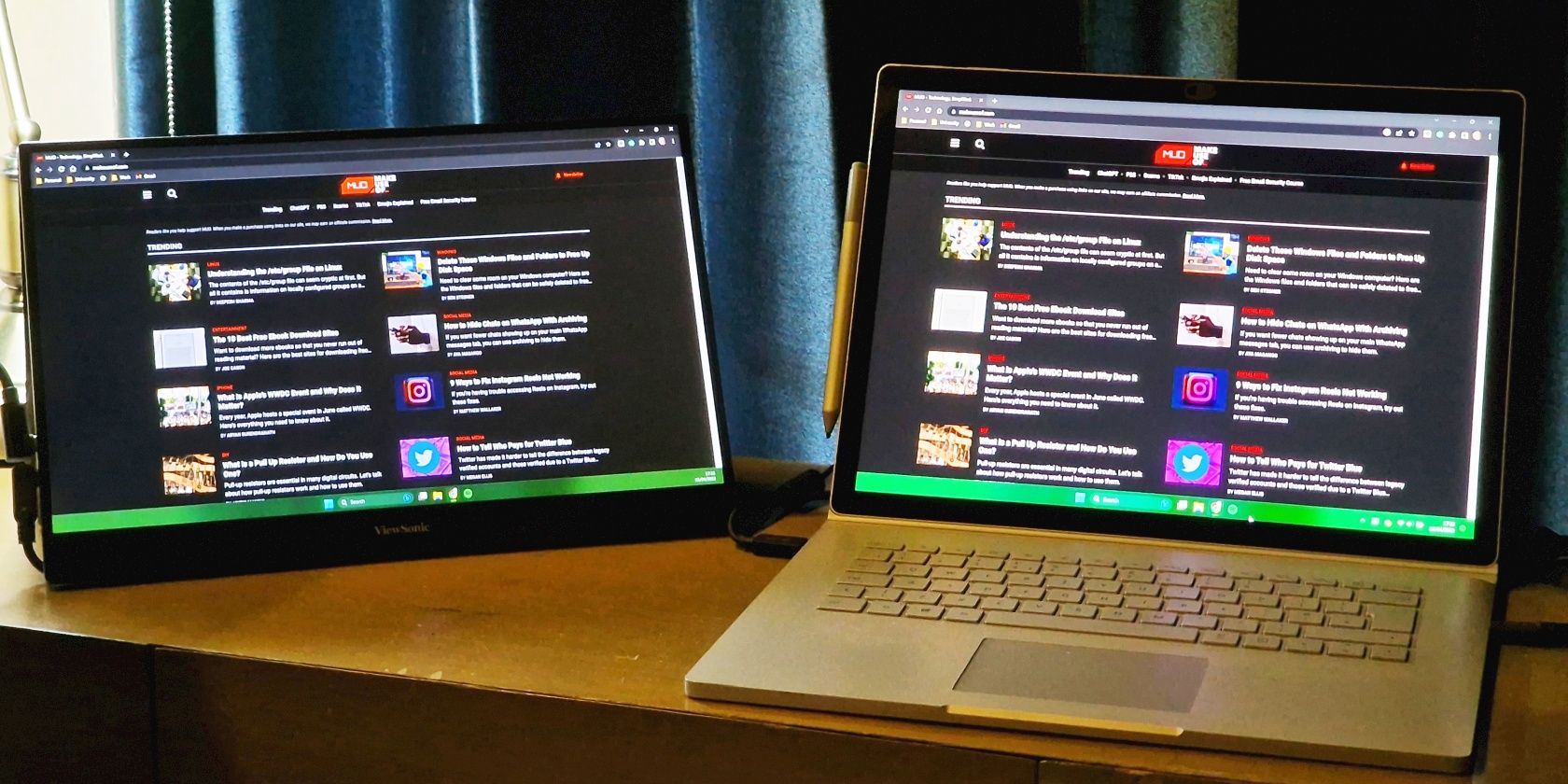
For digital nomads, remote employees, and anyone working from varied locations, a portable monitor transforms a single-screen laptop setup into a multi-monitor workstation. This dramatically enhances multitasking capabilities, enabling users to manage emails, documents, video calls, and reference materials across multiple screens simultaneously, thereby reducing digital fatigue and increasing output.
Gaming
Gamers on the go find portable monitors invaluable. They provide larger, higher-quality displays for gaming consoles like the Nintendo Switch, PlayStation, or Xbox, offering a superior visual experience compared to smaller built-in screens or hotel TVs. High refresh rate portable monitors also cater to PC gamers who want a responsive secondary screen for competitive play or for displaying critical game information, chat windows, or streaming dashboards.
Content Creation and Design
Creative professionals, including photographers, videographers, graphic designers, and digital artists, benefit significantly. Portable monitors with high color accuracy and resolution serve as critical external displays for on-location photo/video previews, color grading, or detailed graphic design work, ensuring visual fidelity away from a calibrated studio monitor. Touchscreen models with stylus support can also double as highly portable drawing tablets.
Business and Presentations
Business professionals leverage portable monitors for client presentations, offering a dedicated screen to display content while keeping private notes on their primary device. They also facilitate collaborative work during meetings, allowing multiple participants to view and interact with shared content more effectively without crowding around a single laptop screen.
Education and Learning
Students and educators can use portable monitors to enhance their study and teaching environments. They provide extra screen space for research, writing, or coding, and can serve as interactive learning tools or presentation aids in classrooms or lecture halls.
Advantages and Considerations for Adoption
While portable monitors offer compelling benefits, potential users should also consider their limitations.
Advantages
- Unrivaled Portability: The primary benefit, allowing multi-monitor setups anywhere an additional screen is needed.
- Significant Productivity Boost: By expanding screen real estate, they minimize window toggling and enhance workflow efficiency.
- Exceptional Versatility: Compatibility with laptops, desktops, smartphones, tablets, and gaming consoles broadens their utility across diverse devices and scenarios.
- Enhanced Ergonomics: Providing an adjustable secondary display can reduce neck strain associated with prolonged laptop use.
- Cost-Effectiveness: Often more affordable than purchasing a full-sized desktop monitor, particularly when considering their multi-device utility and convenience.
Considerations
- Power Consumption: When powered by the host device, a portable monitor can significantly accelerate battery drain. This necessitates planning for power access, especially during extended use away from an outlet.
- Durability Concerns: Their lightweight, slim designs can make them more susceptible to damage from drops or pressure during transit. A robust protective case is often a wise investment.
- Brightness Limitations: Some portable monitors may not achieve the peak brightness levels of dedicated desktop monitors, potentially impacting visibility in very bright environments.
- Input Lag/Refresh Rate: While improving, some models may not match the ultra-low input lag or very high refresh rates of premium gaming monitors.
- Connectivity Compatibility: Users must ensure their primary devices have the necessary ports, particularly USB-C with DisplayPort Alt Mode, to leverage single-cable functionality.
- Ergonomics (with caveats): While offering flexibility, smaller screen sizes or improper positioning can still lead to eye strain if not managed thoughtfully.

Navigating the Market: What to Look For
Choosing the right portable monitor involves aligning its technical specifications with your specific needs.
- Identify Your Primary Use Case: Are you a productivity powerhouse, a casual gamer, or a meticulous creative? Your answer dictates the importance of resolution, refresh rate, and color accuracy.
- Verify Connectivity: Prioritize USB-C with DisplayPort Alt Mode for maximum convenience. Confirm your devices support this standard, or be prepared for multi-cable setups with HDMI.
- Screen Size and Resolution: Balance portability with readability. For general use, FHD (1080p) on a 15.6-inch screen is a common sweet spot. Opt for 4K if detail is paramount and your device can handle the output.
- Power Solution: Decide if you prefer a monitor powered by your host device (simplest), one with an internal battery (most independent), or one requiring an external adapter (for fixed setups or higher power needs).
- Panel Type: For vibrant colors and wide viewing angles, IPS is generally preferred. If competitive gaming is your sole focus, a TN panel with a higher refresh rate might be considered, though IPS gaming monitors are catching up.
- Build Quality and Stand: Look for sturdy construction and a reliable integrated stand or case. VESA mounting options are a bonus for more permanent installations.
- Touchscreen/Stylus Support: Evaluate if these interactive features genuinely enhance your workflow for tasks like presentations, digital art, or navigating touch-friendly operating systems.
- Budget: Portable monitors span a wide price range. Define your budget and aim for the best feature set within it.
- Consult Reviews: Before purchasing, read professional reviews for real-world performance metrics, including brightness, color accuracy, input lag, and overall user experience.
By carefully considering these technical and practical aspects, users can select a portable monitor that not only complements their existing technology but also significantly enhances their digital lifestyle, bridging the gap between desktop power and mobile flexibility.
aViewFromTheCave is a participant in the Amazon Services LLC Associates Program, an affiliate advertising program designed to provide a means for sites to earn advertising fees by advertising and linking to Amazon.com. Amazon, the Amazon logo, AmazonSupply, and the AmazonSupply logo are trademarks of Amazon.com, Inc. or its affiliates. As an Amazon Associate we earn affiliate commissions from qualifying purchases.