
In the vast, interconnected landscape of the internet, information flows ceaselessly, and images play a pivotal role in conveying messages, enriching content, and engaging users. At the heart of how these visual elements are accessed, stored, and shared online lies a fundamental concept: the Picture URL. A Picture URL, or Uniform Resource Locator, is essentially a unique web address that points directly to an image file hosted on a server somewhere on the internet. It acts as a precise digital address, guiding web browsers and applications to the exact location of an image, allowing it to be displayed, downloaded, or processed. Understanding what a picture URL is, its components, and its implications is crucial for anyone navigating or contributing to the digital world, from casual internet users to seasoned web developers and digital marketers.

The Anatomy of a Picture URL
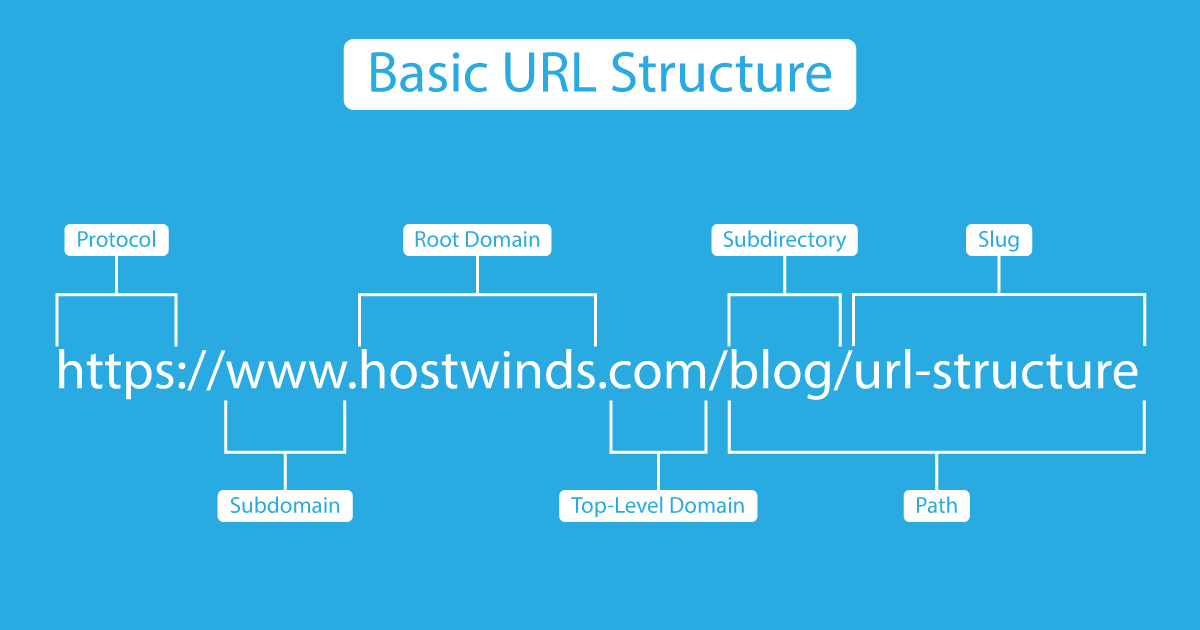
To truly grasp the essence of a picture URL, it’s essential to deconstruct its typical structure. While seemingly a simple string of characters, each part of a URL serves a specific purpose, directing the browser to the correct resource. A standard picture URL is composed of several key elements:
Protocol
The protocol defines the method by which data is transferred between the client (your browser) and the server. The most common protocols for web content, including images, are http:// (Hypertext Transfer Protocol) and its secure counterpart, https:// (Hypertext Transfer Protocol Secure). HTTPS is increasingly prevalent and recommended as it encrypts the data exchanged, providing a layer of security and privacy, which is particularly important for sensitive information but also a best practice for all web content, including images.
Domain Name
Following the protocol is the domain name, which identifies the server or website where the image is hosted. This is the human-readable address of the website, such as example.com or imageserver.net. The domain name translates to an IP address through the Domain Name System (DNS), allowing your browser to locate the specific server on the internet.
Path
The path specifies the exact location of the image file within the server’s file system. It typically starts with a forward slash (/) after the domain name and consists of directories (folders) separated by slashes, leading to the filename itself. For instance, in https://www.example.com/images/products/item123.jpg, /images/products/ represents the directories, and item123.jpg is the filename of the image. The filename also includes the file extension (e.g., .jpg, .png, .gif, .webp), which indicates the image format.
Query Parameters (Optional)
Sometimes, a picture URL may include query parameters, denoted by a question mark (?) followed by key-value pairs separated by ampersands (&). These parameters are often used to pass additional information to the server, which might dictate how the image is served or processed. For example, https://www.example.com/image.jpg?width=500&quality=80 might instruct the server to deliver a version of image.jpg that is 500 pixels wide and compressed at 80% quality. These are frequently employed by Content Delivery Networks (CDNs) or image optimization services.
Fragment Identifier (Rare for Images)
While less common for direct image URLs, a fragment identifier, denoted by a hash symbol (#), points to a specific section within a larger document. For images, it might occasionally be seen in the context of SVG (Scalable Vector Graphics) files, where it could reference a specific element inside the SVG code. However, for standard raster image formats like JPEG or PNG, this component is typically absent.
Why Picture URLs Matter in the Digital Ecosystem
The significance of picture URLs extends far beyond their structural components. They are fundamental to how content is consumed, managed, and optimized across the digital spectrum.
Direct Linking and Sharing
Picture URLs enable direct linking, allowing users to share specific images across platforms without sharing the entire webpage. This is invaluable for social media, messaging apps, and forums, where a visual reference can convey information instantly. It also facilitates the embedding of images into various digital documents and applications.
Web Development and Content Management
For web developers and content creators, picture URLs are the backbone of visual content integration. They are used in HTML <img> tags, CSS background properties, and various content management systems (CMS) to display images on websites. Understanding how to correctly specify and manage these URLs is critical for building visually rich and functional web pages. Dynamic URLs, often generated by CMS platforms or image hosting services, ensure that images are served efficiently and can be updated centrally.
SEO Implications for Images
Search Engine Optimization (SEO) isn’t just about text; images also play a vital role. Search engines crawl image URLs to understand the content. A well-structured URL, combined with descriptive filenames and alt text, helps search engines index images correctly, improving their visibility in image search results and contributing to overall website SEO. Issues like broken URLs or poorly optimized image paths can negatively impact a site’s search ranking.
Digital Asset Management
In organizations, picture URLs are integral to digital asset management (DAM) systems. These systems use unique URLs to track, store, and distribute images and other media files efficiently. Centralized DAM ensures that all departments can access the correct and most up-to-date versions of visual assets, maintaining brand consistency and streamlining workflows.
Common Applications and Use Cases
Picture URLs are ubiquitous in almost every corner of the internet, serving a multitude of practical applications.

Social Media Sharing
When you share an image on platforms like Twitter, Facebook, or Instagram, you’re either uploading the image (which then gets assigned a platform-specific URL) or directly sharing a URL that points to an image hosted elsewhere. These URLs facilitate the quick dissemination of visual content, driving engagement and communication.
Website Content Creation
Every image you see on a website, from product photos on an e-commerce site to illustrations in a blog post, is referenced by a picture URL. Web developers use these URLs within HTML to embed images, enhancing the user experience and breaking up text-heavy content.
Email Marketing
Email campaigns often include images to make them more visually appealing and effective. Instead of embedding large image files directly into the email (which can lead to slow loading times and deliverability issues), email clients typically load images from external URLs when the email is opened. This method relies entirely on picture URLs to display visuals.
Cloud Storage and CDN Integration
Cloud storage services (like Google Drive, Dropbox, Amazon S3) and Content Delivery Networks (CDNs) leverage picture URLs extensively. When you upload an image to cloud storage, it’s assigned a unique URL, allowing you to share or embed it. CDNs, designed to deliver content quickly to users worldwide, generate optimized URLs for images, serving them from the nearest server location to the user, thereby reducing latency and improving website performance.
Security, Privacy, and Best Practices
While picture URLs are incredibly useful, their use also comes with technical considerations related to security, privacy, and overall web performance.
Hotlinking and Bandwidth Theft
Hotlinking, also known as “inline linking,” occurs when someone embeds an image from your server directly onto their website using your image’s URL, consuming your server’s bandwidth. This can lead to increased hosting costs and slower performance for your site. Many websites implement hotlink protection measures, which can block requests from unauthorized domains or replace the hotlinked image with a placeholder or warning message.
Broken Links and Image Availability
A common issue is a broken picture URL, which occurs when the image file is moved, renamed, deleted, or the server hosting it goes offline. When a browser tries to access a broken URL, it results in a “broken image” icon, detracting from the user experience and potentially harming SEO. Regular auditing of image links and using reliable hosting services are crucial best practices.
Protecting Sensitive Images
For images that contain sensitive or private information, relying solely on obscurity (i.e., hoping no one guesses the URL) is insufficient. Access to such images should be controlled through authentication, authorization, and secure server configurations. Using signed URLs with expiry times or storing images in private cloud buckets are technical ways to manage access to sensitive visual assets.
Accessibility Considerations
While not strictly a URL issue, the technical implementation around an image URL must consider accessibility. Providing descriptive alt text for images is crucial for visually impaired users who rely on screen readers. This metadata, though not part of the URL, is intrinsically linked to the <img> tag where the URL is used and is a vital best practice for inclusive web design.
Image Optimization and Performance
The URL for an image often dictates how it’s served. Optimized images (compressed, properly sized, and in modern formats like WebP) referenced by URLs lead to faster page load times and a better user experience. Tools and CDNs frequently offer URL-based transformations to resize, crop, or compress images on the fly, demonstrating a direct link between the URL and image performance.
Advanced Concepts and Future Trends
The evolution of web technology continues to shape how picture URLs are used and managed, leading to more sophisticated solutions.
Responsive Images and srcset
Modern web design prioritizes responsiveness, meaning websites adapt to different screen sizes and devices. For images, this is achieved through HTML attributes like srcset and sizes, which allow developers to provide multiple image URLs for the same visual content. The browser then intelligently selects the most appropriate image URL (e.g., a smaller version for mobile, a higher-resolution version for desktop retina displays) based on the user’s device and viewport, optimizing both appearance and load time.
Content Delivery Networks (CDNs) and Edge Caching
CDNs are increasingly vital for delivering images and other static assets. They store copies of images on servers located geographically closer to users. When an image URL is requested, the CDN directs the request to the nearest server, significantly reducing latency. This “edge caching” mechanism ensures faster load times and a more robust user experience, especially for global audiences. CDNs often provide unique URLs for cached versions of images, demonstrating their pivotal role in modern web architecture.
Programmatic Image Generation and APIs
Many modern applications and services dynamically generate images based on user input or data. APIs (Application Programming Interfaces) allow developers to send requests that result in the creation or modification of an image, which is then served via a unique picture URL. This is common in areas like personalized content, data visualization, or user-generated profile pictures, where images are not static files but are created on demand.
Decentralized Storage (Web3, IPFS)
Emerging technologies like Web3 and the InterPlanetary File System (IPFS) are exploring new paradigms for content storage and retrieval, including images. Instead of relying on a central server, IPFS allows content to be stored across a decentralized network. While the URLs (or CIDs – Content Identifiers) for these images look different (e.g., ipfs://<CID>), the fundamental concept of a unique address pointing to an image remains. This approach promises greater resilience, censorship resistance, and potentially new ways of monetizing or owning digital assets.
In conclusion, a picture URL is far more than just a web address for an image. It is a fundamental building block of the internet, enabling the seamless integration, sharing, and optimization of visual content. From its basic structure to its advanced applications in responsive design, SEO, and decentralized storage, understanding the mechanics and implications of picture URLs is indispensable for anyone operating within the digital realm. As technology continues to evolve, the methods by which images are accessed and managed through their unique identifiers will undoubtedly continue to innovate, promising even more efficient, secure, and engaging visual experiences online.
aViewFromTheCave is a participant in the Amazon Services LLC Associates Program, an affiliate advertising program designed to provide a means for sites to earn advertising fees by advertising and linking to Amazon.com. Amazon, the Amazon logo, AmazonSupply, and the AmazonSupply logo are trademarks of Amazon.com, Inc. or its affiliates. As an Amazon Associate we earn affiliate commissions from qualifying purchases.