
Unpacking the Digital Identity: Decoding the Model Number
The string “MZVL21T0HCLR-00BL2” might appear to be an arcane sequence of characters to the uninitiated, but within the world of computing hardware, it is a precise identifier for a critical component. Specifically, this designation refers to a Samsung Solid State Drive (SSD), a high-performance storage solution. Samsung is a global leader in memory and storage technology, and their products are ubiquitous in everything from consumer electronics to enterprise data centers. The model number provides a rich tapestry of information, hinting at the drive’s capacity, interface, series, and even its intended market.
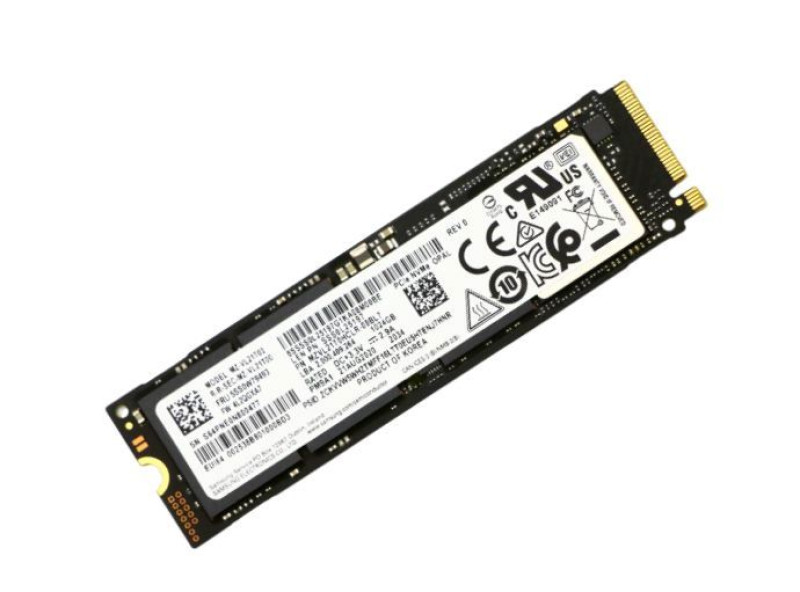
Samsung’s SSD Nomenclature Explained
Samsung employs a systematic approach to naming their SSDs, especially their OEM (Original Equipment Manufacturer) variants, which are often supplied directly to PC manufacturers like Dell, HP, and Lenovo for integration into their systems. These OEM drives, while sometimes lacking the consumer-facing branding of a “980 Pro” or “990 Pro,” are often technologically identical or very similar to their retail counterparts, offering comparable performance and reliability.
The typical Samsung SSD model number is broken down into several segments, each conveying specific attributes:
- MZ: Often indicates a Samsung memory product.
- VL: Denotes the drive’s series or generation (e.g., PM9A1, PM981, PM991). This is crucial as it reveals the underlying controller and NAND flash technology.
- 21T0: This segment typically describes the capacity. Here, “21T0” signifies a 2 Terabyte (TB) drive. Capacities are often coded, with “1T0” for 1TB, “512” for 512GB, and so on.
- HCLR: This portion often refers to the form factor, interface, and potentially a specific revision or characteristic. “HCLR” would indicate an M.2 2280 form factor with a PCIe Gen4 x4 NVMe interface, aligning with contemporary high-performance client SSDs.
- -00BL2: The trailing segment usually denotes a specific firmware version, a variant within the series, or a regional/OEM specific SKU. In many cases, it signifies a standard production model.
Pinpointing MZVL21T0HCLR-00BL2: Capacity, Interface, and Series
Based on this breakdown, the “MZVL21T0HCLR-00BL2” is almost certainly a 2TB Samsung NVMe PCIe Gen4 M.2 2280 SSD. The “VL” segment strongly suggests it belongs to a performance tier similar to Samsung’s PM9A1 or a slightly newer variant designed for high-end laptops and desktops. The PM9A1, for instance, is an OEM version of the formidable 980 Pro, offering cutting-edge performance for its generation. This drive is not merely a storage device; it is a high-speed data conduit, essential for modern computing demands.
The Core Technology: A Deep Dive into NVMe SSDs
The very existence of a model like “MZVL21T0HCLR-00BL2” underscores the dominance of Non-Volatile Memory Express (NVMe) technology in the solid-state storage landscape. NVMe is not just a faster connection; it’s a fundamentally different approach to how storage interacts with a computer’s processor, designed from the ground up to exploit the parallelism and low latency of flash memory.
The Paradigm Shift: Why NVMe Dominates Storage
Before NVMe, most SSDs, despite using flash memory, were shackled by the antiquated SATA (Serial Advanced Technology Attachment) interface, originally designed for mechanical Hard Disk Drives (HDDs). SATA’s command queue and protocol limitations meant that even the fastest SATA SSDs rarely exceeded 550 MB/s for sequential reads/writes and suffered from higher latency compared to what flash memory was capable of.
NVMe shattered these bottlenecks. Developed specifically for flash storage, NVMe leverages the PCI Express (PCIe) bus, which is a direct, high-speed connection to the CPU. This direct pathway drastically reduces latency and enables multiple, parallel command queues, allowing the SSD to handle many more operations simultaneously. The result is a dramatic increase in throughput and responsiveness, making NVMe SSDs several times faster than their SATA counterparts.
Harnessing PCIe Lanes for Unprecedented Speeds
The “Gen4 x4” in the inferred specifications of the MZVL21T0HCLR-00BL2 refers to its use of four PCI Express Generation 4 lanes. Each PCIe lane acts like a high-speed data highway. PCIe Gen4 doubles the bandwidth per lane compared to PCIe Gen3, achieving roughly 2 GB/s (Gigabytes per second) per lane in each direction. With four lanes, a PCIe Gen4 x4 SSD like this Samsung model can theoretically achieve sequential speeds approaching 8 GB/s. This direct, high-bandwidth connection is what allows NVMe SSDs to deliver the incredible performance numbers seen in modern systems.
Key Architectural Components: Controller, NAND, and Firmware
Underneath the hood, every NVMe SSD like the MZVL21T0HCLR-00BL2 is a sophisticated piece of engineering, comprising several critical components:
- The Controller: This is the “brain” of the SSD. It manages data flow, performs wear-leveling (distributing writes evenly across NAND cells to extend drive life), garbage collection (freeing up unused blocks), error correction, and handles the NVMe protocol. Samsung’s controllers are renowned for their efficiency and performance.
- NAND Flash Memory: This is where the data is actually stored. Modern SSDs primarily use 3D NAND, where memory cells are stacked vertically in multiple layers, allowing for higher capacities and better performance within a smaller physical footprint. The type of NAND (TLC – Triple-Level Cell, QLC – Quad-Level Cell) affects endurance and cost. A high-performance drive like this would typically use TLC NAND.
- DRAM Cache: Many high-performance NVMe SSDs include a small amount of DRAM (Dynamic Random-Access Memory) to act as a cache for the mapping table, which tracks where data is physically stored on the NAND. This significantly speeds up read and write operations, especially random ones.
- Firmware: This is the operating system of the SSD. It dictates how the controller interacts with the NAND flash and the host system, playing a critical role in the drive’s performance, stability, and longevity.
Performance Benchmarks and Real-World Impact
The specifications of the MZVL21T0HCLR-00BL2 translate directly into tangible performance benefits that redefine user experience and system capabilities. Understanding these metrics is key to appreciating its value.
Blazing Sequential Speeds and Rapid Random Access
A 2TB Samsung NVMe PCIe Gen4 SSD of this caliber typically boasts sequential read speeds upwards of 6,500 MB/s and sequential write speeds exceeding 5,000 MB/s. These figures are astronomical compared to the roughly 500 MB/s of SATA SSDs or the 100-200 MB/s of traditional HDDs. Such speeds are crucial for tasks involving large file transfers, video editing (reading/writing large media files), and loading massive game assets.

Equally, if not more important, are random read/write speeds, often measured in IOPS (Input/Output Operations Per Second). High random IOPS, usually in the hundreds of thousands (e.g., 800,000 IOPS for random reads and 1,000,000 IOPS for random writes), indicate the drive’s ability to quickly access many small, scattered files simultaneously. This is the metric that truly impacts system responsiveness – how fast applications launch, operating systems boot, and general multitasking feels. A high-end NVMe drive makes the entire computing experience feel instantaneous.
Endurance and Reliability: TBW and MTBF Explained
While speed is often the headline feature, the durability of an SSD is equally vital.
- TBW (Terabytes Written): This specification indicates the total amount of data that can be written to the drive over its lifetime before its cells start to degrade significantly. For a 2TB high-performance NVMe SSD, a TBW rating of around 1200-1400 TBW is common, meaning you could write 1200-1400 terabytes of data to it over its lifespan. For most users, this translates to many years of heavy use, far exceeding the typical lifecycle of a computer system.
- MTBF (Mean Time Between Failures): This is a statistical measure, often stated as 1.5 million hours, indicating the average expected time a device will operate before a failure. While not a guarantee for an individual drive, it reflects a high level of engineered reliability.
These metrics assure users that a drive like the MZVL21T0HCLR-00BL2 is built not just for speed, but also for long-term, dependable service.
Form Factor and Integration: M.2 2280 Standard
The “HCLR” part of the model number, inferring an M.2 2280 form factor, describes the physical dimensions and connector type. M.2 is a small, rectangular card format that plugs directly into a motherboard slot. The “2280” signifies a width of 22mm and a length of 80mm, which is the most common and widely supported size for client NVMe SSDs, making the MZVL21T0HCLR-00BL2 highly compatible with a vast array of modern desktops, laptops, and even some compact form factor PCs. Its compact size and direct motherboard connection eliminate the need for power or data cables, contributing to cleaner builds and more efficient thermal management within a system.
Ideal Applications: Who Benefits Most from This Class of Storage?
The exceptional performance characteristics of the Samsung MZVL21T0HCLR-00BL2 make it an ideal storage solution for demanding computing environments where speed, responsiveness, and reliability are paramount.
Powering High-End Computing: Desktops and Laptops
For users building or upgrading high-performance desktop PCs or purchasing premium laptops, an NVMe SSD of this caliber is a non-negotiable component. It dramatically cuts down operating system boot times, application launch times, and the overall snappiness of the user interface. Whether you’re juggling dozens of browser tabs, running multiple virtual machines, or simply demand a supremely responsive daily driver, this drive elevates the entire computing experience.
Accelerating Creative Workflows and Data-Intensive Tasks
Professionals in creative fields, such as video editors, graphic designers, 3D artists, and music producers, stand to gain immensely. Loading large project files, rendering complex scenes, scrubbing through high-resolution video timelines, and compiling large codebases all benefit directly from the MZVL21T0HCLR-00BL2’s high sequential and random read/write speeds. The 2TB capacity also provides ample space for substantial project files, raw footage, or extensive software libraries, reducing the need for constant external drive management. Data scientists and engineers working with large datasets will find the faster data access invaluable for accelerating simulations and analysis.
Elevating the Gaming Experience
Modern video games are increasingly storage-intensive, featuring sprawling open worlds, high-resolution textures, and complex game assets. Installing games on an NVMe SSD like the MZVL21T0HCLR-00BL2 drastically reduces loading screens, texture pop-in, and level transitions, providing a smoother, more immersive gaming experience. Even in competitive gaming, faster load times can mean the difference between getting into the action first or being left behind. The 2TB capacity is particularly attractive for gamers who want to install a large library of AAA titles without constantly uninstalling and reinstalling games.
Considerations for Adoption and Future-Proofing
While the MZVL21T0HCLR-00BL2 represents a top-tier storage solution, there are practical considerations for anyone looking to integrate such a drive into their system.
Compatibility and Installation Essentials
Before purchasing or installing, users must ensure their motherboard has a compatible M.2 slot that supports PCIe Gen4 NVMe SSDs. Most modern motherboards (especially those supporting Intel 11th Gen CPUs or newer, or AMD Ryzen 3000 series CPUs or newer) will have at least one such slot. For optimal performance, the drive should be installed in a slot directly connected to the CPU, as opposed to a chipset-connected slot, though both will offer significant speed. Installation is typically straightforward: slide the M.2 card into the slot and secure it with a small screw. Operating systems like Windows 10 and 11 offer native support for NVMe, making driver installation usually seamless.
Optimizing Performance and Longevity
To ensure the MZVL21T0HCLR-00BL2 performs at its peak and enjoys a long lifespan, a few best practices are recommended:
- Thermal Management: High-performance NVMe drives can generate heat. Many motherboards come with integrated M.2 heatsinks, which are highly recommended to prevent thermal throttling and maintain peak speeds during sustained heavy loads.
- Keep Sufficient Free Space: While not as critical as with older SSDs, leaving around 15-20% of the drive’s capacity free can aid in performance optimization functions like garbage collection and wear leveling.
- Firmware Updates: Periodically checking for and installing firmware updates from Samsung can improve performance, stability, and compatibility.

The Evolving Landscape of Solid State Storage
The “MZVL21T0HCLR-00BL2” represents the leading edge of client-side storage for its generation, but the technology continues to evolve rapidly. PCIe Gen5 SSDs are already emerging, promising to double current speeds once again. However, these require even newer motherboard platforms. For the vast majority of users today, a high-performance PCIe Gen4 NVMe SSD like this Samsung model offers a phenomenal balance of speed, capacity, and cost-effectiveness, providing a significant performance uplift that will remain highly relevant and capable for years to come. It’s a cornerstone component for any serious computing setup.
aViewFromTheCave is a participant in the Amazon Services LLC Associates Program, an affiliate advertising program designed to provide a means for sites to earn advertising fees by advertising and linking to Amazon.com. Amazon, the Amazon logo, AmazonSupply, and the AmazonSupply logo are trademarks of Amazon.com, Inc. or its affiliates. As an Amazon Associate we earn affiliate commissions from qualifying purchases.