
Configuring Virtual Local Area Networks (VLANs) on a network switch is a foundational practice in modern network design, transforming a seemingly monolithic physical device into a versatile and segment-aware traffic controller. Far from being a mere cosmetic change, VLAN implementation fundamentally alters how a switch processes, forwards, and isolates network traffic, leading to significant improvements in security, performance, and manageability. Understanding these changes is critical for any network professional aiming to build robust and efficient network infrastructures.
The Fundamental Purpose of VLANs
At its core, a VLAN is a logical grouping of network devices that behave as if they are on the same physical local area network (LAN), even if they are connected to different switch ports or even different physical switches. This abstraction allows network administrators to segment a single physical switch into multiple isolated broadcast domains. Traditionally, a switch operates within a single broadcast domain, meaning that a broadcast message sent by any device connected to that switch would be received by all other devices on the same switch. VLANs shatter this monolithic structure.
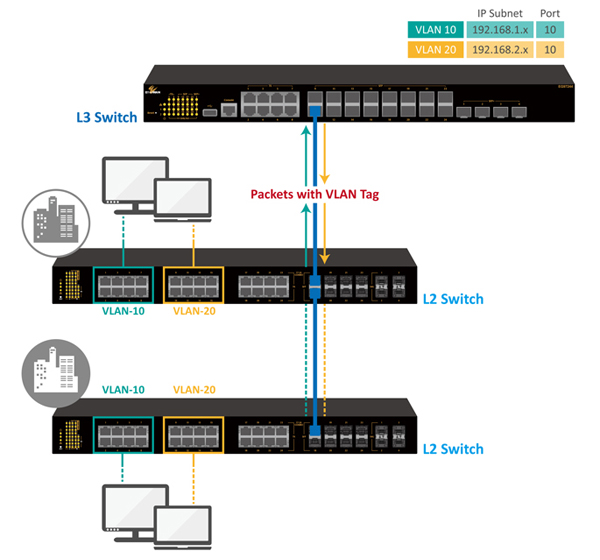
The necessity of VLANs stems from several crucial operational and security requirements. Without VLANs, network segmentation would necessitate multiple physical switches, each dedicated to a specific department or type of traffic. This approach is costly, cumbersome, and inflexible. VLANs provide a software-defined solution, allowing for the logical partitioning of a single switch. This virtual partitioning brings immediate benefits, such as controlling broadcast traffic, enhancing network security by isolating user groups, simplifying network management by enabling logical grouping, and optimizing network performance by reducing unnecessary data propagation.
The Immediate Impact on Network Traffic
When VLANs are configured, the most immediate and profound impact is on how broadcast traffic is handled and how devices communicate. The switch no longer treats all connected devices as part of one large segment; instead, it enforces the boundaries defined by the VLANs.
Broadcast Domain Segmentation
The primary effect of VLAN configuration is the segmentation of broadcast domains. Each VLAN creates an independent broadcast domain. For instance, if a switch has two VLANs configured – VLAN 10 for “Sales” and VLAN 20 for “Marketing” – a broadcast message (like an ARP request or a DHCP discovery packet) originating from a device in VLAN 10 will only be forwarded to other devices within VLAN 10. Devices in VLAN 20 will never see this broadcast traffic.
This segmentation dramatically improves network efficiency. In larger flat networks without VLANs, every broadcast packet would consume resources on every connected device, even if that device had no interest in the broadcast. By containing broadcasts to their respective VLANs, network overhead is significantly reduced, allowing end devices to process less irrelevant traffic and freeing up switch processing power for more pertinent data forwarding. This directly translates to improved network performance and reduced congestion.
Enhanced Security Posture
Beyond broadcast control, VLANs play a pivotal role in enhancing network security. By logically isolating different departments, user groups, or types of traffic, VLANs prevent direct communication between these groups unless specifically routed. For example, sensitive financial data servers might reside in one VLAN, while guest Wi-Fi users are isolated in another. This prevents guest users from directly accessing internal corporate resources, even if they are physically connected to the same switch.
This isolation helps to contain security breaches. If a device in one VLAN becomes compromised, the attack’s lateral movement within the network is restricted to that specific VLAN. Without inter-VLAN routing, the attacker cannot directly pivot to devices in other VLANs, giving security teams more time to detect and mitigate the threat. VLANs are a fundamental building block for implementing a “least privilege” network access model.
Improved Network Performance
While related to broadcast domain segmentation, the performance benefits extend further. Less broadcast traffic means fewer CPU cycles expended on processing irrelevant frames for both end devices and the switch itself. Network protocols that rely heavily on broadcasts, such as ARP or DHCP, become more efficient as their scope is limited.
Furthermore, applications that generate significant traffic can be isolated into their own VLANs, preventing them from impacting the performance of other critical applications. For example, VoIP traffic, which is highly sensitive to latency and jitter, can be placed in a dedicated VLAN with Quality of Service (QoS) policies applied, ensuring it receives preferential treatment without competing with bulk data transfers from other departments.
Simplified Network Management
VLANs simplify network administration by allowing for logical grouping of resources. Users and devices can be grouped based on department, function, or security requirements, irrespective of their physical location on the network. When an employee moves to a different office within the same building, their network access and policies can remain consistent by simply reassigning their new switch port to the appropriate VLAN, rather than having to physically rewire or reconfigure network segments.
Policy application also becomes easier. Access Control Lists (ACLs) can be applied to entire VLANs or between VLANs, allowing for granular control over what traffic is permitted to flow where. This logical organization also aids in troubleshooting, as network administrators can quickly narrow down the scope of an issue to a specific VLAN.
How Switches Handle VLANs: Under the Hood
To implement these logical segments, switches employ specific mechanisms to identify and differentiate traffic belonging to various VLANs.
Port-Based VLANs (Access Ports)
The most common way to assign devices to VLANs is through port-based configuration, where individual switch ports are configured as “access ports” and assigned to a single, specific VLAN. Any device connected to an access port is implicitly a member of that port’s assigned VLAN. Traffic entering an access port is tagged internally by the switch with the corresponding VLAN ID, and traffic leaving an access port is untagged before being sent to the end device. End devices (like PCs, printers, or IP phones) connected to access ports are generally unaware of VLANs; they simply send and receive untagged Ethernet frames.
Trunking (802.1Q Tagging)
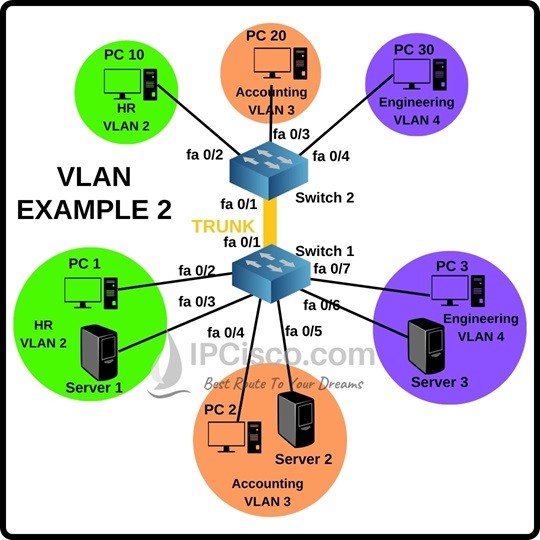
While access ports are for end devices, “trunk ports” are used to carry traffic for multiple VLANs across a single physical link. This is essential when connecting switches to other switches, or switches to routers. The IEEE 802.1Q standard defines how VLAN information is inserted into an Ethernet frame for trunking.
When a frame needs to traverse a trunk link, the sending switch inserts a 4-byte 802.1Q tag into the Ethernet header. This tag contains a Tag Protocol Identifier (TPID) and a Tag Control Information (TCI) field. The TCI includes the 12-bit VLAN ID (VID), which uniquely identifies the VLAN the frame belongs to. When the frame reaches the receiving switch, it reads the 802.1Q tag, identifies the VLAN, and then forwards the frame appropriately within that VLAN. The tag is typically removed when the frame exits an access port destined for an end device.
Native VLAN
On 802.1Q trunk links, there’s a concept of a “native VLAN.” This is a specific VLAN whose traffic is sent across the trunk untagged. All other VLANs’ traffic is tagged. By default, Cisco switches assign VLAN 1 as the native VLAN, though this is configurable. Devices connected to a trunk port that are not configured to handle 802.1Q tags will implicitly communicate on the native VLAN. It’s crucial for the native VLAN to be consistent on both ends of a trunk link; a mismatch can lead to security vulnerabilities (VLAN hopping) and network disruptions. Many security best practices recommend changing the native VLAN from the default and dedicating it to unused ports, or ensuring it is distinct from any active user or management VLANs.
VLAN Database and Configuration
The information about configured VLANs (VLAN IDs, names, and associated ports) is stored in a VLAN database on the switch. On Cisco switches, this database is typically found in a file named vlan.dat in flash memory. This configuration is persistent across reboots. When an administrator configures a VLAN (e.g., vlan 10, name Sales) or assigns a port to it (e.g., switchport mode access, switchport access vlan 10), the switch updates this internal database and modifies its forwarding logic to reflect the new segmentation rules.
Inter-VLAN Routing: Enabling Communication
While VLANs provide excellent isolation, devices in different VLANs often need to communicate with each other. Since each VLAN is a separate broadcast domain and thus a separate IP subnet, a Layer 3 device (a router or a Layer 3 switch) is required to facilitate communication between them. This process is known as inter-VLAN routing.
Router-on-a-Stick
One common method for inter-VLAN routing is “router-on-a-stick.” In this setup, a single physical interface on a router is connected to a switch trunk port. The router interface is then logically subdivided into multiple sub-interfaces, each configured with an IP address for a specific VLAN and acting as the default gateway for that VLAN. When a device in VLAN 10 wants to communicate with a device in VLAN 20, it sends the packet to its default gateway (the sub-interface for VLAN 10 on the router). The router receives the tagged packet, routes it to the correct VLAN 20 sub-interface, and then sends it back down the trunk port, now tagged for VLAN 20. This method is effective for smaller networks but can become a performance bottleneck as all inter-VLAN traffic must traverse the single router link.
Layer 3 Switches (SVI – Switched Virtual Interfaces)
For larger or more performance-sensitive networks, Layer 3 switches are commonly used for inter-VLAN routing. A Layer 3 switch combines the functionality of a Layer 2 switch with basic routing capabilities. Instead of relying on a separate physical router interface, the Layer 3 switch uses Switched Virtual Interfaces (SVIs). An SVI is a logical interface associated with a VLAN, providing a default gateway IP address for that VLAN.
When a Layer 3 switch has SVIs configured for multiple VLANs, it can perform routing decisions internally at line speed. Traffic destined for a different VLAN does not need to leave the switch, be routed by an external router, and then return. Instead, the Layer 3 switch performs the routing operation directly, offering significantly higher throughput and lower latency for inter-VLAN communication compared to router-on-a-stick. This makes Layer 3 switches ideal for aggregating network segments and providing high-speed connectivity within a campus or enterprise network.
Common Challenges and Best Practices
While highly beneficial, VLAN configurations can introduce complexities and potential pitfalls if not managed correctly.
Misconfiguration Issues
Common configuration errors include incorrect port assignments, where a device is placed into the wrong VLAN, leading to connectivity issues. Trunking misconfigurations, such as native VLAN mismatches between interconnected switches, can create security holes or prevent traffic flow. IP addressing conflicts or incorrect default gateway settings on end devices for their respective VLANs are also frequent troubleshooting points. Careful planning, documentation, and verification are essential to avoid these issues.
Security Considerations
Despite their inherent security benefits, VLANs are not foolproof. VLAN hopping attacks, where an attacker bypasses VLAN isolation, are a significant concern. Techniques like double tagging (inserting an extra 802.1Q tag) or switch spoofing (mimicking a trunking switch to gain access to all VLANs) can compromise network segmentation. Best practices include disabling trunking on all ports not explicitly needing it, placing unused ports into an isolated VLAN, and ensuring the native VLAN is changed from the default and untagged traffic is minimized. Implementing robust Access Control Lists (ACLs) on inter-VLAN routing interfaces further refines security by specifying exactly which traffic is allowed between segments.
Scalability and Design
As networks grow, managing VLANs can become complex. A consistent VLAN numbering scheme (e.g., reserving specific ranges for voice, data, management) and careful IP subnet planning are vital for scalability. Spanning Tree Protocol (STP) also needs to be considered, as each VLAN runs its own instance of STP, which can lead to complex interactions if not designed properly. Careful design ensures that VLANs logically group users and resources without creating management nightmares or performance bottlenecks.

Monitoring and Troubleshooting
Effective monitoring and troubleshooting tools are crucial for managing VLAN-enabled networks. Commands to display VLAN status, port assignments, trunk configurations, and SVI states are invaluable for verifying correct operation. Packet capture tools can help diagnose specific traffic flow issues between VLANs. Regular audits of VLAN configurations and security policies help maintain network integrity and performance.
In conclusion, configuring VLANs on a switch fundamentally transforms its operation from a simple Layer 2 forwarding device into a sophisticated network segmentation engine. This transformation is pivotal for achieving a secure, efficient, and manageable network infrastructure capable of supporting the diverse demands of modern organizations.
aViewFromTheCave is a participant in the Amazon Services LLC Associates Program, an affiliate advertising program designed to provide a means for sites to earn advertising fees by advertising and linking to Amazon.com. Amazon, the Amazon logo, AmazonSupply, and the AmazonSupply logo are trademarks of Amazon.com, Inc. or its affiliates. As an Amazon Associate we earn affiliate commissions from qualifying purchases.