
In the ever-expanding landscape of enterprise technology, managing and securing the myriad of devices, applications, and data points has become a monumental challenge. Organizations worldwide grapple with the complexities of a mobile workforce, the proliferation of personal devices in the workplace (BYOD – Bring Your Own Device), and an increasingly sophisticated threat environment. It is within this intricate context that solutions like IBM MaaS360 with Watson emerge as critical enablers for modern businesses. At its core, MaaS360 is a comprehensive Unified Endpoint Management (UEM) platform designed to secure and manage all endpoints—from smartphones and tablets to laptops, desktops, and IoT devices—as well as the applications and content accessed through them, all from a single, integrated console.
Understanding Enterprise Mobility Management (EMM) and UEM
To fully grasp the essence of MaaS360, it’s vital to understand the technological evolution that led to its development. Initially, the focus was predominantly on Mobile Device Management (MDM). MDM solutions primarily offered capabilities for inventorying, provisioning, securing, monitoring, and remotely managing mobile devices. This was crucial for handling the initial wave of corporate-issued smartphones and tablets. However, as mobile technology advanced, so did the demands on IT departments.
The Evolution to Unified Endpoint Management (UEM)
The limitations of MDM quickly became apparent. Organizations didn’t just need to manage devices; they also needed to manage the applications running on them (Mobile Application Management – MAM) and the secure access to corporate content (Mobile Content Management – MCM). These combined functionalities gave rise to Enterprise Mobility Management (EMM). EMM platforms offered a more holistic approach, integrating MDM, MAM, and MCM to provide a richer set of capabilities for managing the mobile ecosystem.
However, the proliferation of endpoints didn’t stop at mobile devices. Laptops and desktops, traditionally managed by separate client management tools, began to converge with mobile devices in terms of security and access needs. The modern digital workspace demanded a unified strategy for all endpoints, regardless of their operating system or form factor. This imperative led to the advent of Unified Endpoint Management (UEM). UEM solutions consolidate the management of traditional devices (Windows, macOS), mobile devices (iOS, Android), and often IoT devices, providing a single pane of glass for IT administrators to enforce policies, deploy software, monitor security, and provide support across the entire IT estate. MaaS360 stands firmly in this UEM category, leveraging advanced capabilities to simplify IT operations and bolster security across a diverse endpoint landscape.
Key Features and Capabilities of IBM MaaS360
IBM MaaS360 is distinguished by its robust suite of features designed to address the multifaceted challenges of endpoint management and security. Its integration with IBM Watson brings an added layer of AI-powered insights, threat intelligence, and automation, making it a highly intelligent and proactive solution.
Device Management
At the heart of MaaS360 lies its comprehensive device management capabilities. It supports a wide array of operating systems, including iOS, Android, Windows, macOS, and Chrome OS. This involves:
- Device Enrollment: Streamlined over-the-air (OTA) enrollment processes for corporate-owned and personal devices, including zero-touch deployment options for certain device types.
- Configuration and Policy Management: Centralized creation and enforcement of security policies, Wi-Fi, VPN, email, and other configurations. This includes setting password complexity, screen lock policies, and restricting certain device functionalities.
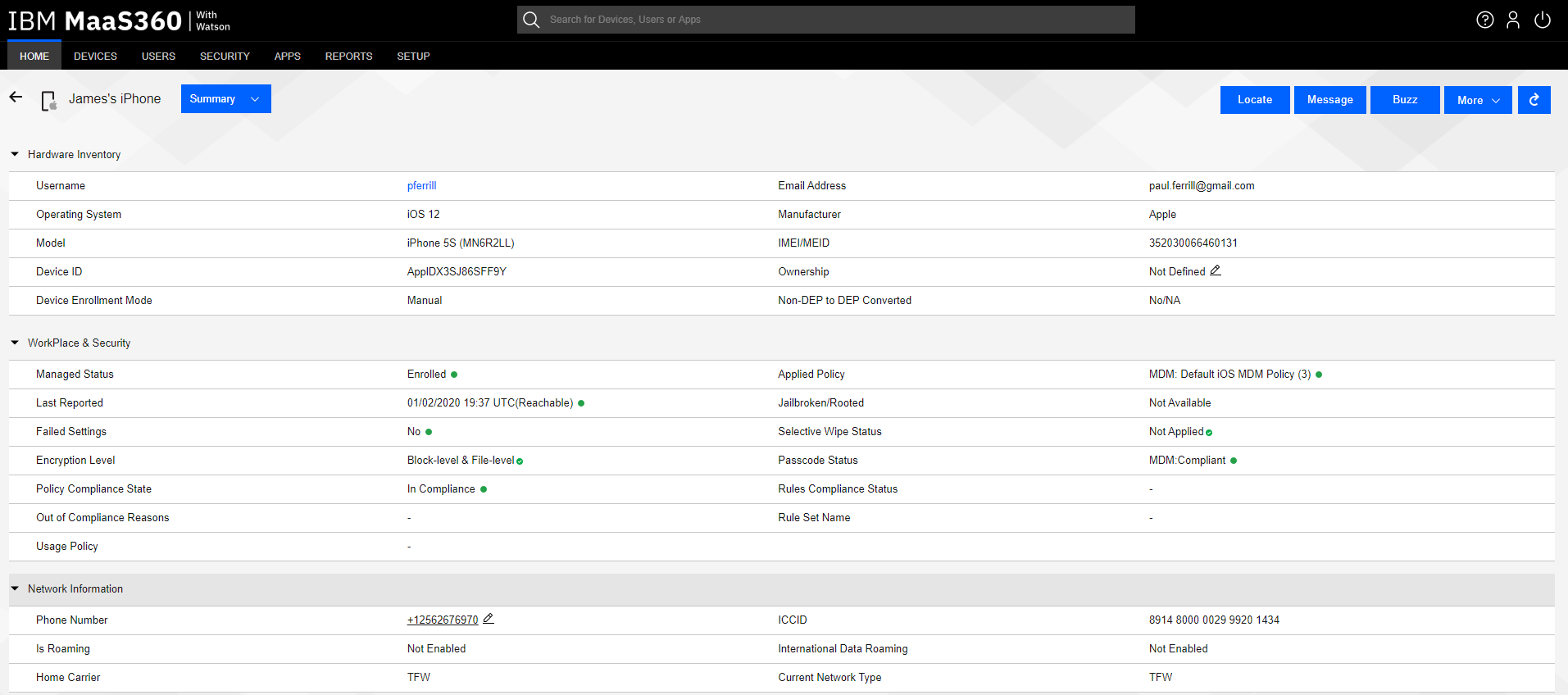
- Inventory and Asset Tracking: Maintaining a real-time inventory of all enrolled devices, including hardware and software details, compliance status, and user information.
- Remote Actions: Ability to remotely locate, lock, wipe (full or selective), and reset passwords for lost or stolen devices, significantly mitigating data breach risks.
- Operating System Updates: Managing and pushing OS updates to ensure devices are running the latest, most secure versions.
Application Management
MaaS360 provides granular control over applications, ensuring that employees have access to the necessary tools while maintaining security and compliance.
- Public and Private App Store Management: Distributing and managing applications from public app stores (e.g., Apple App Store, Google Play) and private enterprise app catalogs.
- App Configuration and Policy: Enforcing policies for application use, such as preventing data sharing between personal and corporate apps, and configuring app settings remotely.
- App Vetting and Security: Leveraging threat intelligence to identify and block risky applications before they can be installed on managed devices.
- License Management: Tracking and managing application licenses to ensure compliance and optimize software spending.
Content Management
Secure access to corporate data and documents is paramount. MaaS360 facilitates this through its content management features.
- Secure Content Locker: Providing a secure container for distributing, viewing, and collaborating on corporate documents. This ensures data remains encrypted and controlled, even when accessed on mobile devices.
- Data Loss Prevention (DLP): Implementing policies to prevent unauthorized sharing, copying, or printing of sensitive corporate data from managed applications and content.
- Secure File Sharing: Enabling secure file sharing and synchronization capabilities, often integrated with existing enterprise file storage solutions.
Identity and Access Management
Ensuring that only authorized users can access corporate resources is a foundational security principle.
- Single Sign-On (SSO): Integrating with enterprise identity providers to enable seamless, secure access to corporate applications and resources using a single set of credentials.
- Conditional Access: Enforcing policies that grant access based on device compliance, user location, network status, and other contextual factors, dynamically adjusting access levels to minimize risk.
- User Authentication: Supporting various authentication methods, including multi-factor authentication (MFA), to strengthen access security.
Security Management
Leveraging IBM Watson’s AI capabilities, MaaS360 offers advanced security features beyond traditional MDM.
- Threat Detection and Remediation: Proactively identifying and alerting on device vulnerabilities, suspicious activities, and compliance violations. Watson’s AI analyzes vast amounts of threat data to provide actionable insights.
- Compliance Monitoring: Continuous monitoring of devices against defined security baselines and regulatory requirements (e.g., GDPR, HIPAA). Non-compliant devices can be automatically quarantined or restricted.
- Security Policy Enforcement: Automatically applying security patches, configuring firewall settings, and encrypting data on devices to maintain a strong security posture.
- Secure Browser: Providing a secure browsing environment to protect users from web-based threats and enforce content filtering policies.
Benefits of Implementing MaaS360 for Organizations
Deploying a robust UEM solution like IBM MaaS360 translates into significant advantages for organizations, impacting security, operational efficiency, and overall business agility.
Enhanced Security Posture
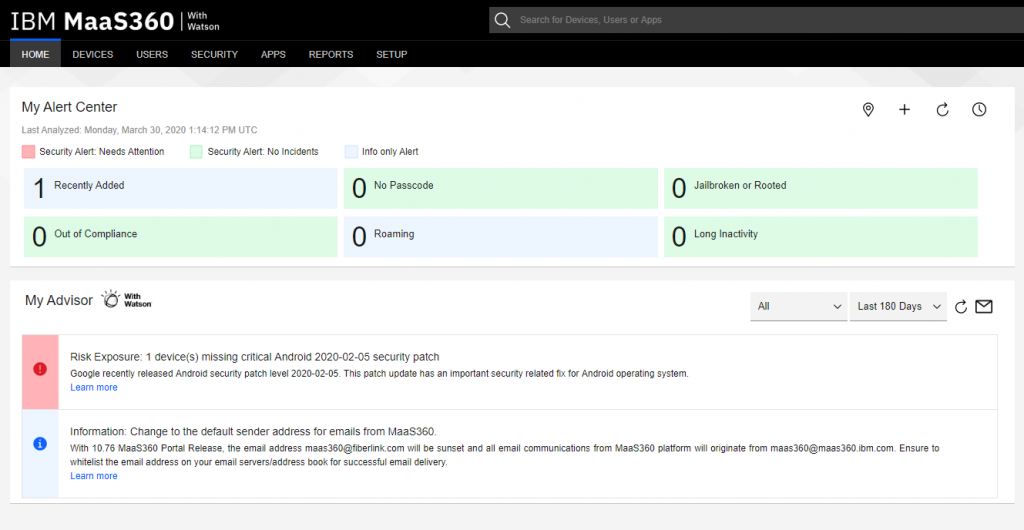
MaaS360 centralizes security policy enforcement, ensuring consistency across all managed endpoints. Its AI-powered threat intelligence proactively identifies and mitigates risks, reducing the likelihood of data breaches and malware infections. The ability to remotely wipe or lock lost devices safeguards sensitive corporate data, while conditional access policies ensure that only compliant and authorized users can access resources. This comprehensive approach significantly strengthens an organization’s overall cybersecurity resilience.
Improved Operational Efficiency
By providing a single console for managing all endpoints, MaaS360 drastically simplifies IT administration. Automation of device enrollment, configuration, and application deployment reduces manual effort and frees up IT staff to focus on more strategic initiatives. Real-time visibility into device inventory and compliance status allows for quicker troubleshooting and more efficient resource allocation, ultimately leading to lower operational costs.
Simplified Compliance
For organizations operating in regulated industries, maintaining compliance with various standards and mandates is non-negotiable. MaaS360’s continuous monitoring capabilities and ability to enforce specific security policies help organizations meet stringent regulatory requirements. Automated reporting and auditing features simplify the process of demonstrating compliance to external auditors, reducing the risk of penalties.
Empowering the Modern Workforce
MaaS360 facilitates a flexible and productive work environment by securely enabling BYOD and remote work. Employees can use their preferred devices while IT retains control over corporate data and applications. Secure access to business applications and content from anywhere, at any time, enhances employee productivity and collaboration without compromising security. This empowers the modern workforce to be agile and responsive to business demands.
Deployment Models and Integration
MaaS360 is built as a cloud-native platform, offering flexibility and scalability for businesses of all sizes.
Cloud-Native Architecture
Being a cloud-native solution means MaaS360 is delivered as a service, eliminating the need for organizations to deploy and maintain on-premise infrastructure. This reduces upfront costs, simplifies updates, and ensures high availability and scalability. Its global infrastructure supports organizations with distributed workforces, providing consistent performance and security worldwide.
Seamless Integration with Enterprise Systems
A key strength of MaaS360 is its ability to integrate seamlessly with existing enterprise IT infrastructure. This includes integration with identity providers (e.g., Azure AD, Okta, Ping Identity), security information and event management (SIEM) systems, enterprise resource planning (ERP) systems, and other critical business applications. These integrations ensure a cohesive security and management ecosystem, enhancing data flow and automating responses across the IT stack.
Who Can Benefit from MaaS360?
MaaS360’s comprehensive features and flexible architecture make it suitable for a wide range of organizations.
Small to Medium Businesses (SMBs)
SMBs often have limited IT resources and budget, making a cloud-native, easy-to-deploy UEM solution highly attractive. MaaS360 helps SMBs secure their growing mobile footprint and protect sensitive customer data without the need for extensive in-house expertise.
Large Enterprises
For large enterprises with thousands of diverse endpoints and complex regulatory requirements, MaaS360 provides the scale, robustness, and advanced security features necessary to manage their extensive IT environment. Its integration with IBM Watson’s AI offers insights and automation capabilities crucial for managing large-scale operations.

Highly Regulated Industries
Sectors such as healthcare, finance, and government, which face stringent compliance mandates and high-stakes data security concerns, benefit immensely from MaaS360’s advanced security, data loss prevention, and compliance monitoring features. It helps these organizations meet requirements like HIPAA, GDPR, PCI DSS, and other industry-specific regulations.
In essence, IBM MaaS360 with Watson is more than just a device management tool; it is a strategic platform that empowers organizations to embrace the complexities of the modern digital landscape with confidence, ensuring secure, efficient, and compliant operations across all endpoints.
aViewFromTheCave is a participant in the Amazon Services LLC Associates Program, an affiliate advertising program designed to provide a means for sites to earn advertising fees by advertising and linking to Amazon.com. Amazon, the Amazon logo, AmazonSupply, and the AmazonSupply logo are trademarks of Amazon.com, Inc. or its affiliates. As an Amazon Associate we earn affiliate commissions from qualifying purchases.