
The transformation of barren dirt blocks into vibrant grass blocks is a fundamental, often overlooked, process within the Minecraft game engine. Far from being a mere aesthetic change, it represents a core mechanic influencing environmental aesthetics, mob spawning, and agricultural potential. Understanding the precise conditions and underlying logic governing this process is crucial for effective world manipulation, base design, and large-scale terraforming projects within the game’s digital landscape.
Understanding Minecraft’s Block Mechanics
At its core, Minecraft operates on a complex system of block updates and environmental checks. Every block in the game world possesses unique properties, interaction rules, and conditions for its existence or transformation. The dirt-to-grass mechanic is a prime example of this dynamic interaction, where the state of one block (dirt) is influenced by the properties of its neighbors and the ambient environment.

The Nature of Dirt Blocks
Dirt blocks (minecraft:dirt) are among the most common and basic blocks in the game. They form the primary substratum of most biomes and serve as a canvas for various ecological processes. While dirt blocks themselves have no inherent ability to “grow” or change state in isolation, they are receptive to external influences, particularly the presence of grass blocks. Their primary attributes include a solid hitbox, susceptibility to gravity (when tilled as farmland), and the ability to support most plant life. Crucially, dirt blocks exposed to light and adjacent to a grass block are eligible for a scheduled block update that can trigger their transformation.
The Grass Block’s Unique Properties
Grass blocks (minecraft:grass_block) are a specialized variant of dirt, distinguished by their green texture and a unique property: the ability to spread. This “spreading” is not an instantaneous event but rather a propagation mechanism driven by the game’s internal tick system. Grass blocks do not merely exist; they actively attempt to convert suitable adjacent dirt blocks under the right conditions. Beyond aesthetics, grass blocks are vital as they are the only blocks upon which passive mobs (like cows, sheep, and pigs) naturally spawn in the overworld, and they provide a renewable source of seeds when broken. Their subsurface, like regular dirt, can also store hydration for farmland, making them agriculturally versatile.
Essential Conditions for Grass Spreading
The game’s engine dictates a precise set of environmental parameters that must be met for a dirt block to successfully convert into a grass block. These conditions ensure a degree of realism in the spread of biomes and prevent arbitrary transformations. Mastering these requirements is key to efficient landscape modification.
Light Level Requirements
Light is arguably the most critical factor in the grass propagation algorithm. For a dirt block to turn into a grass block, the dirt block itself, or any of the eight air blocks directly above it (including the block directly above it), must have a light level of at least 9. This light can originate from the sky (daylight) or from artificial light sources (torches, glowstone, etc.). The absence of sufficient light will completely inhibit grass spread, even if all other conditions are met. This mechanic ensures that grass primarily grows in exposed, well-lit areas, simulating natural plant growth cycles and explaining why grass doesn’t typically grow deep underground or in perpetually shadowed areas without player intervention.
Adjacent Grass Blocks
The propagation of grass is a contact-dependent process. A dirt block cannot spontaneously turn into a grass block; it requires the immediate presence of an existing grass block. Specifically, at least one of the dirt block’s six directly adjacent faces (north, south, east, west, top, bottom) must be touching a grass block. This adjacency acts as the “source” for the grass to spread from. The game engine periodically checks these adjacent blocks, and if a grass block is found and all other conditions are met, the conversion process can initiate. This mechanism prevents grass from appearing in isolated patches unless manually placed, enforcing a contiguous spread pattern.
Obstruction-Free Path
For grass to spread to a dirt block, the dirt block must also be free from specific overhead obstructions. There should be no opaque blocks directly above the dirt block preventing light or preventing the “growth” of the grass texture. Specifically, the dirt block itself, and the block directly above it, must not be obstructed by certain types of blocks that would block light or prevent growth. For example, a solid stone block directly above the dirt would prevent grass from spreading, even if ample light is present elsewhere. Transparent blocks like glass, leaves, or fences generally do not impede grass growth from an overhead perspective, provided they allow sufficient light to pass through or generate it. This condition is intrinsically linked to the light level requirement, as opaque blocks often block the sky light necessary for the process.
Accelerating Grass Growth and Large-Scale Solutions

While the natural spread of grass is a passive process, players often need to accelerate it or implement it on a larger scale for aesthetic projects, animal husbandry, or complex automated systems. Leveraging the game’s mechanics efficiently can significantly reduce wait times and resource expenditure.
Optimizing Light and Proximity
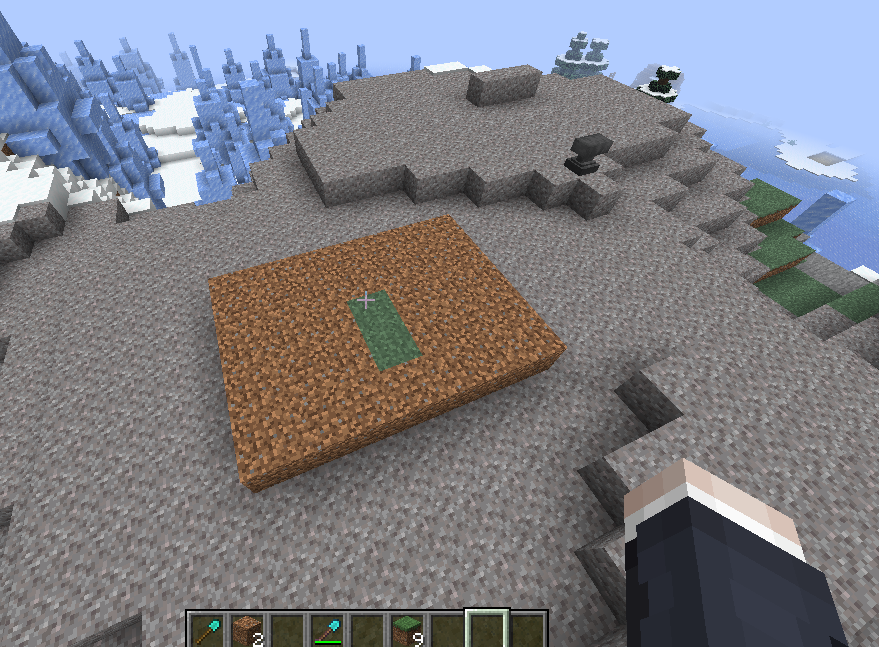
For manual or semi-automated grass propagation, the simplest method involves strategically placing light sources and ensuring optimal proximity to existing grass blocks. If spreading grass underground or in shadowed areas, placing torches, glowstone, or sea lanterns near the dirt blocks awaiting transformation will satisfy the light level requirement. Arranging dirt blocks in a grid or line adjacent to a grass source block maximizes the number of conversion attempts per game tick. For instance, creating a long, narrow strip of dirt adjacent to a single line of grass will see a relatively quick horizontal spread. Clearing any overhead opaque blocks is equally important; replacing stone ceilings with transparent blocks like glass can allow natural light to penetrate, or simply ensuring sufficient space above the dirt.
Using Silk Touch for Instant Grass Blocks
For immediate and controlled placement of grass blocks, the Silk Touch enchantment is invaluable. When a pickaxe or shovel enchanted with Silk Touch is used to mine a grass block, it will drop the grass block itself, rather than regular dirt. This allows players to harvest existing grass blocks from a biome and transport them directly to a desired location, instantly solving the propagation problem for smaller areas. This method bypasses all environmental conditions for spreading, as it directly places a pre-existing grass block. While effective for localized needs, it can be resource-intensive for large-scale projects, requiring significant mining and transportation efforts. Furthermore, it necessitates obtaining the enchantment, which can be an mid- to late-game endeavor.
Automated Grass Farms (Advanced Tech)
For truly large-scale terraforming or dedicated mob spawning platforms, automated grass farms represent a sophisticated application of game mechanics. These contraptions leverage redstone automation to create vast expanses of grass efficiently. One common design involves creating a ‘grass bridge’ that extends over a large area. Pistons are used to periodically push dirt blocks into proximity with existing grass, allowing them to convert, and then retracting or pushing them further along a track. Alternatively, some designs use water streams or conveyor belts to move dirt blocks past a grass-covered section. The critical technological components often include:
- Redstone Circuits: For timing, sequencing, and control of pistons and other moving parts.
- Observers: To detect block state changes (e.g., dirt turning to grass) and trigger further actions.
- Pistons/Sticky Pistons: For manipulating the position of dirt blocks.
- Hopper Systems: For collecting dropped items (e.g., if dirt is replaced and needs to be conveyed elsewhere, though less common in pure grass farms).
- Dedicated Lighting: Glowstone, sea lanterns, or redstone lamps powered by a clock for consistent light levels, especially in enclosed farm environments.
These farms are complex engineering challenges, requiring a deep understanding of redstone logic, block update order, and game physics to design and implement successfully. They transform what would be a tedious manual task into an automated, efficient process for creating massive grass surfaces.
Troubleshooting and Common Misconceptions
Despite the seemingly straightforward nature of grass propagation, players frequently encounter issues or hold misconceptions that hinder their efforts. Understanding these nuances is crucial for effective problem-solving in the digital environment.
Why Isn’t My Grass Spreading?
If grass is not spreading as expected, the issue almost invariably lies with one or more of the core conditions not being met. The most common culprits include:
- Insufficient Light: This is the primary reason. Double-check the light level at the dirt block’s surface and the block directly above it. Using the F3 debug screen (or equivalent on consoles/mobile) to view the “Light” parameter (specifically “Block Light” and “Sky Light”) can provide precise diagnostics. Remember, it needs to be at least 9.
- Opaque Block Obstruction: An invisible block above the dirt block, even if light is present from the side, can prevent growth. Ensure the two blocks directly above the target dirt block are clear or transparent enough.
- No Adjacent Grass: Verify that at least one of the six faces of the target dirt block is directly touching a grass block. Grass cannot “jump” over gaps or spread diagonally.
- Game Tick Delays: Grass spread is not instantaneous. The game performs random block updates, and grass conversion is one of them. In very large areas, it might simply take time. Increasing the number of exposed dirt blocks to existing grass sources can speed up the overall process, as more potential updates can occur.
- Wrong Block Type: Ensure it’s regular dirt (
minecraft:dirt) and not coarse dirt (minecraft:coarse_dirt), rooted dirt, or podzol, none of which naturally convert to grass.
Grass in Different Biomes and Dimensions
The mechanics of grass spread are largely consistent across most Overworld biomes. However, certain biomes introduce unique grass variants or block types that don’t follow the standard dirt-to-grass rule. For instance, in colder biomes, grass might appear with a slightly different hue, but the spreading mechanism remains identical. Similarly, Mycelium (from Mushroom Fields biomes) spreads in a similar fashion to grass but from mycelium blocks to dirt, converting dirt into mycelium. Podzol (from Mega Taiga/Taiga biomes) does not spread naturally.
Crucially, grass (and mycelium) does not naturally spread or exist in other dimensions. The Nether and The End have their own unique ground blocks (Netherrack, End Stone) which do not support grass growth, nor can grass blocks be spread to them. While grass blocks can be placed in these dimensions via Silk Touch, they will not spread to adjacent dirt blocks (if dirt is even present) due to fundamental differences in block update rules and environmental conditions (e.g., light levels, biomes, and mob spawning logic are distinct). Understanding these dimensional limitations is vital when planning cross-dimensional builds or resource gathering.
aViewFromTheCave is a participant in the Amazon Services LLC Associates Program, an affiliate advertising program designed to provide a means for sites to earn advertising fees by advertising and linking to Amazon.com. Amazon, the Amazon logo, AmazonSupply, and the AmazonSupply logo are trademarks of Amazon.com, Inc. or its affiliates. As an Amazon Associate we earn affiliate commissions from qualifying purchases.