
The Uniform Resource Locator (URL) is a fundamental component of the internet, serving as the address that directs users to specific resources, such as web pages, images, or documents. In the context of vast digital platforms like Facebook, understanding its URL structure is crucial not just for navigation but also for security, identity, and technical optimization. At its core, the Facebook URL address refers to the primary web address that grants access to the platform, along with a myriad of variations that point to specific profiles, pages, groups, and features within its ecosystem.
Understanding the Anatomy of a Facebook URL
To fully grasp what constitutes a Facebook URL, it’s essential to first understand the general composition of any URL. A URL is a structured string of characters that provides a complete reference to a resource on the internet. For Facebook, this structure allows browsers and applications to precisely locate and display the correct content.
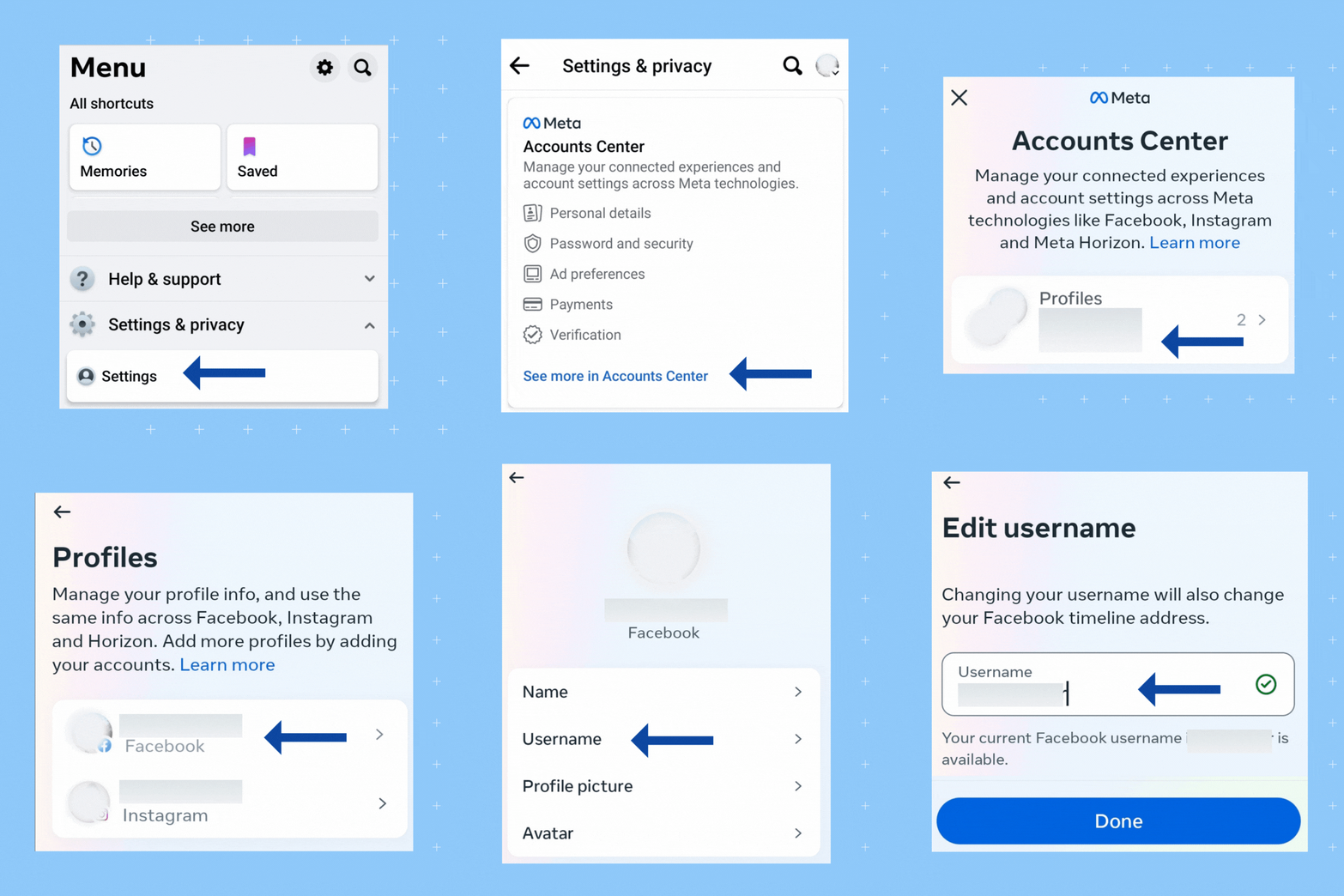
Components of a URL
Every URL, including those for Facebook, typically consists of several key parts:
- Protocol: This specifies the method by which the resource should be accessed. For Facebook, this is almost exclusively
https://. The “s” denotes “secure,” indicating that communication between your browser and Facebook’s servers is encrypted, a critical aspect of digital security. - Subdomain: While
www.is a common subdomain, some sites like Facebook may use it optionally or omit it entirely. For instance,www.facebook.comandfacebook.comoften lead to the same destination. Other subdomains likem.facebook.com(for mobile) serve specific purposes. - Domain Name: This is the unique identifier of the website. For Facebook, it is
facebook. This name is registered and provides the primary branding and access point for the platform. - Top-Level Domain (TLD): This is the suffix at the end of the domain name, such as
.com,.org,.net, or country-code TLDs like.co.uk,.de. Facebook primarily uses.comas its global TLD. - Path/Resource: This part of the URL specifies the exact location of a particular resource or page within the domain. For example,
facebook.com/your-profile-nameorfacebook.com/groups/your-group-id. This component is highly dynamic and changes based on the content being accessed. - Query Parameters (Optional): Following a question mark
?, these are used to pass data to the server, often for tracking, sorting, or filtering content. For example,facebook.com/events?source=4. - Fragment Identifier (Optional): Preceded by a hash
#, this points to a specific section within a page, often used for navigating long articles or single-page applications.
The most fundamental Facebook URL, https://www.facebook.com or simply https://facebook.com, acts as the gateway to the social network, directing users to the login page or their personalized news feed if already logged in. This domain is globally recognized and serves as the digital front door for billions of users.
Navigating Facebook: Core URLs and Specific Resource Addresses
While facebook.com is the entry point, the platform’s complexity means there are countless specific URLs that direct to different types of content, from personal profiles to public pages and private groups. Understanding these variations is key to efficient navigation and interaction.
The Main Domain and Its Mobile Iterations
The primary URL for Facebook remains https://facebook.com. This address serves as the default for desktop and standard web browsers. However, recognizing the global shift towards mobile internet usage, Facebook developed dedicated mobile-optimized URLs to enhance user experience on smaller screens and potentially slower connections.
https://m.facebook.com: This is the URL for Facebook’s mobile site. It provides a lighter, streamlined version of the platform, designed to consume less data and load faster on smartphones and feature phones. Many users accessing Facebook via a mobile browser are automatically redirected to this version.https://touch.facebook.com: An even more basic, touch-friendly version of the mobile site, often tailored for older mobile devices or regions with very limited bandwidth.
These mobile-specific URLs underscore Facebook’s technical strategy to ensure accessibility across a diverse range of devices and network conditions, providing a tailored user interface without requiring a dedicated application.
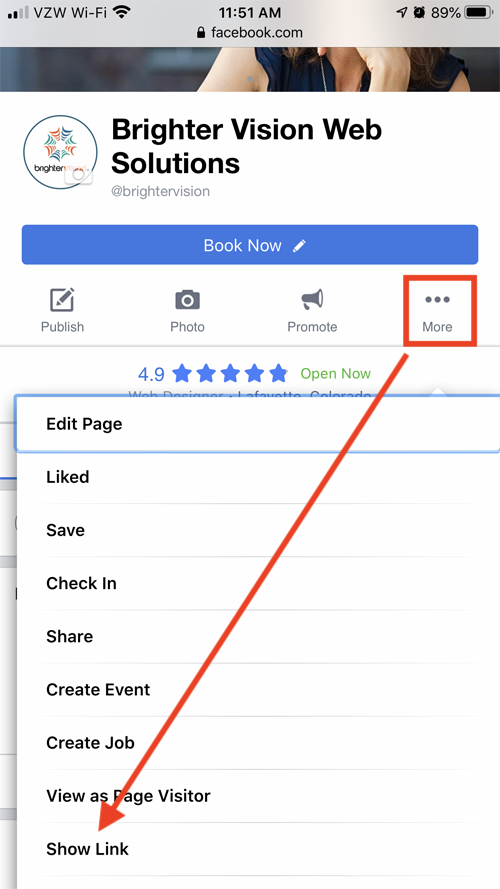
Profile, Page, and Group URLs
Beyond the main domain, Facebook employs distinct URL patterns for various content types, which are crucial for sharing and direct access.
- Personal Profile URLs:
- Initially, profile URLs often contained a numerical user ID (e.g.,
facebook.com/profile.php?id=123456789). - However, Facebook allows users to set a custom “vanity” URL for their profile (e.g.,
facebook.com/john.doe). This custom URL, often based on a username, is far more memorable and shareable, enhancing personal branding and ease of access.
- Initially, profile URLs often contained a numerical user ID (e.g.,
- Business Page URLs:
- Similar to profiles, Facebook Pages also benefit from vanity URLs. A business or brand can select a unique username for its page, resulting in a clean URL like
facebook.com/mybrandname. This is vital for marketing and direct consumer engagement.
- Similar to profiles, Facebook Pages also benefit from vanity URLs. A business or brand can select a unique username for its page, resulting in a clean URL like
- Group URLs:
- Facebook Groups also have unique URLs. These often follow the pattern
facebook.com/groups/groupnameorfacebook.com/groups/groupid. Custom names for groups make them easier to locate and share among communities.
- Facebook Groups also have unique URLs. These often follow the pattern
- Event URLs:
- Each event created on Facebook has its own specific URL, typically
facebook.com/events/eventid, allowing for direct sharing and promotion of gatherings.
- Each event created on Facebook has its own specific URL, typically
These specific URLs are critical technical identifiers within the Facebook ecosystem. They enable direct linking, facilitate sharing across other platforms, and are instrumental in how search engines index and rank content originating from Facebook.
Digital Security and URL Verification on Facebook
In the digital landscape, the URL is not just an address; it’s a critical security indicator. Understanding legitimate Facebook URLs and recognizing deceptive ones is paramount to protecting personal information and ensuring a secure online experience. Cybercriminals frequently exploit URL similarities to trick users into revealing sensitive data through phishing attacks.
Identifying Legitimate Facebook URLs
A genuine Facebook URL will consistently adhere to the following:
- Correct Domain Name: Always
facebook.com. Variations likefacebok.com,facebookk.com, orface-book.comare red flags. - HTTPS Protocol: Ensure the URL begins with
https://. The padlock icon in your browser’s address bar signifies a secure connection. While not foolproof, its absence for Facebook is a clear warning. - No Obscure Subdomains: Legitimate Facebook URLs typically use
www.,m.,touch., or specific feature-related subdomains (e.g.,developers.facebook.com). Be wary of unusual or overly long subdomains precedingfacebook.com. - Directivity: Pay attention to redirects. A phishing site might initially look like Facebook but then redirect to a different, malicious domain.
The Threat of Phishing and Malicious URLs
Phishing attacks often involve crafting URLs that closely mimic legitimate ones, aiming to deceive users. For instance, an attacker might send an email with a link like http://login.facebook-security.com.malicioussite.com. While facebook-security.com appears in the URL, the actual domain is malicioussite.com, making it a fake.
- URL Shorteners: While useful, URL shorteners (e.g., Bitly, TinyURL) can mask the true destination of a link. Exercise caution when clicking shortened links from unknown sources, especially if they promise exclusive access or urgent actions related to your Facebook account. Many modern browsers and security tools can expand shortened URLs to reveal their true destination before clicking.
- Typosquatting: This technique relies on users making typing errors. Attackers register domains like
faceboook.comorfacbook.comto capture unsuspecting visitors. - Homograph Attacks: Using characters from different alphabets that look similar to Latin characters (e.g., using a Cyrillic ‘a’ instead of a Latin ‘a’) to create deceptive URLs.

Best Practices for URL Verification
- Hover Before Clicking: Before clicking a link, hover your mouse cursor over it (on desktop) or long-press (on mobile). The true destination URL will often appear in the browser’s status bar or as a pop-up.
- Manually Type Important URLs: For sensitive actions like logging in, it’s safer to manually type
facebook.cominto your browser rather than clicking a link in an email or message. - Use Browser Security Features: Modern web browsers have built-in security features that can detect and warn against known phishing sites. Keep your browser updated.
- Employ a Password Manager: Password managers can detect if you are on a phishing site because they will only autofill credentials for the legitimate domain. If your password manager doesn’t offer to autofill on a page that looks like Facebook, it’s a strong indicator that the URL is fraudulent.
In conclusion, the Facebook URL address is far more than a simple web link. It’s a complex technical identifier that underpins navigation, user experience, and digital security. A thorough understanding of its structure and variations empowers users to interact with the platform effectively and, more importantly, safely in an increasingly sophisticated online environment.
aViewFromTheCave is a participant in the Amazon Services LLC Associates Program, an affiliate advertising program designed to provide a means for sites to earn advertising fees by advertising and linking to Amazon.com. Amazon, the Amazon logo, AmazonSupply, and the AmazonSupply logo are trademarks of Amazon.com, Inc. or its affiliates. As an Amazon Associate we earn affiliate commissions from qualifying purchases.