
The quest for the “best” laptop processor is a perennial one, fraught with nuances that extend far beyond simple clock speeds or core counts. In an era where laptops serve as indispensable tools for work, creativity, and entertainment, the central processing unit (CPU) acts as the brain, dictating performance, efficiency, and overall user experience. Determining the optimal processor isn’t about identifying a single, universally superior chip, but rather about aligning its capabilities with your specific needs, budget, and intended applications.
Understanding Processor Fundamentals
Before diving into specific models and brands, a foundational understanding of key processor metrics is essential. These elements collectively define a CPU’s power and efficiency.
Cores and Threads: The Multitasking Powerhouse
Historically, processors had a single core, handling one task at a time. Modern CPUs feature multiple cores, each acting as an independent processing unit. A dual-core processor, for instance, can handle two distinct tasks simultaneously. Higher core counts (quad-core, hexa-core, octa-core, etc.) significantly enhance multitasking capabilities, making a laptop more responsive when running multiple applications or handling complex workloads.
Threads are virtual cores. Technologies like Intel’s Hyper-Threading or AMD’s Simultaneous Multithreading (SMT) allow a single physical core to handle two threads concurrently, making the operating system perceive it as two logical processors. This effectively doubles the CPU’s ability to manage tasks, especially those that can be broken down into parallel computations, leading to smoother performance in demanding applications.
Clock Speed and Turbo Boost: Raw Processing Power
Clock speed, measured in gigahertz (GHz), represents how many cycles per second a core can execute. A higher clock speed generally means faster execution of individual instructions. For tasks that rely heavily on single-core performance, such as certain games or specific professional software that isn’t highly multithreaded, a higher base and turbo clock speed can be more beneficial than an abundance of cores.
Turbo Boost (Intel) or Precision Boost (AMD) are technologies that allow the processor to dynamically increase its clock speed above its base frequency for short periods when thermal and power conditions permit. This provides an on-demand performance boost for intensive tasks, maximizing efficiency without constantly running at peak power.
Cache Memory: Speeding Up Data Access
Cache memory is a small, extremely fast memory built directly into the CPU. It stores frequently accessed data and instructions, reducing the time the processor spends retrieving information from slower main RAM. Processors typically have multiple levels of cache (L1, L2, L3), with L1 being the fastest and smallest, and L3 being the slowest and largest. A larger and faster cache can significantly improve processor efficiency, particularly in data-intensive applications.
TDP (Thermal Design Power): Efficiency and Heat
TDP, or Thermal Design Power, indicates the maximum amount of heat generated by the CPU that the cooling system is designed to dissipate under typical workloads. While it’s not a direct measure of power consumption, it’s closely related to it and offers insight into a processor’s efficiency and potential performance characteristics. Lower TDP processors are typically found in ultrabooks and fanless designs, prioritizing battery life and thinness, whereas higher TDP chips are in gaming laptops and mobile workstations, indicating greater raw power with the expectation of robust cooling.
Leading Processor Brands and Their Offerings
The laptop processor market is primarily dominated by three major players: Intel, AMD, and increasingly, Apple. Each offers a distinct philosophy and range of products.
Intel: The Long-Standing Market Leader
Intel has been the dominant force in laptop processors for decades, known for its extensive range and widespread adoption across virtually all laptop manufacturers.
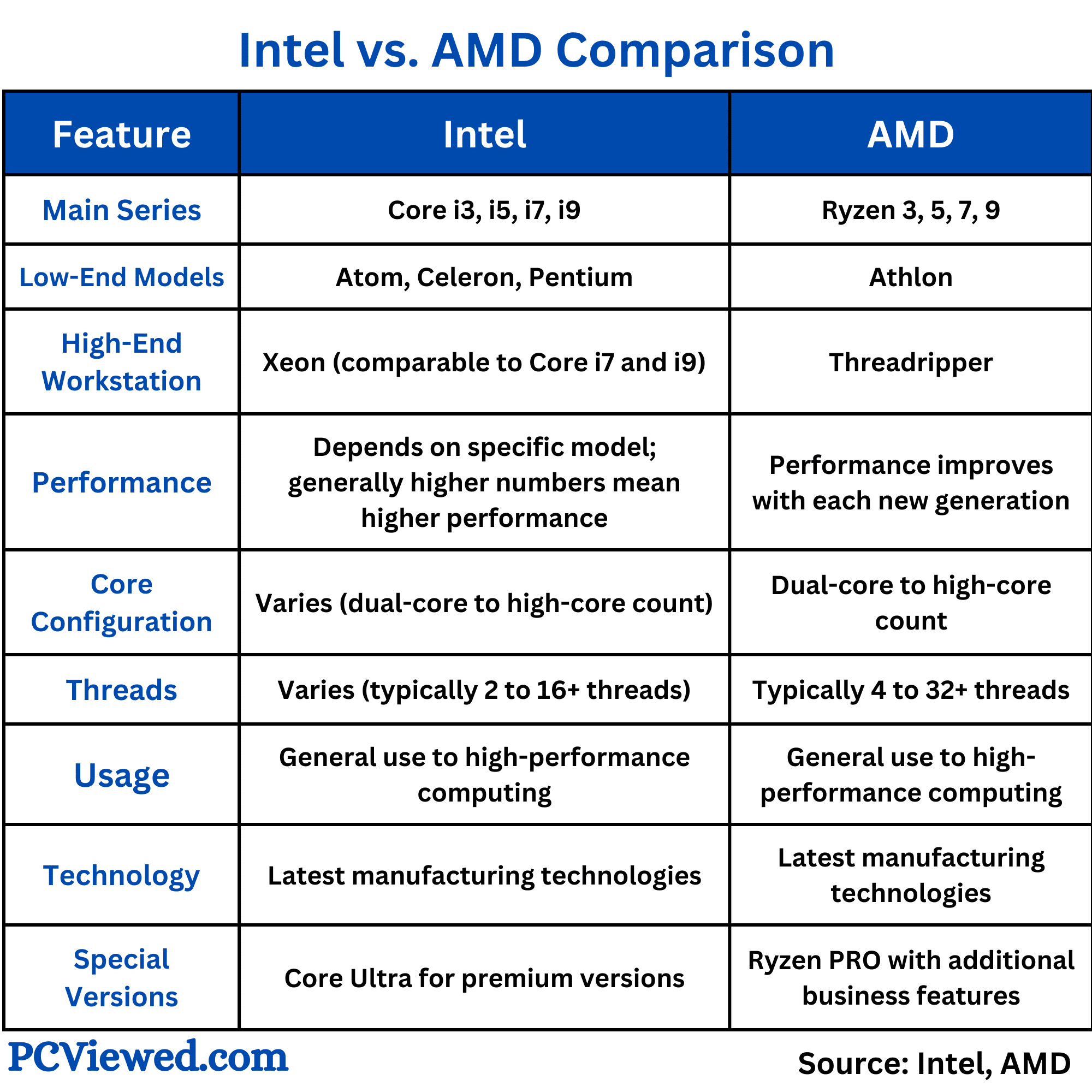
Intel Core i3, i5, i7, i9: Tiers of Performance
- Core i3: Entry-level processors suitable for basic tasks like web browsing, word processing, and light entertainment. They typically have fewer cores and lower clock speeds.
- Core i5: The mainstream choice, offering a good balance of performance and price. Ideal for general productivity, multitasking, and casual gaming. Available in various core counts and clock speeds, often with integrated graphics.
- Core i7: High-performance chips designed for demanding users, including content creators, serious gamers, and professionals who require more processing power. They feature higher core counts, faster clock speeds, and larger cache sizes.
- Core i9: Intel’s flagship mobile processors, offering the highest performance for enthusiasts and professionals who need top-tier processing capabilities for intensive tasks like 4K video editing, complex simulations, and high-refresh-rate gaming.
Intel Evo Platform: Premium Laptop Experience
The Intel Evo platform is a certification program that guarantees a premium laptop experience, regardless of the specific Core i5, i7, or i9 chip inside. Laptops bearing the Evo badge must meet strict criteria for responsiveness, battery life (9+ hours real-world), fast charging, Wi-Fi 6, Thunderbolt 4, and instant wake. This certification streamlines the buying process for consumers seeking a high-quality, reliable ultrabook experience.
Intel Xeon: Workstation-Class Power
For mobile workstations and specialized professional use cases, Intel offers Xeon processors. These chips prioritize reliability, support for ECC (Error-Correcting Code) RAM, and robust performance for demanding applications in fields like engineering, CAD, and scientific computing. They often come with a higher price tag and are found in purpose-built laptops.
AMD: The Resurgent Innovator
AMD has made significant strides in recent years, with its Ryzen processors offering compelling performance and power efficiency that often rivals or surpasses Intel’s offerings, particularly in multi-core performance.
AMD Ryzen 3, 5, 7, 9: Competing Performance Tiers
Similar to Intel, AMD structures its consumer processors into clear performance tiers:
- Ryzen 3: Entry-level, competing with Intel Core i3, suitable for everyday computing.
- Ryzen 5: Mid-range, a strong competitor to Intel Core i5, often delivering superior multi-core performance for productivity and light creative work.
- Ryzen 7: High-performance chips that rival Intel Core i7, excelling in tasks like video editing, gaming, and complex multitasking. Many consider Ryzen 7 excellent value for performance.
- Ryzen 9: AMD’s top-tier mobile processors, designed to compete directly with Intel Core i9, offering exceptional multi-core performance, often with integrated Radeon graphics that are powerful enough for casual gaming.
AMD Ryzen Pro: Business-Oriented Solutions
AMD Ryzen Pro processors offer enhanced security features, manageability tools, and enterprise-grade stability, making them suitable for business and corporate environments where data integrity and remote management are critical.
Apple Silicon: The New Contender
Apple’s transition from Intel processors to its in-house ARM-based Apple Silicon (M-series chips) has redefined performance and power efficiency in laptops.
M1, M2, M3 Series: Integrated Performance and Efficiency
- M1 (and variations like M1 Pro, M1 Max, M1 Ultra): Introduced a revolutionary system-on-a-chip (SoC) design that integrates CPU, GPU, neural engine, and unified memory onto a single die. This results in unprecedented performance per watt, enabling fanless designs (MacBook Air) and exceptional battery life, while offering professional-grade performance in Macs like the MacBook Pro.
- M2 (and variations like M2 Pro, M2 Max): Successor to M1, offering further enhancements in CPU and GPU performance, memory bandwidth, and media engines, pushing the boundaries for creative professionals and general users alike.
- M3 (and variations like M3 Pro, M3 Max): The latest generation, building on the M-series architecture with even greater efficiency and performance gains, especially in graphics and AI acceleration, maintaining Apple’s lead in integrated power.
Apple Silicon excels in applications optimized for its architecture, offering seamless performance, instant wake, and industry-leading battery life, often surpassing x86 competitors in specific workloads.
Matching Processor to Your Needs: Use Case Scenarios
The “best” processor is entirely dependent on how you plan to use your laptop.
Everyday Computing and Web Browsing
For basic tasks like internet browsing, email, word processing, and streaming media, an Intel Core i3, AMD Ryzen 3, or Apple M1/M2 (base model) is more than sufficient. These processors offer ample power for a responsive experience without overspending.
Student and Productivity Tasks
Students and professionals requiring a laptop for research, essays, presentations, video calls, and light multitasking would benefit from an Intel Core i5, AMD Ryzen 5, or Apple M1/M2 (base model). These provide a good balance of performance for academic and office software, along with decent battery life.
Creative Professionals (Video Editing, Graphic Design)
Tasks like 4K video editing, complex graphic design, 3D rendering, and music production demand significant processing power, especially multi-core performance. Here, Intel Core i7/i9, AMD Ryzen 7/9, or Apple M1/M2/M3 Pro/Max chips are highly recommended. Look for higher core counts, faster clock speeds, and ample RAM to complement the CPU. Apple Silicon, especially the Pro/Max variants, offers exceptional performance per watt in creative applications optimized for its architecture.
Gaming Enthusiasts
Gaming requires a strong balance between CPU and GPU. For modern AAA titles, an Intel Core i7/i9 or AMD Ryzen 7/9 is ideal, particularly those with high clock speeds to minimize bottlenecks for the graphics card. Integrated graphics on these chips are generally not sufficient for serious gaming, so pairing them with a powerful discrete GPU (NVIDIA GeForce RTX or AMD Radeon RX) is crucial.
Engineering, Data Science, and Heavy Workloads
For highly specialized tasks like CAD, complex simulations, large-scale data analysis, or virtual machine environments, maximum CPU power is key. Intel Core i9, AMD Ryzen 9, or Intel Xeon processors are the top contenders. These workloads benefit from the highest available core counts, threads, and cache, often coupled with substantial RAM and fast storage.
Future Trends and Considerations
The landscape of laptop processors is constantly evolving, with several trends shaping future choices.
AI Accelerators and Neural Processing Units (NPUs)
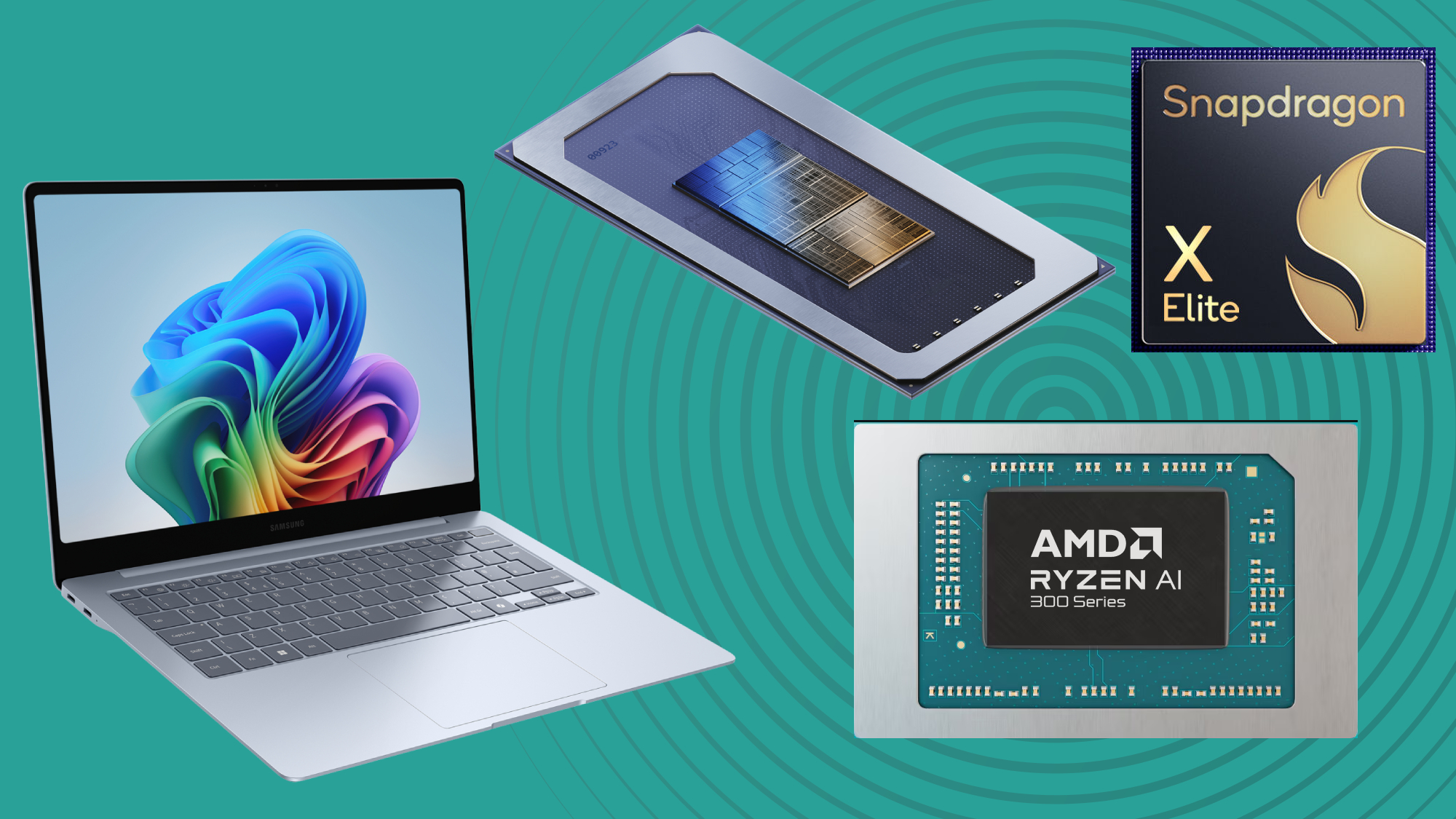
Increasingly, processors are incorporating dedicated AI acceleration hardware, often referred to as Neural Processing Units (NPUs). These units are designed to efficiently handle AI and machine learning tasks, from enhancing video calls with background blur to powering advanced creative filters and improving system efficiency. Both Intel (with its Core Ultra series) and AMD (with Ryzen AI) are integrating NPUs, while Apple Silicon has featured a powerful Neural Engine from its inception. These components will play a growing role in future user experiences.
Power Efficiency and Battery Life
As laptops become more portable, power efficiency is paramount. Manufacturers are continually optimizing their architectures to deliver more performance per watt, leading to longer battery life without sacrificing power. This is particularly evident in Apple Silicon, which has set a new benchmark for laptop battery endurance.
Integrated vs. Dedicated Graphics
Many processors come with integrated graphics (iGPUs) built directly into the chip. While these are perfectly adequate for everyday tasks, video playback, and light gaming, demanding tasks like serious gaming or professional 3D work will require a dedicated graphics processing unit (dGPU). Higher-end iGPUs, particularly AMD’s Radeon integrated graphics in Ryzen chips and Apple’s integrated GPUs in M-series chips, are becoming surprisingly capable, blurring the lines for casual use cases.

The Role of RAM and SSD
While the processor is crucial, its performance is significantly impacted by other components. Ample RAM (16GB or more for demanding tasks) and a fast NVMe SSD are critical to prevent bottlenecks and ensure a smooth, responsive computing experience. Even the most powerful processor will feel sluggish if starved of data due to insufficient RAM or a slow storage drive.
In conclusion, “the best” laptop processor is a highly subjective determination. It necessitates a thorough assessment of your personal or professional requirements, your budget, and the specific applications you intend to run. By understanding the core fundamentals, evaluating the offerings from Intel, AMD, and Apple, and aligning these with your usage scenarios, you can confidently select a processor that empowers your computing experience.
aViewFromTheCave is a participant in the Amazon Services LLC Associates Program, an affiliate advertising program designed to provide a means for sites to earn advertising fees by advertising and linking to Amazon.com. Amazon, the Amazon logo, AmazonSupply, and the AmazonSupply logo are trademarks of Amazon.com, Inc. or its affiliates. As an Amazon Associate we earn affiliate commissions from qualifying purchases.