
In the intricate architecture of computer networks, devices communicate through various mechanisms, each designed for a specific purpose. While much of our digital interaction relies on one-to-one (unicast) or one-to-many (multicast) communication, there’s a fundamental need for a device to communicate with all other devices within its local network segment simultaneously. This is where the concept of a broadcast IP address becomes not just relevant but essential. Understanding the broadcast IP address is critical for anyone delving into network administration, security, or even just appreciating the underlying mechanics of how our digital world connects.
The Foundations of IP Communication
At the core of virtually all modern network communication lies the Internet Protocol (IP). An IP address serves as a unique identifier for a device on a network, much like a street address for a house. However, an IP address contains more information than just a unique identifier; it also implicitly defines the network segment to which the device belongs.
IP Addresses: Your Network Identity
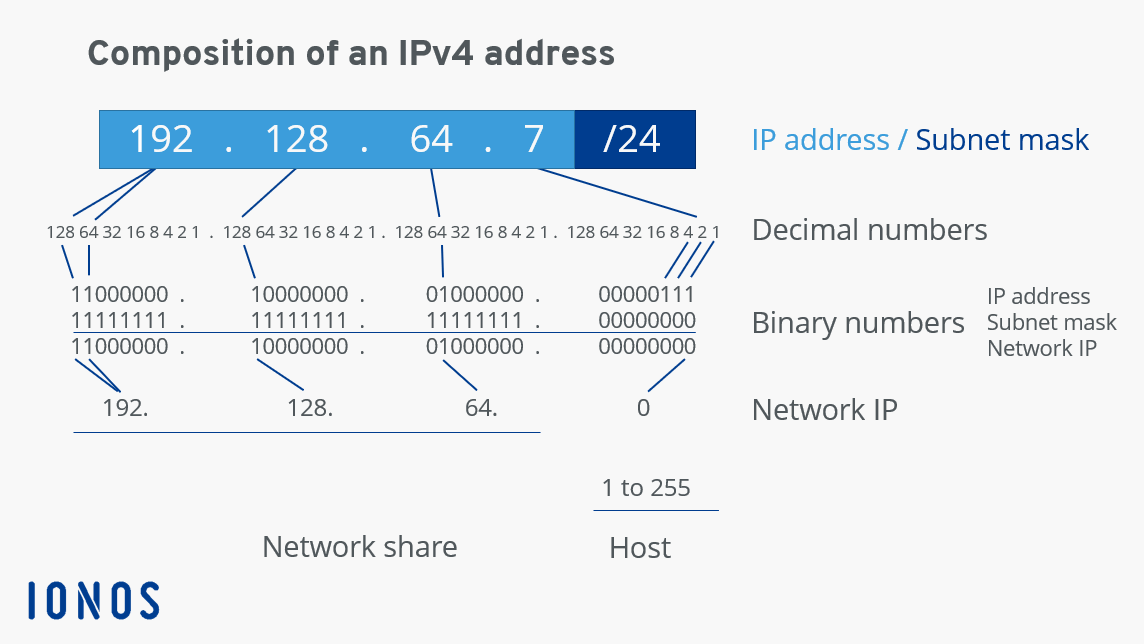
The most common version of IP addressing today is IPv4, a 32-bit numerical label expressed in dotted-decimal format (e.g., 192.168.1.1). This 32-bit address is logically divided into two primary parts: the network portion and the host portion. The network portion identifies the specific network segment that the device resides on, while the host portion uniquely identifies the individual device within that network.
Historically, IPv4 addresses were categorized into “classes” (A, B, C, D, E), each with a predefined network and host bit allocation. However, this classful addressing scheme proved inefficient for the rapidly expanding internet. Today, Classless Inter-Domain Routing (CIDR) is the prevailing method, allowing for much more flexible and efficient allocation of IP addresses by using a subnet mask to explicitly define the boundary between the network and host portions.
The Role of the Subnet Mask
The subnet mask is a 32-bit number, also represented in dotted-decimal format (e.g., 255.255.255.0), that works in conjunction with an IP address to determine which part of the IP address represents the network and which part represents the host. It does this by setting all bits corresponding to the network portion of the IP address to ‘1’ and all bits corresponding to the host portion to ‘0’.
For example, a subnet mask of 255.255.255.0 (or /24 in CIDR notation, indicating 24 network bits) means that the first three octets (24 bits) of an IP address define the network, and the last octet (8 bits) defines the host. This mechanism is fundamental to defining broadcast domains, which are logical divisions of a network where all devices can directly communicate with each other at the data link layer.
Understanding Network-Wide Communication
While most network traffic is directed at a single destination, there are scenarios where a device needs to send information to multiple, or all, devices on its local network segment.
Beyond Unicast and Multicast
To appreciate broadcasting, it’s helpful to briefly contrast it with other communication types:
- Unicast: A one-to-one communication where a packet is sent from a single source to a single destination IP address. Most of our internet traffic (web browsing, email, streaming) is unicast.
- Multicast: A one-to-many communication where a packet is sent from a single source to a selected group of destinations. Devices must explicitly join a multicast group to receive these packets (e.g., video conferencing, online gaming updates).
Broadcast stands apart as a one-to-all communication within a specific network segment or broadcast domain. When a device sends a broadcast packet, all other devices on that segment receive and process it, regardless of whether they “asked” for it.
Why Broadcasts are Essential
Broadcasts, despite their potential for inefficiency, play a critical role in the initial setup and ongoing operation of network devices. They are indispensable for tasks where a device needs to discover information without knowing the specific address of the recipient. Key uses include:
- Address Resolution Protocol (ARP): When a device needs to send data to another device on the local network, but only knows its IP address, it uses ARP. An ARP request is broadcast to all devices on the local network, asking, “Who has this IP address? Tell me your MAC address.” The device with the matching IP then responds with a unicast ARP reply containing its MAC address.
- Dynamic Host Configuration Protocol (DHCP): When a new device connects to a network, it doesn’t yet have an IP address. To obtain one, it sends a DHCP Discover message. This message is a broadcast, as the device doesn’t know the IP address of the DHCP server. The server, hearing the broadcast, then assigns an IP address.
- Network Discovery: Some legacy network services and applications use broadcasts to announce their presence or to discover other services on the local network.
- Wake-on-LAN (WoL): WoL utilizes a “magic packet” that is broadcast to a network to remotely power on a sleeping computer.
Deconstructing the Broadcast Address Calculation
The broadcast IP address for a given network segment is not arbitrary; it’s a precisely calculated address that signifies “all hosts” within that specific network.
The “All Ones” Rule
The fundamental rule for determining a broadcast address is straightforward: it is the IP address for a given network segment where all bits in the host portion are set to ‘1’. Conversely, the network address (or network ID) has all bits in the host portion set to ‘0’. These two addresses are special and cannot be assigned to individual hosts on the network.
When a packet is sent to the broadcast IP address, every device on that specific subnet will receive and process it. This is why routers, by default, do not forward broadcast traffic; doing so would lead to unmanageable network floods across the entire internet.
Practical Calculation Examples
Let’s illustrate how a broadcast address is derived:
Example 1: Common Home Network (Class C equivalent)
- IP Address: 192.168.1.50
- Subnet Mask: 255.255.255.0 (/24)
In binary:
- IP:
11000000.10101000.00000001.00110010 - Mask:
11111111.11111111.11111111.00000000
The first 24 bits are the network portion, and the last 8 bits are the host portion.
- To find the network address, set all host bits to ‘0’:
11000000.10101000.00000001.00000000=192.168.1.0 - To find the broadcast address, set all host bits to ‘1’:
11000000.10101000.00000001.11111111=192.168.1.255

Example 2: Larger Network Segment (Class A equivalent)
- IP Address: 10.0.0.10
- Subnet Mask: 255.0.0.0 (/8)
Here, the first 8 bits are the network, and the remaining 24 bits are the host.
- Network Address:
10.0.0.0 - Broadcast Address:
10.255.255.255
Example 3: Non-Octet Boundary Subnet
- IP Address: 172.16.10.65
- Subnet Mask: 255.255.255.192 (/26)
This mask means 26 network bits. The last octet (10.65) is where the subnetting occurs.
192 in binary is 11000000. So, the last octet of the mask has two ‘1’s (network bits) and six ‘0’s (host bits).
- IP last octet: 65 =
01000001 - Mask last octet: 192 =
11000000
Performing a bitwise AND operation for the network address:
01000001 AND 11000000 = 01000000 (which is 64)
So, Network Address: 172.16.10.64
To find the broadcast address, we take the network portion (172.16.10.) and set the remaining host bits in the last octet to ‘1’:
Network portion of last octet: 01 (from 64)
Host bits set to ‘1’: 111111
So, 01111111 (which is 127)
Broadcast Address: 172.16.10.127
This demonstrates how a broadcast address is a specific, calculated address tied directly to the network’s IP and subnet mask configuration.
Types of Broadcasts and Their Operational Significance
While we generally speak of “the” broadcast IP address, there are nuances in how broadcasts are addressed and handled in networks.
Directed Broadcasts
A directed broadcast is a packet sent to the specific broadcast address of a remote network. For instance, a device on network A (192.168.1.0/24) could theoretically send a packet to network B’s broadcast address (e.g., 192.168.2.255/24). Historically, routers would forward these packets to the specified remote network, where all hosts on that network would receive them.
However, directed broadcasts are largely disabled on modern routers due to security concerns, particularly the “Smurf attack.” In a Smurf attack, an attacker sends ICMP echo requests (pings) to a directed broadcast address of a network, spoofing the source IP address to be that of a victim. All hosts on the target network reply to the spoofed victim, effectively launching a distributed denial-of-service (DDoS) attack.
Limited Broadcasts (Local Broadcasts)
The most common type of broadcast seen in everyday network operations is the limited broadcast, which uses the special IP address 255.255.255.255. This address specifically means “all hosts on this local network segment.” Routers never forward packets addressed to 255.255.255.255; they are strictly confined to the local broadcast domain.
Limited broadcasts are crucial for scenarios where a device needs to communicate with any device on its local link without knowing its IP address, such as the initial DHCP Discover process or ARP requests where the destination IP’s MAC address is unknown.
Common Use Cases
Beyond the foundational ARP and DHCP examples, broadcasts facilitate other functionalities:
- NetBIOS Name Service: In older Windows networks, NetBIOS broadcasts were used for name resolution and service discovery.
- Multicast DNS (mDNS): While primarily multicast, mDNS uses a form of local discovery that can involve broadcasting for initial service announcements.
- Network Time Protocol (NTP) in Broadcast Mode: While less common today due to security and efficiency concerns, NTP servers can broadcast time synchronization messages to clients on the local segment.
Managing Broadcast Traffic in Modern Networks
While essential, excessive broadcast traffic can significantly degrade network performance and pose security risks.
The Challenge of Broadcast Storms
A “broadcast storm” occurs when numerous devices on a network simultaneously generate excessive broadcast traffic. This can happen due to misconfigured devices, network loops (where a broadcast packet gets forwarded endlessly), or malicious attacks. A broadcast storm can overwhelm network devices, consuming CPU cycles and bandwidth, leading to slow network performance, application timeouts, and even complete network outages.
Beyond performance, broadcasts can also be leveraged for reconnaissance by attackers to map out active devices on a network or for denial-of-service attacks like the aforementioned Smurf attack.
Mitigating Broadcast Traffic
Modern network design and technologies aim to contain and minimize the impact of broadcast traffic:
- Routers as Broadcast Domain Boundaries: By their very nature, routers isolate broadcast domains. A broadcast sent on one side of a router will not be forwarded to the other side, preventing broadcasts from flooding the entire network infrastructure.
- VLANs (Virtual Local Area Networks): VLANs are a cornerstone of modern network segmentation. By logically dividing a single physical switch into multiple virtual switches, VLANs create smaller, isolated broadcast domains. This means a broadcast on one VLAN will not reach devices on another VLAN, significantly reducing the size and impact of broadcast storms.
- Layer 3 Switches: These devices combine the functionality of a switch (Layer 2) and a router (Layer 3). They can perform routing between VLANs, effectively acting as the router for different broadcast domains, and thus control broadcast traffic between them.
- Multicast and Unicast Alternatives: Where possible, network architects design applications and services to use multicast or unicast communication instead of broadcast, especially for larger networks or those with many recipients. Multicast is more efficient as it sends traffic only to interested parties, while unicast is precisely targeted.
- Firewall Rules and Access Control Lists (ACLs): Network administrators can configure firewalls and ACLs on routers and switches to filter or rate-limit certain types of broadcast traffic, adding a layer of security and congestion control.

Best Practices for Network Design
Effective management of broadcast addresses and traffic is a hallmark of robust network design. This includes:
- Careful Subnetting: Designing subnets of appropriate size ensures that broadcast domains are not unnecessarily large, balancing efficiency with the number of hosts requiring direct Layer 2 communication.
- Strategic VLAN Implementation: Deploying VLANs to segment networks based on department, function, or security requirements is crucial for containing broadcast traffic.
- Monitoring and Alerting: Implementing network monitoring tools that can detect unusual spikes in broadcast traffic can help identify and mitigate broadcast storms quickly.
In conclusion, the broadcast IP address is a specialized identifier crucial for low-level network operations like device discovery and address resolution. While its direct use has evolved and its propagation is now heavily restricted for security and efficiency, understanding its purpose and calculation remains fundamental to comprehending how local networks function and how to design them effectively for performance and security.
aViewFromTheCave is a participant in the Amazon Services LLC Associates Program, an affiliate advertising program designed to provide a means for sites to earn advertising fees by advertising and linking to Amazon.com. Amazon, the Amazon logo, AmazonSupply, and the AmazonSupply logo are trademarks of Amazon.com, Inc. or its affiliates. As an Amazon Associate we earn affiliate commissions from qualifying purchases.