
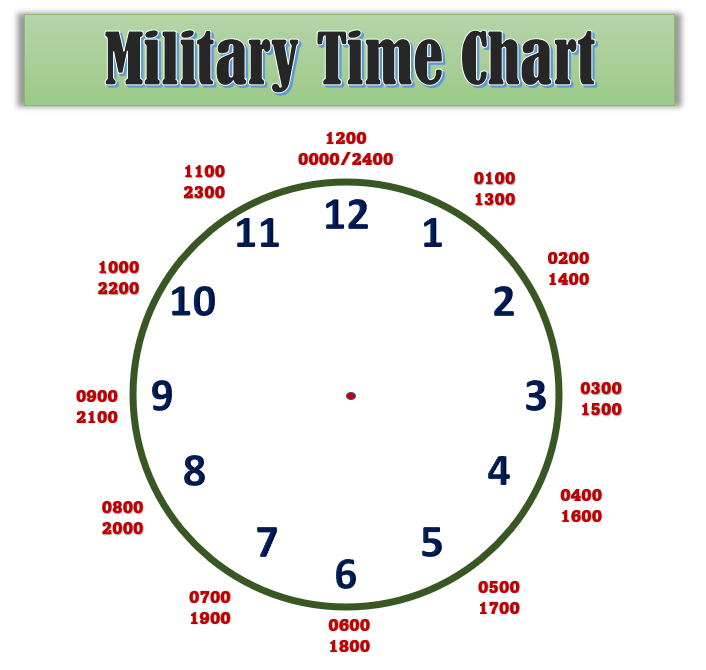
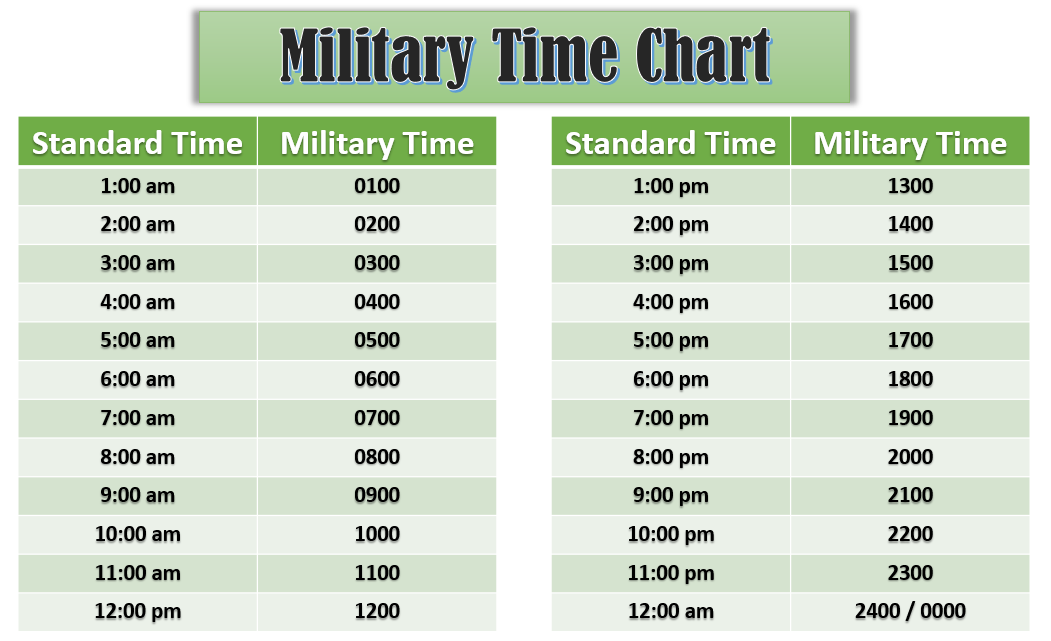
In the precise world of technology, clarity and unambiguous communication are paramount. While a simple query like “what is 7 o’clock in military time” might seem straightforward, its implications for digital systems, software development, and global connectivity run deep. To answer directly, 7 o’clock in standard 12-hour time translates to 0700 for 7 AM and 1900 for 7 PM in military (24-hour) time. This conversion, seemingly minor, underpins much of how digital systems operate, synchronize, and ensure data integrity across the globe.
The 24-hour time format, often colloquially referred to as military time, is the default standard for countless technological applications due to its inherent elimination of the AM/PM ambiguity. This article delves into why this precision is not just a preference but a fundamental requirement in the tech landscape, from operating system design to cybersecurity protocols.
The Foundational Role of 24-Hour Time in Digital Systems
The adoption of 24-hour time in digital environments is not arbitrary; it’s a direct response to the need for absolute precision and machine-readable data. Unlike human interpretation, which can infer AM or PM from context, computers require explicit and unambiguous instructions. The absence of an AM/PM designator in 24-hour time ensures that every timestamp is unique and unequivocally represents a specific moment within a 24-hour cycle.
Precision and Ambiguity in Data Handling
In computing, data integrity is everything. A single bit of misinformation or misinterpretation can lead to critical errors, system failures, or security vulnerabilities. When dealing with time, the 12-hour format inherently introduces ambiguity due to its reliance on AM and PM designators. For instance, “7:00” could mean the morning or the evening. While humans can easily distinguish between “7 AM” and “7 PM,” programming languages, databases, and network protocols require a universal standard that leaves no room for doubt.
The 24-hour format resolves this by continuing the hour count past noon. 1 PM becomes 1300, 7 PM becomes 1900, and so forth. This sequential numbering eliminates the need for additional designators, simplifying parsing and comparison logic for software. Every event, every transaction, every log entry can be timestamped with an absolute value, ensuring that data is consistently ordered and easily traceable. This is crucial for applications ranging from financial trading platforms, where milliseconds matter, to scientific data collection, where exact sequencing is vital for analysis.
Global Synchronization and Coordinated Universal Time (UTC)
Beyond individual system precision, global operations demand a unified time standard. This is where Coordinated Universal Time (UTC) comes into play. UTC is the primary time standard by which the world regulates clocks and time, and it is universally expressed in the 24-hour format. It serves as the reference point for all time zones worldwide, ensuring that systems across different geographical locations can synchronize and communicate effectively.
For technology, UTC is indispensable. Servers across continents, distributed databases, global communication networks, and cloud computing platforms rely on UTC to maintain chronological order of events. When an application in New York interacts with a server in Tokyo, or data is replicated across data centers in different time zones, UTC provides the common temporal denominator. All internal system clocks are typically set to or synchronized with UTC, with conversions to local time zones handled at the user interface level for convenience. This layered approach ensures that while users see “7 PM EST,” the underlying system records “0000 UTC” (or similar, depending on the specific time and offset), maintaining a single source of truth for time. Without this standardization and the unambiguous nature of 24-hour time, orchestrating complex global tech infrastructures would be virtually impossible.
Software Implementation: Display, Conversion, and User Experience
The technical necessity of 24-hour time often contrasts with user preferences. Many users are accustomed to the 12-hour format, leading to a critical design challenge for software developers: how to leverage the precision of 24-hour time internally while providing a user-friendly experience externally. This challenge highlights the sophistication required in handling time within operating systems and applications.
Operating System Settings and Time Formats
Modern operating systems (OS) like Windows, macOS, Android, and iOS provide robust mechanisms for managing time and date formats, allowing users to choose between 12-hour and 24-hour displays. These settings are typically found within the system’s “Date & Time” or “Regional Settings” configurations. When a user selects the 12-hour format, the OS transparently handles the conversion from its internal 24-hour or epoch time representation to the user’s preferred display.
This flexibility is crucial for user adoption and satisfaction. While a system might internally process a timestamp as 2023-10-27T19:00:00Z (an ISO 8601 format often using 24-hour time and UTC offset), a user in the Eastern Time Zone might see this displayed as “October 27, 2023, 7:00 PM EDT.” The OS acts as the intermediary, performing the necessary calculations for time zone offset and format conversion, demonstrating a sophisticated interplay between backend data and frontend presentation. Developers building applications must integrate with these OS-level settings to ensure their software respects user preferences, providing a consistent experience across the platform.
Application Logic and Backend Processing
For application developers, handling time goes beyond simple display. The core logic of most software relies on precise time management for tasks such as scheduling events, logging user actions, managing session expirations, and orchestrating backend processes. Within application code, time is almost invariably stored and processed in a 24-hour format, often as a Unix timestamp (seconds since January 1, 1970, UTC) or an ISO 8601 string.
Programming languages offer specialized date and time objects and libraries (e.g., datetime in Python, java.time in Java, moment.js or date-fns in JavaScript) that abstract away much of the complexity. These libraries facilitate:
- Parsing: Converting human-readable date/time strings into internal data structures.
- Formatting: Converting internal time data into various display formats for users.
- Calculations: Adding or subtracting time units, calculating durations, and determining intervals.
- Time Zone Conversion: Translating times between UTC and specific local time zones.
A robust application will always store time in a universal, unambiguous format (like UTC 24-hour time) and only convert it to a local 12-hour or 24-hour display just before presenting it to the end-user. This approach prevents common pitfalls such as incorrect event ordering, missed deadlines due to time zone errors, or inconsistent data across different user locales.
Digital Security and Time-Based Protocols
In the realm of digital security, timing is not just a convenience; it is a critical component of defensive and investigative strategies. The unambiguous nature of 24-hour time, especially when coupled with UTC, forms the bedrock for secure operations, enabling precise auditing, forensic analysis, and the implementation of time-sensitive security protocols.
Timestamping and Event Logging
Every significant event within a secure system—from user logins and access attempts to data modifications and system alerts—is meticulously recorded with a timestamp. These logs are indispensable for auditing, compliance, and, crucially, for incident response. When a security breach occurs, analysts rely heavily on these timestamps to reconstruct the sequence of events, identify vulnerabilities, and determine the scope of an attack.
The use of 24-hour UTC timestamps in security logs is non-negotiable. It eliminates any ambiguity regarding the time an event occurred, providing a universal chronological record. If a system records “7:00” for an intrusion attempt, it’s unclear whether it was 7 AM or 7 PM, potentially wasting valuable investigation time. However, a timestamp of “19:00 UTC” leaves no room for doubt, precisely pinpointing the event. This precision is vital for correlating events across multiple systems that might be geographically dispersed, ensuring that an attacker cannot manipulate or obscure the true timeline of their activities. Immutable, unambiguous timestamps are a cornerstone of forensic readiness.
Authentication and Session Management
Many modern authentication and session management protocols inherently rely on precise time synchronization and 24-hour time principles. For instance, Kerberos, a network authentication protocol, uses timestamps to prevent replay attacks, where an attacker might try to reuse old authentication credentials. Tokens issued by authentication servers have limited lifespans and are timestamped; if a token is presented outside its valid time window, it’s rejected.
Similarly, in web applications, session tokens and JSON Web Tokens (JWTs) often include an “expiration time” (exp) claim, which specifies the time on or after which the token must not be accepted for processing. These expiration times are always expressed as numeric dates (Unix timestamps), representing the number of seconds from the Unix epoch (January 1, 1970, UTC). A JWT expiring at “19:00 UTC” will be invalid regardless of the user’s local time, ensuring consistent security policy enforcement across all clients and servers. Without the unequivocal nature of 24-hour time and a synchronized global clock (UTC), the integrity and security of these time-sensitive protocols would be severely compromised, opening doors to various forms of cyberattacks.
Tech Tutorials: Mastering 24-Hour Time on Your Devices
Understanding and utilizing 24-hour time is not just for developers or system administrators; it’s a useful skill for any tech-savvy individual, especially those who interact with global teams or analyze technical data. Configuring your devices to display 24-hour time can enhance clarity and prevent misunderstandings, while developers benefit from a deeper understanding of time objects in their code.
Configuring Clocks on PCs and Mobile Devices
Most modern operating systems allow users to easily switch their clock display to the 24-hour format. This can be particularly helpful for individuals who frequently deal with schedules in this format or who simply prefer the unambiguous nature it provides.
- Windows: Go to “Settings” > “Time & Language” > “Date & time”. Under “Format,” you can choose your preferred short time format, which often includes a 24-hour option (e.g.,
HH:mm). For more detailed control, navigate to “Region” settings and adjust “Change data formats.” - macOS: Open “System Settings” > “General” > “Language & Region”. Here, you can select “24-Hour Time” to toggle the format for the system clock and many applications.
- Android: Go to “Settings” > “System” > “Date & time”. You will usually find an option labeled “Use 24-hour format” or “24-hour clock” which you can enable.
- iOS (iPhone/iPad): Navigate to “Settings” > “General” > “Date & Time”. There’s a simple toggle labeled “24-Hour Time” that controls the system’s clock display.
Making this small change can improve personal efficiency and reduce errors when interpreting schedules from various technical or international sources.
Understanding Time in Development Environments
For developers, a deep understanding of how to handle time objects is fundamental. Whether you’re working with JavaScript, Python, Java, or any other programming language, you’ll encounter specific data types and functions designed for date and time manipulation.
For example, in JavaScript, the Date object represents a single moment in time. While it can display local time, its internal representation and methods often lean towards UTC and 24-hour principles. When creating a Date object, you can parse various formats, but using ISO 8601 (YYYY-MM-DDTHH:mm:ssZ) or Unix timestamps is generally recommended for consistency. For instance, new Date('2023-10-27T19:00:00Z') explicitly creates a Date object for 7 PM UTC on October 27, 2023.
Python’s datetime module offers datetime objects that are highly versatile. You can create a datetime object for a specific time, manipulate it, and format it for display:
from datetime import datetime

# Represents 7 PM (1900)
seven_pm_dt = datetime(2023, 10, 27, 19, 0, 0)
print(seven_pm_dt.strftime("%H:%M")) # Output: 19:00
print(seven_pm_dt.strftime("%I:%M %p")) # Output: 07:00 PM


<p style="text-align:center;"><img class="center-image" src="https://cdn.thecoolist.com/wp-content/uploads/2017/04/Simple-Military-Time-Converter.png" alt=""></p>


# Get current UTC time
current_utc_time = datetime.utcnow()
print(current_utc_time.strftime("%Y-%m-%d %H:%M:%S UTC"))
Mastering these concepts, particularly the interplay between local time, UTC, and the 24-hour format, is essential for building robust, reliable, and globally compatible software applications. The simple query of “what is 7 o’clock in military time” thus opens a door to understanding a fundamental pillar of modern technology.
aViewFromTheCave is a participant in the Amazon Services LLC Associates Program, an affiliate advertising program designed to provide a means for sites to earn advertising fees by advertising and linking to Amazon.com. Amazon, the Amazon logo, AmazonSupply, and the AmazonSupply logo are trademarks of Amazon.com, Inc. or its affiliates. As an Amazon Associate we earn affiliate commissions from qualifying purchases.