
In the vast ecosystem of digital imagery and graphic design, file formats often feel like a dizzying alphabet soup. Among these, the Encapsulated PostScript (EPS) file stands as a veteran—a foundational format that has bridged the gap between professional print production and digital vector graphics for decades. Understanding what an EPS file is, how it functions, and why it remains a standard in the design industry is essential for anyone working with visual assets, from corporate branding teams to freelance graphic artists.
Understanding the Foundation of EPS
At its core, an Encapsulated PostScript file is a vector-based image format. Unlike raster images (such as JPEGs or PNGs), which are composed of a fixed grid of pixels, vector files are constructed using mathematical equations. These equations define lines, curves, shapes, and colors, allowing the image to be scaled indefinitely without any loss of quality.
The PostScript Language
The “PostScript” in EPS refers to the page description language developed by Adobe in the 1980s. PostScript was revolutionary because it allowed computers to communicate complex layout instructions—including fonts, vector graphics, and images—to printers. An EPS file is essentially a self-contained “encapsulated” chunk of this PostScript code. It acts as a set of instructions that tells an output device exactly how to render the graphics, ensuring that a logo designed on a desktop computer looks identical when printed on a large-format billboard.
Why Designers Rely on Vectors
Because EPS files are vector-based, they are the gold standard for high-resolution output. If you try to enlarge a small JPEG, the pixels become visible, resulting in a blurry, “pixelated” image. An EPS file, however, recalculates its geometry every time it is resized. Whether you are printing a tiny business card or a massive vinyl banner for a tradeshow, the sharpness of the lines remains perfect. This makes EPS the preferred format for logos, illustrations, and typography that must be deployed across various media.
The Versatility of EPS in Professional Workflows
The utility of the EPS format extends far beyond its scalability. Its design was intended for interoperability, making it a “universal” language among professional design software.
Cross-Platform Compatibility
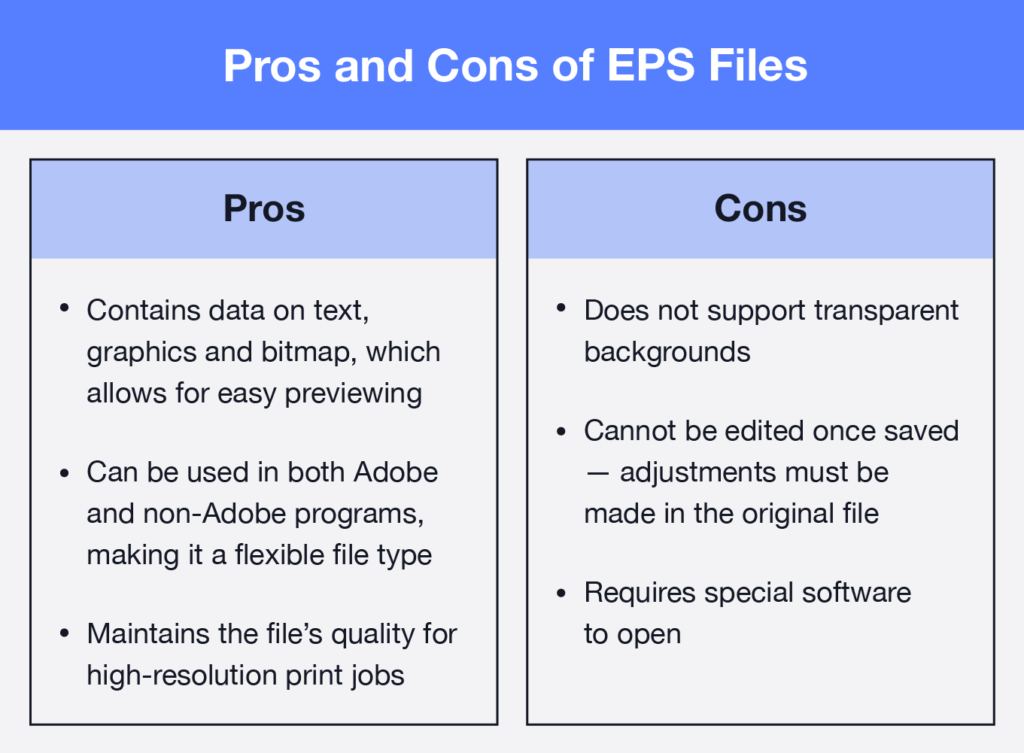
One of the primary reasons EPS became a staple in the design industry is its ability to be opened and edited across a wide array of software. Whether you are working in Adobe Illustrator, CorelDRAW, Affinity Designer, or even legacy print management systems, EPS files are generally supported. This compatibility ensures that a designer can create a brand asset in one application and a printer can ingest that same file into their production software without encountering broken links or font substitution errors.
The Inclusion of Preview Images
A technical hurdle with early PostScript files was that they were difficult to preview without specialized software. To solve this, the EPS format includes an optional low-resolution “preview” image (often in TIFF or PICT format) embedded within the file. This allows users to see a thumbnail representation of the graphic within their file explorer or design software layout, even if the underlying vector data is too complex to be rendered instantly by the system’s previewer. This small but critical feature prevents designers from having to open multiple massive files just to find the correct version of a logo.
Professional Printing and Pre-Press
In the world of professional printing, the EPS format is the reliable workhorse. Most high-end printing presses and digital platesetters still rely on PostScript interpreters. By sending a printer an EPS file, you are providing them with a file that is already formatted for their equipment. It includes the necessary color data, trapping, and font information, which minimizes the risk of printing errors. This is why professional printing bureaus often explicitly request logos and brand assets in EPS format—it is the safest way to ensure the final output matches the design intent.
Navigating the Limitations of EPS
While EPS is a powerful tool, it is not without its modern limitations. As technology has evolved toward faster, more interactive web standards, the limitations of this legacy format have become more apparent.
Lack of Transparency Support
One of the most significant drawbacks of the traditional EPS format is its poor handling of transparency. Unlike more modern formats such as the Adobe Illustrator (AI) native format or PDF, EPS files struggle to interpret complex transparency layers correctly. When a design relies on drop shadows, gradients that fade to nothing, or translucent overlays, EPS files can often result in “flattening” issues. This means the visual effect may change or look “blocked out” when imported into other software.
File Size and Complexity
Because EPS files contain full PostScript code, they can become quite heavy, especially when they include complex illustrations or high-resolution embedded images. If a designer embeds a massive photograph inside an EPS file, the resulting file size can be cumbersome, leading to long loading times or issues with email attachments. In modern workflows, many designers have shifted toward AI or PDF files, which are more efficient at compressing data while retaining complex design features.
The Shift Toward PDF
Today, the Portable Document Format (PDF) has largely usurped the role of EPS in many aspects of professional design. PDFs are also based on PostScript, but they offer superior support for transparency, smaller file sizes, and cross-media versatility. While an EPS file is strictly a graphic asset, a PDF can be a complete, multi-page document that is ready for both print and digital distribution. Consequently, many designers now use EPS files as the “source” for logos, but export final files as high-quality PDFs.
Best Practices for Managing EPS Files
To leverage EPS files effectively, users should adhere to a few standard professional practices. These guidelines help prevent common issues and ensure that assets remain usable for future projects.
Maintain the Source File
Never use your original, master EPS file as your working file. If you are going to manipulate a logo or illustration, save a copy of the original and work on the duplicate. This protects your primary asset from accidental corruption or irreversible changes.
Outline Your Fonts
Before sending an EPS file to a printer or a client, it is best practice to “create outlines” for all text. This converts your fonts into vector shapes. If you send an EPS file with live text, the recipient may not have the exact same font installed on their computer, which will lead to the dreaded “font substitution” error, potentially ruining your layout. Converting to outlines ensures that the typography looks exactly as you intended, regardless of the recipient’s software configuration.
When to Use EPS vs. Other Formats
Knowing when to reach for an EPS file is half the battle:
- Use EPS for: Logo files, icon sets, illustrations, and any design that needs to be scaled for high-quality print production.
- Avoid EPS for: Web-based graphics (use SVG or PNG instead), photographs (use JPEG, TIFF, or WebP), or documents requiring transparency and multiple pages (use PDF).
The Future of the Format
The EPS format is a testament to the longevity of well-engineered standards. Despite the rise of modern alternatives, it remains the backbone of the print industry. As long as professional printers utilize PostScript-based workflows, the EPS file will continue to hold its place in the designer’s toolkit. By understanding its technical strengths—namely its resolution independence and its universal compatibility—you can navigate the world of high-quality design with confidence, ensuring your visual assets remain sharp, professional, and ready for any medium.
aViewFromTheCave is a participant in the Amazon Services LLC Associates Program, an affiliate advertising program designed to provide a means for sites to earn advertising fees by advertising and linking to Amazon.com. Amazon, the Amazon logo, AmazonSupply, and the AmazonSupply logo are trademarks of Amazon.com, Inc. or its affiliates. As an Amazon Associate we earn affiliate commissions from qualifying purchases.