
Snapchat’s ecosystem is built on ephemeral communication, intimate social circles, and a distinct set of privacy controls designed to protect the user experience. Among these controls, the “Block” feature serves as the ultimate digital barrier. However, social dynamics are fluid, and there are many instances where a user may decide to lift this restriction. Understanding the technical mechanics of what occurs when you unblock someone on Snapchat is essential for managing your digital footprint and maintaining your privacy.
The Technical Mechanics of Unblocking
When you choose to unblock a user on Snapchat, the platform does not simply revert the account to its previous state as if nothing happened. Instead, it resets the connectivity status, requiring a new handshake between the two accounts.
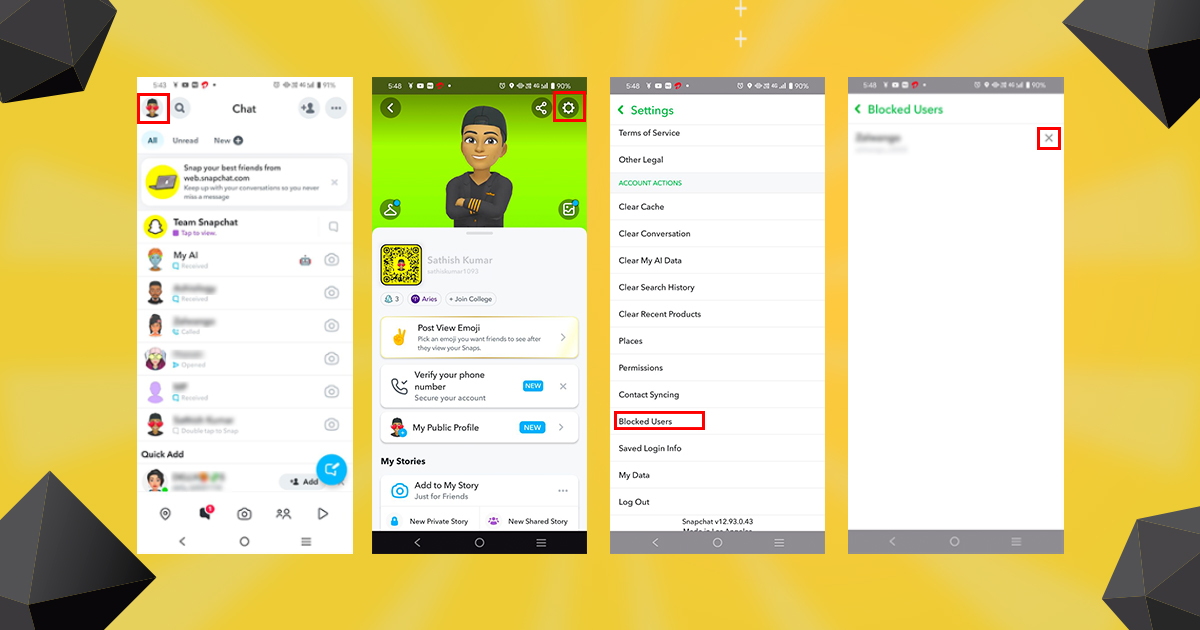
Removal from the Blocked List
The immediate action is the removal of the user’s name from your “Blocked” list within the Privacy settings. Once this list is updated, the app no longer actively filters the specific user’s profile from your search results or interactions. However, unblocking a user does not automatically restore them to your “Friends” list. They remain in a digital limbo—neither blocked nor connected.
Data Synchronization and Visibility
Once the block is lifted, the visibility of your profile depends entirely on your broader account settings. If your privacy settings are set to “Everyone,” the unblocked user will be able to see your public Stories and find your profile in searches. If your settings are restricted to “Friends,” the unblocked user will be unable to see your content until a new request is sent and accepted. Crucially, Snapchat does not send a notification to the person you have unblocked. They will not receive an alert stating, “User X has unblocked you.” The transition is silent on their end, though they may eventually discover the change if they attempt to search for your username.
Navigating the Re-Connection Process
Unblocking is not the same as “adding back.” Once the initial block is removed, the bridge between your two accounts remains broken until a deliberate action is taken to rebuild it.
Why They Disappear from Your Friends List
When you block a user, Snapchat automatically removes them from your Friends list and vice versa. Even after you unblock them, they will not reappear in your contact list. To resume direct communication, you must perform a manual re-add. If you choose not to re-add them, they are essentially just another user on the platform. Depending on your privacy settings, they may be able to send you a Friend Request, which you can choose to accept, decline, or ignore.
The Impact on Chat History
A common misconception is that unblocking a user will restore the conversation history that existed prior to the block. In almost all cases, Snapchat purges the chat history between two users once a block is enacted. Even after unblocking, the previous messages, sent snaps, and saved media are typically not recoverable. You are starting from a blank slate. If you were hoping to retrieve lost information from an old conversation, unblocking the user will not serve as a restoration tool. The technical infrastructure of Snapchat prioritizes data privacy, and once a connection is severed, the ephemeral nature of the platform ensures that the metadata and content history are cleared from the active interface.
Privacy Implications and Security Best Practices
Managing who has access to your Snapchat account is a vital component of digital hygiene. Unblocking someone should be a calculated decision rather than an impulsive reaction to changing social circumstances.
Adjusting Privacy Settings Before Unblocking
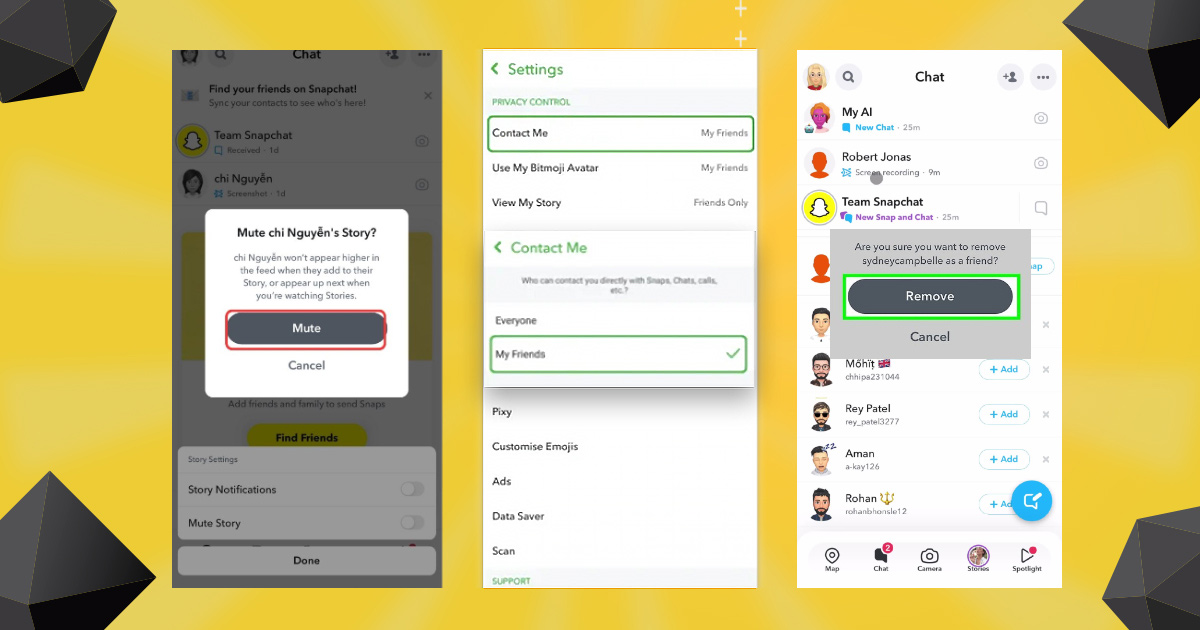
Before you tap that “Unblock” button, it is highly recommended to audit your privacy settings. Navigate to your “Settings” menu and review the “Who Can…” section. By adjusting these permissions, you can ensure that even if you unblock someone, they do not gain immediate access to your location data via Snap Map, your Story content, or the ability to send you direct messages. By tightening these controls first, you maintain a safety buffer that allows you to control the flow of information regardless of your relationship status with that individual.
Managing Potential Harassment
If you blocked someone due to persistent harassment, spamming, or unwanted advances, unblocking them carries the risk of re-exposing yourself to that behavior. If the individual was previously reported to Snapchat, the platform’s safety algorithms may flag them for future activity. However, if the behavior was not strictly against community guidelines, they may resume contact the moment they realize they are no longer restricted.
If you unblock someone and find that the unwanted behavior continues, you can always block them again. Snapchat does not limit the number of times you can block and unblock the same user, but frequent toggling can sometimes lead to temporary restrictions or triggers in the platform’s security protocols that may flag your own account for suspicious activity.
Managing the Social Transition
The social implications of unblocking someone are often more complex than the technical ones. Whether you are attempting to mend a bridge or simply clearing out your block list, the way the platform handles this change can affect your social interactions.
The “Add” Notification
If you unblock someone and then send them a Friend Request, they will receive a standard notification that you have added them. This is the only way they will definitively know your status has changed. If you choose not to add them, and they search for your profile, they will be able to see that your profile is active, but they will not know when exactly the block was lifted. This ambiguity is beneficial if you prefer to keep your digital movements private.

Curating Your Experience
Ultimately, your Snapchat experience should be a reflection of your current social comfort levels. If you decide to unblock a user, view it as a fresh start rather than a continuation of a past narrative. Because the chat history is gone and the friendship status is reset, you have the opportunity to establish new boundaries.
If the unblocking was a mistake or you find that the interaction is not conducive to your well-being, the block feature remains the most effective tool in your arsenal. Digital tools are designed to facilitate connection, but they are also equipped to protect your autonomy. Being aware of these technical realities—the lack of notifications, the loss of history, and the necessity of a manual re-add—empowers you to navigate your social network on Snapchat with confidence and control. By keeping your privacy settings robust and understanding how the app processes these changes, you ensure that your digital space remains a place of your choosing.
aViewFromTheCave is a participant in the Amazon Services LLC Associates Program, an affiliate advertising program designed to provide a means for sites to earn advertising fees by advertising and linking to Amazon.com. Amazon, the Amazon logo, AmazonSupply, and the AmazonSupply logo are trademarks of Amazon.com, Inc. or its affiliates. As an Amazon Associate we earn affiliate commissions from qualifying purchases.