
In the digital era, where the keyboard serves as the primary gateway between human thought and machine execution, the speed at which one traverses the QWERTY landscape has become a vital metric of proficiency. Whether you are a student drafting a thesis, a developer churning out lines of code, or a professional managing a high-volume email inbox, you have likely encountered the acronym “WPM.” But what does WPM mean in the context of typing, and why has it remained the gold standard for measuring human-computer interaction for over a century?
WPM stands for “Words Per Minute.” At its core, it is a measurement of typing speed that calculates how many words an individual can input into a text field within a sixty-second timeframe. While the concept sounds straightforward, the mechanics behind how WPM is calculated, verified, and improved reveal a fascinating intersection of human cognitive performance and hardware efficiency.
The Mathematical Foundation of WPM
To understand WPM, one must move past the literal count of words and look at the standardized methodology used by software, typing tests, and professional certifications. If you simply counted the number of times a spacebar was hit, the resulting data would be wildly inconsistent due to varying word lengths. Consequently, the industry adopted a standardized unit of measure.
The Five-Character Rule
In standard typing tests, a “word” is defined as any five characters, including the spaces, punctuation, and symbols immediately following the text. This normalization prevents someone who types short, simple words from having a statistically unfair advantage over someone who types complex, multi-syllabic terminology. By treating every five keystrokes as a single word, developers of typing software ensure that the metric remains consistent regardless of the linguistic complexity of the passage being typed.
Gross vs. Net Speed
A critical distinction in professional and competitive typing is the difference between Gross WPM and Net WPM. Gross WPM measures the total number of characters typed divided by five, irrespective of accuracy. This reflects raw output speed but ignores the reality of input errors. Net WPM, by contrast, is the more rigorous and widely used metric. It is calculated by taking the Gross WPM and subtracting the number of errors made during the session. In many professional environments, if an error is made, it is penalized further to account for the time spent hitting the backspace key or the time lost correcting the mistake, making Net WPM the only reliable gauge of actual productivity.
Why WPM Still Matters in the Digital Workplace
Despite the rise of voice-to-text software, predictive AI, and gesture-based interfaces, physical typing remains the most reliable and precise method for high-fidelity data entry and creative composition. The “speed” of your typing is not just about finishing a document faster; it is about the reduction of cognitive load.
Minimizing the “Brain-to-Keyboard” Gap
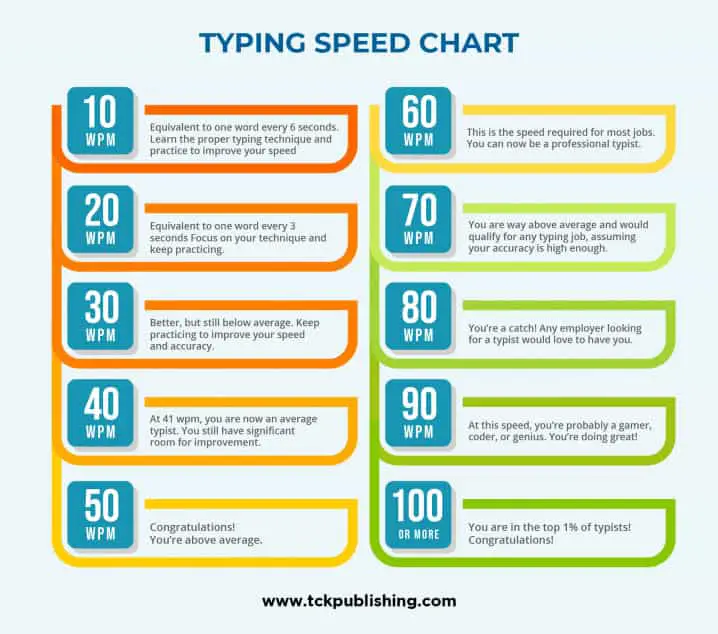
When a typist reaches a high WPM—typically above 60 to 80—the act of typing shifts from a conscious mechanical process to an unconscious motor skill. This is known as “touch typing.” When you do not need to look at your hands or deliberate on the location of specific keys, your brain can focus entirely on the content being generated. A higher WPM facilitates a “flow state,” where the gap between conceptualizing a sentence and seeing it appear on the screen is minimized. This allows for superior brainstorming, complex troubleshooting, and more nuanced drafting.
The Professional Benchmark
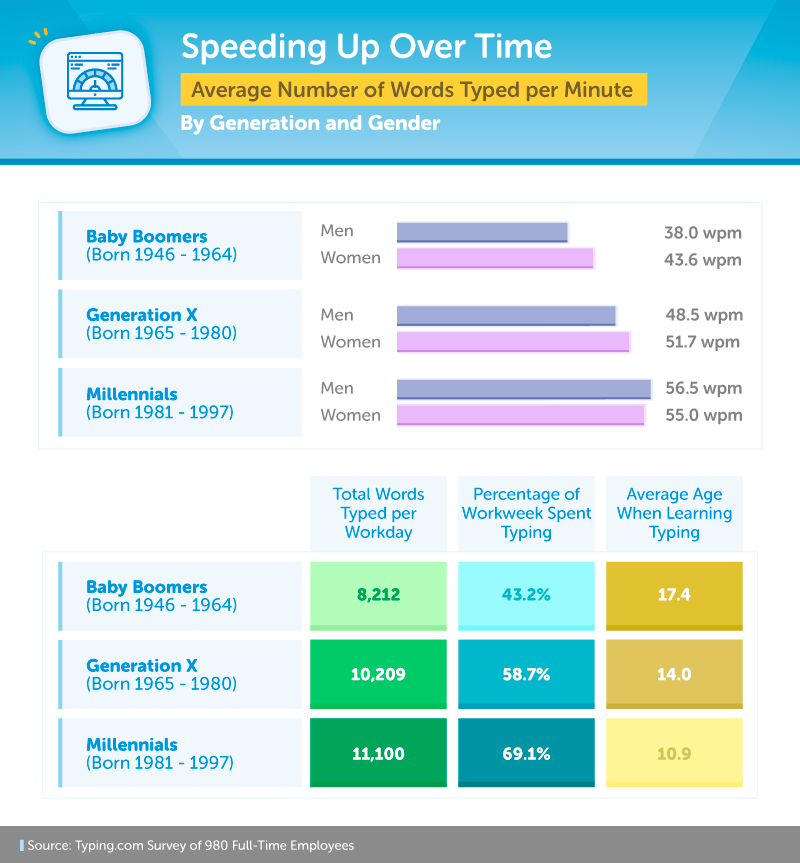
In many administrative, technical, and data-driven careers, WPM serves as a functional baseline for employability. Medical transcriptionists, court reporters, and data entry specialists are often required to meet specific WPM thresholds to ensure they can keep pace with live audio or high-volume document requests. Even in software engineering, where “typing fast” is often jokingly dismissed in favor of “thinking deep,” the ability to quickly navigate an Integrated Development Environment (IDE) or write boilerplate code with high WPM significantly reduces the time spent on mundane tasks, allowing developers to focus on architectural problem-solving.
Factors Influencing Your Typing Speed
Typing is a complex neuro-muscular activity. Your WPM is influenced by a combination of physical hardware, ergonomic setup, and ingrained memory patterns. If you find your WPM stagnating, it is rarely due to a lack of effort; it is usually a result of structural inefficiencies in your technique or equipment.
Ergonomics and Hardware
The input device plays a non-trivial role in how fast you can type. A high-quality mechanical keyboard with consistent tactile feedback—such as Cherry MX Brown or Blue switches—can provide the physical “click” that confirms a key press, allowing the typist to move to the next key before the finger has fully bottomed out. Conversely, low-profile laptop keyboards or mushy membrane keyboards can lead to “ghosting” or missed keystrokes, forcing the user to slow down to ensure accuracy. Proper ergonomic positioning, including wrist support and monitor height, prevents repetitive strain injury (RSI), which is the single greatest enemy of long-term typing performance.
The Role of Muscle Memory
Muscle memory, or “motor learning,” is the bedrock of fast typing. Your goal is to move from “hunt and peck” (searching for keys) to “touch typing” (using all ten fingers while maintaining a fixed hand position). By consistently practicing on the “home row” (ASDF-JKL;), you train your subconscious to map keys to specific finger movements. Over time, the brain ceases to process the location of the letter ‘P’ and simply triggers the signal to the right pinky finger to strike. This automation is the only way to break through the WPM plateau that occurs when a typist relies on visual confirmation of the keys.
Strategies for Improving Your WPM
If you have measured your current WPM and found it lacking, the path to improvement is systematic. You do not increase speed by trying to type faster; you increase speed by reducing errors and optimizing your physical movements.
Focus on Accuracy First
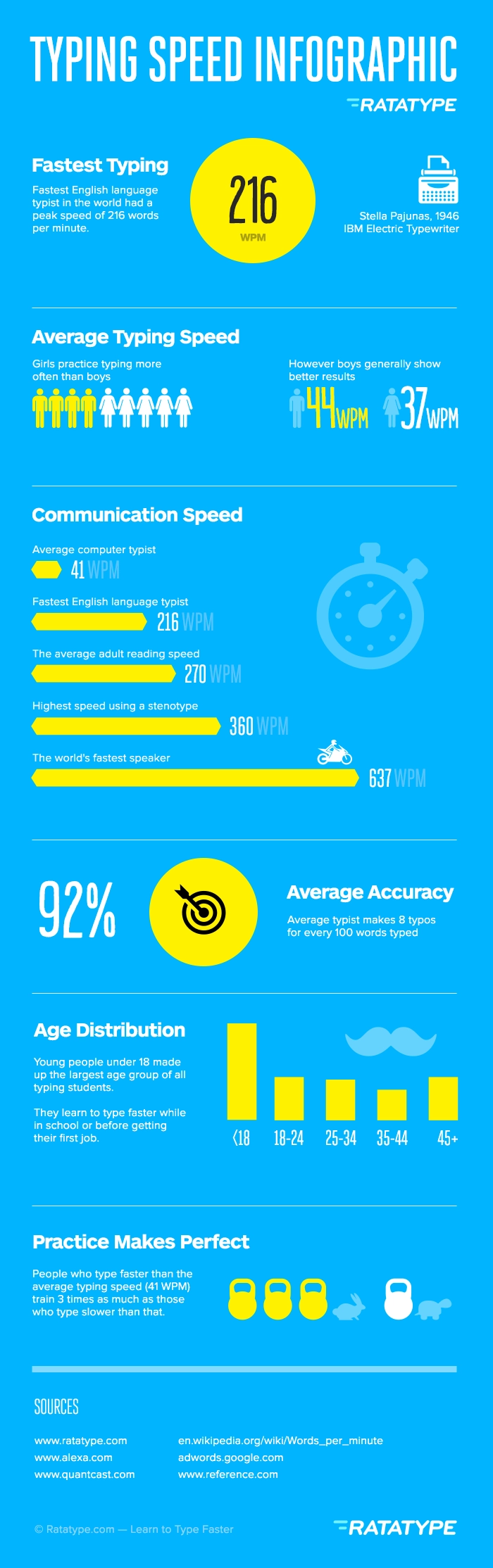
The most common mistake among beginners is trying to rush. Speed is the byproduct of accuracy, not the cause. When you make a mistake, you have to hit backspace, re-type the character, and correct the rhythm. This cycle destroys momentum. By slowing down to a pace where you rarely make a mistake, you allow your brain to build “perfect” muscle memory. As you repeat these movements, they become faster naturally. Once you reach 98%–100% accuracy, speed will follow as a natural evolution of your comfort level.
Targeted Practice and Pattern Recognition
Words in the English language follow specific patterns and letter clusters. For example, the letters “t-h-e” or “i-n-g” appear with high frequency. Typing drills that emphasize these common combinations help the brain recognize “chunks” of text rather than individual letters. Using online typing trainers that provide analytical feedback can help you identify which specific fingers or keys are slowing you down. For instance, if the software reports that you consistently hit the ‘B’ key slowly, you can dedicate practice time specifically to movements involving the index finger in the bottom row.
The Impact of Consistency
Typing is a skill that requires neural adaptation. Practicing for fifteen minutes every day is infinitely more effective than practicing for three hours once a week. Because the goal is to ingrain movements into your procedural memory, short, frequent bursts of practice encourage the brain to solidify these new pathways. Over several weeks, you will notice that your hands seem to “know” where to go, a sensation that indicates you have successfully upgraded your touch-typing proficiency.
Ultimately, understanding what WPM means is the first step toward mastery. It is more than just a number on a screen; it is a measure of your digital fluency. In an age where the pace of information is ever-increasing, developing the ability to translate thought into digital text with speed and precision is one of the most practical and valuable skills you can acquire. Whether you are aiming for a modest 50 WPM to improve daily correspondence or pushing toward 100+ WPM to reach a competitive professional level, the principles remain the same: prioritize accuracy, invest in your ergonomics, and embrace the slow, deliberate work of building muscle memory.
aViewFromTheCave is a participant in the Amazon Services LLC Associates Program, an affiliate advertising program designed to provide a means for sites to earn advertising fees by advertising and linking to Amazon.com. Amazon, the Amazon logo, AmazonSupply, and the AmazonSupply logo are trademarks of Amazon.com, Inc. or its affiliates. As an Amazon Associate we earn affiliate commissions from qualifying purchases.