
In the ever-evolving landscape of digital commerce, establishing an online presence is no longer a luxury but a necessity for businesses aiming for growth and broad market reach. Among the myriad e-commerce platforms available, Shopify stands out as a robust, scalable, and user-friendly solution, enabling entrepreneurs and established brands alike to launch and manage their digital storefronts with impressive efficiency. This guide will delve into the technical intricacies of setting up a Shopify store, providing a structured approach to leveraging its features, from initial configuration to advanced customization and integration. Our focus will strictly remain on the technological aspects, ensuring you grasp the underlying mechanisms and best practices for building a resilient online store.
I. Understanding the Shopify Ecosystem and Why It’s a Top Choice
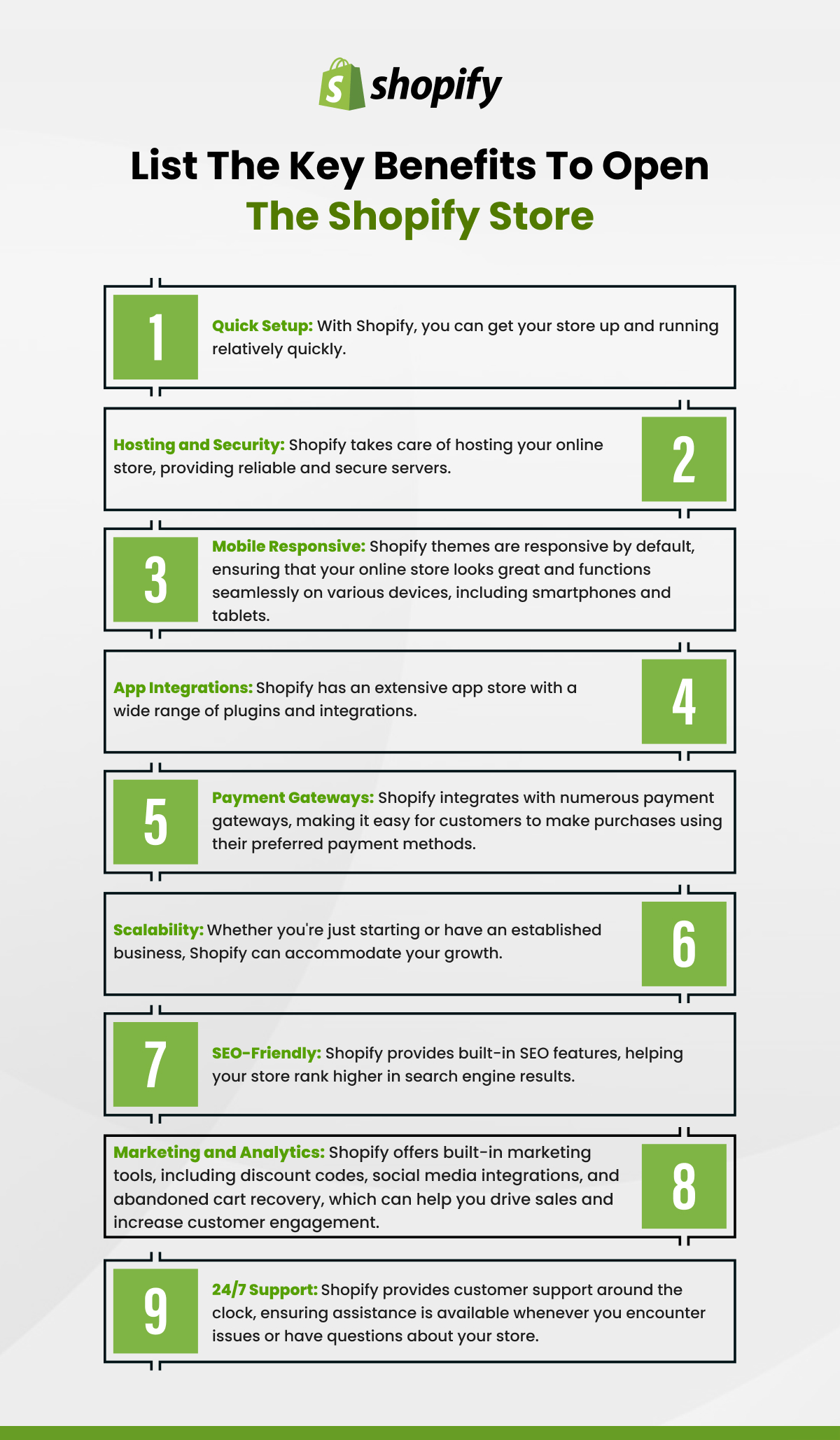
Before diving into the operational setup, it’s crucial to appreciate Shopify as a technology platform. Its architecture, feature set, and underlying philosophy are designed to abstract away much of the technical complexity typically associated with e-commerce, allowing users to focus on business rather than infrastructure.
What is Shopify? A Platform Overview
At its core, Shopify is a proprietary e-commerce software-as-a-service (SaaS) platform. This means it’s a hosted solution, providing all the necessary backend infrastructure – servers, security, software updates, and payment gateway integrations – directly to the merchant. Unlike open-source solutions that require self-hosting and extensive technical management, Shopify offers an all-in-one package, accessible via a web browser. It operates on a subscription model, offering various plans tailored to different business scales and technical requirements. The platform is built with Ruby on Rails and utilizes Liquid, its own templating language, for theme development, providing a powerful yet flexible environment for storefront customization.
Core Features: Beyond Just a Shopping Cart
Shopify’s technical prowess extends far beyond a basic shopping cart functionality. It’s an integrated suite encompassing product management, inventory control, order processing, customer relationship management (CRM) light features, analytics, and powerful marketing tools. Technically, it handles secure HTTP connections (HTTPS) by default for all stores, ensuring data encryption. It provides a robust API (Application Programming Interface) that allows for extensive integration with third-party applications, expanding its native capabilities significantly. This comprehensive feature set minimizes the need for external tools and complex multi-system integration, simplifying the overall technology stack for merchants.
Technical Advantages for Merchants: Scalability, Security, Ease of Use
One of Shopify’s most compelling technical advantages is its inherent scalability. Its cloud-based infrastructure is designed to handle fluctuating traffic volumes, from small startups to large enterprises experiencing peak sale events like Black Friday, without requiring merchants to manage server resources. This eliminates concerns about bandwidth, server crashes, and database performance, which are common headaches with self-hosted solutions. Security is paramount; Shopify maintains PCI DSS (Payment Card Industry Data Security Standard) compliance, ensuring secure processing of credit card information. They also manage DDoS protection, SSL certificates, and regular security updates. Finally, the user-friendly administrative interface, with its intuitive dashboard and drag-and-drop functionalities, significantly lowers the technical barrier to entry for managing a complex e-commerce operation.
II. Initial Setup and Configuration: Laying the Technical Foundation
Embarking on your Shopify journey requires a methodical approach to initial setup, ensuring all technical parameters are correctly configured from the outset. This foundational phase is critical for the store’s smooth operation and future scalability.
Choosing Your Plan and Signing Up: Navigating the Dashboard
The first technical step is selecting a Shopify plan that aligns with your business’s immediate needs and anticipated growth. Shopify offers several tiers (Basic, Shopify, Advanced Shopify, Plus), each with differing feature sets and transaction fees. Post-selection, the signup process leads you directly into your Shopify Admin dashboard. This central control panel is where all technical configurations, data management, and operational tasks are performed. Familiarize yourself with its navigation, which includes sections for Orders, Products, Customers, Analytics, Marketing, Discounts, and Apps, alongside crucial “Settings.”
Domain Integration: Connecting Your Digital Address
A professional online store requires a custom domain name (e.g., yourstore.com). Shopify provides options to either purchase a new domain directly through its platform or connect an existing domain. Technically, connecting an existing domain involves updating DNS (Domain Name System) records with your domain registrar. This typically means pointing the A record to Shopify’s IP address and the CNAME record to shops.myshopify.com. Shopify automatically provisions an SSL certificate for your connected domain, ensuring secure browsing (HTTPS) and building trust with your customers. Proper domain integration is essential for branding and search engine visibility.
Essential Store Settings: Payments, Shipping, Taxes (Technical Configuration)
Within the “Settings” section of your Shopify Admin, several critical technical configurations must be addressed.
- Payments: This involves setting up your payment gateways. Shopify Payments is the platform’s native solution, simplifying credit card processing and eliminating transaction fees (except for card processing fees). You can also integrate numerous third-party payment providers (e.g., PayPal, Stripe, Authorize.net). This technical integration involves API keys and specific credential setups provided by the payment gateway, ensuring secure transaction processing and financial reconciliation.
- Shipping: Configuring shipping involves defining shipping zones, rates, and carriers. This requires understanding your product’s weight and dimensions, preferred shipping methods, and geographic reach. You’ll set up automated shipping calculations based on weight, price, or flat rates. Advanced configurations might involve integrating with shipping apps that connect directly to carrier APIs for real-time rate calculations and label generation.
- Taxes: Shopify offers robust tax calculation features. You can configure automatic tax rates based on location or manually define specific tax overrides. This technical setup ensures compliance with local and international tax regulations, a critical aspect of e-commerce legality.
III. Designing Your Storefront: Theme Selection and Customization
The aesthetic appeal and functional layout of your online store are paramount to user experience (UX) and conversion rates. Shopify’s theme system provides the technical framework for designing a responsive and engaging digital storefront.
Exploring Shopify Themes: Free vs. Paid Options (Technical Customization)
Shopify offers a rich ecosystem of themes, categorized into free themes developed by Shopify and thousands of paid themes available through the Shopify Theme Store or third-party marketplaces. From a technical perspective, themes are pre-built templates based on Shopify’s Liquid templating language, HTML, CSS, and JavaScript. They dictate the store’s layout, styling, and some functionalities. While free themes offer basic yet robust designs, paid themes typically come with more advanced features, sections, and greater customization options out-of-the-box, often with dedicated technical support from the theme developer. Selecting a theme means choosing a technical foundation that supports your product display needs and brand identity.
Utilizing the Theme Editor: Drag-and-Drop Interface Explained (UI/UX)
Shopify’s Online Store editor provides a powerful, intuitive, and largely code-free environment for theme customization. This drag-and-drop interface allows merchants to modify page layouts, add sections (e.g., image banners, text blocks, product grids), adjust color schemes, fonts, and imagery. Technically, this editor generates and modifies the underlying CSS and HTML of your theme dynamically, reflecting changes in real-time. It abstracts away the need for direct code manipulation for basic and many advanced customizations, making design accessible to users without deep programming knowledge. Understanding how different sections and blocks interact within the editor is key to optimizing the user interface and overall user experience.
Customizing with Code (Optional Advanced): Liquid, HTML, CSS
For merchants seeking a higher degree of control or unique functionalities not offered by the theme editor, direct code customization is possible. Shopify themes are built using:
- Liquid: Shopify’s templating language, which allows dynamic data (like product details, collections, customer information) to be rendered on your storefront. Understanding Liquid syntax enables complex layout logic and conditional content display.
- HTML: The structural backbone of your web pages.
- CSS: Stylesheets that control the visual presentation (colors, fonts, spacing, responsiveness).
- JavaScript: For interactive elements and dynamic functionalities.
The theme editor provides access to the theme’s code files, allowing developers to make direct modifications. This advanced technical customization requires proficiency in these web technologies and careful version control (e.g., duplicating themes before editing) to avoid breaking store functionality.
Mobile Responsiveness and Cross-Browser Compatibility (Technical Best Practice)
A crucial technical consideration for any modern website is mobile responsiveness and cross-browser compatibility. All Shopify themes are designed to be inherently responsive, meaning they automatically adapt their layout and elements to display optimally across various screen sizes, from desktops to tablets and smartphones. This is achieved through responsive CSS frameworks and media queries. Merchants should always test their store’s appearance and functionality on different devices and browsers (Chrome, Firefox, Safari, Edge) to ensure a consistent and positive user experience, a fundamental technical best practice for maximizing reach and conversions.
IV. Populating Your Store: Product Management and Technical SEO
The heart of any e-commerce store lies in its products. Efficiently adding, organizing, and optimizing your product data within Shopify is a critical technical task that impacts both internal management and external discoverability.
Adding Products: Images, Descriptions, Variants (Data Entry & Media Management)
Adding products to your Shopify store involves meticulous data entry and careful media management. Each product requires a title, description, pricing information, and inventory levels. From a technical standpoint:
- Images: Optimizing product images is vital. This means uploading high-resolution images that are appropriately sized and compressed to ensure fast loading times without sacrificing visual quality. Shopify automatically generates different image sizes for various display contexts, but starting with well-optimized source images is crucial.
- Descriptions: Product descriptions, while marketing-focused, should also be structured for readability and keyword inclusion for SEO.
- Variants: For products with multiple options (e.g., size, color), Shopify’s variant system allows you to define these, each potentially having its own SKU, price, inventory, and image. This sophisticated system manages complex product configurations efficiently.
Inventory Management: Tracking Stock Levels (Software Feature)
Shopify’s built-in inventory management system is a powerful technical feature for real-time tracking of product stock. When an item is sold, the system automatically decrements the stock level. You can set up alerts for low stock, track inventory across multiple locations (if enabled), and integrate with inventory management apps for more complex needs like warehouse management or dropshipping automation. Accurate inventory management prevents overselling and ensures operational efficiency, relying on the platform’s database and data synchronization capabilities.
Basic On-Page SEO: Product Titles, Meta Descriptions (Technical Optimization)
Search Engine Optimization (SEO) is not just a marketing tactic; it involves technical optimization within the platform. For each product, page, and blog post, Shopify allows you to edit the:
- SEO Title: This is the title displayed in search engine results and browser tabs. It should be concise, keyword-rich, and accurately describe the page content.
- Meta Description: A brief summary displayed under the title in search results. While not a direct ranking factor, a compelling meta description can improve click-through rates.
- URL Handle: The unique part of the URL. Keeping it clean, descriptive, and keyword-relevant is a technical SEO best practice.
Shopify also generates a sitemap.xml automatically, which helps search engines crawl and index your store effectively.
Collections and Navigation: Structuring Your Digital Catalog (Information Architecture)
Organizing products into collections (e.g., “Men’s T-shirts,” “Summer Sale”) is crucial for guiding customers through your store. Technically, collections can be created manually or automatically based on rules (e.g., products with a specific tag, price range, or vendor). Well-structured collections improve product discoverability and user navigation. Similarly, defining your store’s main menu, footer menu, and other navigational links (using Shopify’s “Navigation” section) creates a clear information architecture, making it easier for users to find what they’re looking for and improving the crawlability of your site by search engines.
V. Extending Functionality: The Shopify App Store and Integrations
While Shopify offers a robust set of core features, its true power lies in its extensibility through the Shopify App Store and its robust API for integrations. This is where merchants can tailor their store’s technical capabilities to very specific business needs.
Exploring Shopify Apps: Categories and Use Cases (Software Ecosystem)
The Shopify App Store is a marketplace of thousands of applications, akin to an app store for your smartphone, but specifically for your e-commerce store. These apps extend Shopify’s native functionality across numerous categories: marketing, sales, customer service, reporting, inventory, shipping, and more. From a technical perspective, these apps connect to your store via Shopify’s API, adding code and functionality without requiring you to manually modify your theme’s core files. Examples include apps for dropshipping automation, advanced email marketing integration, loyalty programs, subscription services, and complex analytics. Carefully selecting and installing apps can significantly enhance your store’s capabilities and operational efficiency.
Integrating Third-Party Tools: Payment Gateways, ERPs, Marketing Automation
Beyond the App Store, Shopify’s well-documented API allows for direct, custom integrations with a wide array of third-party systems. This is particularly relevant for larger businesses or those with specific technical requirements:
- Payment Gateways: While Shopify supports many payment providers, direct API integration allows for tailored checkout experiences or connections to niche payment solutions.
- ERPs (Enterprise Resource Planning) & CRMs (Customer Relationship Management): Integrating Shopify with an ERP system (like NetSuite or SAP) can synchronize product data, inventory, and order information across your entire business operations. CRM integration (e.g., Salesforce) allows for a unified view of customer interactions.
- Marketing Automation Platforms: Connecting Shopify to platforms like Klaviyo, HubSpot, or Mailchimp via API ensures seamless data flow for personalized email campaigns, abandoned cart recovery, and customer segmentation. These integrations leverage webhooks and data transfer protocols to keep systems synchronized.
Ensuring Performance and Security with Apps (Technical Considerations)
While apps can significantly enhance functionality, they introduce technical considerations. Each app adds code and potentially makes external requests, which can impact your store’s loading speed if not optimized. It’s crucial to select reputable apps with strong reviews and consistent updates. Furthermore, apps require specific permissions to access your store’s data (e.g., product information, customer details). Always review these permissions carefully to ensure data security and privacy compliance. Regularly audit your installed apps, removing any that are no longer needed, to maintain optimal performance and minimize potential security vulnerabilities.

Conclusion: Launching and Maintaining Your Digital Storefront
Starting a Shopify store is a technical journey that involves much more than just uploading products. It’s about leveraging a sophisticated SaaS platform, configuring its myriad settings, optimizing its technical components for performance and SEO, and strategically extending its capabilities through a vibrant app ecosystem. By methodically addressing these technical aspects – from initial setup and domain integration to theme customization, product data management, and third-party integrations – you can construct a resilient, scalable, and highly functional digital storefront. The ongoing maintenance, security audits, and continuous optimization of these technical elements will ensure your Shopify store remains a robust and high-performing asset in your digital commerce strategy.
aViewFromTheCave is a participant in the Amazon Services LLC Associates Program, an affiliate advertising program designed to provide a means for sites to earn advertising fees by advertising and linking to Amazon.com. Amazon, the Amazon logo, AmazonSupply, and the AmazonSupply logo are trademarks of Amazon.com, Inc. or its affiliates. As an Amazon Associate we earn affiliate commissions from qualifying purchases.