
In an increasingly digital world, the concept of a physical wallet is steadily giving way to its digital counterpart. Google Wallet stands as a prime example of this technological shift, serving as a pivotal application for managing not just payments, but a growing array of digital credentials. Yet, for many, navigating the landscape of Google’s evolving digital payment and identity solutions can sometimes be confusing. The question, “Where can I find Google Wallet?” isn’t merely about locating an app icon; it’s about understanding its place within the broader tech ecosystem, its functionalities, and how to harness its full potential across various devices and platforms.

This article delves into the technical and practical aspects of locating, understanding, and utilizing Google Wallet. We’ll explore its evolution from previous iterations like Google Pay, detail where to access it on different operating systems, unpack the sophisticated technology that underpins its security, and reveal the diverse range of functions it performs beyond simple tap-to-pay transactions. By the end, you’ll have a comprehensive understanding of Google Wallet as an essential component of modern digital life, empowering you to integrate it seamlessly into your daily routines.
The Evolution of Google’s Digital Wallet Ecosystem
Google’s journey in the digital wallet space has been dynamic, reflecting the rapid advancements in mobile technology and consumer expectations. What started as a promising venture into contactless payments has matured into a comprehensive platform designed to streamline various aspects of personal digital management. Understanding this evolution is key to appreciating Google Wallet’s current form and function.
From Google Pay to Google Wallet: A Naming Journey
The path to the current Google Wallet has seen several significant rebrands and consolidations. Initially, Google Wallet was launched in 2011, primarily as a mobile payment system for NFC-enabled devices. Over time, Google introduced Android Pay, which focused on tap-to-pay, and eventually merged these services under the unified brand of Google Pay in 2018. Google Pay then became a more encompassing platform, handling not just in-store payments but also peer-to-peer transfers, online purchases, and even loyalty programs.
The latest evolution, bringing back the “Google Wallet” name, occurred in 2022. This rebrand wasn’t just a nostalgic return but a strategic move to differentiate and expand. While Google Pay continues to exist as the underlying payment infrastructure for online transactions and money transfers in some regions, Google Wallet now specifically refers to the app that stores your digital items – a “digital wallet” in the truest sense. This distinction is crucial: Google Wallet is the container for your cards, passes, and IDs, leveraging the Google Pay system for actual transactions. This clarity helps users understand where to find their digital credentials and where the actual payment processing occurs.
Consolidating Digital Payment and Identity
The reintroduction of Google Wallet signals a broader ambition: to be a central hub not just for payments, but for all your essential digital identity and access credentials. The shift reflects a growing industry trend towards digital wallets as comprehensive identity platforms. No longer just for credit cards, Google Wallet is designed to securely house a variety of sensitive information, transforming your smartphone into an indispensable tool for daily interactions, from commuting to attending events.
This consolidation strategy aims to simplify the user experience by reducing the number of physical items a person needs to carry. By bringing together payment cards, loyalty cards, boarding passes, event tickets, transit cards, and increasingly, digital driver’s licenses and vaccine passports, Google Wallet aspires to be the ultimate digital companion. This technological integration represents a significant step towards a truly paperless and cardless future, where your smartphone becomes the single key to your financial, travel, and personal identification needs.
The Core Functionality: What It Offers Today
At its core, Google Wallet today is a secure, convenient, and versatile digital container. Its primary functions include:
- Secure Payment Storage: Storing credit, debit, and loyalty cards for quick tap-to-pay transactions (via NFC) and online purchases.
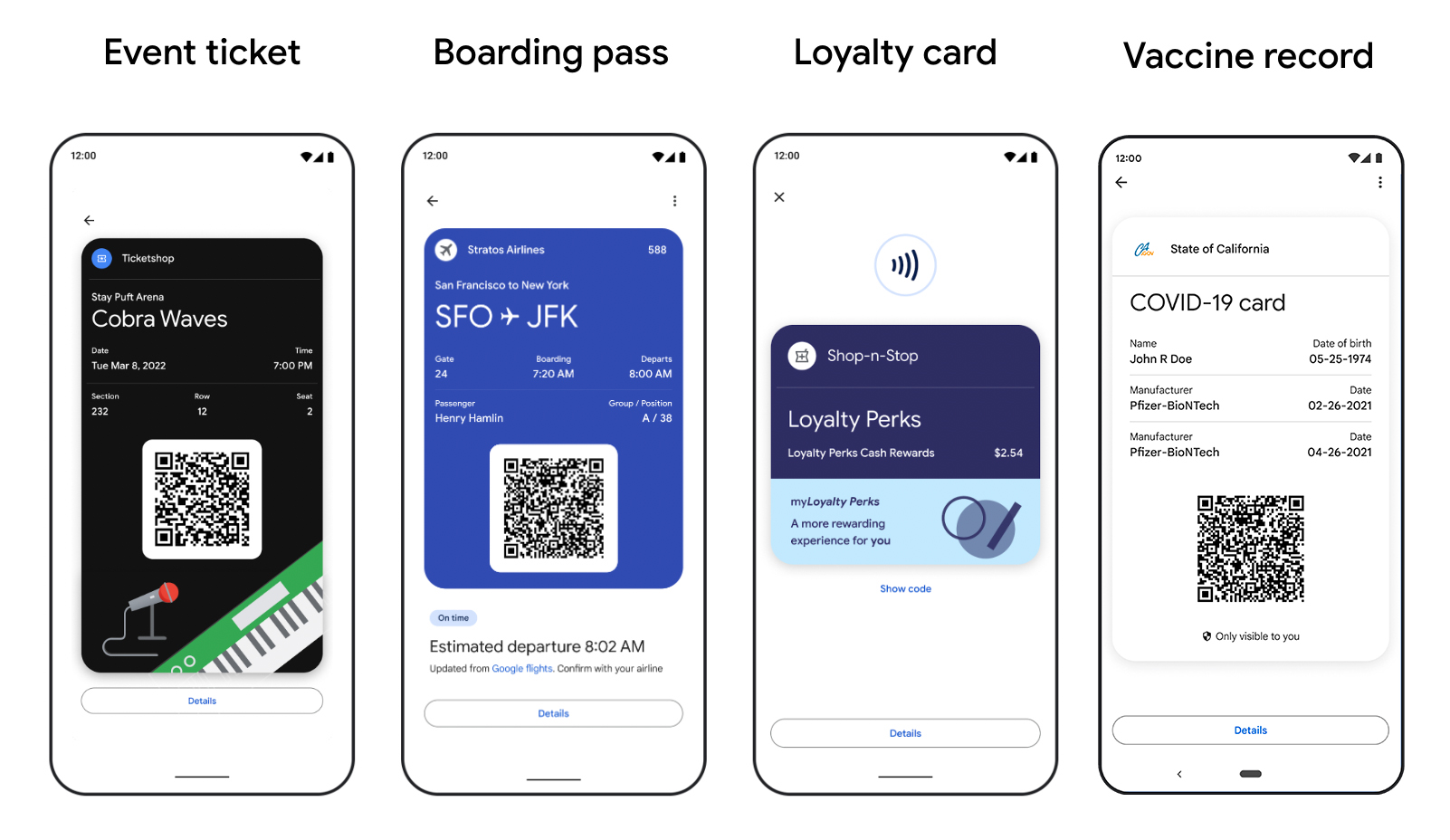
- Digital Passes: Holding boarding passes, event tickets, cinema tickets, and gym memberships, often with dynamic updates.
- Transit Cards: Integrating with public transport systems, allowing users to tap their phone or smartwatch to pay for fares.
- Digital IDs: In supported regions, securely storing digital driver’s licenses or state IDs.
- Vaccine Cards: Providing a digital record of vaccination status where applicable.
This suite of features positions Google Wallet as more than just a payment app; it’s a comprehensive digital organizer built on a foundation of robust security and seamless integration with Google’s broader ecosystem.
Locating and Accessing Google Wallet Across Devices
The first step to harnessing Google Wallet’s power is knowing where to find and access it. While primarily designed for mobile devices, its integration extends across various platforms, ensuring a consistent and accessible experience for users within the Google ecosystem.
On Android Smartphones: The Native Experience
For Android users, Google Wallet is deeply integrated into the operating system. It comes pre-installed on most modern Android devices.
- Finding the App: Look for the “Wallet” app icon, often found in your app drawer or on your home screen. It typically features a distinctive multi-colored wallet icon.
- Quick Access: Many Android phones offer quick access to Google Wallet. You can usually access your default payment card by pressing the power button twice rapidly, even when the phone is locked. On some devices, a quick toggle or widget might also be available in the notification shade or lock screen.
- Google Play Store: If you can’t find it, or if it needs an update, you can always download or update the “Google Wallet” app directly from the Google Play Store. It’s crucial to ensure you’re downloading the official app for security reasons.
Once found, setting up Google Wallet involves adding your payment cards, loyalty cards, and other digital passes. This process is guided and typically requires verification with your bank or card issuer.
For iOS Users: Bridging the Ecosystem Gap
While Apple Wallet is the native digital wallet for iOS devices, Google Wallet is also available for iPhone users. Google recognizes the importance of cross-platform accessibility, especially for users deeply integrated into Google’s services (Gmail, Maps, Photos, etc.).
- App Store: iPhone users can download the “Google Wallet” app directly from the Apple App Store. Search for “Google Wallet,” and ensure you select the official application published by Google LLC.
- Functionality on iOS: On iOS, Google Wallet functions similarly to its Android counterpart for storing cards, passes, and tickets. However, due to Apple’s ecosystem restrictions, Google Wallet on iOS cannot be set as the default tap-to-pay solution for in-store purchases via NFC. This functionality is reserved for Apple Pay. Instead, Google Wallet on iOS is primarily used for online purchases, managing saved cards, storing non-payment items (like loyalty cards, tickets), and facilitating peer-to-peer transfers (if Google Pay is still the underlying service in your region).
- Web Integration: Even without NFC payments, iOS users benefit from Google Wallet’s ability to save passes and tickets directly from web pages (e.g., airline confirmations) or emails, mirroring the convenience found on Android.
Web-Based Access and Google Account Integration
Google Wallet’s foundational integration with your Google Account means that some aspects of your digital wallet are accessible and managed through web browsers.
- Payments Profile: Your saved payment methods, including those added to Google Wallet, are tied to your Google Payments profile. You can manage these at
pay.google.com. Here, you can add, edit, or remove credit/debit cards, bank accounts, and view past transactions related to Google services or purchases made using your Google-saved payment methods. - Cross-Device Sync: Because Google Wallet data is linked to your Google Account, your cards and passes generally sync across devices where you’re signed in and have Google Wallet enabled. This means if you add a new card on one Android phone, it will automatically appear on another Android tablet or smartwatch associated with the same account. This cloud-based synchronization ensures consistency and convenience.
Troubleshooting Common Access Issues
Occasionally, users might encounter issues finding or accessing Google Wallet.
- Updates: Ensure your Google Wallet app and Android OS are up to date. Outdated software can cause compatibility problems.
- Country/Region Restrictions: Some features, like digital IDs, are rolled out incrementally and may not be available in all regions. Similarly, the availability of specific transit cards or loyalty programs can vary.
- Account Issues: Ensure you’re signed into the correct Google Account. Discrepancies can prevent your saved items from appearing.
- Device Compatibility: While most modern smartphones support Google Wallet, older devices might lack the necessary hardware (like NFC for tap-to-pay) or software versions.
- Reinstallation: As a last resort, uninstalling and reinstalling the app (after ensuring your data is backed up via your Google Account) can resolve persistent software glitches.
Beyond Payments: Understanding Google Wallet’s Versatile Features
The transformation from a purely payment-centric application to a comprehensive digital wallet highlights its increasing versatility. Google Wallet is engineered to streamline various aspects of daily life, moving far beyond the simple act of “tapping to pay.”
Storing Payment Methods: Cards, Bank Accounts, and Loyalty
At its foundation, Google Wallet excels at managing financial instruments. Users can securely add:
- Credit and Debit Cards: Virtually all major credit and debit cards (Visa, Mastercard, American Express, Discover) can be added. These are tokenized for security, meaning your actual card number is never transmitted during a transaction.
- Bank Accounts: In certain regions and for specific functionalities (like peer-to-peer payments or direct debits), bank accounts can be linked.
- Loyalty and Gift Cards: A significant convenience feature is the ability to store loyalty cards from various retailers. This eliminates the need to carry numerous plastic cards, and often, points are automatically applied during checkout when using Google Wallet. Gift cards can also be added, making redemption straightforward.
Digital IDs and Passes: A Step Towards a Paperless Future
One of Google Wallet’s most ambitious advancements is its capability to store identity documents and access passes.
- Digital Driver’s Licenses/State IDs: In a growing number of U.S. states and countries, users can add a digital version of their driver’s license or state ID to Google Wallet. This is done with robust security features, including encryption and biometric authentication, designed to meet regulatory standards for legal identification. The technology behind this typically involves advanced cryptography and secure element integration.
- Vaccine Cards and Health Passes: During global health crises, Google Wallet has offered a secure way to store digital COVID-19 vaccination cards or health passes, often integrating with healthcare providers’ systems for verified credentials.
- Access Cards: The potential for Google Wallet to store digital keys for homes, offices, or hotel rooms is a burgeoning area, promising a future where your phone is your universal access card.
Transit Cards and Event Tickets: Streamlining Daily Life
For commuters and entertainment seekers, Google Wallet offers considerable practical benefits.
- Transit Cards: Integration with public transportation systems is a major convenience. Users can add transit cards (e.g., Oyster in London, Ventra in Chicago) and simply tap their phone or smartwatch at turnstiles or bus readers, eliminating the need for physical cards or tickets. This often involves real-time balance updates and journey history.
- Event and Boarding Passes: From concert tickets to airline boarding passes, Google Wallet can store them all. These digital passes often include dynamic information, such as gate changes for flights or seat assignments, and can provide timely notifications, enhancing the travel and event experience. The QR codes or barcodes embedded in these passes are easily scannable, making entry swift and hassle-free.
Integration with Google Services: A Seamless Experience
Google Wallet is not an isolated application; it’s a tightly integrated component of the broader Google ecosystem.
- Google Maps: If you have transit cards in Google Wallet, Google Maps can provide personalized directions that suggest using those cards for fare payment.
- Gmail and Calendar: When you receive flight confirmations or event tickets in Gmail, Google often provides a “Save to Google Wallet” option directly within the email, automatically parsing the relevant information and adding it to your wallet. These events can also be automatically synced with your Google Calendar.
- Google Assistant: You can use Google Assistant to quickly check balances on transit cards or locate specific passes stored in your Wallet, leveraging voice commands for hands-free convenience.
- Google Chrome Autofill: Payment methods saved in Google Wallet can be seamlessly used for autofill during online checkouts in Google Chrome, streamlining e-commerce experiences.
This deep integration underscores Google Wallet’s strategic position as a central hub for personal digital management, making interactions across Google’s services more fluid and intuitive.
The Technology Underpinning Google Wallet’s Security and Privacy
For an application that stores such sensitive information – financial details, personal IDs, and access credentials – security and privacy are paramount. Google Wallet employs a multi-layered approach, leveraging advanced cryptographic techniques and hardware-level protections to safeguard user data.
Tokenization: Protecting Your Financial Data
The cornerstone of Google Wallet’s payment security is tokenization. When you add a credit or debit card, the actual card number is not stored on your device or transmitted to merchants during a transaction. Instead, Google Wallet creates a unique, encrypted digital account number (a “token”) that represents your actual card number.
- How it Works: When you make a tap-to-pay purchase, this token is sent to the merchant, along with a cryptogram that changes with each transaction. The merchant’s point-of-sale (POS) system sends this token and cryptogram to the payment network (e.g., Visa, Mastercard), which then securely maps it back to your real card number in a heavily secured vault, authorizes the payment, and then returns a confirmation.
- Benefits: This means that even if a merchant’s system is compromised, hackers would only obtain the token, not your actual card number, rendering the stolen data useless for fraudulent activities. Each transaction is a unique exchange, significantly reducing the risk associated with data breaches.
Biometric Authentication and Device Security
Access to Google Wallet and its stored items is further protected by robust device-level security.
- Required Authentication: To make payments or access sensitive items like digital IDs, users are typically required to authenticate using a fingerprint, face scan, PIN, or pattern. This ensures that even if your phone is lost or stolen, an unauthorized user cannot easily access your financial or personal information.
- Secure Element/Titan M: Many Android devices feature a hardware-based “Secure Element” (SE) or Google’s Titan M security chip. This dedicated, tamper-resistant hardware component is isolated from the main operating system and securely stores cryptographic keys and other sensitive data, providing an extra layer of protection against software attacks. Google Wallet leverages these hardware security modules to protect your payment tokens and digital identity credentials.
Google’s Privacy Commitments and Data Handling
Google emphasizes its commitment to user privacy with Google Wallet.
- Data Minimization: Google states that it does not share your actual card number with merchants when you use Google Wallet for tap-to-pay transactions.
- Opt-in for Personalization: Users have control over how their data is used. For instance, personalized features like transaction history or loyalty program suggestions are often opt-in, allowing users to choose their level of data sharing.
- Encryption In Transit and At Rest: All sensitive data within Google Wallet is encrypted both when it’s stored on Google’s servers (“at rest”) and when it’s transmitted between your device and Google’s systems (“in transit”). This end-to-end encryption ensures that your data remains confidential and protected from eavesdropping.
Understanding NFC and Tap-to-Pay Technologies
The magic behind Google Wallet’s in-store payment functionality is Near Field Communication (NFC).
- How NFC Works: NFC is a short-range wireless technology that allows two devices to communicate when they are brought within a few centimeters of each other. In the context of Google Wallet, your NFC-enabled smartphone communicates with an NFC-enabled payment terminal.
- Security of NFC: The extremely short range of NFC communication inherently adds a layer of security, as malicious interception requires physical proximity. Combined with tokenization and device authentication, NFC payments are remarkably secure, often more secure than swiping a traditional magnetic stripe card.
- Indicator: Look for the NFC symbol (a stylized four-arc icon) on payment terminals at checkout to confirm they accept tap-to-pay via Google Wallet.
Maximizing Your Google Wallet Experience
Once you’ve located and understood the fundamentals of Google Wallet, optimizing its usage can significantly enhance your daily digital interactions. Maximizing your experience involves proper setup, staying informed about updates, and looking ahead to future technological advancements.
Tips for Optimal Setup and Configuration
A well-configured Google Wallet is a powerful tool.
- Default Payment Method: Set a default payment card in your Wallet settings. This card will be automatically used for quick tap-to-pay transactions unless you manually select another.
- Organize Your Passes: Utilize categories or the search function within the app to quickly find specific loyalty cards, tickets, or passes. Delete expired passes to keep your wallet clutter-free.
- Notifications: Customize notifications for things like upcoming flight changes, event reminders, or transit card low balances. Timely alerts can prevent missed connections or delays.
- Smartwatch Integration: For even greater convenience, set up Google Wallet on your Wear OS smartwatch. This allows you to make tap-to-pay transactions and access passes directly from your wrist, often without needing to take out your phone.
- Accessibility Features: Explore accessibility settings if needed, such as larger text or voice assistance, to ensure the app is comfortable for all users.
Staying Updated: Features and Security Patches
Like all critical software, Google Wallet is continuously evolving.
- App Updates: Regularly update the Google Wallet app via the Google Play Store or Apple App Store. Updates often include new features, performance improvements, and crucial security patches that protect against emerging threats.
- Android OS Updates: Ensure your Android operating system is kept up to date. Security vulnerabilities at the OS level can impact the overall security of applications like Google Wallet, and new OS versions often bring enhanced security features and better integration with Google’s services.
- Official Sources: Always download updates from official app stores to avoid malicious fake apps that could compromise your data.

Future Trends: What’s Next for Digital Wallets?
The trajectory of Google Wallet and digital wallets in general points towards an even more integrated and comprehensive future.
- Increased Digital ID Adoption: Expect to see more regions and institutions supporting digital driver’s licenses, student IDs, and other forms of official identification within digital wallets, potentially replacing physical cards entirely.
- Smart Home and Automotive Integration: The potential for digital wallets to store digital keys for homes, offices, and even vehicles is growing. Imagine using your phone to unlock your car, start it, or even grant temporary access to others.
- CBDCs and Cryptocurrency Integration: As central bank digital currencies (CBDCs) and mainstream cryptocurrency adoption grow, digital wallets may become key interfaces for managing these new forms of digital money, potentially alongside traditional fiat currencies.
- Enhanced Personalization and AI: Future iterations could leverage AI more deeply to offer highly personalized financial insights, automated coupon application, or proactive suggestions based on your travel and spending patterns.
- Beyond the Phone: While the smartphone is central, the expansion of digital wallet capabilities to smartwatches, smart glasses, and other wearables will continue, making payments and identity verification even more ubiquitous and seamless.
In conclusion, “where can I find Google Wallet” transcends a simple search query. It leads us to an exploration of a sophisticated technological tool that stands at the forefront of digital convenience and security. By understanding its past, present, and future, users can unlock its full potential, making their digital lives more organized, secure, and efficient.
aViewFromTheCave is a participant in the Amazon Services LLC Associates Program, an affiliate advertising program designed to provide a means for sites to earn advertising fees by advertising and linking to Amazon.com. Amazon, the Amazon logo, AmazonSupply, and the AmazonSupply logo are trademarks of Amazon.com, Inc. or its affiliates. As an Amazon Associate we earn affiliate commissions from qualifying purchases.