
In an increasingly digital world, the ability to conduct transactions quickly, securely, and conveniently is paramount. Google Payments, now primarily known and integrated within the broader Google Pay ecosystem, stands as a formidable solution, transforming how individuals manage their finances and make purchases across various platforms. This guide delves into the technical intricacies, setup processes, and operational nuances of Google Payments, offering a deep dive into leveraging this powerful tool for an enhanced digital experience. From understanding its core functionalities to mastering advanced security features, we unpack everything a tech-savvy user needs to navigate the world of digital transactions with Google’s robust platform.
Understanding the Google Payments Ecosystem
The journey into mastering Google Payments begins with a clear understanding of its architecture, purpose, and the technological advantages it offers. Far more than just a payment processor, Google Pay represents a holistic digital wallet designed to streamline financial interactions in a modern, interconnected environment.
What is Google Pay (formerly Google Payments)?
Google Pay is Google’s overarching digital wallet platform and online payment system that powers in-app, online, and in-person contactless purchases on mobile devices, enabling users to make payments with Android phones, tablets, or smartwatches. While the nomenclature “Google Payments” historically referred to the backend service managing payment methods across Google products, it has largely been consolidated under the Google Pay brand, which offers a user-facing application for managing these methods and initiating transactions. This evolution signifies a move towards a unified, user-centric experience, integrating diverse functionalities such as storing credit/debit cards, loyalty programs, gift cards, transit passes, and even digital IDs in some regions. It leverages Near Field Communication (NFC) technology for contactless payments in physical stores and provides a streamlined checkout experience for online merchants and within various applications.
Why Choose Google Pay?
The decision to adopt Google Pay is underpinned by a compelling array of technological and user experience benefits. Firstly, its integration with the broader Google ecosystem is a major draw. Users already embedded in Google services find a seamless connection, allowing for easy purchases on Google Play Store, YouTube, Google Shopping, and more, without re-entering payment details. Secondly, security is paramount. Google Pay employs advanced encryption and tokenization protocols, meaning your actual card number is never shared with merchants during transactions. Instead, a unique encrypted virtual account number (token) is used, significantly reducing the risk of fraud. Moreover, convenience and speed are inherent. Contactless payments eliminate the need for physical cards or fumbling for cash, enabling quick taps at point-of-sale terminals. Online, its one-click checkout functionality drastically speeds up the purchasing process. Finally, broad acceptance across millions of physical locations and countless online platforms makes it a versatile tool for almost any transaction.
Key Components and Supported Platforms
The Google Pay ecosystem is built upon several core components that collectively enable its diverse functionalities. The primary interface for users is the Google Pay app, available on Android devices (smartphones, tablets, Wear OS smartwatches). This app serves as the digital wallet, allowing users to add, manage, and utilize their payment methods. For web-based transactions, Google Pay is integrated directly into the Chrome browser’s autofill features and appears as a payment option on numerous e-commerce websites and apps.
Technologically, the platform relies on NFC for in-store payments, facilitating secure, short-range communication between a user’s device and a payment terminal. For online transactions, it leverages secure APIs that integrate with merchant payment gateways, ensuring encrypted transmission of transaction data. Compatibility extends beyond just Android devices; while the full app experience is Android-centric, the payment methods saved in a user’s Google Account can often be accessed for online purchases across various devices logged into that Google Account. This multi-platform flexibility underscores its design as a truly pervasive digital payment solution.
Setting Up Your Google Pay Account
Getting started with Google Pay is a straightforward process designed for intuitive user onboarding. The initial setup involves associating your Google Account with the payment service and securely adding your preferred financial instruments.
Initial Setup and Account Creation
The first step involves downloading the Google Pay app from the Google Play Store onto your Android device. Once installed, opening the app will prompt you to sign in with your existing Google Account. If you don’t have one, you’ll be guided through the simple process of creating one. Your Google Account serves as the central identity for Google Pay, linking your payment methods to all Google services. The app will then guide you through a brief introductory tour, explaining its features and prompting you to begin adding payment methods. This foundational step is critical as it establishes the secure conduit through which all your digital transactions will flow. Ensure your device meets the minimum software requirements and has NFC enabled if you intend to use tap-to-pay features.
Adding Payment Methods
The core utility of Google Pay lies in its ability to securely store and manage various payment methods. Adding a new card or bank account is a meticulous, security-enhanced process:
- Credit and Debit Cards:
- Open the Google Pay app and tap on “Add payment method” or the ‘+’ icon.
- You can either use your phone’s camera to quickly scan your card details or manually enter the card number, expiration date, CVV, and billing address.
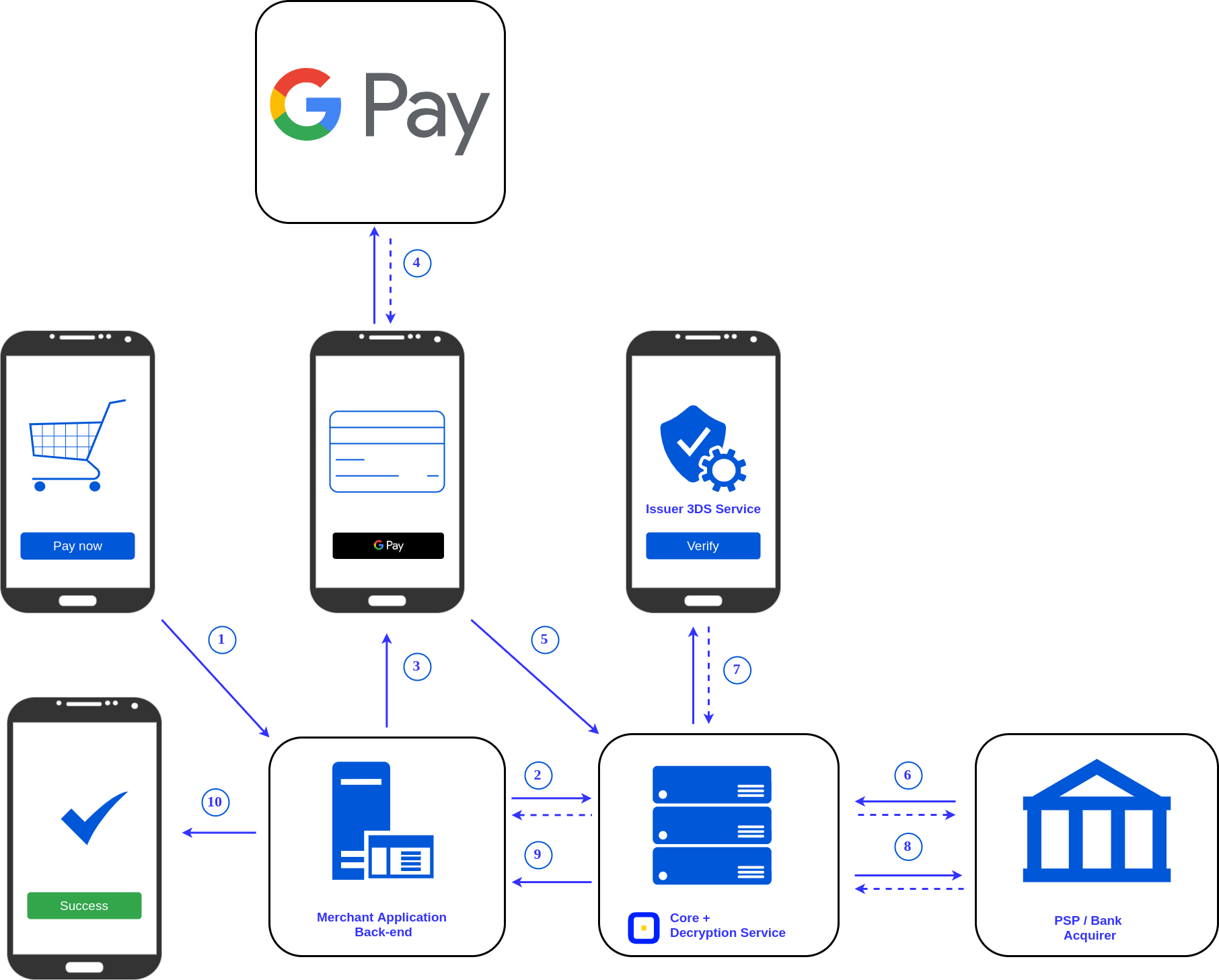
- Verification: This is a crucial security step. Your bank or card issuer will typically require you to verify ownership. This might involve receiving a one-time code via SMS to your registered phone number, email, or a quick call to your bank. Some banks also offer app-based verification. Once verified, the card is tokenized – a unique virtual account number is generated for your device, ensuring your actual card details are never exposed during transactions.
- Bank Accounts: While primary for peer-to-peer transfers or certain bill payments in some regions, adding a bank account often involves linking it directly through your bank’s online portal or providing account and routing numbers. This usually requires a micro-deposit verification process.
- PayPal and Other Services: Google Pay also supports linking to third-party payment services like PayPal. This typically involves authenticating through the respective service’s login page, granting Google Pay permission to access your account for transactions.
- Gift Cards and Loyalty Programs: These can often be added by scanning their barcodes or manually entering the details, making it convenient to access them digitally without carrying physical cards.
The system is designed to provide clear, step-by-step instructions for each payment method, ensuring a smooth and secure setup experience.
Managing Your Payment Information
Maintaining control over your payment methods within Google Pay is simple and intuitive. From the main screen of the Google Pay app, you can view all your added cards and accounts. Tapping on a specific card allows you to:
- View Details: Access the virtual account number (token) used for transactions, though your actual card number remains hidden.
- Set as Default: Designate a preferred card for automatic use in transactions, though you can override this at the point of purchase.
- Edit Information: Update billing addresses or card nicknames.
- Remove Card: Securely delete a card from your Google Pay wallet. This is particularly useful if a card expires, is lost, or compromised. Removing it from Google Pay does not affect the physical card but severs its digital link to your device.
- Transaction History: Review a chronological list of payments made using that specific card or through Google Pay in general. This feature offers a clear audit trail of your digital spending.
These management tools empower users to keep their digital wallet organized, current, and secure, adapting to changes in their financial instruments with ease.
Making Transactions with Google Pay
The true power of Google Pay is realized in its ability to facilitate seamless transactions across various scenarios, from tapping your phone at a store to clicking a button online.
In-Store Payments (NFC/Tap-to-Pay)
Making a payment at a physical store using Google Pay is remarkably simple and fast, leveraging NFC technology. First, ensure your Android phone has NFC enabled (usually found in your device’s settings under “Connected devices” or “NFC & payment”). When you’re ready to pay at a compatible terminal (look for the Google Pay or contactless payment symbol), simply:
- Unlock Your Phone: For enhanced security, Google Pay often requires your phone to be unlocked (using your fingerprint, PIN, or face unlock). For smaller transactions in some regions, a quick tap might be sufficient without unlocking.
- Hold Near Terminal: Hold the back of your phone near the contactless payment reader until you see a checkmark on your screen or hear a confirmation sound. This indicates the payment has been processed.
- No Need to Open App: You don’t usually need to open the Google Pay app; the default card will be used automatically. If you wish to use a different card, open the app beforehand and select the desired card.
This process eliminates the need to carry physical cards, providing a secure and hygienic way to pay, especially appealing in an era of heightened health consciousness.

Online Payments (Websites and Apps)
Google Pay also offers a streamlined experience for online shopping, both on websites and within mobile applications. When checking out online, look for the “Buy with Google Pay” or “Pay with Google Pay” button.
- Select Google Pay: Click or tap on the Google Pay option during the checkout process.
- Choose Payment Method: A pop-up or redirect will appear, displaying your stored Google Pay cards. Select the desired card, confirm your shipping address (if applicable), and any other required details.
- Confirm Purchase: Authenticate the purchase, which may involve your Google Account password, device unlock method, or a one-time verification code.
- Complete Transaction: The payment is processed instantly, and you’ll receive confirmation.
This method drastically reduces friction in online purchases, as you avoid manually entering card numbers, expiration dates, and billing information for every transaction. It’s a key feature for improving conversion rates for merchants and user convenience for shoppers.
Transit and Loyalty Cards
Beyond traditional payments, Google Pay expands its utility by serving as a digital repository for transit passes and loyalty cards, further reducing the clutter in your physical wallet.
- Transit Cards: In participating cities and regions, you can add digital versions of public transit cards to Google Pay. This allows you to tap your phone or smartwatch at turnstiles and readers, making commuting more efficient. The app can often display your balance and transaction history for these cards.
- Loyalty Programs: Instead of carrying multiple plastic loyalty cards, you can scan or manually add them to Google Pay. When making a purchase at a store where you have a loyalty card stored, you can often present the digital version from your phone at checkout, either by tapping (if integrated with the POS system) or by allowing the cashier to scan a barcode displayed on your screen. This ensures you never miss out on rewards points or discounts.
These integrations highlight Google Pay’s ambition to be a comprehensive digital wallet that extends beyond just financial transactions, enhancing daily convenience for users across multiple facets of their lives.
Advanced Features and Digital Security
The technological prowess of Google Pay extends into sophisticated security measures and deep integration capabilities, making it a robust and trustworthy platform for digital transactions.
Enhancing Security with Google Pay
Security is foundational to Google Pay, employing a multi-layered approach to protect user data and transactions:
- Tokenization: As discussed, your actual credit card number is never shared with merchants. Instead, a unique encrypted virtual account number, or “token,” is used for each transaction. This token is tied to your device and specific card, rendering it useless if intercepted by unauthorized parties.
- Encryption: All transaction data is encrypted during transmission between your device, Google’s servers, and the payment network. This ensures that sensitive information remains confidential and inaccessible to third parties.
- Biometric Authentication: Google Pay leverages your device’s biometric security features, such as fingerprint scanning or face unlock, to authenticate purchases. This adds a critical layer of protection, ensuring that only you can authorize transactions from your device. For non-biometric devices, a PIN or pattern is required.
- Remote Features: In case your Android device is lost or stolen, Google’s Find My Device service allows you to remotely lock it, wipe its data, or locate it. This immediately secures your Google Pay account, preventing unauthorized access to your payment methods.
- Continuous Monitoring: Google employs sophisticated fraud detection systems that continuously monitor transactions for suspicious activity, providing an additional layer of security against unauthorized use.
These robust security features instill confidence, allowing users to conduct digital transactions with peace of mind.
Integrating with Other Google Services
Google Pay’s integration capabilities are a testament to Google’s cohesive ecosystem design. The stored payment methods and transaction history are seamlessly accessible across various Google platforms, significantly enhancing user experience:
- Google Play Store: Purchasing apps, games, movies, and books is streamlined with Google Pay, allowing for one-tap purchases.
- YouTube: Subscriptions to YouTube Premium, channel memberships, and movie rentals are easily managed and paid for via Google Pay.
- Google Shopping & Ads: Google Pay simplifies checkout on platforms leveraging Google Shopping, and payment for Google Ads campaigns can be managed through the same system.
- Google Photos: For printing services or extra storage, Google Pay provides a quick payment option.
- Chrome Autofill: Your saved payment methods in Google Pay can be seamlessly integrated with Chrome’s autofill feature, offering consistent payment options across all web browsing.
This deep integration ensures a consistent and frictionless payment experience, reducing the need to re-enter details and enhancing convenience across your digital life.
Troubleshooting Common Issues
While Google Pay is designed for reliability, occasional issues can arise. Here’s a quick tech-focused troubleshooting guide:
- Payment Failure (In-Store):
- NFC Check: Ensure NFC is enabled on your device and that your phone is unlocked and positioned correctly over the terminal.
- Terminal Compatibility: Verify the terminal accepts contactless payments.
- Default Card: Check if your default card has sufficient funds or isn’t expired.
- App Permissions: Ensure Google Pay has necessary permissions (e.g., NFC, location).
- Payment Failure (Online):
- Internet Connection: Confirm a stable internet connection.
- Card Status: Check if the selected card is active and has sufficient funds.
- Verification: Some banks might require an additional verification step (e.g., 3D Secure) that might cause a delay or failure if not completed promptly.
- Browser/App Cache: Clear browser cache or app data if persistent issues occur.
- Adding Cards Fails:
- Issuer Support: Not all banks or card types are supported. Verify your issuer supports Google Pay.
- Internet Connection: A stable connection is required for card verification.
- Verification Codes: Ensure you’re receiving and entering verification codes correctly.
- Account Access Issues:
- Google Account: Ensure you’re logged into the correct Google Account.
- Device Security: Verify your device’s screen lock (PIN, pattern, fingerprint) is active, as it’s often a prerequisite for Google Pay security.
Most issues can be resolved by checking these common points or by consulting Google Pay’s official support documentation, which offers detailed technical solutions and FAQs.
The Future of Google Payments and Digital Wallets
The trajectory of Google Pay and the broader digital wallet landscape points towards increased integration, enhanced functionality, and a seamless blend of physical and digital identities.
Evolution of Digital Wallets
Digital wallets like Google Pay are constantly evolving. Historically, they focused on simply digitizing payment cards. Today, they are becoming comprehensive identity and access platforms. Trends suggest a future where digital wallets will not only store payment methods but also official IDs (driver’s licenses, passports), health cards, car keys, and event tickets, all secured by robust encryption and biometric authentication. The convergence of payment, identity, and access will create a truly frictionless experience across various daily interactions. The underlying technology will continue to advance, with improved NFC capabilities, ultra-wideband (UWB) for more precise proximity interactions, and potentially deeper integration with augmented reality (AR) for richer contextual shopping experiences.

Google Pay’s Role in the Digital Economy
Google Pay is strategically positioned at the forefront of this evolution. Its vast user base, deep integration into Android, and comprehensive security infrastructure make it a pivotal player in shaping the future of digital transactions. As payment methods become more diversified (e.g., cryptocurrencies, BNPL options), Google Pay could serve as an aggregator, simplifying complex financial choices for the end-user. Furthermore, its potential to offer personalized financial insights, budgeting tools, and even direct banking services (as seen with some of its past initiatives) indicates a future where Google Pay transitions from merely a payment tool to a central hub for personal financial management, seamlessly integrated into the fabric of the digital economy. Its continuous development underscores a commitment to providing technologically advanced, secure, and user-friendly solutions that anticipate the next generation of digital commerce and personal finance.
In conclusion, Google Payments, spearheaded by Google Pay, is an indispensable technological asset for anyone navigating the modern digital landscape. Its robust security features, seamless integration across Google services, and intuitive user experience simplify complex financial interactions, transforming how we pay, manage, and interact with our money in the digital realm. By embracing and understanding its functionalities, users can unlock a new level of convenience and security in their everyday transactions, making it an essential tool for the tech-savvy consumer.
aViewFromTheCave is a participant in the Amazon Services LLC Associates Program, an affiliate advertising program designed to provide a means for sites to earn advertising fees by advertising and linking to Amazon.com. Amazon, the Amazon logo, AmazonSupply, and the AmazonSupply logo are trademarks of Amazon.com, Inc. or its affiliates. As an Amazon Associate we earn affiliate commissions from qualifying purchases.