
In an increasingly digitized world, online payment platforms have become indispensable tools for managing transactions, sending money to friends and family, and facilitating e-commerce. Among these, PayPal stands out as a pioneering and widely adopted service, known for its robust technology and extensive global reach. Creating a PayPal account is the foundational step to leveraging its powerful capabilities, transforming how individuals and businesses interact with digital currency. This guide will walk you through the technical process of setting up your PayPal account, emphasizing the software functionalities, user experience, and critical digital security measures essential for a seamless and secure online payment journey.
Understanding PayPal’s Core Technology and Functionality
Before diving into the account creation process, it’s crucial to grasp the technological underpinnings that make PayPal a dominant force in the digital payment landscape. PayPal operates as a sophisticated digital payment ecosystem, built on intricate software architecture designed to facilitate secure and efficient money transfers across various platforms and devices.
PayPal as a Digital Payment Ecosystem
At its heart, PayPal is a digital payment gateway that acts as an intermediary between buyers and sellers, or senders and receivers, insulating sensitive financial information. When you make a transaction through PayPal, your bank account or credit card details are not directly shared with the recipient. Instead, PayPal handles the encrypted transfer of funds, adding a significant layer of digital security. This system relies on advanced encryption technologies, secure servers, and real-time fraud detection algorithms to protect users from unauthorized access and malicious activities. The platform supports a wide array of currencies and cross-border transactions, making it a truly global digital wallet accessible via web browsers or dedicated mobile applications. Its infrastructure is designed for high availability and scalability, ensuring that millions of transactions can be processed daily with minimal latency.
Key Technological Features and Benefits
PayPal’s success is largely attributable to its rich suite of technological features that enhance user experience and provide practical benefits. One of its primary features is its interoperability; PayPal integrates seamlessly with countless e-commerce platforms, invoicing software, and peer-to-peer payment systems. This broad compatibility means users can send or receive money from almost anywhere online. Another key feature is its dispute resolution system, which, while not a direct technical feature, is supported by robust backend analytics and user-interface tools allowing users to report and manage transaction issues directly within the platform.
For developers and businesses, PayPal offers extensive APIs (Application Programming Interfaces) that allow for custom integrations, enabling businesses to embed PayPal payment options directly into their websites and applications. This flexibility underlines PayPal’s commitment to being a versatile digital tool. Furthermore, the platform continuously evolves, incorporating modern web technologies and user-interface design principles to ensure an intuitive and accessible experience across different devices, from desktop computers to smartphones and tablets. The commitment to continuous technological refinement ensures that PayPal remains at the forefront of digital payment innovation, offering reliability and convenience through its meticulously engineered software.
Step-by-Step Account Creation: Navigating the Digital Onboarding Process
Creating a PayPal account is a straightforward process, meticulously designed for user accessibility. This section details the technical steps involved in setting up your account, from initial registration to linking your financial instruments.
Choosing Your Account Type: Personal vs. Business
The first step in setting up your PayPal account involves selecting the appropriate account type: Personal or Business. This choice dictates the suite of features and functionalities available to you.
- Personal Accounts are designed for individuals who primarily want to send money to friends and family, shop online, or receive payments for casual sales. The setup is simpler, focusing on individual identity verification and personal financial linking.
- Business Accounts cater to merchants, freelancers, and companies needing to accept payments for goods and services, manage invoices, process mass payouts, and integrate with e-commerce platforms. These accounts often require more extensive business verification and offer advanced tools like multi-user access, reporting features, and various payment gateway options.
The selection process typically involves a clear prompt on the PayPal registration page, guiding users based on their intended use. This initial configuration ensures that the system tailors the subsequent onboarding steps and available features to your specific needs.
Registration Essentials: Information Input and Verification
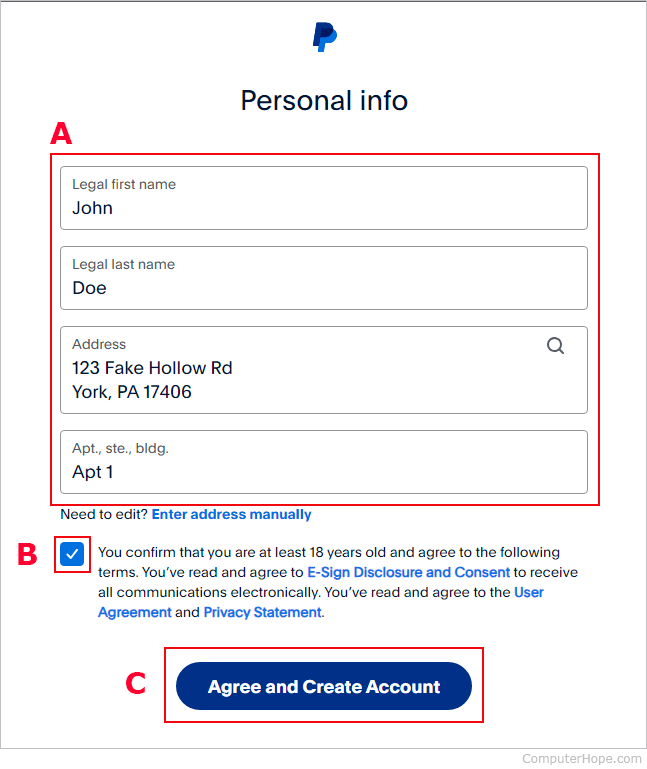
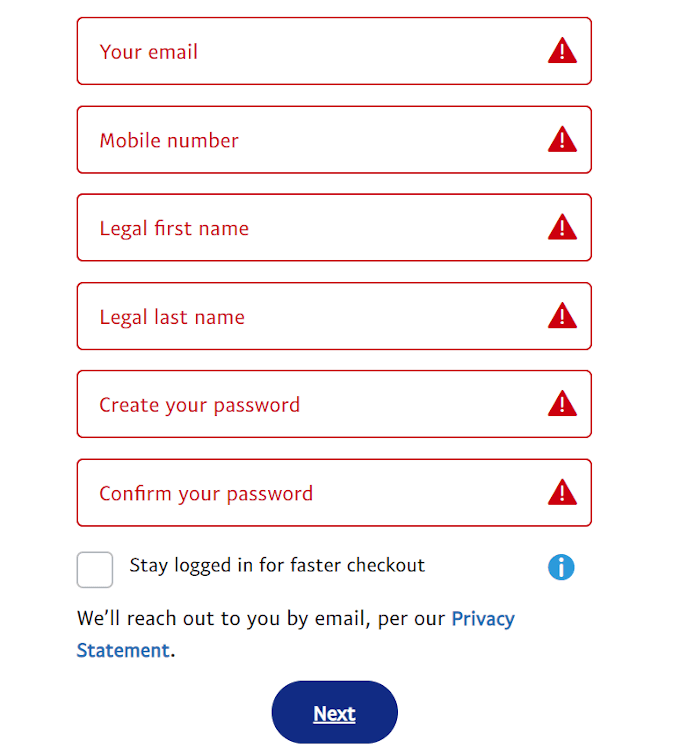
Once you’ve selected your account type, the core registration process begins. This involves entering a series of personal or business details into a secure web form. For a Personal Account, this typically includes:
- Your full legal name
- Email address (which will serve as your primary PayPal identifier)
- A secure password (adhering to complexity requirements for digital security)
- Your mobile phone number (for verification and security purposes)
- Your address and date of birth
For Business Accounts, additional details like business name, legal entity type, business address, and potentially tax identification numbers are required.
After submitting these details, PayPal employs various verification methods to confirm your identity and ensure the integrity of its platform. This often involves:
- Email Verification: An email containing a confirmation link is sent to the registered email address. Clicking this link verifies that you have access to the email and establishes it as your primary contact.
- Phone Verification: A verification code is sent via SMS to your registered mobile number, which you then enter into the PayPal interface. This adds another layer of digital identity confirmation.
These steps are critical for maintaining the security and regulatory compliance of the PayPal ecosystem, preventing fraudulent account creation and ensuring legitimate users.
Linking Financial Instruments: Cards and Bank Accounts
To fully utilize your PayPal account for sending and receiving funds, you must link it to external financial instruments. This is where your bank account or credit/debit cards connect to the PayPal digital wallet. The process involves:
- Linking a Debit/Credit Card: You will be prompted to enter your card number, expiry date, and the CVV (Card Verification Value) code. PayPal may perform a small temporary authorization charge (often less than $2) to verify the card’s validity, which is typically refunded within a few days.
- Linking a Bank Account: This often involves providing your bank name, account number, and routing number. To verify ownership, PayPal will typically send two small deposits (e.g., $0.15 and $0.23) to your bank account within 2-3 business days. You then log back into PayPal and enter the exact amounts of these deposits into the verification field. This confirms that you have access to the bank account.
These linking mechanisms are secured with robust encryption, ensuring that your sensitive financial details are transmitted and stored securely within PayPal’s systems, never directly exposed during transactions with third parties.
Concluding Setup: Email and Identity Confirmation
While much of the setup is completed by linking financial instruments, PayPal may sometimes require additional identity confirmation, especially for business accounts or if certain transaction limits are reached. This could involve uploading government-issued ID documents (like a driver’s license or passport) directly through a secure portal on the PayPal website. This advanced verification helps PayPal comply with “Know Your Customer” (KYC) and Anti-Money Laundering (AML) regulations. Once all necessary information is provided and verified, your PayPal account is fully activated, allowing you to seamlessly integrate into the global digital payment network. The successful completion of these technical steps transforms your digital identity into a functional PayPal wallet, ready for use.
Fortifying Your Digital Wallet: Advanced Security Protocols and Best Practices
In the realm of digital payments, security is paramount. PayPal integrates multiple advanced security protocols into its platform, but user diligence is equally vital. Understanding and implementing best practices will significantly fortify your digital wallet against potential threats.

Multi-Factor Authentication: A Critical Security Layer
One of the most effective security features PayPal offers is Multi-Factor Authentication (MFA), often referred to as Two-Factor Authentication (2FA). This protocol requires you to provide two or more verification factors to gain access to your account. Typically, this means something you know (your password) and something you have (a code sent to your phone or generated by an authenticator app).
- How it works: When you enable MFA, after entering your password, PayPal will send a unique, time-sensitive code to your registered mobile device (via SMS) or generate it through a dedicated authenticator app (like Google Authenticator or Authy). You must then enter this code into the login screen to proceed.
- Why it’s critical: Even if a malicious actor manages to obtain your password, they cannot access your account without the second factor. This significantly reduces the risk of unauthorized access, making MFA an indispensable digital safeguard that all PayPal users should enable. Activating MFA is usually found within the “Security” or “Login and Security” settings of your PayPal account dashboard.
Recognizing and Avoiding Phishing and Scams
Despite PayPal’s robust technical security, the human element remains the weakest link. Phishing attacks and various online scams are designed to trick users into divulging their login credentials or financial information.
- Phishing Emails/Messages: These often mimic official PayPal communications, asking you to click on suspicious links, verify account details, or update personal information. They typically contain urgent language, grammatical errors, or slight variations in sender email addresses.
- Recognizing Red Flags: Always scrutinize the sender’s email address (it should be an official PayPal domain), hover over links before clicking to see the actual URL, and be wary of requests for personal or financial information via email. PayPal will never ask for your password, bank account number, or full credit card number in an email.
- Best Practice: If you receive a suspicious message, do not click any links. Instead, navigate directly to PayPal’s official website by typing the URL into your browser or using the official PayPal app to log in and check your account for any alerts or notifications. Forward any suspicious emails to PayPal’s dedicated spoof email address (spoof@paypal.com) for investigation.
Regular Security Reviews and Password Management
Maintaining a secure PayPal account also involves proactive management of your digital security posture.
- Strong, Unique Passwords: Always use a strong, complex password for your PayPal account that combines uppercase and lowercase letters, numbers, and symbols. Crucially, this password should be unique and not reused on any other website or service. Password managers can help generate and store these complex passwords securely.
- Regular Account Review: Periodically log into your PayPal account to review your transaction history, linked financial instruments, and security settings. Report any unrecognized transactions immediately. This vigilance helps detect unauthorized activity early.
- Software Updates: Ensure that the operating system on your computer or mobile device, as well as your web browser and PayPal app, are always up to date. Software updates often include critical security patches that protect against newly discovered vulnerabilities.
By diligently implementing these security protocols and best practices, users can significantly enhance the protection of their PayPal account, safeguarding their digital transactions and personal financial data from cyber threats.
Mastering the PayPal Interface: Software Navigation and User Experience
A well-designed user interface (UI) and intuitive user experience (UX) are hallmarks of effective digital tools. PayPal’s platform, both on its website and mobile app, is engineered for ease of use, allowing users to efficiently manage their transactions.
Dashboard Overview: Essential Features at Your Fingertips
Upon logging into your PayPal account, you are greeted by a dashboard designed to provide an immediate overview of your account status and quick access to essential features. This centralized hub typically displays:
- Current Balance: If you hold a balance in your PayPal account.
- Recent Activity: A summary of your latest transactions, allowing for quick review and verification.
- Quick Links: Prominent buttons or icons for common actions such such as “Send Money,” “Request Money,” “Pay Online,” and “Wallet” (for managing linked cards and bank accounts).
- Notifications and Alerts: Important messages from PayPal, security alerts, or transaction confirmations.
The layout is typically clean and modular, allowing users to quickly identify and navigate to the features they need. This intuitive design minimizes the learning curve, making the platform accessible even for less tech-savvy individuals.
Sending and Receiving Funds: A Seamless Digital Transaction Process
The core functionality of PayPal revolves around sending and receiving money, a process streamlined through its user-friendly interface.
- Sending Money: To send money, users typically navigate to a dedicated “Send” or “Pay” section. They input the recipient’s email address or mobile number (which must be linked to a PayPal account), the amount, and optionally, a note. The system then prompts the user to select the funding source (PayPal balance, linked bank account, or card) and review the transaction before confirming. The underlying software handles the immediate processing and notification.
- Receiving Money: When someone sends you money, PayPal typically sends an email notification. The funds are automatically credited to your PayPal balance. You can then choose to keep the money in your PayPal balance for future transactions, transfer it to a linked bank account, or use it for online purchases. The system ensures that all transactions are recorded and accessible in your activity log for easy tracking.
The speed and efficiency of these digital transactions are a testament to PayPal’s robust backend infrastructure and optimized data processing capabilities, ensuring near-instantaneous movement of funds within the PayPal ecosystem.
Mobile App Integration: PayPal on the Go
Recognizing the shift towards mobile-first interactions, PayPal has developed highly functional and feature-rich mobile applications for both iOS and Android platforms. The mobile app mirrors most of the website’s functionalities but optimizes the user experience for smaller screens and touch interaction.
- Key Features: Users can send and request money, manage their wallet, check activity, and even use features like in-store QR code payments directly from their smartphone. The app often includes additional conveniences like fingerprint or facial recognition for quicker, secure logins, leveraging device-specific biometric technologies.
- UX Design: The mobile app employs responsive design principles, ensuring a consistent and engaging experience regardless of screen size. Notifications are integrated with the device’s operating system, providing real-time alerts for incoming payments or security updates. This mobile integration ensures that PayPal’s powerful financial tools are always accessible, providing unparalleled convenience for users managing their digital payments on the go. The continuous refinement of the app’s software and features underscores PayPal’s commitment to delivering a modern and user-centric digital payment solution.
Troubleshooting and Ongoing Account Management: Ensuring Digital Reliability
Even with a well-designed system like PayPal, users may occasionally encounter technical issues or need to adjust account settings. Proactive management and knowing where to find support are crucial for ensuring digital reliability.
Common Technical Issues and Resolutions
While PayPal’s platform is generally stable, users might occasionally face specific technical hurdles.
- Login Issues: Forgotten passwords are common. PayPal provides a secure password reset process that typically involves email or SMS verification. Problems with Multi-Factor Authentication (MFA) – like not receiving SMS codes – can often be resolved by checking phone signal, ensuring the correct phone number is registered, or using alternative verification methods if set up.
- Transaction Failures: Funds may not send or receive as expected. This can stem from insufficient funds, incorrect recipient details, card expiry, or bank declines. The PayPal system usually provides specific error messages that guide users toward the underlying problem. Checking linked payment methods for validity and ensuring adequate balance are primary troubleshooting steps.
- Website/App Glitches: On rare occasions, the PayPal website or app might experience temporary technical difficulties. Clearing browser cache and cookies, trying a different browser, or reinstalling the mobile app can often resolve minor software-related issues. If the problem persists, it may indicate a broader system outage, which PayPal typically communicates on its status page or social media channels.
Resolving these issues often involves basic diagnostic steps or referring to PayPal’s online help resources for specific guidance.
Accessing PayPal’s Digital Support Resources
PayPal offers a comprehensive array of digital support resources designed to help users troubleshoot problems and answer questions without direct human interaction.
- Help Center/Knowledge Base: The PayPal Help Center is an extensive online knowledge base containing articles, FAQs, and step-by-step guides on virtually every aspect of using the platform. Users can search for specific topics, from account setup to dispute resolution, and often find immediate solutions to their technical queries.
- Community Forums: PayPal hosts active community forums where users can post questions and receive advice from other experienced users or PayPal support staff. This peer-to-peer support mechanism can be very effective for common issues and provides a collaborative problem-solving environment.
- Resolution Center: For transactional disputes or issues with specific payments, PayPal provides a dedicated “Resolution Center” within the account interface. This technical tool guides users through the process of filing claims, communicating with counterparties, and escalating issues for PayPal’s intervention, all managed through a structured digital workflow.
These self-service digital resources are a cornerstone of PayPal’s support strategy, empowering users to independently resolve many technical and account-related challenges.
Account Customization and Notification Settings
Effective account management extends beyond troubleshooting to personalizing your PayPal experience through various settings.
- Notification Preferences: Users can customize email and SMS notifications for transactions, security alerts, marketing communications, and more. This allows you to stay informed without being overwhelmed, tailoring the platform’s digital communications to your preferences.
- Privacy Settings: PayPal offers granular control over privacy settings, allowing users to manage how their data is shared and used within the platform and with third-party applications. Regularly reviewing these settings ensures your digital privacy aligns with your comfort level.
- Linked Accounts and Apps: You can view and manage all linked bank accounts, cards, and third-party applications that have access to your PayPal account. Regularly reviewing and revoking access for dormant or unused applications is a good digital security practice.
By actively managing these settings, users can optimize their PayPal experience, ensuring the platform operates according to their specific needs and maintaining a robust digital security posture. From initial setup to ongoing management, PayPal’s technological framework provides the tools necessary for secure and efficient digital payment interactions.