
In an increasingly digital world, managing our subscriptions to various services has become a fundamental aspect of personal tech literacy. From streaming platforms to cloud storage, the convenience of on-demand access is often paired with the occasional need to cancel or modify a service. SiriusXM, a prominent player in satellite and online radio, is no exception. While signing up for a new digital service is often streamlined and intuitive, the cancellation process can sometimes feel like navigating a labyrinth, designed to encourage retention rather than ease of departure. This guide delves into the technicalities of canceling your SiriusXM subscription, offering insights into the underlying digital processes, user experience considerations, and best practices for managing your digital footprint.
Understanding Digital Subscription Management in the Tech Landscape
The modern consumer’s digital life is interwoven with subscriptions. From software-as-a-service (SaaS) tools to entertainment platforms, these recurring charges are powered by sophisticated back-end systems, user interfaces, and often, deliberate retention strategies. Understanding the technological underpinnings helps users navigate these systems more effectively.
The Evolving Landscape of Digital Services and User Control
The shift from physical products to digital services has brought immense convenience but also a new set of challenges regarding ownership and control. Digital subscriptions, by their nature, are services rather than assets, meaning access can be revoked or modified by the provider, and conversely, by the user through a defined process. The technology facilitating these interactions typically involves web portals, mobile applications, and customer relationship management (CRM) systems that track your subscription status, billing information, and usage patterns. SiriusXM, with its blend of in-car hardware integration and standalone app access, exemplifies this complex digital ecosystem, requiring users to interact with various digital touchpoints.
Why Cancellation Processes Matter for User Experience and Retention
From a tech and user experience (UX) perspective, the cancellation flow is a critical touchpoint. While companies naturally aim to retain customers, a difficult or opaque cancellation process can breed frustration and damage brand perception. Good UX dictates that all user journeys, including off-boarding, should be clear, efficient, and respectful of the user’s time. For SiriusXM, like many subscription services, the cancellation process often involves multiple steps designed to present alternatives (e.g., lower-tier plans, promotional offers) before final termination. Recognizing these retention tactics as part of the system’s design helps users move through the process with informed intent.
SiriusXM’s Place in the Digital Entertainment Ecosystem
SiriusXM occupies a unique niche, combining traditional radio broadcasting with digital streaming capabilities. This dual nature means that managing your subscription can sometimes involve legacy systems alongside modern app-based interfaces. Whether you subscribed through a vehicle purchase, directly via their website, or through a third-party like Apple or Google, the technical pathway to cancellation might differ slightly. Understanding these potential variations is key to a smooth process, highlighting the importance of knowing your initial subscription channel. This also underscores a broader tech principle: the method of signup often dictates the method of management and cancellation.
Navigating SiriusXM’s Cancellation Pathways
When it comes to ending your SiriusXM subscription, there isn’t always a single, universal “cancel” button prominent within an app. Instead, SiriusXM, like many major service providers, offers multiple channels, each with its own technical interaction model and user experience.
Online Account Portal: The Primary Digital Hub
For most digital services, the official website’s account portal serves as the central hub for managing subscriptions. This is typically a secure, authenticated web application where users can view billing history, update personal information, and theoretically, manage their service tiers or cancel. For SiriusXM, logging into your account on their website (siriusxm.com/myaccount) is often the most direct digital pathway. Here, the system queries your account status from its databases, presents your current subscription details, and provides options for modification or cancellation. While some services offer a clear “cancel subscription” button directly within the online portal, SiriusXM generally directs users to contact customer support for final cancellation, using the portal primarily for account management and initial inquiries. This design choice shifts the final step from a purely automated digital process to one involving human interaction, which is a common retention strategy.
The Mobile App Experience: Limitations and Directives
Mobile applications are designed for convenience and on-the-go access. While the SiriusXM app allows you to listen to content and manage basic profile settings, direct subscription cancellation through the app is usually not an option. This is a common pattern across many subscription apps, where the primary function is content consumption rather than detailed account management. Instead, the app will typically redirect you to the website’s account portal or provide a phone number for customer service. If you subscribed through an app store (like Apple App Store or Google Play), the cancellation process must be initiated directly through that specific app store’s subscription management settings, as they handle the billing relationship. This highlights a crucial distinction in digital subscriptions: who the billing entity is (SiriusXM directly, or a third-party app store) dictates the technical path for cancellation.
Phone Support: The Human-Assisted Digital Process
Despite the prevalence of digital self-service, phone support remains a critical channel for many service cancellations, especially for complex or high-value subscriptions like SiriusXM. When you call SiriusXM customer service, you are engaging with their CRM system through a human agent. The agent accesses your account details, verifies your identity, and can then process the cancellation in their internal system. This method is often the most reliable way to ensure cancellation, as it involves direct confirmation from a representative. Be prepared for potential retention offers during this call; the agent’s system is likely equipped with scripts and incentives to try and keep you as a subscriber. From a technical standpoint, this is the most “managed” cancellation path, relying on a human interface to their digital backend.
Step-by-Step Online Cancellation (When Applicable)
While SiriusXM’s primary cancellation method often defaults to a phone call, it’s essential to understand the online steps you can take, as well as the moments where the digital path redirects. This section focuses on the parts of the process that leverage their web application.
Accessing Your SiriusXM Account Online
The first technical hurdle is always authentication. Navigate to the official SiriusXM website (siriusxm.com) and locate the “Sign In” or “My Account” link, typically in the top right corner. You’ll need your username and password. If you’ve forgotten them, utilize the “Forgot Username” or “Forgot Password” links. These initiate automated password reset flows, usually sending a link or code to your registered email address or phone number. Ensure you have access to these associated accounts for a smooth login. This step confirms your digital identity within their system.
Locating the Subscription Management Section
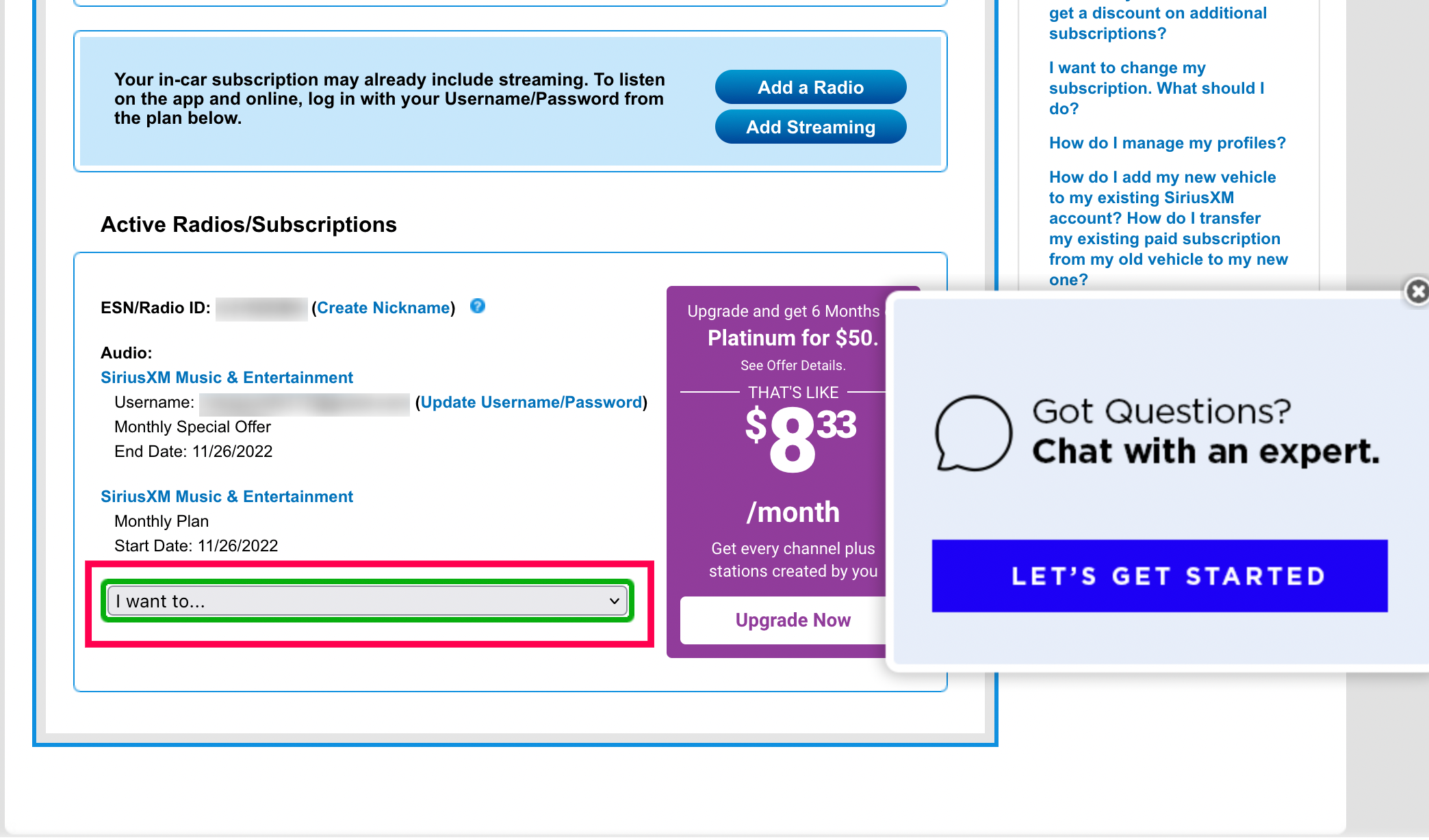
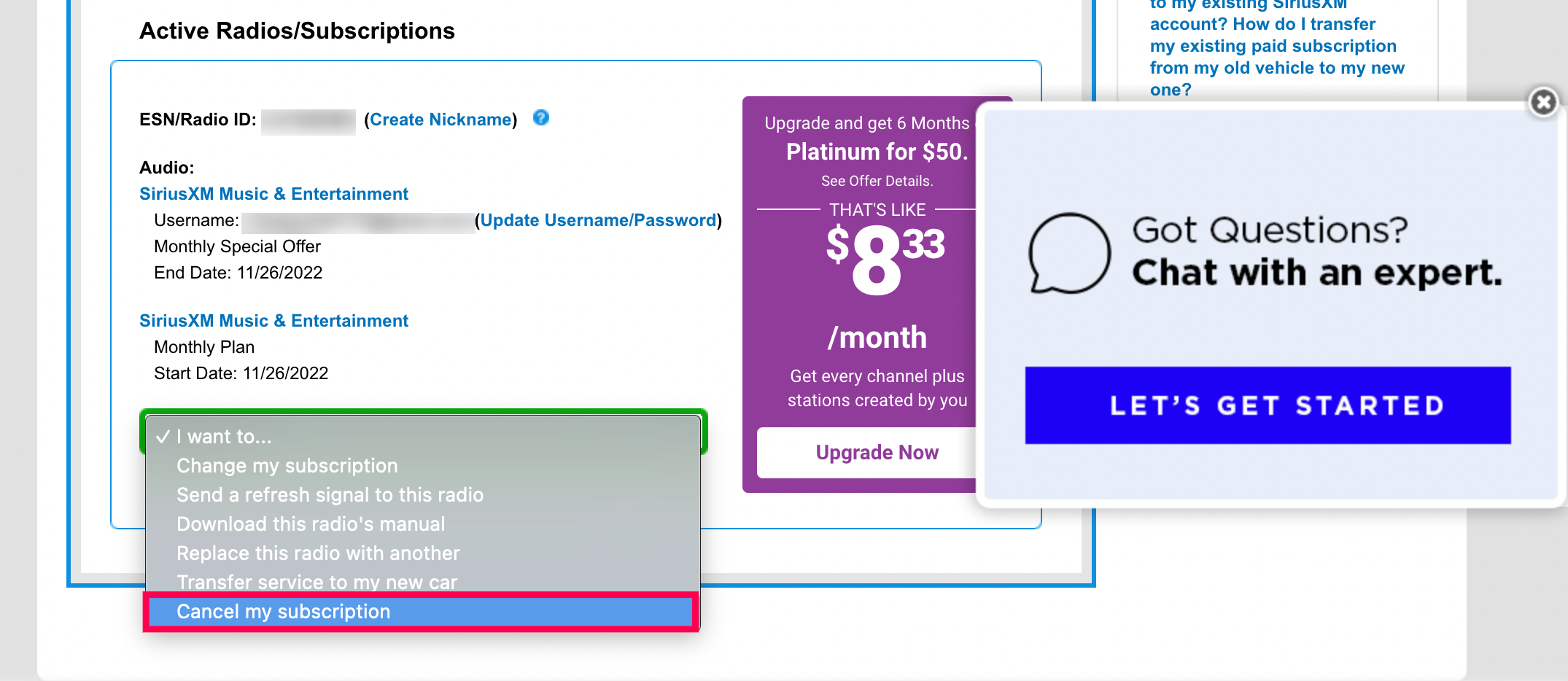
Once logged in, you’ll be directed to your “My Account” dashboard. This interface is designed to centralize all your account information. Look for sections titled “Manage My Subscription,” “Subscription Details,” “Billing & Payment,” or similar. The exact nomenclature may vary over time as their website’s UI/UX evolves. Within this section, you should be able to view your current plan, billing date, and potentially options to change your plan. While a direct “cancel” button is rare here, this area provides the context for your subscription and often the necessary information (like your account number) you’ll need if you proceed to phone cancellation.
Following the On-Screen Prompts: A UX Perspective
If a cancellation option is presented online, the prompts will guide you through the process. These steps are meticulously designed from a user experience (UX) perspective, often involving:
- Reason for Cancellation: A dropdown menu or text field asking why you’re leaving. This data is invaluable for the company to understand churn and improve their service.
- Confirmation Page: A page summarizing your decision, often with a final “Are you sure?” prompt.
- Retention Offers: Before final confirmation, the system might present “last-ditch” offers—discounted rates, free months, or alternative packages—to entice you to stay. These are dynamically generated based on algorithms and your customer profile. Be prepared to decline these if your intent to cancel is firm.
Successfully navigating these prompts requires careful reading and firm decision-making to avoid inadvertently accepting a new offer instead of canceling.
Confirmation and Digital Record Keeping
Regardless of whether you fully cancel online or are redirected to phone support, always look for a confirmation. If you’re able to complete the cancellation online, the system should display a confirmation message on screen and ideally send an email confirmation to your registered address. For phone cancellations, ask the agent for a confirmation number and the effective cancellation date, and ensure they confirm an email will be sent. Digital record-keeping, such as taking screenshots of confirmation pages or saving confirmation emails, is a critical best practice in managing all digital subscriptions. This provides irrefutable proof should any billing discrepancies arise later.
Best Practices for Digital Subscription Termination
Beyond the direct steps of cancellation, there are broader tech-savvy strategies to ensure a clean break from any digital service and to protect your digital footprint.
Documenting the Process: Screenshots and Call Logs
As mentioned, creating a digital paper trail is paramount. When interacting with any online portal for cancellation, take screenshots of every step, especially the final confirmation. If you call, note the date, time, the name of the representative you spoke with (if provided), and any confirmation numbers. Store these records in a dedicated digital folder (e.g., in cloud storage or a specific email folder) for easy retrieval. This proactive approach treats the cancellation process like a formal transaction, providing you with data to dispute any erroneous charges or service continuation.
Understanding Promotional Offers and Retention Attempts
Tech companies invest heavily in customer retention strategies. Expect a concerted effort to keep you subscribed, whether through the online portal or during a phone call. These offers might include:
- Reduced rates for a limited period.
- Access to premium content for free.
- Trial periods for different service tiers.
- Bundling options with other services.
From a tech perspective, these offers are generated by complex algorithms analyzing your usage data, subscription history, and demographic information to present the most appealing “save” offer. Be firm but polite in declining these if you are resolute in your decision to cancel.
Checking for Auto-Renewal Settings
Many digital subscriptions, including SiriusXM, are set to auto-renew by default. This is a crucial setting to identify and disable if you intend to cancel permanently or avoid unexpected charges after a promotional period ends. Often, managing auto-renewal can be done within your online account settings, even if full cancellation requires a call. If you’ve canceled, double-check your account settings a few days later to ensure that auto-renewal is indeed off. For subscriptions managed via third-party app stores (Apple App Store, Google Play), managing auto-renewal is done directly through their respective subscription management interfaces.
Data Privacy and Account Deactivation Considerations
While canceling your subscription stops billing, it doesn’t always automatically delete your account or associated personal data. Review the service’s privacy policy or terms of service for information on data retention after cancellation. If you’re concerned about your data footprint, you might need to explicitly request account deletion, which is often a separate process from subscription cancellation. This ensures that your personal information, listening habits, and payment details are removed from their active databases, aligning with your data privacy preferences.
Troubleshooting Common Tech-Related Cancellation Issues
Even with a clear guide, technical glitches or unexpected hurdles can arise during the cancellation process. Being prepared to troubleshoot these common issues can save time and frustration.
Account Access Problems (Forgotten Passwords, Email Issues)
One of the most frequent initial roadblocks is inability to log in. If “Forgot Password” links aren’t working, or if you no longer have access to the email address tied to your account, you’ll need to contact customer support to verify your identity through alternative means (e.g., billing address, last four digits of a credit card, phone number). This often requires a phone call or a specific online form for account recovery. This highlights the importance of keeping your contact information updated in all your digital accounts.
Website Glitches and App Freezes
Sometimes, the issue isn’t user error but a technical problem with the platform itself. A webpage might fail to load correctly, a button might be unresponsive, or the app might crash. In these cases:
- Clear your browser cache and cookies: This often resolves loading issues by removing old data.
- Try a different browser or device: Compatibility issues can sometimes occur.
- Check your internet connection: A stable connection is crucial for web applications.
- Wait and try again later: Server-side issues can be temporary.
If problems persist, document the issue (with screenshots of error messages) and contact tech support, providing them with as much detail as possible about the error.
Dealing with Unclear Instructions or Loops
Some cancellation processes are designed with “dark patterns” or intentionally complex steps that make it difficult to leave. You might find yourself going in circles, redirected to the same page, or facing ambiguous prompts. If you encounter such a loop online, the most effective technical workaround is often to bypass the web interface entirely and switch to the phone support channel. The human agent can usually cut through these digital layers to process the request directly.

Escalating Tech Support Interactions
If your initial attempts at cancellation or troubleshooting are unsuccessful, don’t hesitate to escalate. If speaking to a customer service representative proves difficult, politely ask to speak with a supervisor or a manager. Frame your request clearly and professionally, referring to any documentation you’ve collected (screenshots, call notes). For persistent issues, especially if you believe you’re being unfairly billed or prevented from canceling, consider contacting regulatory bodies (e.g., Federal Communications Commission or Better Business Bureau) or consumer protection agencies. These steps represent the highest level of tech-adjacent problem-solving, leveraging external oversight when internal mechanisms fail.
Canceling a SiriusXM subscription, like managing any digital service, is a process that benefits from a tech-informed approach. By understanding the various digital pathways, anticipating common UX and retention strategies, and adopting best practices for documentation and troubleshooting, you can ensure a smooth and efficient departure from the service, maintaining control over your digital subscriptions and personal data.
aViewFromTheCave is a participant in the Amazon Services LLC Associates Program, an affiliate advertising program designed to provide a means for sites to earn advertising fees by advertising and linking to Amazon.com. Amazon, the Amazon logo, AmazonSupply, and the AmazonSupply logo are trademarks of Amazon.com, Inc. or its affiliates. As an Amazon Associate we earn affiliate commissions from qualifying purchases.