
The landscape of air travel has been irrevocably shaped by technology, transforming what was once a laborious, counter-centric process into a streamlined, often self-service experience. Checking in for an American Airlines flight, at its core, is no longer just about confirming your presence; it’s a testament to the power of digital innovation in simplifying complex logistics. This guide delves deep into the various technological avenues available for American Airlines check-in, offering a professional, insightful, and engaging tutorial for modern travelers. From intuitive mobile applications to sophisticated web portals and efficient airport kiosks, understanding these tools is key to a smooth and stress-free journey.

The Digital Evolution of Airline Check-in
The journey from paper tickets and long queues to digital boarding passes and seamless online processes represents one of the most significant shifts in air travel. This evolution isn’t merely about convenience; it’s about efficiency, data management, and empowering travelers with unprecedented control over their pre-flight experience.
From Counter to Click: A Paradigm Shift
For decades, checking in meant arriving at the airport well in advance, standing in line at the airline counter, presenting identification, and receiving a physical boarding pass. This manual process was resource-intensive for airlines and often frustrating for passengers. The advent of the internet and mobile technology ushered in a paradigm shift. Airlines, including American Airlines, quickly recognized the potential for automation, migrating core customer services like check-in to digital platforms. This move not only reduced operational costs but also significantly improved passenger flow and satisfaction. The “click” now replaces the counter, allowing travelers to manage their journey from virtually anywhere. This transformation underscores a broader trend in the service industry: leveraging technology to personalize and expedite customer interactions.
Why Digital Check-in Matters: Speed, Convenience, Control
The advantages of digital check-in are manifold, fundamentally redefining the traveler’s pre-flight routine.
- Speed: Digital check-in dramatically cuts down the time spent at the airport. By completing the process beforehand, passengers can often bypass check-in lines entirely, proceeding directly to security if they have no bags to check, or to a dedicated bag drop-off point if they do. This time-saving is invaluable, especially for business travelers or those on tight schedules.
- Convenience: The ability to check in from a smartphone, tablet, or computer offers unparalleled flexibility. Whether you’re at home, in a hotel, or even on your way to the airport, the process is accessible 24/7 (within the check-in window). This eliminates the need to rush to the airport purely for check-in purposes, allowing for more relaxed preparation.
- Control: Digital platforms provide passengers with greater control over their journey. They can often select or change seats, review and update personal information, add loyalty program numbers, and even upgrade their flight, all before arriving at the airport. This proactive management capability reduces uncertainty and enhances the overall travel experience, putting the passenger firmly in the driver’s seat. Moreover, digital check-in tools often integrate with real-time flight status updates, gate changes, and delay notifications, ensuring travelers are always informed.
Mastering Mobile Check-in with the American Airlines App
For the modern traveler, the American Airlines mobile app is arguably the most powerful and versatile tool for managing their journey, with check-in being a primary feature. Its intuitive design and comprehensive functionalities make it an indispensable companion.
Downloading and Navigating the App
The first step to harnessing mobile check-in is to download the official American Airlines app, available on both iOS and Android platforms from their respective app stores. Once downloaded, creating or logging into your AAdvantage account is highly recommended, as it auto-populates many details and keeps all your travel plans centralized. The app’s interface is designed for user-friendliness, typically featuring a prominent “Trips” or “My Trips” section where your upcoming flights are displayed. Navigating through the various menus for flight status, booking, or account management is generally straightforward, with clear icons and logical pathways. Familiarizing yourself with its layout before your travel day can save valuable time and reduce stress.
Step-by-Step Mobile Check-in Process
The mobile check-in process through the American Airlines app is streamlined and efficient:
- Open the App: Launch the American Airlines app on your smartphone or tablet.
- Access Your Trip: Navigate to “My Trips” or “Trips.” If you’re logged into your AAdvantage account, your upcoming flight should automatically appear. If not, you may need to enter your confirmation code, ticket number, or AAdvantage number and last name to retrieve your reservation.
- Initiate Check-in: Once your flight is displayed and within the 24-hour check-in window, a “Check In” button will typically appear prominently. Tap this to begin the process.
- Confirm Details: The app will guide you through a series of screens to confirm passenger details, review flight information, and acknowledge security questions (e.g., “Are you carrying any hazardous materials?”).
- Select/Change Seats (Optional): This is often an opportunity to review or change your seat assignment if desired and available.
- Add/Update AAdvantage Number: Ensure your AAdvantage number is correctly associated with your booking to earn miles.
- Review and Finalize: After confirming all details, you’ll be prompted to finalize the check-in.
- Receive Boarding Pass: Upon successful check-in, your mobile boarding pass will be generated within the app. It typically features a QR code or barcode that can be scanned at security and the boarding gate. You’ll also usually have the option to email it to yourself or add it to your mobile wallet (e.g., Apple Wallet, Google Pay) for quick access.
Beyond Check-in: Digital Boarding Passes and Flight Management
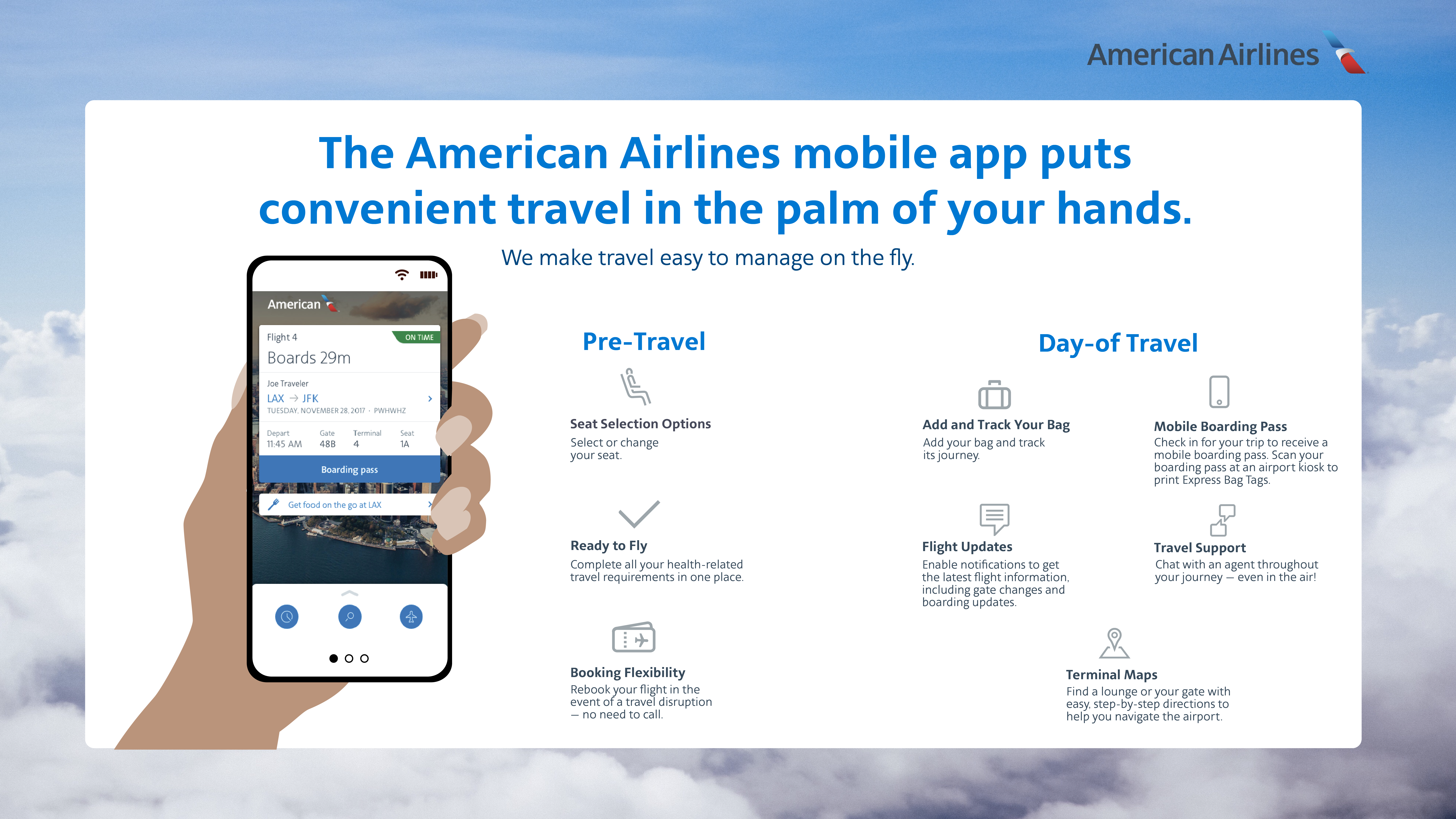
The app’s utility extends far beyond just check-in. The digital boarding pass is a central feature, eliminating the need for paper. It updates automatically with gate changes or delays and is easily accessible even without an internet connection once downloaded. Furthermore, the app allows for real-time flight status tracking, notifications for gate changes or delays, and even offers options for rebooking in case of disruptions. For travelers with checked bags, the app can often track the status of their luggage, providing peace of mind. This comprehensive suite of tools makes the American Airlines app a powerful digital command center for your entire journey.
Troubleshooting Common App Issues
While generally robust, the app can occasionally encounter issues. Common problems include difficulty loading flight information, glitches during the check-in process, or problems adding a boarding pass to a mobile wallet.
- Connectivity: Ensure you have a stable internet connection.
- App Updates: Always make sure your app is updated to the latest version.
- Clear Cache/Reinstall: If persistent issues occur, try clearing the app’s cache or reinstalling it.
- Contact Support: If all else fails, American Airlines’ customer service or airport agents can assist. Screenshots of error messages can be helpful when seeking support.
Seamless Web Check-in: Your Desktop Guide
For those who prefer a larger screen or are more comfortable with traditional web interfaces, American Airlines’ website offers a robust and equally effective online check-in portal. It mirrors many of the app’s functionalities but in a desktop-optimized format.
Accessing American Airlines’ Website Check-in Portal
To begin web check-in, navigate to American Airlines’ official website (aa.com). Look for a prominent “Check In” or “My Trips” section, usually located in the top navigation bar or central to the homepage. Clicking on this will lead you to the check-in portal. You’ll need to enter your confirmation code (a six-character alphanumeric code), e-ticket number, or your AAdvantage number and last name to retrieve your reservation. It’s crucial to ensure you are on the legitimate American Airlines website to protect your personal information and prevent phishing.
A Detailed Walkthrough of Online Check-in
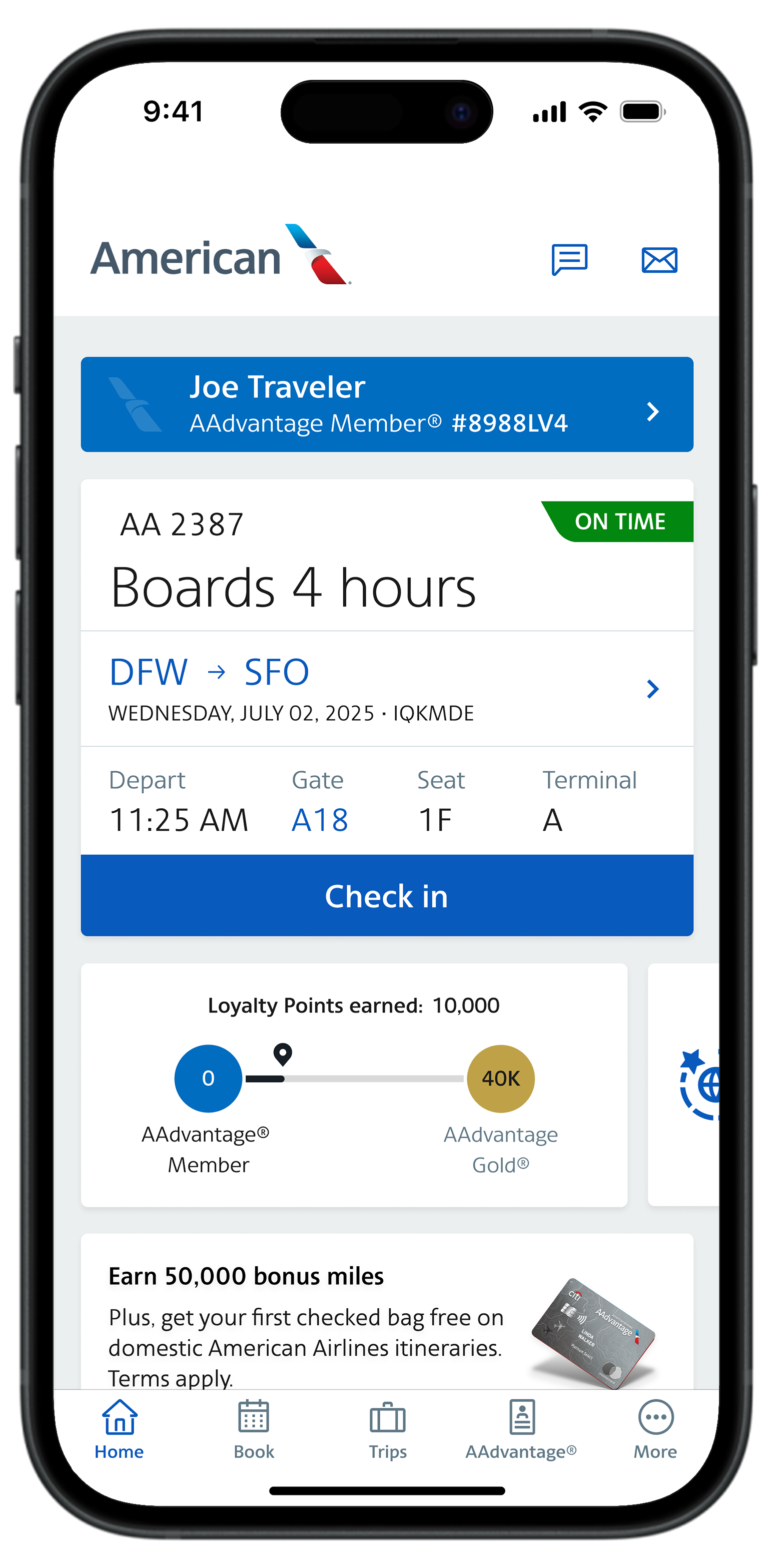
The online check-in process via the website is highly similar to the mobile app, providing a consistent user experience:
- Enter Retrieval Information: On the check-in page, input your chosen reservation identifier (confirmation code, e-ticket number, or AAdvantage number + last name).
- Select Flight/Passengers: If your reservation includes multiple flights or passengers, select the specific flight and individuals you wish to check in.
- Review and Confirm: You’ll be presented with your flight details, passenger information, and security questions. Carefully review everything for accuracy. This is also an opportunity to confirm or update your AAdvantage number.
- Seat Selection (Optional): If you haven’t already, you can select or change your seat assignment here, often with a visual seat map.
- Declare Checked Bags: If you intend to check bags, you’ll declare them during this step. This helps streamline the bag drop process at the airport.
- Finalize Check-in: Once all information is confirmed, click to finalize the check-in.
- Receive Boarding Pass Options: After successful check-in, you’ll be given options to receive your boarding pass. These typically include printing it, having it emailed to you, or sending a link to your mobile device for a mobile boarding pass.
Printing Boarding Passes vs. Digital Options
The web check-in provides flexibility in how you receive your boarding pass.
- Printed Boarding Pass: This is a reliable fallback, especially if you prefer a physical document or anticipate potential mobile device issues (e.g., low battery, no signal). It ensures you always have a tangible proof of check-in and your gate information.
- Digital Options: Sending the boarding pass to your mobile device (via email or direct link) allows you to use your smartphone as your boarding pass, mirroring the app experience. This is eco-friendly and convenient, but always ensure your phone is charged and accessible.
When Web Check-in is the Preferred Choice
Web check-in often becomes the preferred choice in several scenarios:
- Travelers without a smartphone: For those who don’t own a smartphone or prefer not to rely on one for travel, the website offers a complete digital check-in solution.
- Group travel: Checking in multiple passengers with complex itineraries can sometimes be easier to manage on a larger screen, allowing for a better overview.
- Specific browser extensions/accessibility needs: Some travelers may rely on specific browser features or accessibility tools that make the desktop experience more user-friendly.
- Pre-printing documents: If you need to print other travel documents (e.g., visa confirmations, hotel reservations), it might be convenient to handle all printing simultaneously after web check-in.
Airport Kiosks: Bridging the Digital and Physical Divide
While mobile and web check-in offer ultimate flexibility, airport self-service kiosks serve as a crucial technological bridge, providing a digital check-in solution right at the terminal for those who haven’t checked in remotely or require physical assistance.
Locating and Utilizing Self-Service Kiosks
American Airlines self-service kiosks are typically located prominently in the check-in area of the airport terminal, often near the airline’s physical check-in counters. They are easily identifiable by their touchscreens and American Airlines branding. To use a kiosk, you’ll need one of the following: your credit card (for identification, not payment), your AAdvantage number, your confirmation code, or your passport (for international flights). The kiosk’s touchscreen interface is designed to be intuitive, guiding you through the check-in process step-by-step. It’s essentially a condensed, physical version of the online check-in process.
The Kiosk Interface: A Digital Extension at the Airport
The kiosk interface presents a simplified, touch-friendly version of the check-in process. You’ll start by selecting your identification method, then follow prompts to:
- Retrieve Reservation: Confirm your flight details.
- Answer Security Questions: Similar to online/app check-in.
- Select Seats: Change or confirm seat assignments.
- Declare/Pay for Bags: This is a key advantage of kiosks for those needing to check luggage. You can declare the number of bags and often pay for any applicable fees directly at the kiosk using a credit card.
- Print Boarding Pass/Bag Tags: Upon successful check-in, the kiosk will print your physical boarding pass and, crucially, your baggage tags. This allows you to attach the tags to your luggage and then proceed to a designated bag drop-off point, bypassing the traditional check-in counter queue.
When to Opt for Kiosk Check-in
Kiosk check-in is particularly beneficial in several scenarios:
- Last-minute check-in: If you’re running late and haven’t managed to check in online, kiosks offer a quick solution at the airport.
- Checking bags: For passengers with checked luggage, kiosks are invaluable. They allow you to print your bag tags, significantly speeding up the bag drop process compared to waiting in line at a full-service counter.
- No smartphone/printer access: If you don’t have a smartphone or access to a printer for a boarding pass, kiosks provide a physical boarding pass.
- Technical difficulties: If you encountered issues with the app or website, kiosks offer a reliable alternative to complete your check-in.
- Unusual situations: Occasionally, certain booking complexities might direct you to a kiosk or counter, making them essential.
Optimizing Your Check-in Experience: Tips and Best Practices
Leveraging American Airlines’ technology for check-in is about more than just following steps; it’s about smart planning and preparedness to ensure a truly optimized and stress-free travel experience.
Timing is Everything: Understanding Check-in Windows
American Airlines typically allows check-in starting 24 hours before your scheduled flight departure and ending 45 minutes before departure for domestic flights, and 90 minutes before departure for international flights.
- Early Check-in (24 hours out): This is highly recommended. It gives you the best chance to select your preferred seat (if not already assigned), provides ample time to address any issues, and gets you a mobile boarding pass well in advance.
- Last-minute check-in: While possible, it’s risky. Technical glitches, slow internet, or unexpected delays can prevent you from checking in on time, potentially leading to denied boarding.
- Bag Check Deadlines: Remember that even if you’ve digitally checked in, there are separate deadlines for checking your bags, which are typically longer than the passenger check-in deadlines. Always verify these specific times on the American Airlines website or app for your departure airport.
Essential Information You’ll Need
To ensure a smooth check-in process, regardless of the method, have the following information readily accessible:
- Confirmation Code: The six-character alphanumeric code for your reservation.
- E-ticket Number: Your 13-digit ticket number.
- AAdvantage Number: If you’re a member and want to earn miles.
- Passport (for international travel): You’ll need to enter details and sometimes scan it.
- Government-issued photo ID: For verification purposes at security and the gate.
- Credit Card (for kiosk identification or bag fees): Though usually not for initial check-in payment, it’s often used to retrieve your reservation at a kiosk.
Special Circumstances: International Flights, Bag Check, and Special Assistance
Certain situations require additional attention during check-in:
- International Flights: These often have stricter check-in deadlines and require passport information, visa details, and sometimes additional screening questions. It’s often recommended to perform an early digital check-in but be prepared to show your physical passport to an agent for verification before proceeding to security, especially for destinations with specific entry requirements.
- Checked Bags: If you have bags to check, ensure you complete the check-in process digitally, then proceed to an American Airlines bag drop counter or kiosk at the airport. You’ll print your bag tags and attach them before handing over your luggage.
- Special Assistance: Passengers requiring special assistance (e.g., wheelchair services, unaccompanied minors, specific medical accommodations) should indicate this during the booking process or contact American Airlines in advance. While you can often check in digitally, you may still need to speak with an agent at the airport to confirm arrangements.
- Upgrades and Standby: If you’re on a waitlist for an upgrade or flying standby, you can still check in digitally. However, final seat assignments or confirmation for standby will typically occur closer to departure time at the gate.
Enhancing Security and Privacy During Digital Transactions
When using digital check-in tools, maintaining security and privacy is paramount:
- Secure Networks: Always use a secure, private Wi-Fi network when checking in or accessing sensitive travel information. Avoid public, unencrypted Wi-Fi networks where data can be intercepted.
- Strong Passwords: Use strong, unique passwords for your AAdvantage account and any other accounts linked to your travel.
- Official Channels: Only use the official American Airlines website (aa.com) and the official mobile app downloaded from reputable app stores. Beware of phishing websites or unofficial apps.
- Log Out: Always log out of your account on shared or public computers after checking in.
- Mobile Wallet Security: If using a mobile boarding pass, ensure your phone has robust security measures (e.g., strong passcode, biometric authentication) to protect access to your device.
By understanding and utilizing the sophisticated technological tools American Airlines provides, travelers can transform the once-tedious check-in process into a swift, efficient, and empowering start to their journey. Embrace the digital age of travel, and enjoy a smoother path from curb to cabin.
aViewFromTheCave is a participant in the Amazon Services LLC Associates Program, an affiliate advertising program designed to provide a means for sites to earn advertising fees by advertising and linking to Amazon.com. Amazon, the Amazon logo, AmazonSupply, and the AmazonSupply logo are trademarks of Amazon.com, Inc. or its affiliates. As an Amazon Associate we earn affiliate commissions from qualifying purchases.