
In the intricate world of personal and business finance, certain numerical identifiers serve as crucial lynchpins, enabling the smooth flow of money between institutions and individuals. Among these, the routing number stands as a fundamental component, acting as a unique digital address for banks within the U.S. financial system. For millions of customers, particularly those banking with a giant like Chase, understanding how to quickly and accurately locate their routing number is not just a convenience but a necessity for managing various financial transactions, from receiving direct deposits to setting up online bill payments and executing wire transfers.

This guide delves into the specifics of Chase routing numbers, illuminating their purpose, detailing the most reliable methods for retrieval, and offering critical insights into common pitfalls and security considerations. By the end of this article, Chase account holders will possess a clear, actionable understanding of how to confidently navigate their financial needs, ensuring every transaction finds its correct destination.
Understanding the Essence of Your Routing Number
Before diving into the “how-to,” it’s essential to grasp the “what” and “why” behind routing numbers. These nine-digit codes are far more than just arbitrary numbers; they are the bedrock of interbank communication, ensuring your money goes to the right financial institution.
What is a Routing Number? The ACH Identifier
A routing number, officially known as an ABA (American Bankers Association) Routing Transit Number (RTN), is a nine-digit code used by U.S. financial institutions to identify themselves within the Automated Clearing House (ACH) network. The ACH network is the primary electronic funds transfer system in the United States, facilitating a wide range of transactions including direct deposits, automatic bill payments, and person-to-person payments. Each unique routing number corresponds to a specific bank or credit union, and sometimes even to a particular branch or a specific type of transaction within a larger institution like Chase.
Think of it as the bank’s street address within the national financial system. When you initiate a payment, transfer, or deposit, your routing number directs the funds to the correct bank, and your account number then specifies which account within that bank should receive or send the money.
Why Your Routing Number is Crucial for Financial Operations
The importance of your routing number cannot be overstated in modern personal and business finance. It is indispensable for a multitude of common financial activities, making its accurate retrieval a frequent necessity.
- Direct Deposit: To receive your paycheck, government benefits, or tax refunds directly into your Chase account, your employer or the issuing agency will require both your Chase routing number and your account number.
- Automatic Bill Payments: Setting up recurring payments for utilities, mortgage, loans, or subscriptions often involves providing your bank’s routing number to the service provider.
- Electronic Funds Transfers (EFTs): Moving money between your Chase account and external accounts at other banks (e.g., for investment platforms, online payment services like PayPal, or other banking apps) typically requires the routing number of both institutions.
- Wire Transfers: Both domestic and international wire transfers depend on accurate routing information. While domestic wires use standard routing numbers, international wires often require additional SWIFT/BIC codes alongside your routing number.
- Check Processing: Every check you write has your routing number printed on it, enabling the payee’s bank to identify your bank for processing the payment.
Without the correct routing number, these critical financial transactions can face delays, be rejected, or even be sent to the wrong institution, leading to significant headaches and potential financial losses.
Distinguishing Routing Numbers from Account Numbers
A common point of confusion for many is the difference between a routing number and an account number. While both are essential for financial transactions, they serve distinct purposes and possess varying levels of sensitivity.
- Routing Number: Identifies your bank or financial institution. It’s a general identifier for the bank itself and is often publicly accessible (though Chase has multiple, making it specific).
- Account Number: Identifies your specific individual or business account within your bank. This number is unique to you and your account and is highly confidential.
When providing information for a transaction, you will almost always need both. The routing number ensures the funds reach Chase Bank, while the account number ensures they are credited to your specific checking, savings, or money market account. Always exercise caution when sharing your account number, as it is a direct gateway to your funds when combined with a routing number.
Primary Methods to Locate Your Chase Routing Number
Fortunately, Chase Bank provides several straightforward and reliable ways for its customers to find their routing number, catering to various preferences and circumstances.
Via Chase Online Banking and Mobile App
For most modern banking customers, the quickest and most convenient way to find their Chase routing number is through their online banking portal or the Chase Mobile app. This method offers instant access to your account details in a secure environment.
For Online Banking (Desktop):
- Log In: Go to the official Chase website (chase.com) and log into your online banking account using your username and password.
- Select Account: Once logged in, navigate to the specific checking or savings account for which you need the routing number. You’ll usually see a summary of all your accounts.
- View Account Details: Click on the selected account. Look for a section or link titled “Account details,” “See account activity,” or “Statements & documents.” Within this section, your routing number will typically be displayed prominently alongside your account number. Sometimes it might be under a “Show Details” or “More Information” toggle.
For Chase Mobile App:
- Open and Log In: Launch the Chase Mobile app on your smartphone or tablet and log in using your credentials.
- Select Account: Tap on the specific checking or savings account from your account summary screen.
- Find Account Details: Look for an option like “Show details,” “Account details,” or a gear/settings icon related to the account. Tapping this will reveal your routing number, often along with your account number and other pertinent information.
- Security Feature: For security, the app may sometimes require you to confirm your identity (e.g., fingerprint, face ID, or passcode) before displaying sensitive information like account numbers and routing numbers.
This method is generally the most up-to-date and reflects the correct routing number associated with your specific account and location.
Checking Your Chase Bank Statements
Bank statements, whether paper or electronic, are another reliable source for locating your Chase routing number. They serve as official records of your account activity and details.
For Paper Statements:
If you receive paper statements by mail, retrieve your most recent statement. Your routing number is typically printed at the bottom of the statement, often near your account number and other bank information. Look for a series of numbers that appear similar to what you’d see on a check.
For Electronic Statements (eStatements):
- Log In to Online Banking/App: Access your Chase online banking portal or mobile app.
- Navigate to Statements: Look for a section labeled “Statements,” “eStatements,” “Documents,” or “Paperless.”
- Select a Statement: Choose a recent statement (e.g., from the last month or two) and open it. It will usually be in PDF format.
- Locate Routing Number: Once the PDF statement is open, scroll down to the bottom. The routing number will be printed there, just as it would be on a physical paper statement.
Using statements is a good alternative if you prefer not to navigate directly through account details or if you need a physical record.
On Your Chase Checks and Deposit Slips
For those who still use physical checks, your Chase routing number is literally at your fingertips. This is perhaps the most traditional method and often the quickest if you have a checkbook handy.
On Personal Checks:
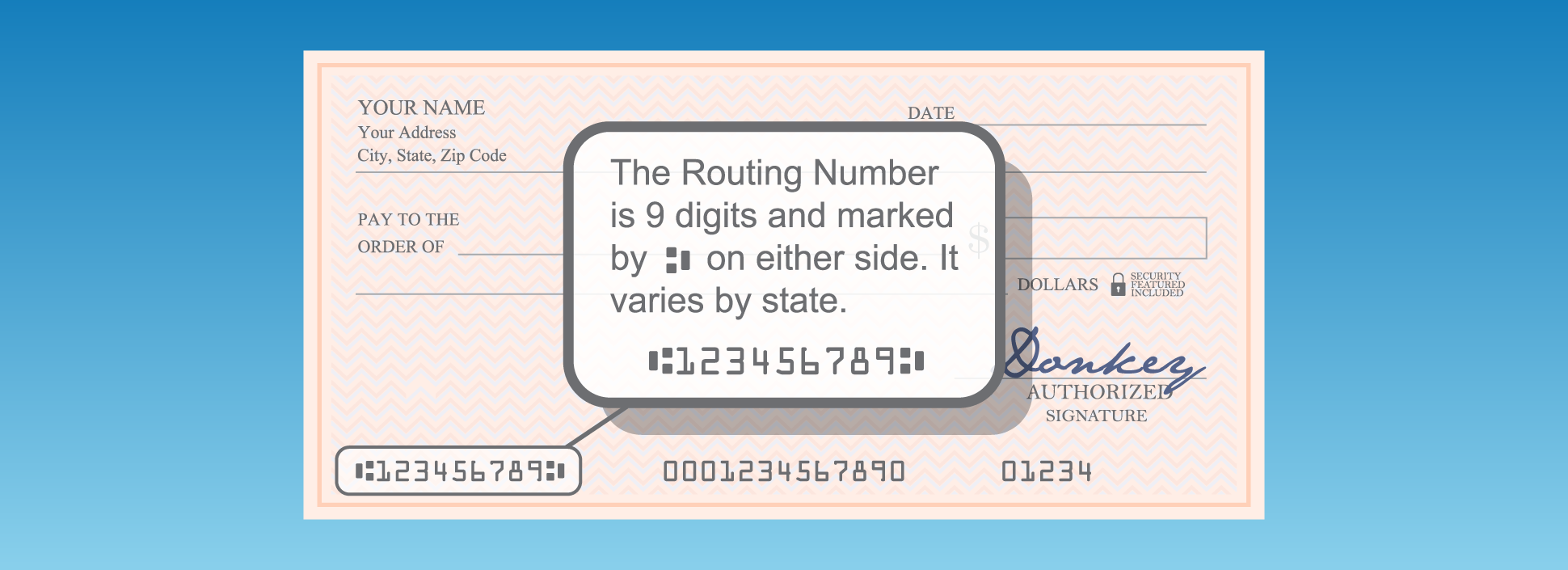
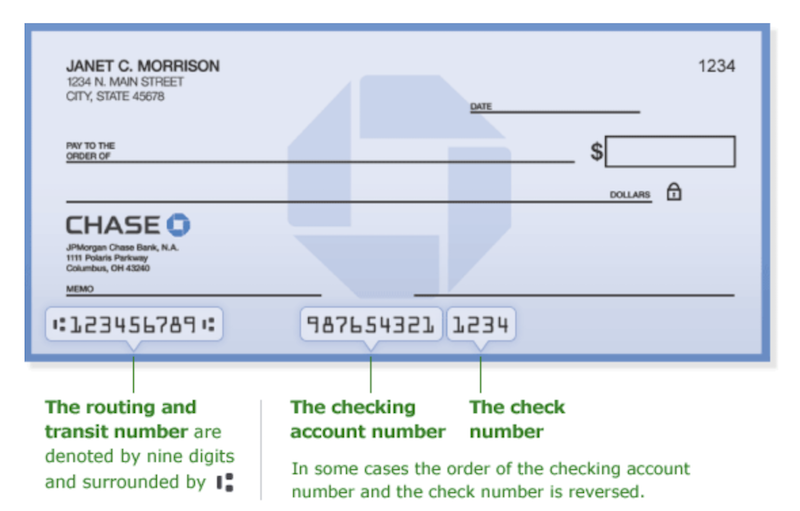
Look at the bottom left-hand corner of any Chase check. You will see three sets of numbers printed using magnetic ink character recognition (MICR) font.
- The first set of nine digits is your routing number.
- The second set of numbers (usually 10-12 digits) is your account number.
- The third set is the check number.
On Deposit Slips:
Similarly, your Chase deposit slips will also have your routing number printed at the bottom, followed by your account number.
Important Note: Always verify that the routing number on your checks matches the one provided by Chase online or on your statement, especially if you have older checks or checks from a different account type. While usually consistent, discrepancies can occur if your account was opened a long time ago in a region that has since merged or changed routing designations, or if you have multiple types of accounts.
Alternative Avenues and Direct Support
While the primary methods cover most scenarios, there might be times when you need alternative ways to find your Chase routing number or require direct assistance.
Contacting Chase Customer Service
If you’re unable to find your routing number through online banking, statements, or checks, or if you have any doubts, reaching out to Chase customer service is a reliable option.
- Phone Support: Call Chase’s general customer service number. Be prepared to verify your identity with personal information (e.g., account number, social security number, date of birth) before they can provide your routing number.
- Secure Message (Online Banking): You can often send a secure message through your Chase online banking portal. This allows you to communicate with a representative directly within a secure environment and ask for your routing number.
- Visit a Chase Branch: For in-person assistance, visit your nearest Chase branch. A teller or customer service representative can look up your routing number for you after verifying your identity. This is particularly useful if you need to perform a complex transaction requiring precise routing information.
When contacting customer service, clearly state whether you need the routing number for ACH transfers (like direct deposit) or for wire transfers, as Chase might have different routing numbers for these specific transaction types.
Utilizing the Federal Reserve’s Routing Directory (For Verification)
The Federal Reserve maintains a public directory of all active routing numbers. While this directory won’t tell you your specific Chase account’s routing number directly, it can be a useful tool for verifying a routing number you’ve already found.
- Visit the Federal Reserve’s Website: Navigate to the Federal Reserve Banks’ ABA Routing Number Lookup Tool (a quick search for “Federal Reserve routing number lookup” will typically lead you there).
- Input Routing Number: Enter the nine-digit routing number you’ve found into the search field.
- Verify Bank Name: The tool will display the name of the financial institution associated with that routing number. You can then confirm that it corresponds to “JPMorgan Chase Bank, N.A.” or a similar official Chase entity.
Caveat: This tool is for verification, not discovery. Given that Chase operates with multiple routing numbers across different regions and for different types of transactions, simply looking up “Chase” on the Fed’s site might not immediately give you the correct one for your specific account and transaction. Always prioritize obtaining the number directly from your Chase account information.
Navigating Common Scenarios and Security Considerations
Chase, being one of the largest banks in the U.S., has a vast operational footprint. This can sometimes lead to nuances in routing numbers that customers need to be aware of.
Multiple Routing Numbers: Understanding Geographic and Transactional Variations for Chase
This is perhaps the most critical insight for Chase customers: Chase Bank uses several different routing numbers. The correct one for you depends on several factors:
- Geographic Location: Historically, banks often had different routing numbers based on the state or region where the account was opened. While Chase has consolidated many of these, older accounts or those opened in certain states might still retain a specific routing number. For instance, a Chase account opened in New York might have a different routing number than one opened in California, especially for certain transaction types.
- Account Type: While less common, sometimes checking accounts and savings accounts might have slightly different routing numbers, or certain business accounts. Always verify for the specific account you intend to use.
- Transaction Type (ACH vs. Wire Transfers): This is a very common distinction for large banks.
- ACH (Automated Clearing House) Routing Number: Used for most everyday electronic transactions like direct deposits, bill pay, and standard electronic transfers. This is the routing number you’ll find on your checks and usually in your online banking account details.
- Wire Transfer Routing Number: Chase often has a specific routing number designated only for incoming domestic wire transfers. This number is typically universal across Chase for wire transfers, but it’s crucial not to confuse it with your standard ACH routing number. Using the wrong one for a wire can cause significant delays or rejection. Always confirm the wire routing number directly with Chase, usually found in their wire transfer instructions online or by calling customer service.
How to Handle This:
- Always check your specific account details: The routing number displayed in your online banking or mobile app for your particular checking or savings account is almost always the correct one for ACH transactions (direct deposit, bill pay).
- Be explicit when asking: If you call Chase, specify if you need the number for direct deposit (ACH) or for an incoming wire transfer.
- Refer to Chase’s official wire instructions: Chase’s website will have a dedicated section for “Incoming Wire Transfer Instructions” which will provide the exact routing number for wires.
Ensuring Accuracy: The Risks of Incorrect Routing Numbers
Providing an incorrect routing number can lead to various problems, ranging from minor inconveniences to serious financial repercussions:
- Transaction Delays: The most common outcome is that your payment or deposit will be delayed as the financial systems try to correct the error or return the funds.
- Rejected Transactions: Many systems will simply reject transactions with an invalid routing number, requiring you to resubmit the information.
- Funds Sent to the Wrong Account (Rare but Serious): In rare cases, if the incorrect routing number happens to match another valid bank’s number, funds could be sent to the wrong institution. While banks have protocols to recover these funds, the process can be lengthy and stressful.
- Fees: Incorrect transfers can sometimes incur fees from your bank or the recipient’s bank for returned items or investigation.
Always double-check the routing number before submitting it, especially for critical transactions like direct deposits or large transfers.
Protecting Your Financial Information
While a routing number is less sensitive than an account number, it’s still part of your financial identity.
- Share Responsibly: Only provide your routing number to trusted entities (your employer, legitimate billers, or other financial institutions) when initiating a transaction.
- Be Wary of Phishing: Chase will never ask for your routing number, account number, or other sensitive details via unsolicited emails, texts, or pop-up ads. Be vigilant against phishing attempts.
- Secure Online Access: Ensure your online banking account is protected with a strong, unique password and, if available, two-factor authentication.
- Shred Old Documents: When disposing of old checks, statements, or deposit slips, shred them to prevent others from accessing your financial information.
Integrating Your Chase Routing Number into Your Financial Life
Once you’ve confidently located your Chase routing number, you can seamlessly integrate it into various aspects of your financial management.
Setting Up Direct Deposit with Your Employer
This is one of the most common uses. When starting a new job or changing banking information, your employer’s HR or payroll department will provide a direct deposit form. You will need to fill in:
- Your Chase Bank name (JPMorgan Chase Bank, N.A.)
- Your Chase routing number
- Your Chase account number (checking or savings)
- Account type (checking or savings)
Attach a voided check if required, as it visually confirms all three crucial numbers.
Linking External Accounts for Transfers
Many individuals link their primary Chase account to external platforms like investment accounts (e.g., Fidelity, Vanguard, Robinhood), online payment services (e.g., PayPal, Venmo), or accounts at other banks. This process usually involves:
- Logging into the external platform.
- Navigating to the “Link Bank Account” or “Add Funding Source” section.
- Providing your Chase routing number and account number.
- Verification: The external platform will typically perform a small “micro-deposit” verification (sending 1-2 small deposits to your Chase account, which you then verify on their platform) or use instant bank verification services to confirm the link.
Initiating Wire Transfers (Domestic vs. International)
Wire transfers are generally used for larger, time-sensitive payments. As discussed, Chase has specific routing numbers for incoming domestic wire transfers that are different from their standard ACH routing numbers.
- Domestic Wire Transfers: For receiving a domestic wire, you’ll need to provide the sender with Chase’s specific wire routing number, your full account number, your full account name (as it appears on your Chase statement), and Chase’s address. Always obtain the precise wire instructions directly from the Chase website or customer service.
- International Wire Transfers: International wires typically use a SWIFT (Society for Worldwide Interbank Financial Telecommunication) or BIC (Bank Identifier Code) code in addition to or instead of a domestic routing number. Chase’s SWIFT/BIC code for international wires is typically CHASUS33. You’ll also need your account number and full name.
Crucial Advice: Never assume the routing number for an ACH transfer is the same as for a wire transfer. Always confirm the specific number required for the type of transaction you’re undertaking.
Conclusion
Your Chase routing number is an indispensable piece of your financial puzzle, facilitating countless transactions that are central to managing your money effectively. Whether you’re setting up direct deposit, paying bills, or moving funds between accounts, knowing how to quickly and accurately locate this nine-digit identifier is a fundamental skill for any Chase account holder.
By leveraging Chase’s online banking portal, mobile app, bank statements, or even the familiar printed numbers on your checks, you have multiple reliable avenues at your disposal. Remember the crucial distinction of Chase’s multiple routing numbers for different regions or transaction types, particularly for wire transfers, and always prioritize security when handling your financial information. With this comprehensive guide, you are now equipped to navigate your Chase banking needs with confidence and precision, ensuring your money flows exactly where it needs to go.
aViewFromTheCave is a participant in the Amazon Services LLC Associates Program, an affiliate advertising program designed to provide a means for sites to earn advertising fees by advertising and linking to Amazon.com. Amazon, the Amazon logo, AmazonSupply, and the AmazonSupply logo are trademarks of Amazon.com, Inc. or its affiliates. As an Amazon Associate we earn affiliate commissions from qualifying purchases.