
Updating your billing address with your financial institutions, especially a major one like Chase, is a critical task often overlooked until a problem arises. Whether you’ve moved to a new home, changed your business location, or simply need to correct an error, ensuring your address information is current is paramount for the security, functionality, and seamless management of your financial accounts. This guide will walk you through the essential reasons why keeping your Chase billing address up-to-date is vital and provide detailed, step-by-step instructions on how to accomplish this important task through various convenient methods. We’ll also delve into what to expect after the change and offer best practices for maintaining your financial contact information securely and efficiently.

Why Updating Your Chase Billing Address Is Crucial
Maintaining an accurate billing address linked to your Chase accounts goes far beyond mere administrative tidiness. It forms a fundamental layer of your financial security and ensures the smooth operation of all your banking and credit card services. Neglecting this crucial detail can lead to a cascade of inconveniences, potential financial risks, and even legal complications. Understanding the profound implications underscores the importance of prompt action when your address changes.
Preventing Fraud and Identity Theft
An outdated address is an open invitation for fraudsters. If your financial statements, new cards, or sensitive communications are sent to an old address, they could fall into the wrong hands. This scenario creates a significant vulnerability, potentially exposing your personal and financial details to identity thieves who could then use this information to open new accounts in your name, make unauthorized purchases, or compromise your existing financial standing. Chase, like all reputable financial institutions, uses your billing address as a key verification point for transactions and account management. Discrepancies can trigger security alerts, or worse, allow fraudulent activity to go unnoticed.
Ensuring Timely Communication and Statements
Your billing address is the primary physical conduit through which Chase communicates with you regarding your accounts. This includes critical monthly statements, important notices about account changes, privacy policy updates, security alerts, and new card reissuances. If these documents are misdirected, you could miss crucial deadlines, fail to detect erroneous charges, or remain unaware of vital information that impacts your financial well-being. This could lead to late payment fees, damaged credit, or a failure to respond to time-sensitive requests from the bank. Even in an increasingly digital world, physical mail still plays a significant role in official financial communications.
Maintaining Credit Score Accuracy
Your billing address is a core piece of information reported by lenders to credit bureaus. Inaccurate or inconsistent address details across your various financial accounts can create discrepancies in your credit report, potentially flagging your profile as less reliable. While not a direct factor in credit score calculation, maintaining consistency helps ensure that all your credit accounts are correctly linked to your identity. Furthermore, if you miss statements due to an incorrect address and consequently miss payments, this will directly and negatively impact your credit score. An updated address ensures that all financial activity associated with your identity is accurately represented, contributing to a healthy and robust credit profile.
Avoiding Service Disruptions and Denials
Many online retailers, subscription services, and digital wallets use your credit card’s billing address as part of their payment verification process. If the address you enter during an online purchase does not match the billing address on file with Chase, your transaction might be declined. This security measure, known as AVS (Address Verification System), is designed to protect you from fraud but can be a source of immense frustration if your information is not current. Beyond online purchases, an incorrect address could affect loan applications, access to certain banking services, or even the approval of new financial products, as lenders rely on accurate information for underwriting and risk assessment.
Methods for Updating Your Billing Address with Chase
Chase provides multiple convenient avenues for updating your billing address, catering to different preferences and situations. Each method is designed with security and user-friendliness in mind, ensuring you can make the necessary changes efficiently.
Online Through Chase.com
This is often the quickest and most preferred method for many Chase customers due to its 24/7 availability and direct control.
Step-by-step Guide for Personal Accounts:
- Log In Securely: Visit www.chase.com and log in to your account using your User ID and Password. Be sure to use a secure, private internet connection.
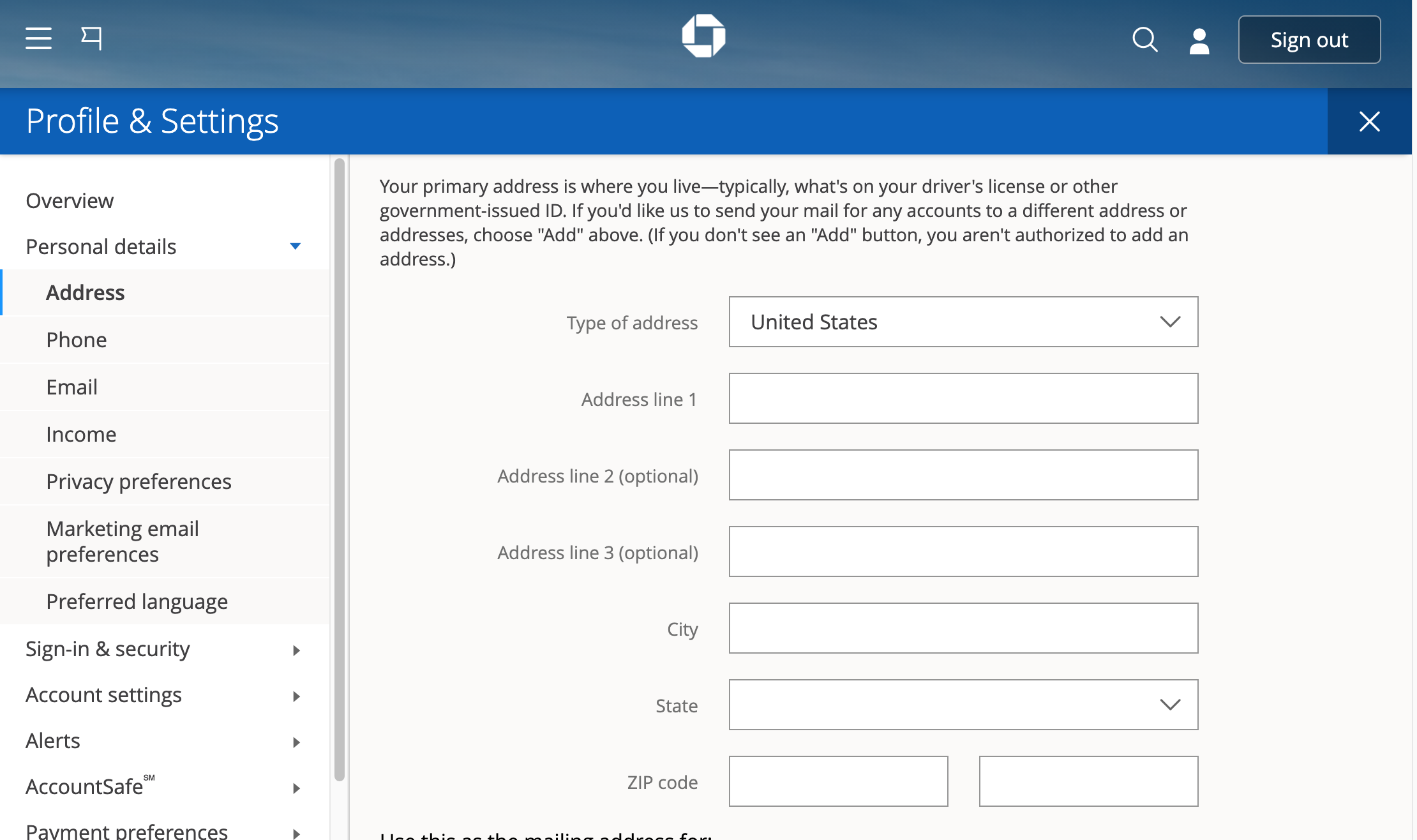
- Navigate to Profile & Settings: Once logged in, look for your name or an icon representing your profile, typically in the top right corner of the page. Click on it to reveal a dropdown menu. Select “Profile & Settings” or “My Profile.”
- Find Contact Information: Within the Profile & Settings section, you should see categories like “Contact Information,” “Addresses,” or “Personal Details.” Click on the relevant section.
- Edit Address: Locate your current billing address and click on an “Edit” or “Change” button next to it.
- Enter New Address: Carefully enter your new street address, apartment number, city, state, and ZIP code. Double-check for any typos.
- Verify and Confirm: Chase may prompt you to verify your identity, possibly through a one-time code sent to your phone or email. Review the new address for accuracy one last time before confirming the change. You will typically receive an email confirmation once the update is processed.
Step-by-step Guide for Business Accounts:
For business accounts, the process is similar but may have additional verification steps or require specific roles/permissions to make changes.
- Log In to Business Online: Access your Chase Business Online account at www.chase.com/business.
- Access Business Profile: Navigate to “Customer Service” or “Account Management” sections. Look for “Profile & Settings” or “Manage Business Profile.”
- Update Contact Details: Find the “Business Information” or “Contact Information” section where the business address is listed.
- Edit and Confirm: Enter the new business address and follow any additional prompts for verification, which might include specific business account security questions or require an authorized signer’s approval.
Security Considerations for Online Changes:
Always ensure you are on the official Chase website (check the URL and look for the padlock icon). Avoid clicking links from suspicious emails. Use strong, unique passwords and consider enabling two-factor authentication for an added layer of security.
Via the Chase Mobile App
The Chase Mobile App offers a convenient way to manage your accounts on the go, including updating your address.
Steps for Mobile App Users:
- Open and Log In: Launch the Chase Mobile App on your smartphone or tablet and log in using your credentials, biometric ID, or PIN.
- Access Profile: Tap on the menu icon (usually three horizontal lines or a person icon) to open the main menu. Look for “Profile & Settings” or “My Info.”
- Select Address: Navigate to the “Contact Information” or “Addresses” section.
- Update Details: Tap on the existing billing address to edit it. Input your new address accurately.
- Review and Save: Confirm the changes. The app may require a security verification step before saving.
Advantages of Using the App:
The app provides a streamlined user experience, instant access, and often leverages mobile device security features for easier verification. It’s ideal for quick updates when you don’t have access to a computer.
By Phone with Chase Customer Service
If you prefer speaking to a representative or encounter issues online, calling Chase customer service is a reliable option.
When to Use This Method (Complex Cases, Security Concerns):
This method is particularly useful for complex situations, such as needing to update multiple accounts with different addresses, if you’re experiencing technical difficulties with the online platform, or if you have specific security concerns you wish to discuss directly with a representative. It’s also suitable for those less comfortable with online banking.
What Information to Have Ready:
Before calling, ensure you have your account numbers, your previous billing address, your new billing address, and personal identification information ready (e.g., date of birth, Social Security Number, answers to security questions). This will expedite the verification process.
Contact Numbers and Operating Hours:
You can find the appropriate contact numbers for Chase personal banking, business banking, or specific credit card products on the back of your card or on the official Chase website under the “Contact Us” section. General customer service lines typically operate extended hours or 24/7 for certain services.
In Person at a Chase Branch
For those who prefer face-to-face interaction or require assistance with sensitive or complex account changes, visiting a local Chase branch is an excellent choice.
Benefits of In-Person Assistance:
Visiting a branch allows you to speak directly with a banking professional who can guide you through the process, answer any questions, and ensure all changes are made correctly. This method offers an added layer of security and peace of mind, especially if you have other banking needs to address concurrently.
Required Documentation for Branch Visits:
When visiting a branch, you will typically need to bring:
- Valid Photo ID: A government-issued ID such as a driver’s license, state ID, or passport.
- Proof of New Address: Documents like a utility bill, lease agreement, or mortgage statement showing your new address.
- Your Chase Debit/Credit Card: For account verification.

Finding a Local Branch:
Use the “Find a Branch & ATM” locator tool on www.chase.com or via the Chase Mobile App to locate the nearest branch and check its operating hours.
What Happens After You Change Your Billing Address?
The process doesn’t end with simply submitting your new address. There are several post-update steps and considerations to be aware of to ensure a smooth transition and continuous account security.
Confirmation and Verification Process
After you initiate an address change, Chase will typically send a confirmation via email or postal mail to your new address to confirm the update. They might also send a notification to your old address as a security measure, informing you that an address change has been requested. It’s crucial to monitor these communications and report any discrepancies immediately. In some cases, especially for significant changes or if there are security flags, Chase may require additional verification, such as a phone call or a secure message within your online banking portal.
Updating Linked Services and Subscriptions
One of the most critical follow-up tasks is to update your billing address with any third-party services that use your Chase card for payments. This includes:
- Online Retailers: Amazon, eBay, etc.
- Subscription Services: Netflix, Spotify, gym memberships, software subscriptions.
- Utility Providers: Electricity, gas, internet, water, if using auto-pay with a Chase card.
- Digital Wallets: PayPal, Apple Pay, Google Pay, Samsung Pay.
- Automated Bill Payments: Any recurring payments set up directly with vendors using your Chase card information.
Failure to update these can lead to declined transactions, service interruptions, and the hassle of manually resubmitting payment information.
Receiving New Cards or Statements
Depending on the type of account and the nature of the change, Chase may issue a new card to your updated billing address, especially if your old card was nearing expiration or if the address change was accompanied by a reissuance. You should also start receiving your monthly statements and any other official correspondence at your new address within one or two billing cycles. Keep an eye out for these documents to ensure the change has been fully implemented.
Monitoring Your Account for Changes
Post-address change, it’s a good practice to closely monitor your Chase account activity for a few weeks. Check your online statements, transaction history, and any alerts. This helps in quickly identifying any unauthorized activity or signs that the address update might not have been fully processed across all Chase systems or linked third-party services. Early detection of issues can prevent larger financial problems.
Common Issues and Troubleshooting
While updating your address is generally straightforward, occasional issues can arise. Knowing how to troubleshoot these problems can save you time and frustration.
Address Verification Failures
Sometimes, the system might not accept your new address. This can happen if:
- Typographical Errors: A simple mistake in street name, number, or ZIP code.
- USPS Discrepancies: The address might not match the format recognized by the United States Postal Service (USPS) database.
- New Construction/Rural Addresses: Newly built properties or certain rural addresses may take time to be updated in national databases.
- P.O. Boxes: While Chase usually allows P.O. Boxes for mailing addresses, a physical address might be required for certain account types or services.
Ensure your address is entered exactly as recognized by official postal services. If problems persist, contact Chase customer service for manual assistance.
Delays in Update Processing
While online changes are often instant, sometimes there can be a delay of a few business days for the update to fully propagate across all systems, especially if manual review is required. If you’ve been waiting longer than a week and haven’t received confirmation or seen the change reflected in your profile, follow up with Chase customer service. Have the date and method of your original request handy.
Dealing with Fraudulent Activity Post-Change
If, after changing your address, you notice any suspicious activity on your account or receive notifications about changes you didn’t authorize, act immediately. This could indicate identity theft or a compromise of your account.
- Contact Chase Fraud Department: Use the dedicated fraud hotline (found on the back of your card or Chase’s website).
- Review Account Activity: Go through your transactions with the representative to identify all unauthorized charges.
- Change Passwords: Update your Chase online banking password and any other linked financial passwords immediately.
- File a Police Report: In cases of confirmed identity theft, filing a police report is often a necessary step for recovery.
Contacting Support for Persistent Problems
If you’ve exhausted the self-service options and troubleshooting tips, don’t hesitate to contact Chase customer support. Be prepared to clearly explain the issue, the steps you’ve already taken, and any relevant dates or confirmation numbers. Persistence is key, and documenting your interactions (who you spoke to, when, and what was discussed) can be very helpful.
Best Practices for Managing Your Financial Contact Information
Proactive management of your financial contact information is a cornerstone of sound personal finance and security.
Regular Review of Account Details
Make it a habit to periodically review your personal information on file with Chase and other financial institutions – perhaps once a year, or whenever you conduct a major transaction. Check your mailing address, phone numbers, and email addresses to ensure everything is current and accurate. This simple check can prevent future headaches.
Secure Record Keeping
Maintain a secure, organized record of all your important addresses, account numbers, and contact information. This isn’t just for your bank accounts but also for utilities, insurance, and other services. In a move, having this consolidated information makes the update process much smoother. Be cautious about where you store this sensitive data, opting for encrypted digital solutions or physically secured locations.
Understanding Chase’s Privacy Policy
Familiarize yourself with Chase’s privacy policy, which outlines how your personal information (including your address) is collected, used, shared, and protected. Understanding these policies empowers you to make informed decisions about your data and helps you recognize legitimate communications from the bank versus potential phishing attempts.
Proactive Communication with Your Bank
Don’t wait for a problem to arise. If you anticipate an address change, plan to update your information with Chase as soon as possible, ideally before you even officially move. Similarly, if you notice any unusual activity or have questions about your account details, reach out to Chase promptly. Proactive communication is a vital component of a healthy banking relationship and helps ensure your financial security.
In conclusion, updating your billing address with Chase is a straightforward but fundamentally important task. By understanding the reasons behind its necessity and utilizing the various methods available, you can safeguard your financial well-being, maintain accurate records, and ensure seamless access to all your banking services. Make it a priority, and manage your financial future with confidence.
aViewFromTheCave is a participant in the Amazon Services LLC Associates Program, an affiliate advertising program designed to provide a means for sites to earn advertising fees by advertising and linking to Amazon.com. Amazon, the Amazon logo, AmazonSupply, and the AmazonSupply logo are trademarks of Amazon.com, Inc. or its affiliates. As an Amazon Associate we earn affiliate commissions from qualifying purchases.