
In an increasingly digitized world, the ability to move money swiftly and securely between various platforms is paramount. Two titans in the digital payment arena, Venmo and Apple Pay, have fundamentally reshaped how we conduct transactions. Venmo, known for its social peer-to-peer payments, and Apple Pay, a leader in contactless mobile payments, both offer immense convenience. However, users often wonder about the direct interoperability between these services – specifically, “how to transfer Venmo to Apple Pay.” This article delves deep into the mechanics, limitations, and practical solutions for navigating these powerful financial technologies, providing a clear, insightful guide for the modern digital user.

Understanding the Ecosystems: Venmo and Apple Pay Fundamentals
Before exploring transfer methods, it’s crucial to grasp the distinct architectures and primary functionalities of Venmo and Apple Pay. While both facilitate digital payments, their core designs and operational philosophies differ significantly, influencing how they interact with each other and the broader financial landscape.
Venmo’s Core Functionality: Peer-to-Peer Payments and Digital Wallet
Venmo, a PayPal service, gained massive popularity through its intuitive platform for peer-to-peer (P2P) payments. Its social feed, allowing users to share payment notes and emojis, transformed financial transactions into an interactive experience. At its heart, Venmo operates as a digital wallet. Users can receive money into their Venmo balance, send funds to others, or make payments to participating merchants.
Key features include:
- Venmo Balance: Funds received from other users or added from a linked bank account reside here.
- Linked Bank Accounts/Debit Cards: Essential for funding payments, withdrawing balances, or adding money.
- Venmo Debit Card/Credit Card: Physical cards linked to your Venmo balance or line of credit, allowing spending anywhere Mastercard is accepted.
- Merchant Payments: Paying businesses directly through the Venmo app or by scanning QR codes.
Venmo’s strength lies in its simplicity for immediate, often casual, money transfers between individuals. The emphasis is on convenience and speed for internal network transactions.
Apple Pay’s Role: Contactless Payments and Wallet Integration
Apple Pay, conversely, is not a standalone digital wallet in the same vein as Venmo but rather a secure mobile payment and digital wallet service by Apple. It allows users to make payments in person, in apps, and on the web using an iPhone, Apple Watch, iPad, or Mac. Apple Pay works by securely storing your credit, debit, and prepaid card information within the Wallet app, leveraging NFC (Near Field Communication) technology for contactless transactions.
Central to Apple Pay are:
- Apple Wallet: The secure hub where users store digital versions of their cards, boarding passes, loyalty cards, and even car keys.
- Tokenization: A critical security feature where actual card numbers are replaced with a unique, encrypted “device account number” during transactions, enhancing privacy and security.
- Apple Cash: A digital debit card within Apple Wallet that allows users to send and receive money via Messages (iMessage) and use the balance for Apple Pay purchases. It acts as an intermediary, much like a traditional bank account or prepaid card.
Apple Pay’s primary value proposition is security and convenience for physical and digital merchant transactions, leveraging existing bank accounts and credit cards rather than holding its own transferable balance (apart from Apple Cash).
The Direct Transfer Conundrum: Why Direct Venmo-to-Apple Pay Isn’t a Feature
Given the convenience of both platforms, it’s a common misconception that funds can be directly “transferred” from a Venmo balance into Apple Pay. However, a direct conduit for moving money from a Venmo balance to your Apple Pay wallet (specifically, to add funds to Apple Cash or link it as a direct payment method within Apple Pay) does not natively exist. This limitation stems from fundamental architectural differences and security protocols.
Architectural Differences and Security Protocols
Venmo operates as a proprietary peer-to-peer payment network with an associated digital wallet. Funds in your Venmo balance are held within Venmo’s system until you explicitly withdraw them to a linked bank account or spend them using a Venmo card.
Apple Pay, on the other hand, is a payment facilitator that securely digitizes and stores existing payment methods (credit cards, debit cards, prepaid cards, and Apple Cash, which functions like a debit card). When you use Apple Pay, you’re not spending money from Apple Pay; you’re spending money via Apple Pay from one of the linked cards in your Wallet.
The primary reasons for the lack of direct integration include:
- Closed Systems: Both platforms prioritize security and user experience within their own ecosystems. Integrating direct fund transfers would require complex API development, extensive security audits, and potential regulatory hurdles.
- Payment Gateway vs. Digital Wallet: Apple Pay acts as a secure payment gateway for existing cards, whereas Venmo functions as a digital wallet that holds funds. These are distinct operational models.
- Focus on Existing Financial Infrastructure: Apple Pay is designed to leverage your existing banking relationships. It doesn’t aim to become a bank itself (though Apple Cash functions similarly to a prepaid debit card backed by Green Dot Bank). Venmo, while not a bank, holds user balances, operating more akin to a payment institution.
The Concept of Digital Wallets and Payment Gateways
Understanding the distinction between a “digital wallet” that holds funds (like Venmo, or PayPal, or even a traditional bank account) and a “payment gateway” or “mobile payment service” that securely transmits existing payment information (like Apple Pay, Google Pay, or Samsung Pay) is key.
Venmo is a digital wallet that can hold funds. Apple Pay facilitates payments using cards stored in the Apple Wallet; Apple Cash is a digital wallet within Apple Pay. The challenge lies in Venmo not being a recognized direct funding source for Apple Cash or a standard bank account that can be directly linked and verified by Apple Pay as an underlying payment method in the same way a traditional bank’s debit card would be.
Navigating the Indirect Route: Methods to Bridge Venmo and Apple Pay
While a direct transfer button doesn’t exist, there are several effective indirect methods to move funds from your Venmo balance to where they can be utilized by Apple Pay. These methods typically involve leveraging a traditional bank account or a Venmo-issued card as an intermediary.
Method 1: Venmo to Bank Account, then Bank Account to Apple Cash/Debit Card
This is the most common and straightforward method, utilizing your linked bank account as the bridge.
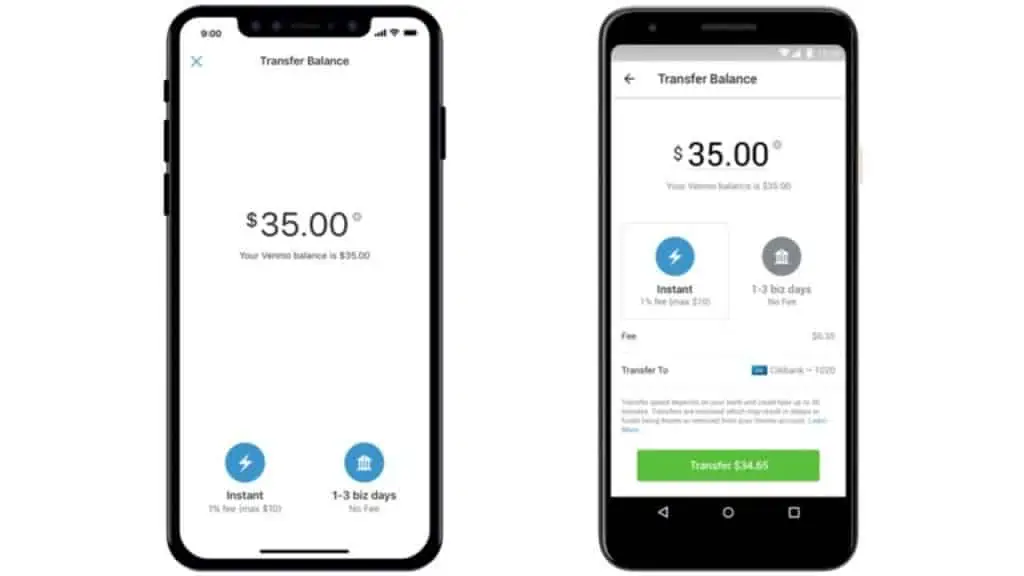
Detailed Steps for Venmo Withdrawal:
- Open the Venmo App: Log in to your Venmo account.
- Access Your Balance: Tap the “Me” tab (your profile icon or “You”) at the bottom of the screen. Your Venmo balance will be displayed.
- Initiate Transfer: Tap “Transfer Balance” or “Manage Balance” and then select “Transfer to Bank.”
- Choose Transfer Amount: Enter the amount you wish to transfer from your Venmo balance.
- Select Transfer Speed:
- Instant Transfer: Funds arrive in your linked bank account within minutes (usually less than 30). Venmo typically charges a fee (e.g., 1.75% with a minimum fee of $0.25 and a maximum fee of $25.00 for consumer accounts).
- Standard Transfer: Funds typically arrive in 1-3 business days and are free of charge.
- Confirm Bank Account: Ensure the correct linked bank account is selected. If not, you may need to add or select a different one.
- Confirm Transfer: Review the details and confirm the transfer.
Once the funds are in your traditional bank account, you can then proceed to make them available for Apple Pay.

Detailed Steps for Adding Funds to Apple Cash or Linking Bank/Debit Card to Apple Pay:
Once the money is in your traditional bank account:
Option A: Add Funds to Apple Cash (for sending money via Messages or spending directly via Apple Pay):
- Open Wallet App: Open the Wallet app on your iPhone.
- Select Apple Cash Card: Tap on your Apple Cash card.
- Tap More Button: Tap the “More” button (the three dots icon) in the top right corner.
- Add Money: Select “Add Money.”
- Enter Amount: Enter the desired amount to add to your Apple Cash balance.
- Choose Funding Source: Select the bank account or debit card that the Venmo funds were transferred to as your funding source. If it’s not already linked, you may need to add it via the Wallet app settings.
- Confirm: Authenticate with Face ID, Touch ID, or passcode.
Option B: Use your Bank’s Debit Card (linked to the same bank account) directly with Apple Pay:
If your bank’s debit card is already added to Apple Pay (which it likely is if you’re using Apple Pay regularly), then once the Venmo funds are in your bank account, you can simply use Apple Pay with that debit card. Any transactions made via Apple Pay will draw from your bank account, which now contains the funds originally from Venmo.
Method 2: Venmo Debit Card to Apple Pay (If Applicable)
If you have a Venmo Debit Card, this method offers a more direct way to use your Venmo balance with Apple Pay-enabled terminals. The Venmo Debit Card is linked directly to your Venmo balance and functions like a standard Mastercard debit card.
Explanation of the Venmo Debit Card:
The Venmo Debit Card allows you to spend your Venmo balance anywhere Mastercard is accepted, online or in physical stores. It effectively externalizes your Venmo balance, making it spendable outside the immediate Venmo app environment.
Steps to Add a Venmo Debit Card to Apple Pay:
- Open Wallet App: Open the Wallet app on your iPhone.
- Tap Add Button: Tap the “+” button in the top right corner to add a new card.
- Select Debit or Credit Card: Choose “Debit or Credit Card.”
- Follow On-Screen Instructions: You can either use your camera to scan the card details or manually enter the card number, expiration date, and security code (CVV) of your Venmo Debit Card.
- Verification: Your bank (PNC Bank, which issues the Venmo Debit Card) may require you to verify the card. This typically involves receiving a code via text message or email, or a phone call.
- Card Added: Once verified, your Venmo Debit Card will appear in your Apple Wallet and can be used with Apple Pay.
With your Venmo Debit Card added to Apple Pay, you can now use Apple Pay at contactless terminals, and the transactions will draw directly from your Venmo balance. This method is particularly useful for those who frequently use their Venmo balance for everyday spending.
Security, Speed, and Fees: Optimizing Your Digital Transfers
Understanding the nuances of digital payment systems involves more than just knowing the steps; it also requires an awareness of security implications, transfer speeds, and associated costs.
Understanding Transfer Speeds and Associated Costs (Instant vs. Standard)
- Standard Transfers (Venmo to Bank): These transfers are generally free but take 1-3 business days. This delay is due to traditional banking clearing processes (ACH network). It’s the most cost-effective option for non-urgent transfers.
- Instant Transfers (Venmo to Bank): For immediate access to funds, Venmo offers instant transfers to linked debit cards (or bank accounts via debit card rails) for a fee (typically 1.75%, min $0.25, max $25.00). The speed is crucial for time-sensitive needs, but the fee is a consideration.
- Apple Cash Funding: Adding money to Apple Cash from a debit card is usually instant. Adding from a bank account can take 1-3 business days. Most debit cards are instant.
When planning your transfers, assess the urgency against the cost. For regular budgeting or non-critical expenses, standard transfers are economical. For immediate needs, the instant transfer fee is the trade-off for convenience.
Best Practices for Digital Security in Transactions
Digital security is paramount when dealing with financial transactions. Both Venmo and Apple Pay employ robust security measures, but user vigilance is also key.
- Strong Passwords/Authentication: Always use strong, unique passwords for Venmo and enable multi-factor authentication (MFA). Apple Pay leverages biometric authentication (Face ID/Touch ID) or your device passcode for every transaction, adding a strong layer of security.
- Monitor Account Activity: Regularly review your transaction history on both Venmo and in your Apple Wallet/bank statements to detect any unauthorized activity promptly.
- Beware of Phishing: Be wary of suspicious emails or messages asking for personal or financial information. Venmo and Apple will never ask for your password or sensitive details via unsolicited communications.
- Secure Devices: Keep your devices’ operating systems and apps updated to ensure you have the latest security patches. Use passcodes/biometrics to lock your devices.
- Public Wi-Fi Caution: Avoid conducting sensitive financial transactions over unsecured public Wi-Fi networks.
Potential Limitations and Troubleshooting Tips
- Linked Accounts: Ensure your bank account and debit cards are correctly linked and verified with both Venmo and Apple Pay/Apple Cash. Outdated information or verification issues can cause transfer failures.
- Transfer Limits: Both Venmo and Apple Cash have transfer limits (daily, weekly, monthly). Be aware of these limits, especially for large transfers.
- Bank Processing Times: Standard transfers are subject to bank processing times, which do not include weekends or holidays. Plan accordingly.
- Card Compatibility: While most major debit cards work with Apple Pay, ensure your specific card is supported by Apple Pay and that the issuing bank is compatible.
- Troubleshooting: If a transfer fails, first check your internet connection, then verify account details and available balance. If problems persist, contact Venmo or your bank’s customer support. For Apple Pay issues, Apple Support is the primary resource.
The Future of Digital Payments: Interoperability and User Experience
The digital payment landscape is constantly evolving, driven by technological advancements and consumer demand for greater convenience and integration. While direct Venmo-to-Apple Pay transfers aren’t a reality today, the industry trends suggest a push towards more seamless interoperability.
Evolving Payment Standards and Platform Integration
The development of new payment standards and open banking initiatives could pave the way for more direct integrations between disparate financial apps. APIs (Application Programming Interfaces) are becoming more sophisticated, allowing different platforms to communicate and exchange data securely. Regulatory changes may also encourage greater interoperability among payment service providers, leading to a more unified user experience.
Imagine a future where you could directly select your Venmo balance as a funding source within your Apple Wallet, much like a traditional debit card. This level of integration would simplify digital money management, reducing the need for intermediary steps.
The Drive Towards a Unified Digital Wallet Experience
Consumers increasingly desire a single, intuitive platform to manage all their financial activities – from sending and receiving money to budgeting, investing, and making purchases. This demand is propelling innovation towards “super apps” or highly integrated digital wallets that consolidate various financial services.
As Venmo continues to expand its merchant payment capabilities and Apple Pay enhances its peer-to-peer (via Apple Cash) and broader financial management features, the lines between different types of financial tech services may blur further. The underlying goal for tech companies in this space is to create an ecosystem that is so frictionless and comprehensive that users rarely need to leave their preferred app for financial tasks.
Understanding the “how-to” of current digital transactions is not just about mastering a function; it’s about navigating the current state of financial technology and appreciating the path toward a more integrated, efficient, and user-friendly digital financial future. For now, leveraging the indirect methods outlined provides a robust and secure way to bridge Venmo and Apple Pay, ensuring your funds are where you need them, when you need them.
aViewFromTheCave is a participant in the Amazon Services LLC Associates Program, an affiliate advertising program designed to provide a means for sites to earn advertising fees by advertising and linking to Amazon.com. Amazon, the Amazon logo, AmazonSupply, and the AmazonSupply logo are trademarks of Amazon.com, Inc. or its affiliates. As an Amazon Associate we earn affiliate commissions from qualifying purchases.