
In an increasingly digital world, the way we manage and transfer money has evolved dramatically. Gone are the days when cash and checks were the sole arbiters of everyday transactions. Today, mobile payment applications have taken center stage, offering unparalleled convenience, speed, and security. Among these, Venmo stands out as a pioneering platform, transforming peer-to-peer payments and integrating itself into the broader digital commerce landscape. This guide delves deep into the technical intricacies and user functionalities of Venmo, offering a comprehensive tutorial on how to leverage this powerful application for all your payment needs. From initial setup to advanced features, we’ll explore the technology that makes Venmo an indispensable tool in the modern digital wallet.
Understanding Venmo: Your Digital Wallet Companion
At its core, Venmo is more than just a payment app; it’s a social financial platform designed to simplify money transfers between individuals and businesses. Its intuitive interface and robust backend technology have made it a favorite for millions seeking a frictionless way to handle payments.
What is Venmo and How Does It Work?
Venmo, a service owned by PayPal, operates primarily as a mobile payment service that facilitates instant money transfers between users. The fundamental technology behind Venmo involves linking a user’s account to their bank account, debit card, or credit card. When a payment is initiated, Venmo acts as an intermediary, deducting funds from the sender’s chosen source and crediting them to the recipient’s Venmo balance. This process often occurs in real-time, especially for standard transfers, with instant transfers available for a small fee.
The app is built on a robust server-client architecture, where user actions on the mobile application (client) communicate with Venmo’s secure servers. These servers manage user accounts, transaction data, payment processing, and security protocols. Each transaction is encrypted and verified, ensuring data integrity and user privacy. A distinguishing feature of Venmo’s technology is its optional social feed, which displays anonymized or personalized transaction descriptions (without showing amounts) among friends, adding a unique social layer to financial interactions. This feature, while optional, underscores the app’s design philosophy of making money transfers less sterile and more integrated into daily social exchanges.
Why Venmo Has Revolutionized Casual Payments
Venmo’s rise to prominence can be attributed to its ability to solve common pain points associated with casual money transfers. Before Venmo, splitting a dinner bill, collecting money for a group gift, or reimbursing a friend often involved awkward exchanges of cash or slow bank transfers. Venmo streamlined these interactions through its mobile-first approach and user-friendly design.
Technologically, Venmo’s innovation lies in its seamless integration of several features:
- Instantaneity: The ability to send and receive money almost instantly minimizes waiting times.
- Simplicity: The app’s design prioritizes ease of use, with payment flows that are logical and quick to complete.
- Group Functionality: Features like bill splitting and payment requests facilitate complex group financial arrangements with minimal effort.
- Broad Accessibility: As a mobile app, Venmo is available anywhere a smartphone has internet access, making it incredibly accessible for a wide user base.
These technological advantages collectively created a new paradigm for casual payments, making them faster, less cumbersome, and more socially integrated.
Getting Started: Account Setup and Security Basics
Initiating your Venmo journey is straightforward, but it requires adherence to essential security protocols to safeguard your digital assets.
- Download the App: Begin by downloading the Venmo app from your device’s app store (iOS App Store or Google Play Store).
- Sign Up: Create an account using your email address, phone number, or Facebook profile. You’ll need to verify your identity, typically through a mobile number and email.
- Link a Funding Source: To send money, you must link a funding source. This is usually a U.S. bank account (via instant verification or micro-deposits) or a debit card. You can also link a credit card, though these often incur a 3% transaction fee for payments. Venmo’s secure linking technology encrypts your financial details, ensuring they are not stored directly on your device.
- Set Up a PIN/Biometrics: For enhanced security, configure a PIN or enable biometric authentication (fingerprint or facial recognition) for accessing the app and authorizing payments. This adds an extra layer of defense against unauthorized access to your account.
- Enable Multi-Factor Authentication (MFA): Strongly recommended, MFA requires a second form of verification (e.g., a code sent to your phone) in addition to your password, significantly reducing the risk of account compromise. Venmo’s security architecture relies on industry-standard encryption protocols (like TLS) to protect data in transit and at rest, alongside sophisticated fraud detection algorithms.
The Core Mechanics: Sending and Receiving Payments
The fundamental utility of Venmo revolves around its ability to send and receive money effortlessly. Understanding these core mechanics is key to harnessing the app’s full potential.
Making a Direct Payment to Friends or Businesses
Sending money via Venmo is a highly streamlined process designed for efficiency:
- Open the App and Tap the Pay/Request Icon: This is typically a central button or icon within the app’s navigation.
- Enter Recipient Details: You can find recipients by their Venmo username, phone number, or email address. If they are a contact in your phone, Venmo can often suggest them. For businesses, you might scan a Venmo QR code or select them from a list of participating merchants.
- Enter the Amount: Specify the exact amount you wish to send.
- Add a Note (Optional but Recommended): Include a brief description of the payment (e.g., “Dinner,” “Rent,” “Concert Tickets”). This helps both parties keep track of transaction purposes.
- Choose Privacy Setting: Venmo offers three privacy options:
- Public: Visible to all Venmo users on the public feed.
- Friends: Visible only to your Venmo friends.
- Private: Visible only to you and the recipient.
This feature is unique to Venmo, allowing users to control the social visibility of their transactions.
- Select Funding Source: Confirm which linked bank account, debit card, or Venmo balance you want to use. Remember, credit card payments to friends incur a 3% fee.
- Confirm and Send: Review all details carefully before tapping the “Pay” button. Once confirmed, the payment is typically processed immediately.
The underlying technology ensures that funds are debited and credited with cryptographic security, linking the transaction to unique identifiers for both sender and receiver, and logging it in both user accounts.
Understanding Payment Sources and Transaction Fees
Venmo offers flexibility in how you fund your payments, each with its own technical implications and potential fee structure:
- Venmo Balance: Funds held within your Venmo account from received payments are the primary, fee-free payment source. Payments from your balance are instantaneous.
- Linked Bank Account: Paying with a linked U.S. bank account via ACH transfer is also free. However, initially linking a bank account may require micro-deposits for verification, a standard security measure to confirm account ownership.
- Debit Card: Using a debit card linked to your account for payments is generally free. The payment processing typically involves standard debit card network transactions, which are integrated into Venmo’s backend.
- Credit Card: While you can link a credit card, Venmo imposes a 3% fee for sending money using a credit card. This fee covers the higher processing costs associated with credit card transactions. This fee does not apply when using a credit card for Venmo’s specific merchant payments (where Venmo charges the merchant instead).
Additionally, withdrawing funds from your Venmo balance to your bank account has two options:
- Standard Transfer: Free, typically takes 1-3 business days. This uses standard ACH batch processing.
- Instant Transfer: For a 1.75% fee (minimum $0.25, maximum $25), funds are transferred to your linked bank account or eligible debit card within minutes. This leverages real-time payment network capabilities.
Requesting Money and Splitting Bills Effortlessly
Venmo also simplifies the process of receiving money:
- Requesting Money: Similar to sending, you tap the “Pay/Request” icon, select the person you want to request from, enter the amount, add a note, and tap “Request.” The recipient receives a notification and can then approve or decline the request. This feature is essentially an inverse payment initiation, designed to reduce friction in chasing debts.
- Splitting Bills: Venmo excels at group payments. When initiating a request, you can add multiple recipients and choose to “split the bill.” The app will then divide the total amount equally among the selected individuals, sending each a request for their share. This sophisticated backend calculation and distribution of requests automate a historically tedious task, showcasing Venmo’s technical prowess in handling multi-party transactions.

Beyond Peer-to-Peer: Venmo’s Expanding Ecosystem
Venmo has evolved significantly beyond its initial peer-to-peer roots, integrating into broader commercial environments and offering diverse financial tools.
Paying at Participating Merchants and Online Stores
Recognizing the potential of its vast user base, Venmo has expanded its utility to enable payments to businesses:
- Venmo QR Codes: Many small businesses and vendors now display Venmo QR codes. Scanning these codes within the app instantly pulls up the business’s profile, pre-populating payment details and streamlining transactions in physical retail settings. This utilizes standard QR code scanning technology integrated into the Venmo app.
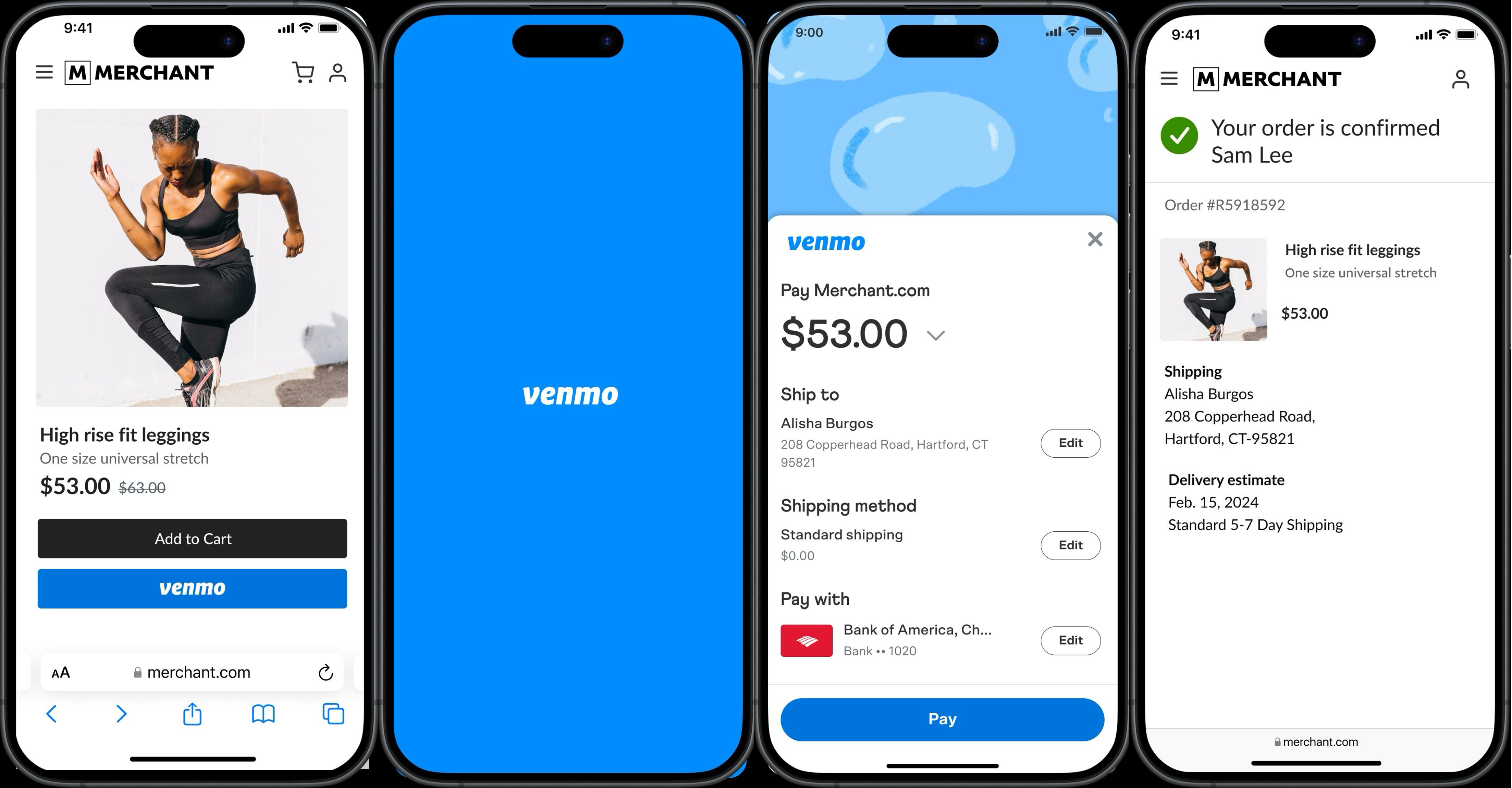
- Venmo Checkout Button: For online shopping, many e-commerce sites now offer “Pay with Venmo” as a checkout option. When selected, it redirects the user to the Venmo app (or web interface) to authorize the payment securely, pulling funds from their Venmo balance or linked funding source. This integration involves APIs (Application Programming Interfaces) that allow Venmo’s payment processing system to communicate directly with the merchant’s e-commerce platform.
- In-App Purchases: Some apps allow direct payment through Venmo for services or goods, further embedding Venmo into the digital economy.
These integrations transform Venmo from a simple money transfer app into a versatile payment gateway, leveraging its established user network and payment infrastructure.
The Venmo Debit Card and Credit Card
Venmo has also introduced physical and virtual card options, extending its digital functionality into the physical world:
- Venmo Debit Card: This Mastercard debit card is directly linked to your Venmo balance. It allows you to spend funds from your Venmo balance anywhere Mastercard is accepted, offline and online. If your Venmo balance is insufficient, it can automatically draw from a linked bank account. The card also offers cashback rewards for certain categories. This integrates Venmo’s digital balance with traditional card network infrastructure.
- Venmo Credit Card: Issued by Synchrony Bank, the Venmo Credit Card offers customized cash back rewards on your top spending categories. It also integrates directly with the Venmo app, allowing users to track spending, view rewards, and manage their account all within the familiar Venmo interface. This represents a further expansion into traditional banking products, leveraging Venmo’s strong user engagement and tech-forward approach.
Crypto on Venmo: Exploring Digital Assets
In a move reflecting the growing interest in blockchain technology and digital currencies, Venmo has introduced the ability to buy, hold, and sell cryptocurrencies directly within the app. Users can purchase Bitcoin, Ethereum, Litecoin, and Bitcoin Cash with as little as $1. This feature utilizes external crypto exchange partners, integrating their trading and custody infrastructure securely within the Venmo ecosystem. It allows Venmo users to dip their toes into the world of digital assets without needing to navigate complex dedicated crypto exchanges, showcasing Venmo’s adaptability to emerging financial technologies.
Navigating Common Scenarios and Troubleshooting
Despite its robust design, users might encounter specific situations or require troubleshooting. Venmo provides features and support to address these.
Addressing Payment Issues and Disputes
While Venmo transactions are generally smooth, issues can arise:
- Cancelling a Payment: If you sent money to the wrong person or amount, you can only cancel a payment if the recipient has not yet claimed it (e.g., if they are not a Venmo user yet). Otherwise, you must request the recipient to send the money back. Venmo’s immediate transfer technology means funds are quickly moved, making cancellations difficult once processed.
- Wrong Recipient: Double-check usernames before sending. If a payment goes to the wrong person, immediate communication with the recipient is often the fastest solution.
- Fraud Protection: Venmo employs sophisticated fraud detection algorithms and security teams. If you suspect unauthorized activity, report it immediately through the app or website. Venmo’s technology monitors for suspicious patterns, unusual login locations, and transaction anomalies.
- Disputes: For unauthorized transactions or merchant disputes, Venmo offers a dispute resolution process. This typically involves submitting details and evidence, after which Venmo’s support team investigates, often in coordination with payment networks (for card transactions).
Managing Privacy Settings and Transaction History
Venmo provides tools for users to manage their transaction data and privacy:
- Privacy Settings: Users can adjust the default privacy for future transactions to Public, Friends, or Private. They can also change the privacy setting for individual past transactions. This granular control over data visibility is a key feature of Venmo’s social design.
- Reviewing Past Transactions: The app maintains a detailed transaction history in the “Me” tab, allowing users to review all sent and received payments, requests, and activity. This digital ledger serves as a personal financial record within the app.
- Data Management: Users can access and manage their account information, including linked funding sources, notification preferences, and privacy settings, all within the app’s settings menu.
International Payments: Limitations and Alternatives
It’s important to note a current technical limitation: Venmo is primarily designed for transactions within the United States.
- Geographic Restrictions: Both the sender and recipient must have U.S.-based bank accounts, phone numbers, and be physically located within the U.S. to use Venmo. This is due to regulatory compliance and network agreements.
- Cross-Border Payment Technology: For international payments, users will need to explore alternative services that specialize in cross-border remittances, such as PayPal (Venmo’s parent company), Wise (formerly TransferWise), or other international money transfer platforms, which are built on different global payment network infrastructures.
The Future of Digital Payments with Venmo
Venmo continues to evolve, reflecting broader trends in financial technology and user expectations. Its journey from a simple peer-to-peer app to a comprehensive digital payment platform is indicative of its adaptability and commitment to innovation.
Emerging Features and Innovations
The future of Venmo will likely see continued expansion of its technological capabilities:
- Enhanced AI and Machine Learning: Further integration of AI for more personalized user experiences, smarter fraud detection, and potentially automated financial insights.
- Broader Merchant Integration: Expect Venmo to deepen its partnerships with more businesses, making it an even more ubiquitous payment option online and in physical stores.
- Advanced Security Protocols: As cyber threats evolve, Venmo will continue to implement cutting-edge encryption, authentication methods, and threat detection systems to protect user data and funds.
- Integration with Open Banking: As open banking initiatives mature, Venmo may offer more seamless integration with various financial institutions, providing users with a more holistic view of their finances through the app.
- Web3 and Blockchain Exploration: Beyond simple crypto buying, Venmo may explore deeper integrations with decentralized finance (DeFi) or NFT marketplaces, leveraging blockchain technology for new financial services.
Best Practices for Secure and Efficient Venmo Usage
To maximize your Venmo experience while maintaining robust security:
- Always Double-Check Recipient Details: Before sending any money, verify the username, phone number, or email to ensure you are paying the correct person.
- Use Strong, Unique Passwords and MFA: Protect your account with complex passwords and enable multi-factor authentication.
- Be Mindful of Privacy Settings: Choose the “Private” setting for most personal transactions unless you specifically want them to be public or visible to friends.
- Monitor Your Account Activity: Regularly review your transaction history for any unauthorized activity.
- Be Skeptical of Unsolicited Requests: Do not send money to strangers or respond to suspicious payment requests. Venmo is primarily for trusted individuals.
- Update the App Regularly: Keep your Venmo app updated to ensure you have the latest security patches and features.
Venmo has cemented its place as a cornerstone of the digital payment ecosystem. By understanding its underlying technology, core functionalities, and best practices, users can confidently navigate the world of seamless digital transactions, benefiting from the convenience and innovation Venmo brings to everyday finance. Its continued evolution promises an even more integrated and secure future for how we pay.
aViewFromTheCave is a participant in the Amazon Services LLC Associates Program, an affiliate advertising program designed to provide a means for sites to earn advertising fees by advertising and linking to Amazon.com. Amazon, the Amazon logo, AmazonSupply, and the AmazonSupply logo are trademarks of Amazon.com, Inc. or its affiliates. As an Amazon Associate we earn affiliate commissions from qualifying purchases.