
In an increasingly digital economy, tools that simplify personal finance management are invaluable. Among these, the Cash App Card stands out as a popular choice for millions seeking a convenient way to access and spend their digital funds. Linked directly to your Cash App balance, this prepaid debit card offers a seamless bridge between your digital wallet and everyday transactions, both online and in physical stores. However, for many, the initial step of understanding how to effectively fund this card can be a point of confusion.
This comprehensive guide aims to demystify the process, providing clear, actionable insights into various methods for adding money to your Cash App Card. By mastering these techniques, you can ensure your digital wallet is always adequately stocked, empowering you to manage your finances with greater flexibility and control. We’ll delve into everything from linking traditional bank accounts to leveraging direct deposits and even depositing physical cash, all within the framework of sound personal finance principles.
Understanding the Cash App Card and Its Utility
Before diving into the mechanics of funding, it’s crucial to grasp what the Cash App Card is and why it has become such a prominent financial tool. Essentially, it’s a free, customizable Visa debit card directly associated with your Cash App balance. Unlike a traditional bank debit card that draws from a checking account, the Cash App Card spends directly from the funds you hold within your Cash App account. This distinction is vital for understanding how to manage your spending and deposits effectively.
What is the Cash App Card?
The Cash App Card functions as a prepaid debit card, allowing users to spend money stored in their Cash App balance wherever Visa cards are accepted. It provides the convenience of a traditional bank card without necessarily requiring a traditional bank account for all its functionalities. Users can design their own card with various colors and even add custom drawings, adding a personal touch to a financial instrument. This blend of personalization and utility has contributed significantly to its widespread adoption, especially among demographics seeking alternatives to conventional banking.
Why Use a Cash App Card?
The utility of the Cash App Card extends beyond mere spending. It serves several crucial financial purposes:
- Convenience and Accessibility: It offers instant access to funds received via Cash App, whether from peer-to-peer transfers or direct deposits. This makes it an excellent tool for managing everyday expenses, online purchases, and bill payments without needing to transfer money to a separate bank account first.
- Budgeting Aid: For some, using a Cash App Card helps in budgeting. By only spending what’s loaded onto the app, users can create a psychological barrier against overspending from their primary bank accounts. It acts as a dedicated spending wallet.
- Alternative Financial Tool: For individuals who are unbanked or underbanked, the Cash App Card provides a crucial gateway to the digital financial ecosystem, offering a means to receive payments, make purchases, and withdraw cash at ATMs (though ATM fees may apply).
- Instant Transactions: The ability to send and receive money almost instantly between Cash App users, and then immediately spend those funds via the card, streamlines financial interactions dramatically.
The Role of Your Cash App Balance
It cannot be overstated: your Cash App Card’s spending power is directly tied to your Cash App balance. Every transaction made with the card draws from this balance. Therefore, “putting money on your Cash App Card” is synonymous with “adding funds to your Cash App balance.” Understanding this fundamental connection is the first step toward effective money management within the Cash App ecosystem.
Primary Methods for Adding Money to Your Cash App Card
Funding your Cash App Card, by virtue of funding your Cash App balance, can be achieved through several convenient methods. Each method caters to different user preferences and financial setups, ensuring flexibility for almost everyone.
Linking a Bank Account
This is arguably the most common and straightforward method for adding significant funds to your Cash App. By securely linking your bank account, you enable direct transfers.
How to Link and Add Money:
- Navigate to the Banking Tab: Open your Cash App and tap the “Banking” tab (the house icon) on the home screen.
- Link Bank: Select “Link Bank” or “Add Bank.”
- Follow Prompts: Cash App uses Plaid, a secure third-party service, to connect to your bank. You’ll be asked to select your bank and log in using your online banking credentials. This process is encrypted and secure.
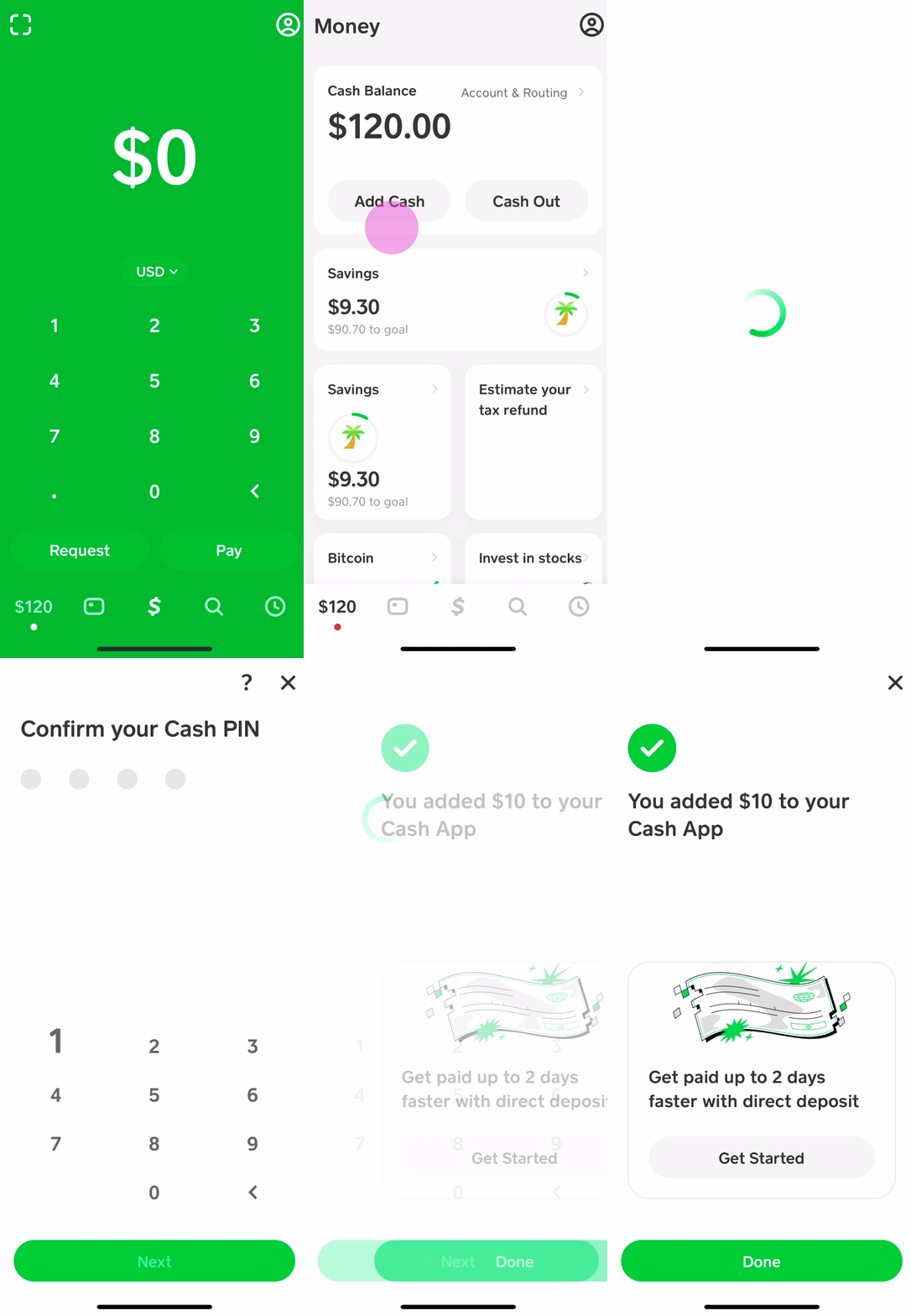
- Add Cash: Once your bank account is linked, go back to the “Banking” tab and tap “Add Cash.”
- Enter Amount: Input the desired amount you wish to add to your Cash App balance.
- Confirm: Confirm the transaction using your PIN or Touch ID.
Funds added from a linked bank account typically take 1-3 business days to settle, although Cash App often makes a portion of the funds available instantly. Instant Deposits from a linked bank account may incur a small fee.
Using a Debit Card
If you prefer not to link your full bank account, or if you need to add funds from an alternative source quickly, linking a debit card is an excellent option. This method often allows for faster access to funds compared to standard bank transfers.
How to Link and Add Money:
- Navigate to the Banking Tab: Tap the “Banking” tab in Cash App.
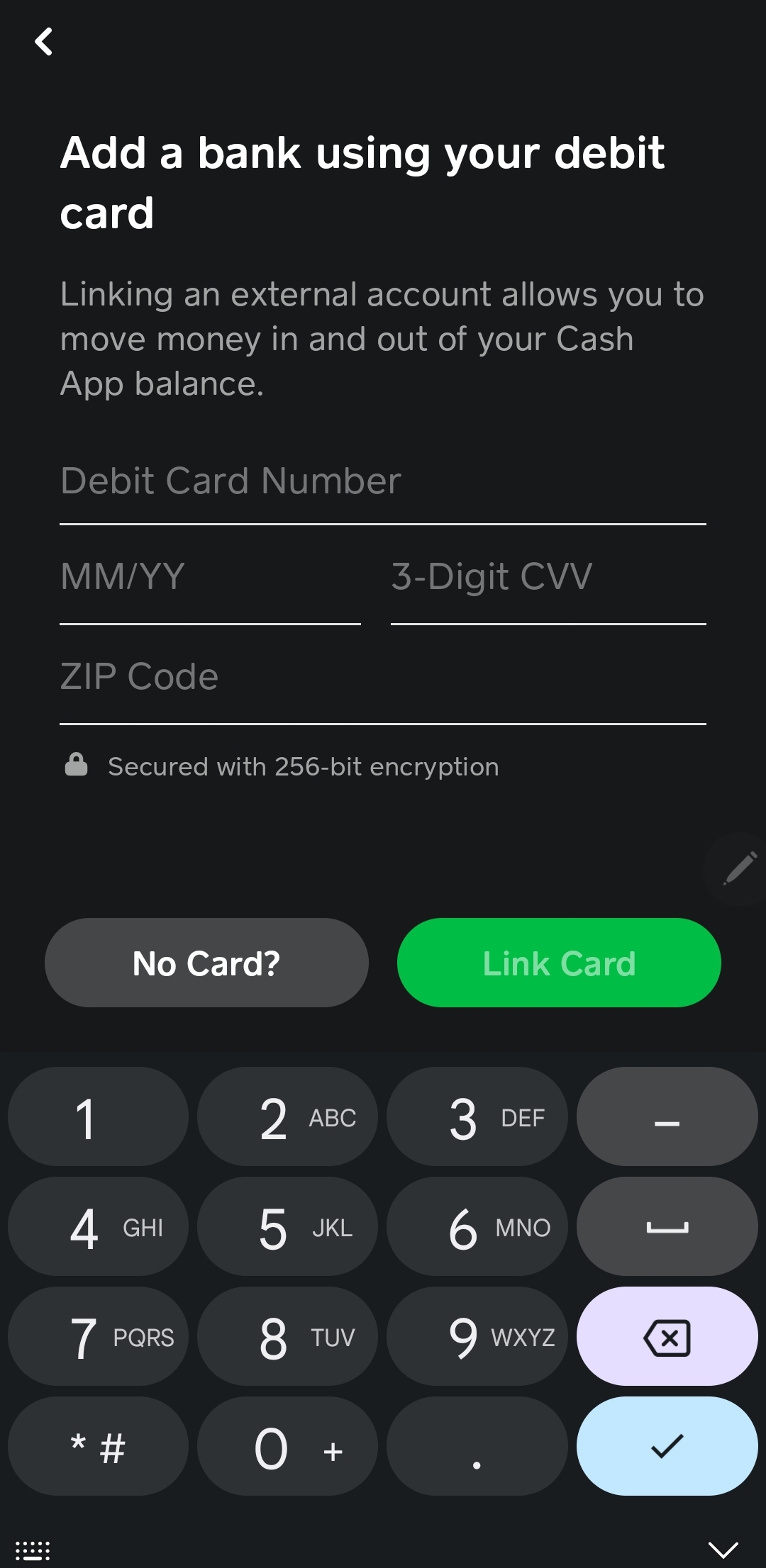
- Link Debit Card: Select “Link Debit Card” or “Add Card.”
- Enter Card Details: Input your debit card number, expiration date, CVV, and billing ZIP code.
- Add Cash: Once linked, go to the “Banking” tab and tap “Add Cash.”
- Enter Amount & Confirm: Enter the amount and confirm the transaction.
Funds added via a linked debit card are usually available instantly, which makes this a popular choice for urgent funding needs. Be mindful of any daily or weekly limits imposed by Cash App or your issuing bank.
Direct Deposit
For a more automated approach to funding, Cash App offers direct deposit functionality. This allows you to have your payroll, government benefits, or other recurring payments sent directly to your Cash App balance.
How to Set Up Direct Deposit:
- Access Direct Deposit Info: In Cash App, go to the “Banking” tab and select “Direct Deposit.”
- Find Account Details: You’ll see your Cash App routing number and account number.
- Provide to Payer: Give these details to your employer, government agency, or other payer. They will typically require you to fill out a direct deposit authorization form.
Once set up, funds will automatically arrive in your Cash App balance on your payday, making them immediately available for use with your Cash App Card. This method is highly convenient for managing regular income and can simplify personal budgeting by centralizing funds.
Receiving Money from Other Cash App Users
One of Cash App’s core functionalities is peer-to-peer (P2P) payments. Any money you receive from other Cash App users automatically gets added to your Cash App balance, making it instantly available on your Cash App Card.
How it Works:
- When someone sends you money via Cash App, it appears in your balance.
- You can also “Request” money from other users if they owe you funds. Once they send it, it’s instantly added to your balance.
This is a seamless way to fund your card, especially if you regularly receive money from friends, family, or clients who also use Cash App.
Alternative and Cash-Based Funding Options
While digital transfers are convenient, Cash App also recognizes the need for physical cash deposits, broadening its accessibility for users who handle cash regularly or prefer not to link bank accounts.
Depositing Cash at Retail Stores
Cash App partners with various retail stores, primarily through Green Dot Bank services, to allow users to deposit physical cash directly into their Cash App balance. This is a crucial feature for the unbanked or those who receive wages in cash.
How to Deposit Cash:
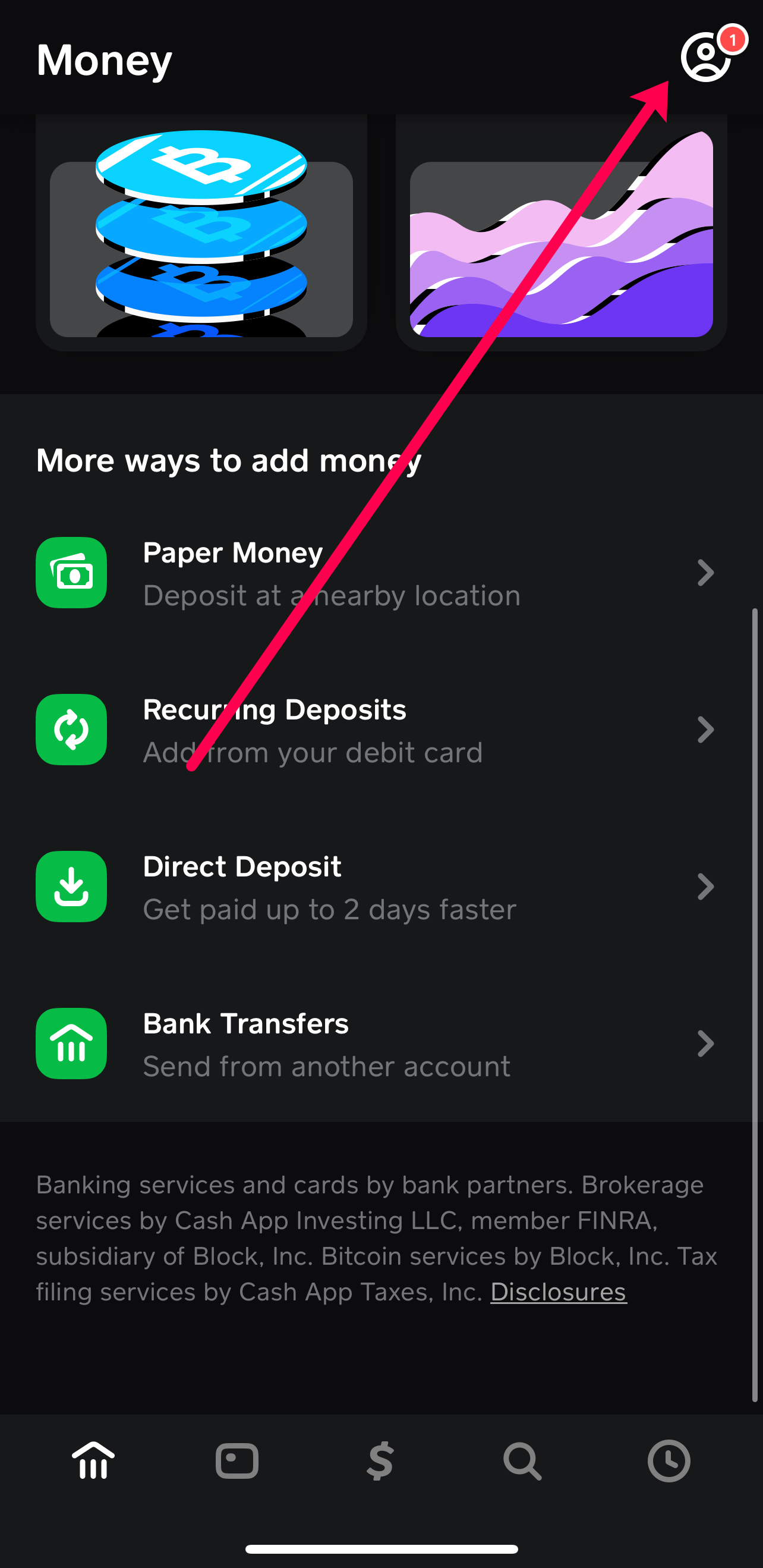
- Find a Location: Open Cash App, go to the “Banking” tab, select “Paper Money,” and tap “Show Map” to find nearby stores that accept Cash App deposits (e.g., Walmart, Walgreens, CVS, 7-Eleven).
- Generate Barcode: At the chosen retailer, inform the cashier you want to add money to your Cash App. They will usually ask for your phone to scan a unique barcode generated within your Cash App.
- Hand Over Cash: Give the cashier the cash amount you wish to deposit.
- Receive Confirmation: The funds are usually instantly added to your Cash App balance, and you’ll receive a digital receipt.
Important Considerations:
- Fees: Many retailers charge a small fee (typically around $1-$5) for this service.
- Limits: There are often daily and weekly limits on how much cash you can deposit.
- Availability: Not all retailers participate, so always check the in-app map.
This method bridges the gap between physical cash and digital funds, ensuring that even cash-reliant individuals can fully utilize their Cash App Card.
Managing Your Cash App Card Funds Effectively
Beyond simply adding money, effective management of your Cash App Card funds is key to leveraging its full potential as a financial tool. This involves understanding limits, prioritizing security, and using the app’s features for better financial oversight.
Understanding Deposit Limits and Fees
Cash App implements various limits on deposits, withdrawals, and spending to ensure security and comply with financial regulations. These limits can vary based on whether your account is verified (by providing your full name, date of birth, and the last four digits of your SSN).
- Deposit Limits: There are typically daily, weekly, and monthly limits on how much money you can add to your Cash App from external sources like bank accounts or cash deposits.
- Instant Deposit Fees: While standard bank transfers are free, opting for “Instant Deposit” when moving funds from your Cash App balance to an external bank account usually incurs a small fee (e.g., 0.5% to 1.75%). Adding cash from a debit card or via retail stores might also have fees.
Always check the most current limits and fees within the Cash App or on their official website, as these can change. Being aware of these parameters helps in planning your transactions efficiently.
Security Best Practices
Protecting your funds is paramount. Cash App, like any financial platform, requires users to adopt good security habits.
- Enable PIN/Touch ID/Face ID: Always secure your Cash App with a strong PIN, Touch ID, or Face ID to prevent unauthorized access.
- Monitor Transactions: Regularly review your transaction history within the app to spot any suspicious activity immediately.
- Be Wary of Scams: Cash App is a frequent target for scammers. Never share your PIN, sign-in code, or sensitive account information with anyone. Be skeptical of unsolicited requests for money or offers that seem too good to be true.
- Enable Notifications: Turn on notifications for all transactions to stay informed about money coming in and out of your account.
Troubleshooting Common Deposit Issues
Occasionally, you might encounter issues when trying to add money. Common problems and their solutions include:
- Declined Bank/Debit Card Transactions:
- Insufficient Funds: Ensure your linked bank account or debit card has enough money.
- Incorrect Information: Double-check card number, expiration date, CVV, and billing ZIP code.
- Bank Restrictions: Your bank might have security measures blocking the transaction; contact them directly.
- Cash App Limits: You might have hit your daily/weekly deposit limit on Cash App.
- Cash Deposit Issues:
- Store Participation: Ensure the store is a participating Cash App location.
- Barcode Issues: Sometimes the barcode might not scan correctly; ask the cashier to re-scan or try another register.
- Minimum/Maximums: Verify you are within the store’s acceptable cash deposit range.
If problems persist, contacting Cash App support directly through the app is always the best course of action.
The Broader Financial Implications of Digital Wallets
The Cash App Card, alongside other digital wallets, represents a significant shift in how individuals manage their personal finances. Its ease of funding and spending capability underscores several broader financial trends and benefits.
Empowerment for the Unbanked
For the estimated 4.5% of U.S. households that are unbanked, digital wallets like Cash App offer a vital pathway to participate in the digital economy. By providing features like direct deposit and cash-to-digital conversion, these tools allow individuals without traditional bank accounts to receive payments, make online purchases, and manage funds more efficiently, reducing reliance on costly check-cashing services or money orders.
Convenience in the Digital Economy
In an era dominated by e-commerce and digital transactions, the Cash App Card facilitates seamless engagement. It eliminates the need to carry large amounts of cash and simplifies online shopping, subscription payments, and person-to-person transfers, aligning perfectly with the demands of modern consumer behavior. This convenience not only saves time but also integrates financial management more smoothly into daily life.
Integration with Personal Finance Strategies
For financially savvy individuals, the Cash App Card can be integrated into broader personal finance strategies. Its direct link to an app balance makes it an excellent tool for specific budgeting categories (e.g., entertainment, dining out), allowing users to allocate a set amount of funds and track spending in real-time. This granular control over specific spending categories can be a powerful aid in achieving financial goals.
Conclusion
Funding your Cash App Card, which is essentially adding money to your Cash App balance, is a straightforward process with multiple flexible options designed to cater to a diverse user base. Whether you prefer the traditional route of linking a bank account or debit card, the convenience of direct deposit, the instant gratification of peer-to-peer transfers, or the accessibility of cash deposits at retail locations, Cash App provides the tools to keep your digital wallet ready for action.
By understanding these methods and adhering to best practices in security and financial management, you can effectively leverage your Cash App Card as a powerful component of your personal finance toolkit. It offers not just a means to spend, but a pathway to greater financial control, convenience, and inclusion in the ever-evolving digital economy. Mastering its funding mechanisms is the first step towards unlocking its full potential and simplifying your everyday financial life.
aViewFromTheCave is a participant in the Amazon Services LLC Associates Program, an affiliate advertising program designed to provide a means for sites to earn advertising fees by advertising and linking to Amazon.com. Amazon, the Amazon logo, AmazonSupply, and the AmazonSupply logo are trademarks of Amazon.com, Inc. or its affiliates. As an Amazon Associate we earn affiliate commissions from qualifying purchases.