
In the rapidly evolving landscape of fintech, applications like Cash App have redefined how individuals manage their money, transforming complex financial processes into intuitive, mobile-first experiences. Yet, for users accustomed to the traditional banking lexicon, navigating these modern interfaces can sometimes present a unique challenge. One common query that arises is: “Where is the banking tab on Cash App?” This question, while seemingly straightforward, points to a broader need to understand the architectural design of modern financial applications and how they diverge from the conventional banking model. This article will serve as a comprehensive guide, demystifying Cash App’s interface and helping users efficiently locate and utilize its robust suite of financial management tools, all through a technical lens that focuses on app functionality and user experience.

Understanding Cash App’s Core Functionality
Before diving into the specifics of tab locations, it’s crucial to grasp Cash App’s foundational design philosophy. Unlike a traditional bank that organizes its services under explicit categories like “Checking,” “Savings,” or “Loans,” Cash App, as a fintech application, integrates various financial functions into a seamless, interconnected experience. This approach prioritizes user flow and speed over rigid categorization.
More Than Just Peer-to-Peer Payments
Initially gaining traction as a simple peer-to-peer payment service, Cash App has significantly expanded its capabilities. Today, it stands as a multifaceted financial platform offering direct deposit, a customizable debit card (the Cash Card), investing in stocks and Bitcoin, and tax filing services. This evolution means that its interface must accommodate a wider array of functions, often consolidating them under more generalized, action-oriented labels rather than institutional banking terms. The app’s design reflects a shift from a transaction-focused utility to a broader financial ecosystem accessible from a smartphone. From a tech perspective, this represents a sophisticated integration of multiple microservices within a single application framework, designed for scalability and user convenience.
The Concept of a “Banking Tab” in a Fintech App
The very notion of a “banking tab” implies a dedicated section for services traditionally associated with banks – managing accounts, viewing statements, transferring funds, etc. In Cash App, this functionality isn’t housed under a single, explicitly named “Banking” tab. Instead, these services are distributed across several key sections, each intuitively named to reflect the specific action or asset it manages. This design choice is deliberate, aiming to simplify the user journey by presenting features where they are most logically expected, rather than grouping them under an abstract institutional heading. For developers, this means designing a user interface (UI) that is task-oriented and predictive, minimizing the cognitive load on the user. The goal is to make financial actions as intuitive as using any other consumer app, abstracting away the underlying complexity of financial operations.
Locating Your Financial Management Tools Within Cash App
To effectively navigate Cash App, it helps to think of its main tabs as functional modules rather than departments. The primary tabs, typically found at the bottom of the screen, are your gateways to various financial functionalities.
The “Money” Tab: Your Central Hub
For most users seeking “banking” functionalities, the “Money” tab (often represented by a dollar sign icon or an icon depicting your current balance) is the closest equivalent to a central banking hub. This tab is where you’ll find your current Cash App balance prominently displayed. More importantly, it’s the gateway to several critical functions:
- Add Cash: This allows you to transfer money from a linked bank account or debit card into your Cash App balance.
- Cash Out: The reverse process, enabling you to transfer funds from your Cash App balance to a linked bank account.
- Activity/Transactions: Often accessed by tapping on your balance or scrolling down, this section provides a detailed history of all your inbound and outbound transactions, mirroring a traditional bank statement.
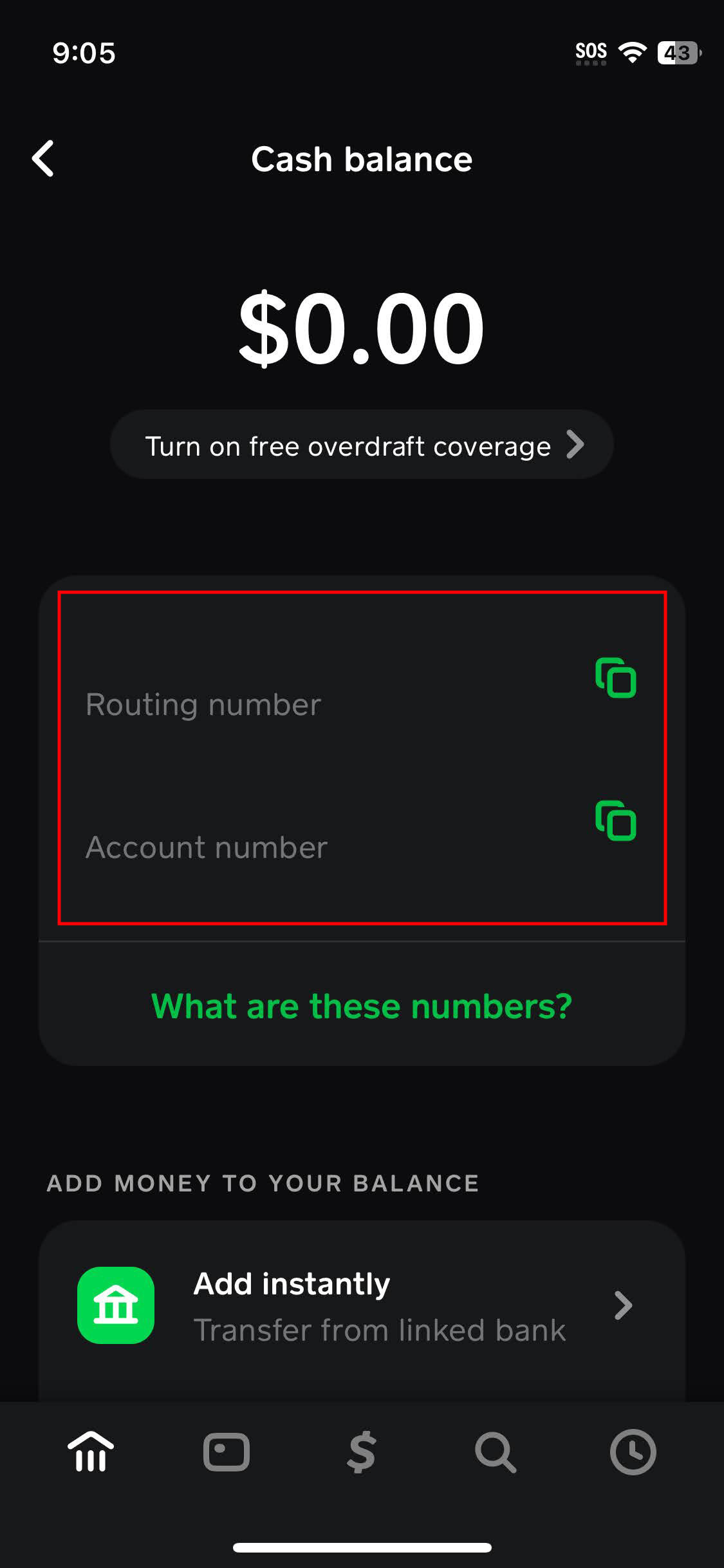
- Direct Deposit Information: Within this tab, you can typically find your Cash App routing and account numbers, which are essential for setting up direct deposit of paychecks or government benefits – a core banking service.
From a software architecture standpoint, the “Money” tab acts as a dashboard, aggregating real-time data from various backend financial services and presenting them in a digestible format for the end-user.
The “Cash Card” Tab: Managing Your Debit Card
Another crucial “banking” component is the “Cash Card” tab (represented by an image of your physical or virtual Cash Card). This section is dedicated to all things related to your Cash Card, which functions much like a traditional debit card linked to your Cash App balance. Here, you can:
- View your virtual card details: Essential for online purchases.
- Order a physical Cash Card: If you haven’t already.
- Activate your physical card: Once it arrives.
- Lock/Unlock your card: A critical security feature allowing you to instantly disable or enable transactions.
- Manage Boosts: Special discounts and rewards exclusive to Cash Card users.
- PIN management: For physical card transactions.
This tab essentially digitizes the management of a physical banking instrument, providing users with real-time control over their spending and card security directly from their mobile device.
The “Investing” Tab: Exploring Beyond Basic Banking
While not strictly “banking,” the “Investing” tab (often represented by a stock chart icon) expands Cash App’s financial utility. It allows users to buy and sell fractional shares of stocks and Bitcoin directly within the app. For users looking to grow their finances, this represents a significant addition to the traditional banking suite, integrating investment opportunities seamlessly into their daily financial app. From a technological perspective, this involves real-time market data integration, secure transaction processing, and compliance with financial regulations, all within the existing app framework.
Step-by-Step Guide: Accessing Key “Banking” Features
Let’s break down how to perform common “banking” tasks within Cash App.
Checking Your Balance and Transaction History
- Open Cash App: Launch the application on your smartphone.
- Navigate to the “Money” tab: Look for the dollar sign icon or the icon displaying your current balance at the bottom of the screen and tap it.
- View Balance: Your current Cash App balance will be prominently displayed at the top of this screen.
- Access Transaction History: Scroll down on the “Money” tab screen. You will see a chronological list of your recent transactions. To view older transactions, simply continue scrolling. Tapping on any individual transaction will reveal more detailed information. This feature is analogous to an online bank statement, providing a digital ledger of all financial movements.
Adding Money to Your Cash App Account
- From the “Money” tab: With your balance displayed, tap the “Add Cash” button.
- Enter Amount: Input the amount of money you wish to add.
- Confirm: Tap “Add” and confirm the transaction using your PIN or Touch ID/Face ID. The funds will be transferred from your linked bank account or debit card.
- Direct Deposit: To set up direct deposit for paychecks or benefits, also from the “Money” tab, you’ll find an option for “Direct Deposit” which will provide your unique Cash App account and routing numbers. Share these with your employer or benefit provider.
Cashing Out to Your Bank Account
- From the “Money” tab: Tap the “Cash Out” button.
- Enter Amount: Specify the amount you wish to transfer.
- Choose Speed (Standard or Instant): You’ll typically have an option for a standard transfer (usually 1-3 business days, often free) or an instant transfer (immediate, usually for a small fee). Select your preferred option.
- Confirm: Tap “Cash Out” and authenticate the transaction. Funds will be sent to your linked bank account.
Managing Your Cash Card Settings
- Navigate to the “Cash Card” tab: Tap the Cash Card icon at the bottom of the screen.
- Access Card Management: On this screen, you’ll see options to:
- Lock/Unlock Card: A toggle switch to instantly enable or disable your card.
- View Card Details: Tap to see your card number, expiration date, and CVV for online purchases.
- Order Card: If you don’t have one, this is where you can request a physical card.
- Boosts: Browse and activate rewards programs for your card.
This hands-on guide underscores how Cash App has compartmentalized traditional banking functions into easily accessible, task-specific interfaces within the app, prioritizing user control and immediacy.
Maximizing Your Cash App Experience: Advanced Tips
Beyond basic transactions, Cash App offers features that deepen its utility as a comprehensive financial tool. Understanding these can significantly enhance your digital banking experience.
Setting Up Direct Deposit
Direct Deposit transforms Cash App from a mere digital wallet into a primary banking solution for many. By providing your employer with your unique Cash App routing and account numbers (found under the “Money” tab by selecting “Direct Deposit”), your paychecks can be deposited directly into your Cash App balance. This eliminates the need for a traditional bank account for receiving income, offering convenience and potentially faster access to funds on payday, depending on your employer’s processing. From a security and infrastructure perspective, this feature relies on robust integration with the Automated Clearing House (ACH) network, ensuring reliable and compliant fund transfers.
Linking External Bank Accounts for Seamless Transfers
To fully leverage Cash App’s transfer capabilities, correctly linking and managing your external bank accounts is paramount.
- Navigate to your profile icon: Usually located in the top-right corner of the main screen.
- Scroll to “Linked Banks”: Under the “Funds” section.
- Link Bank: Follow the prompts to securely connect your bank account using your online banking credentials. This establishes a secure API connection, enabling Cash App to initiate transfers to and from your external account.
- Replace/Remove: You can also manage existing linked accounts here, replacing an old card or bank account with a new one. Maintaining updated linked accounts ensures uninterrupted access to your funds and smooth transfers.
Security Best Practices for Your Cash App Account
Given Cash App’s role in managing personal finances, security is non-negotiable.
- Enable Security Lock: Always activate a PIN, Touch ID, or Face ID requirement for every transaction. This is the primary defense against unauthorized access.
- Strong, Unique Password: Use a robust, unique password for your Cash App login that isn’t reused on other services.
- Two-Factor Authentication (2FA): Where available, enable 2FA for an additional layer of security, typically involving a code sent to your registered phone or email.
- Beware of Scams: Be vigilant against phishing attempts, fake customer support, or schemes promising free money. Cash App will never ask for your login details outside the app.
- Monitor Activity: Regularly check your transaction history for any unfamiliar activity. Report suspicious transactions immediately to Cash App support.
- Lock Cash Card: Use the in-app feature to instantly lock your Cash Card if it’s lost or stolen, preventing unauthorized use.
Adhering to these practices, which are standard for any financial technology platform, is critical for safeguarding your digital assets.
The Evolution of Fintech and Cash App’s Role
Cash App’s interface and functionality are a direct reflection of broader trends in financial technology. Understanding these shifts provides context for why “banking” looks different in an app.
Shifting Paradigms: From Traditional Banks to Digital Wallets
The rise of digital wallets and fintech apps like Cash App represents a significant paradigm shift from the traditional brick-and-mortar banking model. These apps leverage mobile technology to offer faster, more accessible, and often more user-friendly financial services. They challenge the legacy systems of traditional banks by focusing on digital-native generations, simplifying complex processes, and reducing overhead costs. This transformation is driven by advancements in mobile computing, cloud infrastructure, and secure data transmission protocols, enabling real-time financial interactions without physical branches. Cash App’s distributed “banking” features are a testament to this, integrating disparate financial actions into a cohesive digital experience.

Future Trends in App-Based Financial Management
The trajectory for apps like Cash App points towards even greater integration and personalization. We can expect to see enhanced AI-driven financial insights, more sophisticated budgeting tools, seamless integration with other financial services (e.g., mortgages, loans via partnerships), and potentially even more advanced cryptocurrency features. The goal is to create an even more holistic financial ecosystem within a single, secure mobile application, anticipating user needs and proactively offering solutions. The user interface will likely become even more dynamic, adapting to individual financial behaviors and preferences, further blurring the lines between traditional banking, investment, and payment services. This continuous evolution will likely continue to challenge conventional financial terminologies, pushing users to adapt to new, app-centric ways of managing their money.
In conclusion, while Cash App may not feature a single, explicitly labeled “Banking” tab, its comprehensive suite of financial tools—spread across the “Money,” “Cash Card,” and “Investing” tabs—effectively serves the same purpose, and often with greater convenience and speed. By understanding the app’s intuitive design and leveraging its specific features, users can fully harness the power of Cash App for their everyday financial management, embracing the future of digital banking.
aViewFromTheCave is a participant in the Amazon Services LLC Associates Program, an affiliate advertising program designed to provide a means for sites to earn advertising fees by advertising and linking to Amazon.com. Amazon, the Amazon logo, AmazonSupply, and the AmazonSupply logo are trademarks of Amazon.com, Inc. or its affiliates. As an Amazon Associate we earn affiliate commissions from qualifying purchases.