
In the evolving landscape of personal finance, digital payment applications like Cash App have become indispensable tools for managing money. Far beyond simple peer-to-peer transfers, these platforms offer a versatile ecosystem for spending, saving, and even investing. Understanding how to effectively fund your Cash App account is a foundational step in harnessing its full potential, transforming it from a mere convenience into a core component of your financial toolkit. This guide delves into the various methods for loading cash onto your Cash App, offering insights into each process and best practices for optimizing your digital financial experience.

The Essentials of Funding Your Cash App Account
Before diving into the mechanics of adding funds, it’s crucial to grasp why maintaining a loaded balance is beneficial and what preparatory steps ensure a smooth process. Cash App serves as a digital wallet, allowing users to make seamless transactions without direct reliance on a traditional bank account for every interaction.
Why a Loaded Cash App Balance is Beneficial
A well-funded Cash App balance offers a myriad of advantages in daily financial management. For starters, it facilitates instant peer-to-peer payments, making it effortless to split bills, send money to friends and family, or pay for goods and services from small businesses. Beyond social transactions, a loaded balance can be utilized for online shopping, paying bills, and accessing various financial features within the app, such as investing in stocks or Bitcoin (where available). It also acts as a separate, easily accessible fund for specific budgeting categories or an emergency petty cash account, providing a layer of financial agility distinct from your primary bank account. This separation can be a useful personal finance strategy for managing discretionary spending or specific savings goals.
Preparing Your Account for Funding
To ensure you can load cash onto your Cash App without hurdles, a few preliminary steps are essential. First, ensure your account is fully verified. This typically involves providing personal information such as your full name, date of birth, and the last four digits of your Social Security Number. Verification is critical because unverified accounts often face significant limitations on how much money can be sent, received, or loaded. Full verification not only expands your transaction limits but also enhances the security of your account and unlocks access to features like the Cash App Card and direct deposit. Secondly, most digital funding methods require you to link an external financial account. This usually involves connecting a debit card or a bank account, providing Cash App with the necessary pathways to pull funds from your existing financial institutions.
Step-by-Step Guide to Adding Funds Digitally
The most common and often quickest ways to load cash onto your Cash App involve leveraging your existing digital financial infrastructure. These methods prioritize convenience and speed, making them ideal for everyday use.
Linking and Transferring from a Bank Account
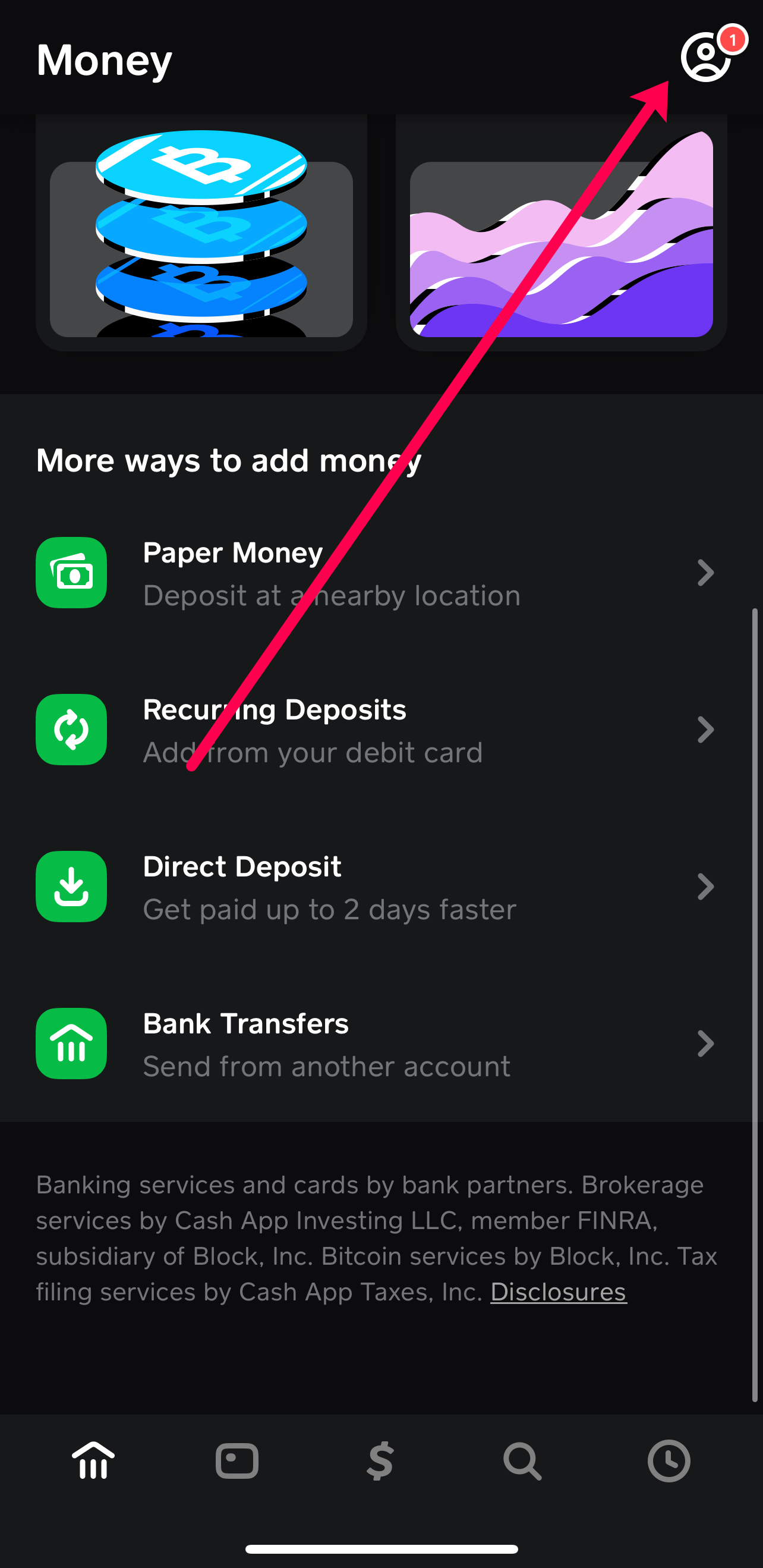
Connecting your bank account directly to Cash App is a robust method for adding larger sums of money. This process requires your bank’s routing number and your account number, which can usually be found on your checks or through your online banking portal.
- Navigate to the “Banking” or “Money” tab: In the Cash App home screen, tap the banking icon (usually a house or a bank building) or the money tab.
- Link Bank Account: Select “Link Bank” or “Add Bank” and follow the prompts. You may be directed to a secure portal (often powered by Plaid) to log into your bank account directly, which is the most common and secure way to link. Alternatively, you might manually enter your routing and account numbers.
- Initiate Transfer: Once linked, return to the “Banking” or “Money” tab, tap “Add Cash,” enter the desired amount, and confirm the transfer from your linked bank account.
Funds transferred from a linked bank account typically arrive within 1-3 business days. While generally free for standard transfers, some banks might impose their own fees, and Cash App may offer an “Instant Deposit” option for a small fee, which moves funds immediately.
Using a Linked Debit Card for Instant Transfers
For quick, smaller additions of cash, linking a debit card is often the preferred method. This allows for instant transfers directly into your Cash App balance.
- Link Debit Card: From the “Banking” or “Money” tab, select “Link Debit Card” or “Add Card.” Enter your debit card number, expiration date, CVV, and zip code.
- Add Cash: Once linked, tap the “Add Cash” button on the main screen (often represented by a ‘$’ symbol), enter the amount you wish to add, and confirm. The funds will be drawn from your linked debit card and appear in your Cash App balance almost instantly.
It’s important to note that while debit card transfers are instant, Cash App typically charges a small fee (e.g., 0.5% – 1.75%) for these instant deposits, similar to instant withdrawals. Be mindful of these fees, especially for frequent transactions, as they can add up over time and impact your overall financial planning.
Receiving Payments from Other Cash App Users
One of the most frequent ways users “load” cash onto their Cash App is by receiving money from friends, family, or customers. This is inherently a peer-to-peer function, and any funds received automatically get added to your Cash App balance.
- Provide Your $Cashtag: To receive money, simply provide the sender with your unique $Cashtag (e.g., $YourName) or your associated phone number or email address.
- Funds Automatically Appear: Once the sender initiates the payment, the funds are typically deposited into your Cash App balance instantaneously.
This method is usually free for both sender and receiver, making it a highly efficient way to consolidate funds from various sources into your digital wallet.

Depositing Physical Cash into Your Cash App
While digital transfers are convenient, there are times when you might have physical cash you wish to convert into a digital balance within Cash App. Cash App facilitates this through partnerships with various retail stores.
Finding Participating Retail Locations
Cash App has partnered with numerous retailers across the United States to allow users to deposit paper money directly into their accounts. Major participating stores often include Walmart, Walgreens, 7-Eleven, Dollar General, Family Dollar, and Rite Aid, among others.
- Use the In-App Map: To find the nearest participating location, open Cash App and navigate to the “Banking” or “Money” tab. Look for an option like “Paper Money” or “Deposit Paper Money” and tap “Find a Store.” This will display a map with nearby locations that support cash deposits.
- Verify Location: It’s always a good idea to confirm with the store’s customer service or cashier that they process Cash App paper money deposits before making a special trip.
The In-Store Deposit Process
Once you’re at a participating retailer, the process to deposit physical cash is straightforward:
- Generate Deposit Barcode: In the Cash App, navigate to the “Paper Money” section (as mentioned above) and select “Show Barcode.”
- Present at Register: Inform the cashier that you want to deposit cash to your Cash App account. Present the barcode on your phone screen to the cashier for scanning.
- Hand Over Cash: Give the desired amount of physical cash to the cashier. They will process the transaction.
- Receive Confirmation: You should receive an immediate confirmation within the Cash App, indicating that the funds have been successfully added to your balance. Always request and retain a physical receipt from the store for your records.
Funds deposited this way are usually available instantly in your Cash App balance, allowing for immediate use.
Important Considerations for Cash Deposits
When depositing physical cash, be aware of specific limits and potential fees. Most retailers impose a minimum and maximum deposit amount per transaction (e.g., $5 minimum, $500 maximum per deposit, $1,000 per week, $4,000 per month). Additionally, while Cash App itself does not charge a fee for this service, some retailers might levy a small convenience fee (e.g., $1.00-$4.00) for processing the cash deposit. These fees can vary by location and retailer, so it’s wise to inquire beforehand. Always count your cash before handing it over and ensure the amount processed matches your intention on the receipt.
Optimizing Your Cash App for Comprehensive Financial Management
Beyond the basic act of loading funds, Cash App offers several features that, when utilized effectively, can enhance your overall financial management and seamlessly integrate into your budgeting and savings strategies.
Setting Up Direct Deposit for Regular Income
For those seeking a more consistent and automated way to load funds, Cash App provides account and routing numbers, allowing you to set up direct deposit for your paycheck, government benefits, or tax refunds.
- Access Account Details: In the “Banking” tab, locate your Cash App routing and account numbers.
- Provide to Payer: Share these details with your employer or benefit provider, typically through their payroll portal or a direct deposit form.
- Enjoy Early Access: One notable benefit of Cash App direct deposit is the potential for early access to funds, with paychecks often arriving up to two days earlier than traditional bank deposits. This can be a significant advantage for managing cash flow and timely bill payments, offering greater flexibility in your personal budgeting.
Understanding Funding Limits and Transaction Fees
Effective financial management requires a clear understanding of the limitations and costs associated with your financial tools. Cash App, like any financial service, has daily, weekly, and monthly limits for sending, receiving, and loading funds. These limits vary based on whether your account is verified and the specific transaction type (e.g., debit card transfer limits differ from direct deposit limits). Regularly review these limits within the app’s support section to ensure your financial activities remain within permissible boundaries. Similarly, be cognizant of fees: instant transfers from debit cards, ATM withdrawals using the Cash App Card, and certain retailer cash deposits may incur charges. Integrating these potential costs into your financial planning prevents unexpected deductions and helps you maintain an accurate budget.
Best Practices for Securing Your Funds
Protecting your loaded funds is paramount. Employ robust security measures to safeguard your Cash App balance and personal information.
- Enable Security Lock: Always enable a Security Lock (PIN, Touch ID, or Face ID) within the app settings to prevent unauthorized access.
- Two-Factor Authentication (2FA): Activate 2FA for an extra layer of security, requiring a code from a linked device in addition to your password.
- Strong Passwords: Use unique, complex passwords for your Cash App account and linked email.
- Beware of Scams: Be vigilant against phishing attempts, unsolicited requests for money, and fraudulent support messages. Cash App will never ask for your sign-in code or full debit card number over the phone or social media. Report any suspicious activity immediately. These practices are fundamental to protecting any digital financial asset.
By mastering the various methods of loading cash and adhering to sound financial security practices, you can leverage Cash App as a powerful and convenient tool for managing your daily finances, making payments, and even pursuing broader financial goals with confidence and control.
aViewFromTheCave is a participant in the Amazon Services LLC Associates Program, an affiliate advertising program designed to provide a means for sites to earn advertising fees by advertising and linking to Amazon.com. Amazon, the Amazon logo, AmazonSupply, and the AmazonSupply logo are trademarks of Amazon.com, Inc. or its affiliates. As an Amazon Associate we earn affiliate commissions from qualifying purchases.