
Managing your financial tools effectively is paramount in the digital age, and for many users, Cash App serves as a central hub for transactions. A common necessity arises when a debit card linked to your account expires, is lost, stolen, or you simply wish to switch to a different financial institution. While the process is designed to be straightforward, understanding the exact steps and underlying security considerations is crucial for a smooth and secure transition. This guide will walk you through the precise procedure to update your debit card on Cash App, ensuring your access to its features remains uninterrupted and secure within the realm of digital financial applications.
Understanding Why You Might Need to Update Your Debit Card on Cash App
Maintaining up-to-date payment information within any financial application is a fundamental aspect of digital security and functionality. On Cash App, your linked debit card serves as the primary conduit for funding your account, sending money, and withdrawing funds to your external bank account. Several scenarios necessitate updating this critical piece of information:
Firstly, card expiration is perhaps the most frequent reason. All debit cards have an expiry date, and once passed, the card becomes invalid for transactions. To avoid interruptions in adding funds or cashing out, proactive replacement is essential. Secondly, lost or stolen cards demand immediate action. Replacing a compromised card within Cash App not only restores functionality but, more importantly, enhances your account’s security by delinking a potentially misused card. Thirdly, users might choose to switch banks or prefer a different card due to better rewards, lower fees, or simply consolidating their banking relationships. Lastly, occasional technical issues or card declines might prompt a user to try a different card to troubleshoot transaction problems. Understanding these triggers underscores the importance of knowing how to efficiently manage your payment methods within the application’s interface.
Step-by-Step Guide: Replacing Your Debit Card on Cash App
The process of updating your debit card on Cash App is intuitive, designed to be completed entirely within the mobile application. Following these steps will ensure a seamless transition without disrupting your financial activities.
Step 1: Accessing Your Cash App Profile
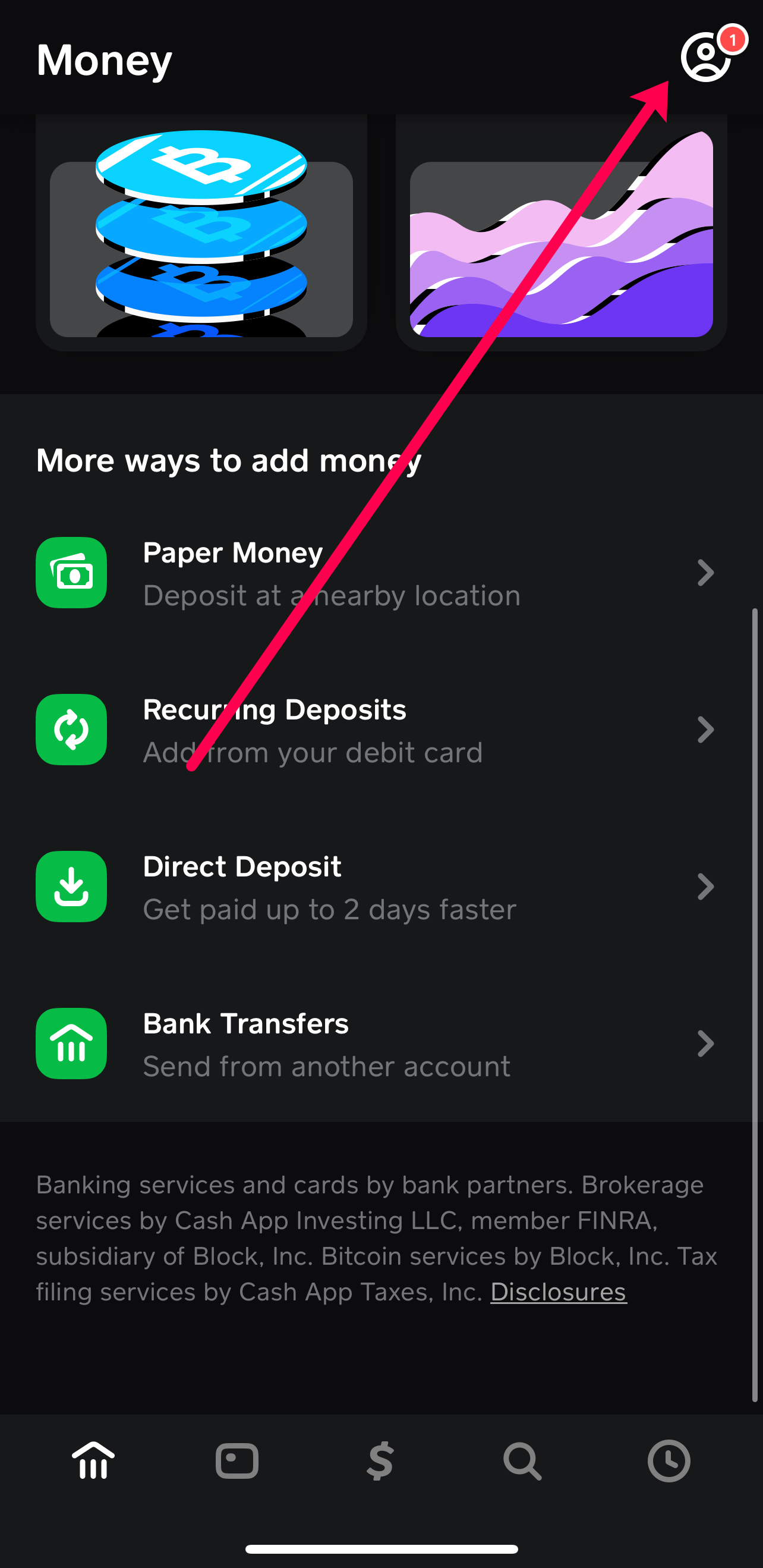
Begin by opening the Cash App on your mobile device. Once the app loads, navigate to your profile. This is typically done by tapping on the profile icon, which often appears as a small circle with your photo or initials, located in the upper-right corner of the main Cash App screen. This action will open a menu displaying various account settings and options.
Step 2: Navigating to Linked Banks and Cards
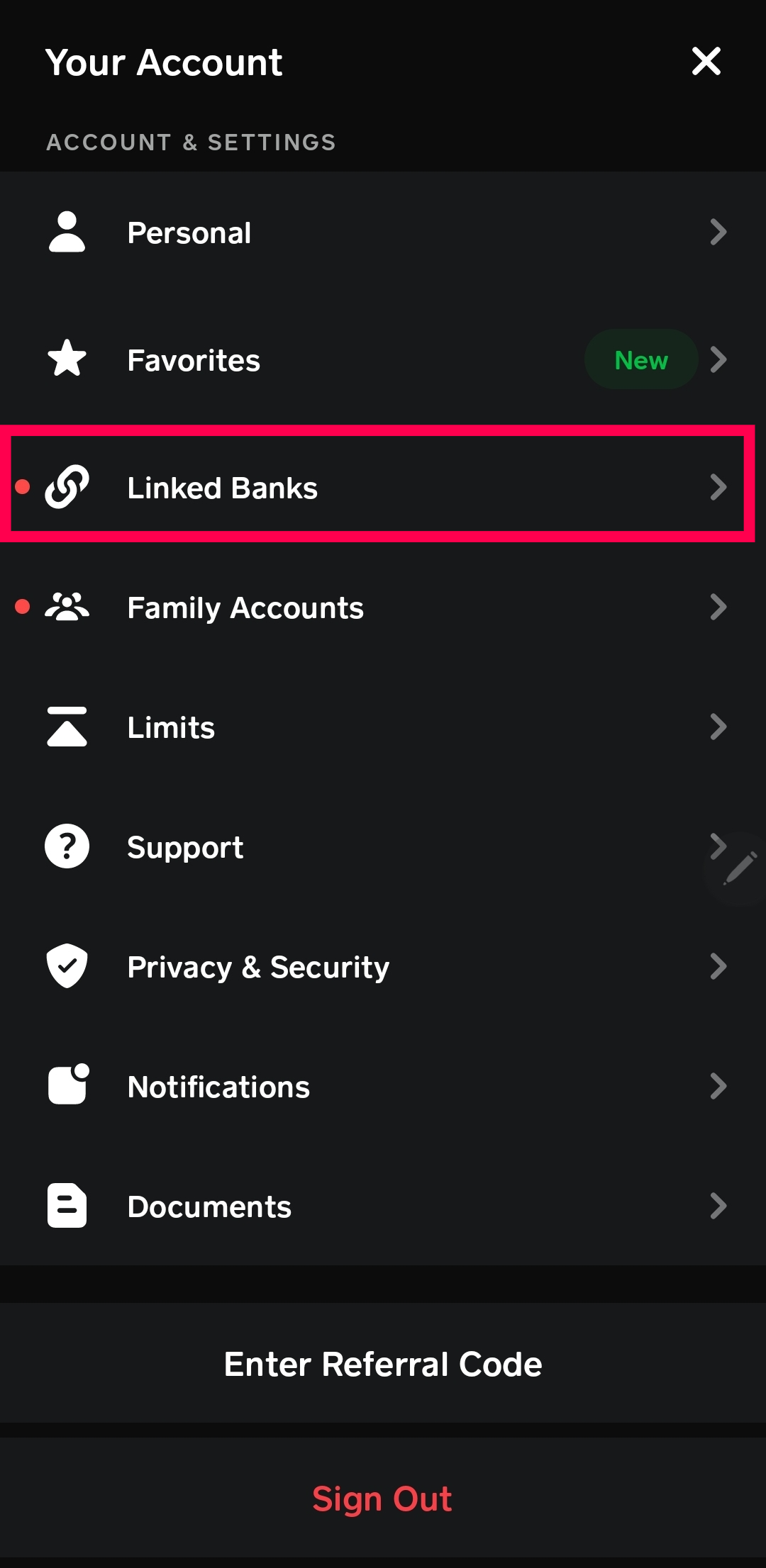
Within your profile menu, scroll down until you find the “Linked Banks” or “Linked Accounts” option. The exact phrasing might vary slightly with app updates, but it will be clearly identifiable as the section managing your external financial connections. Tap on this option to proceed. Here, you will see a list of all your currently linked debit cards and bank accounts.
Step 3: Removing the Old Debit Card
Before adding a new card, it’s generally best practice to remove the outdated or compromised one. From the “Linked Banks” screen, locate the debit card you wish to remove. Tap on this specific card. A new screen will appear, providing details about that card and an option to “Remove Card” or “Replace Card.” Choose “Remove Card.” Cash App will likely ask for confirmation to ensure this action is intentional. Confirm your decision. This step is crucial for security and to prevent any potential confusion or accidental transactions with an invalid card.
Step 4: Adding a New Debit Card
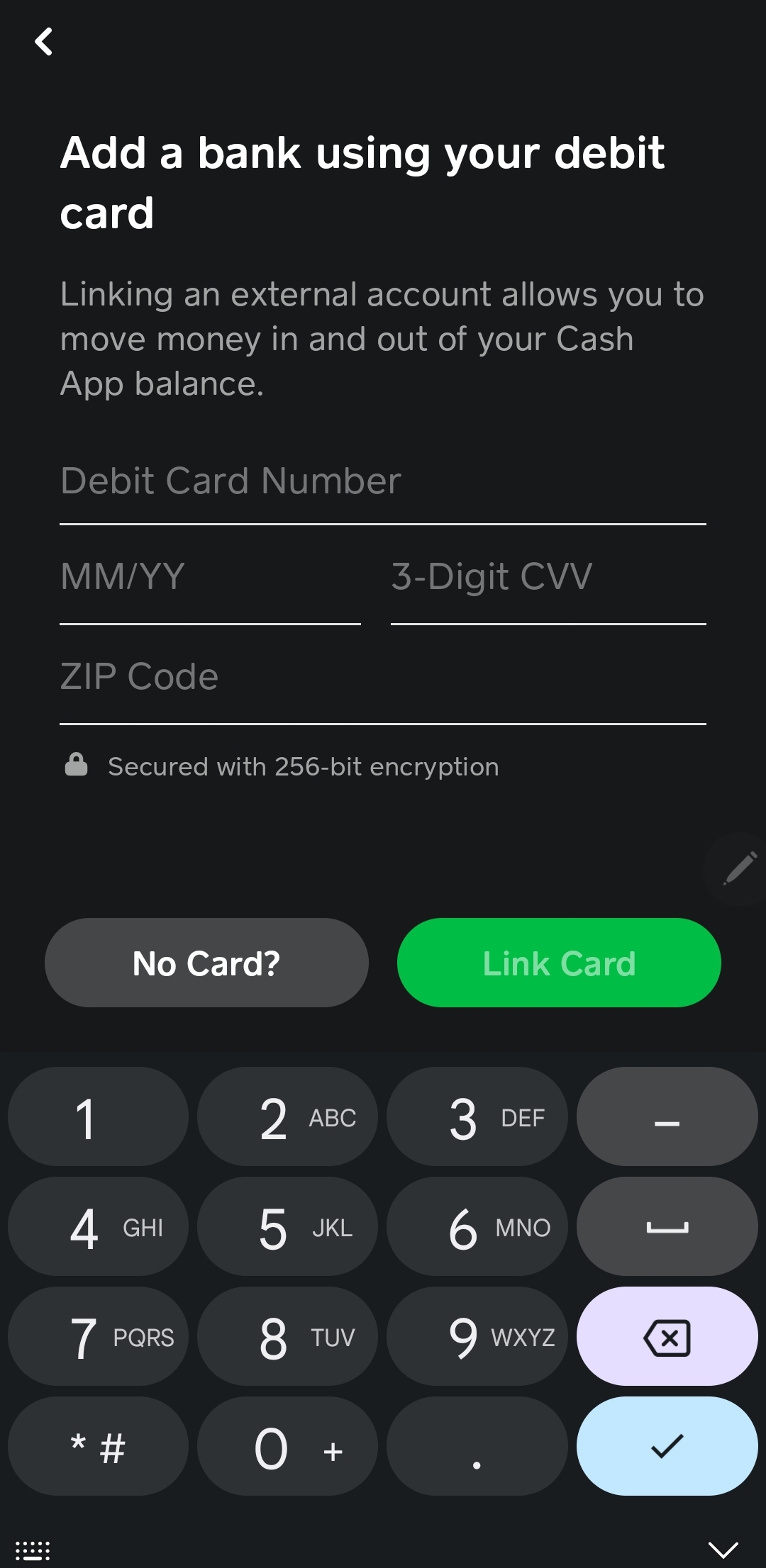
Once the old card has been successfully removed, you can now add your new debit card. On the “Linked Banks” screen, you should see an option to “Link Bank” or “Add Debit Card.” Tap this option. Cash App will then prompt you to enter the details of your new debit card. This typically includes:
- The 16-digit card number
- The expiration date (MM/YY)
- The CVV (3-digit security code on the back of the card)
- Your billing ZIP code
Carefully enter all the required information. Double-check for any typos before proceeding, as incorrect details will lead to a failed linking attempt.
Step 5: Verifying Your New Card (If Prompted)
After entering your card details, Cash App may initiate a small verification process. This often involves a temporary micro-transaction (a very small amount, usually less than a dollar) that appears on your bank statement. You might be asked to confirm the exact amount of this transaction to verify that you are the legitimate cardholder. Alternatively, some banks might use a 3D Secure authentication pop-up requiring you to enter a code sent to your phone or verify through your bank’s app. Follow any on-screen prompts from Cash App or your bank to complete the verification. Once successfully verified, your new debit card will be fully linked and ready for use within Cash App.
Essential Security Considerations When Managing Your Debit Card
While changing your debit card on Cash App is a functional procedure, it inherently touches upon critical aspects of digital security. Understanding and adhering to security best practices is not just advisable but essential for protecting your financial information and preventing unauthorized access.
Data Encryption and Cash App’s Security Protocols
Cash App employs robust security measures to protect user data, including end-to-end encryption for all transactions and sensitive information, such as debit card details. When you enter your card information, it’s transmitted securely and stored in encrypted form, compliant with industry standards like PCI DSS (Payment Card Industry Data Security Standard). This means that even if a breach were to occur, your raw card numbers would be significantly challenging for malicious actors to decipher. However, this backend security doesn’t absolve users of their responsibility in maintaining front-end vigilance.
Recognizing Phishing Attempts and Scams
A significant threat often arises not from the app’s security itself, but from social engineering tactics. Phishing attempts, where fraudsters impersonate Cash App support or other trusted entities, are designed to trick users into divulging their sensitive information, including card details, PINs, or login credentials. Be extremely wary of unsolicited emails, texts, or calls asking for this information. Cash App will never ask for your PIN or full card number outside of the secure app interface for adding a card. Always verify the sender and URL if you receive communications that seem suspicious. If in doubt, directly access Cash App through the official app or website rather than clicking on links from external sources.
Best Practices for Protecting Your Account
Beyond recognizing threats, proactive measures are key to safeguarding your Cash App account and linked debit card:
- Enable Two-Factor Authentication (2FA): This adds an extra layer of security, requiring a code from your phone in addition to your password for login.
- Use Strong, Unique Passwords: Never reuse passwords, especially for financial applications. A strong password combines uppercase and lowercase letters, numbers, and symbols.
- Monitor Your Account Activity: Regularly check your Cash App transaction history and your linked bank statements for any unauthorized activity. Report suspicious transactions immediately.
- Keep Your App Updated: Software updates often include security patches that address vulnerabilities. Ensure your Cash App is always running the latest version.
- Be Cautious with Public Wi-Fi: Avoid conducting financial transactions over unsecured public Wi-Fi networks, as they can be vulnerable to eavesdropping.
- Never Share Your Login Information: Your Cash App PIN, password, or verification codes should remain private.
By integrating these security practices into your routine, you significantly reduce the risk associated with managing your debit card within the Cash App ecosystem.
Common Issues and Troubleshooting Tips
While the process of changing a debit card on Cash App is generally smooth, users might occasionally encounter issues. Understanding how to troubleshoot these common problems can save time and frustration.
Card Not Accepted
If Cash App declines your new debit card, several factors could be at play:
- Incorrect Information: Double-check the card number, expiration date, CVV, and billing ZIP code. A single digit error can cause a decline.
- Card Type Restrictions: Cash App primarily supports Visa, MasterCard, American Express, and Discover debit cards. Prepaid cards are also generally supported, but certain gift cards or corporate cards might not be. Confirm your card type.
- Bank Restrictions: Some banks might have internal policies that initially block transactions from certain apps like Cash App as a security measure. Contact your bank to confirm they aren’t blocking the link attempt.
- Insufficient Funds (for verification): Although micro-transactions are small, if your card has a zero balance or insufficient funds for the verification process, it might fail.
Verification Failure
When Cash App attempts to verify your card (e.g., through a micro-transaction or 3D Secure), and the process fails:
- Check Bank Statements: If a micro-transaction is used, log into your bank account online or check your statement to find the exact amount charged by Cash App, then re-enter it correctly in the app.
- Bank Security Holds: Your bank’s fraud detection system might flag the verification attempt. Contact your bank directly and inform them you are trying to link your card to Cash App.
- Expired Verification Code: If a code was sent to your phone for 3D Secure, ensure you enter it before it expires.
Account Locked
In rare instances, multiple failed attempts to link a card or suspicious activity could lead to your Cash App account being temporarily locked. If this occurs:
- Follow On-Screen Instructions: Cash App will usually provide steps to unlock your account, which might involve verifying your identity or contacting support.
- Identity Verification: Be prepared to provide identification documents as requested by Cash App to confirm your identity.
Contacting Cash App Support
If you’ve exhausted all troubleshooting options and are still unable to change your debit card, contacting Cash App support is the next logical step.
- In-App Support: The most efficient way is often through the “Support” section within your Cash App profile. This allows them to securely access your account details (with your permission) and provide tailored assistance.
- Official Website: Visit the official Cash App support website for FAQs and contact options.
- Be Prepared: Have your account details, the new card information, and details of the issue ready when you contact them.
Optimizing Your Cash App Experience with an Updated Card
Successfully updating your debit card on Cash App ensures that you can continue to leverage its full suite of features without interruption. A properly linked and current debit card is fundamental to:
- Seamless Fund Loading: Quickly add money to your Cash App balance for sending payments, investing, or using your Cash Card.
- Instant Cash Outs: Efficiently transfer funds from your Cash App balance to your external bank account, typically within minutes.
- Direct Deposit: If you utilize Cash App for direct deposits, a valid linked bank account (often tied to your debit card for initial linking) is essential for receiving funds.
- Cash Card Functionality: While the Cash Card is a separate physical card issued by Cash App, its underlying functionality for spending depends on a healthy connection to your primary funding sources.
- Avoiding Transaction Delays: An expired or invalid card will inevitably lead to declined transactions, causing inconvenience and potential delays in urgent financial matters.
By maintaining accurate and up-to-date payment information, users ensure their Cash App remains a reliable and efficient tool for managing personal finances, perfectly aligning with the app’s purpose as a central node in modern digital banking. Regular review of linked accounts and proactive updates are key practices for a robust and secure digital financial experience.
aViewFromTheCave is a participant in the Amazon Services LLC Associates Program, an affiliate advertising program designed to provide a means for sites to earn advertising fees by advertising and linking to Amazon.com. Amazon, the Amazon logo, AmazonSupply, and the AmazonSupply logo are trademarks of Amazon.com, Inc. or its affiliates. As an Amazon Associate we earn affiliate commissions from qualifying purchases.