
Understanding Cash App’s Blocking Features for Businesses
Cash App, a popular mobile payment service, offers users a convenient way to send and receive money. However, like any digital platform facilitating financial interactions, it’s essential to understand its built-in security and privacy features, particularly when dealing with businesses. Blocking a business on Cash App is a crucial function for managing your digital financial interactions, ensuring security, and maintaining control over your personal data and transactions. This feature is not just about silencing unwanted communications; it’s a mechanism to prevent unsolicited payment requests, mitigate potential fraud, and define your digital boundaries within the application.
Why Blocking a Business Differs from Blocking an Individual
The technical and practical implications of blocking a business on Cash App can be subtly different from blocking an individual peer-to-peer (P2P) contact. While the core action—preventing direct communication and payment requests—remains similar, the nature of a business account introduces additional considerations. Businesses often use Cash App for various purposes: receiving payments for goods/services, issuing refunds, sending invoices (via Square integration), or managing subscription-like services. When you block an individual, you typically sever a direct P2P connection. When you block a business, the scope of the block primarily covers direct interactions within the Cash App ecosystem, such as direct payment requests or messages. However, it’s important to recognize that blocking a business on Cash App does not necessarily cancel a recurring subscription or a payment mandate that was established through an external platform, such as a website linking your debit card to a merchant’s payment gateway, even if that merchant also uses Cash App as a payment processor for other transactions. The Cash App block primarily addresses interactions initiated directly through the Cash App profile. This distinction is vital for understanding the true reach of the blocking mechanism and for protecting your digital financial security comprehensively.
The Nuances of “Blocking” within a Financial Application
In a financial application like Cash App, “blocking” extends beyond mere social media muting. It’s a proactive security measure designed to protect your account from unwanted or potentially malicious interactions. When you block a business, you are essentially telling the Cash App system to sever the direct connection between your profile and theirs for certain actions. This means they should no longer be able to send you direct payment requests, messages, or locate you easily through your Cash App details. The system is designed to prevent these direct, peer-to-peer style interactions. It acts as a digital barrier, reducing your exposure to unsolicited contact and potential security risks. For instance, if a business attempts to send you an invoice or a payment request, the block should prevent this from reaching your inbox, adding a layer of digital security against persistent or potentially fraudulent attempts to solicit funds.
Protecting Your Digital Financial Security
Utilizing the blocking feature is a cornerstone of responsible digital financial security. By actively managing which entities can interact with your Cash App account, you minimize the surface area for potential exploitation. This includes preventing phishing attempts that might masquerade as legitimate business interactions, stopping unsolicited requests that could lead to accidental payments, and generally reducing digital clutter from businesses you no longer wish to engage with. It empowers users to curate their financial environment within the app, ensuring that only trusted and desired interactions can proceed.
Step-by-Step Guide to Blocking a Business on Cash App
The process of blocking a business on Cash App is straightforward, designed to be intuitive for users. However, it requires correctly identifying the business and understanding the interface flow.
Identifying the Business Profile or Transaction
Before you can block a business, you need to locate their profile or a past transaction involving them within your Cash App. This can typically be done in one of two ways:
-
Through a Past Transaction: If you’ve previously sent money to or received money from the business, or if they’ve sent you a request, navigate to your activity feed.
- Open Cash App.
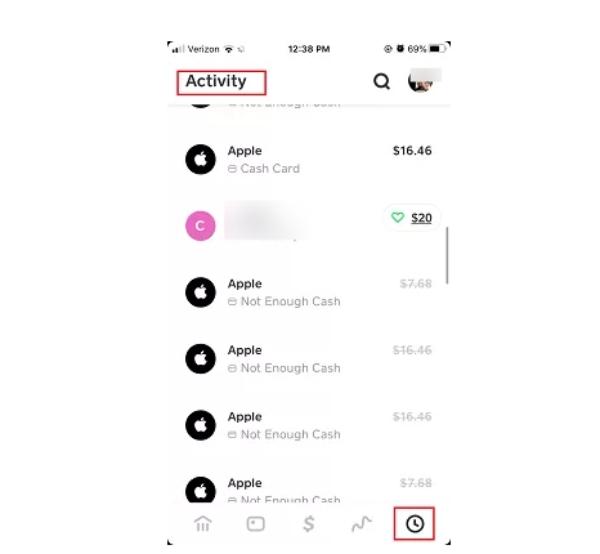
- Tap the activity tab (the clock icon) on the bottom right of the screen.
- Scroll through your transaction history to find an interaction with the specific business.
- Tap on the transaction to view its details. From here, you can usually access the business’s profile.
-
Searching for Their Cash App Tag: If you know the business’s unique Cash App tag ($Cashtag), you can search for them directly.
- Open Cash App.
- Tap the profile icon (the circle with your photo or initials) in the top right.
- Look for a search bar or “Add Cash App Contact” section. While primarily for adding contacts, sometimes you can access profiles this way, or by attempting to send money and searching for the $Cashtag. The most reliable method remains via a past interaction.
Once you’ve identified a transaction or located their profile, proceed to the next step.
Navigating the Blocking Interface
After you’ve accessed the business’s profile via a transaction or direct search, the blocking option should be readily available:
- Access the Business’s Profile: From the transaction detail screen, tap on the business’s name or $Cashtag to go to their profile page.
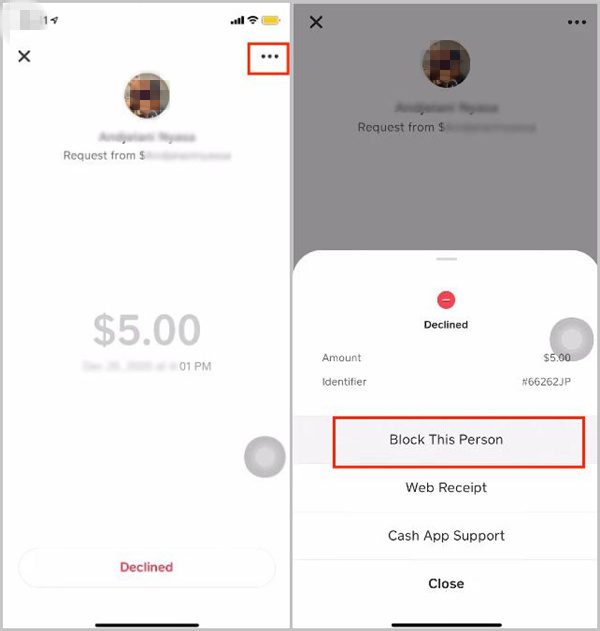
- Locate the Options Menu: On the business’s profile page, look for an ellipsis (…) or a three-dot icon, usually located in the top right corner of the screen. Tap this icon to open a menu of options.
- Select “Block”: In the options menu, you should see an option labeled “Block” or “Block this person/business.” Tap on this option.
- Confirm the Action: Cash App will typically ask for a confirmation to ensure you intend to block the business. Review the prompt and confirm your decision.
Confirming the Block and Understanding Its Implications
Once you confirm the block, the business will be added to your blocked list. The immediate implications are:
- No Direct Payment Requests: The blocked business will no longer be able to send you direct payment requests through Cash App.
- No Direct Messages: Any attempts by the business to message you directly through Cash App will be prevented.
- Limited Visibility: Your profile may become less visible to the blocked business, hindering their ability to initiate new interactions.
- Inability to Send Money: You will also be prevented from sending money to the blocked business through Cash App, acting as a two-way barrier.
It’s crucial to reiterate that while effective for direct Cash App interactions, this block may not automatically terminate existing recurring payments or subscriptions established outside Cash App (e.g., a subscription paid via a linked debit card on a merchant’s website). For such scenarios, additional steps might be required.
When and Why You Might Need to Block a Business
Blocking a business on Cash App isn’t just for extreme cases; it’s a versatile tool for managing your digital financial life proactively. Understanding the common scenarios where this feature becomes invaluable helps users make informed decisions for their digital security and peace of mind.
Preventing Unwanted Charges or Recurring Payments
One of the primary reasons to block a business is to stop unsolicited payment requests or prevent potential future unwanted charges. While Cash App’s direct blocking primarily affects P2P-style requests, it’s a vital first line of defense.
- Forgotten Subscriptions or Trials: You might have signed up for a service or a trial period, and the business continues to send payment requests via Cash App even after you’ve decided not to proceed. Blocking them stops these direct solicitations.
- Unauthorized or Disputed Charges: If a business repeatedly attempts to charge you for services you didn’t authorize or if there’s an ongoing dispute, blocking can prevent further direct requests while you resolve the underlying issue through official channels (e.g., customer service, bank disputes).
- Services No Longer Desired: You simply no longer wish to interact with a particular business or use their services, and blocking them helps you maintain digital distance.
Crucially, if a recurring payment is set up directly through a linked debit card or bank account outside of Cash App’s direct P2P system, blocking on Cash App will likely not stop that recurring charge. For those, you would need to cancel the subscription directly with the business or through your bank. However, blocking prevents the business from initiating new, direct P2P-style requests to your Cash App account.
Avoiding Spam, Scams, or Harassment
Unfortunately, not all entities on financial platforms operate legitimately. Blocking becomes essential when you encounter businesses engaged in dubious activities.
- Excessive Solicitations: Some businesses might overzealously send promotional messages or payment requests, cluttering your activity feed. Blocking provides a digital “unsubscribe” button for these persistent direct communications.
- Fraudulent Activities: If you suspect a business is involved in scams, phishing attempts, or trying to trick users into unauthorized payments, blocking is an immediate defensive action. Reporting them to Cash App in tandem is also crucial.
- Harassment or Unprofessional Conduct: In rare cases, a business might exhibit unprofessional behavior or harassment through the platform. Blocking offers a way to immediately cease such interactions and protect your digital well-being.
Managing Digital Boundaries and Privacy
Beyond security concerns, blocking is a tool for personal preference and digital hygiene.
- Reducing Digital Clutter: You might simply not want certain businesses appearing in your contacts or activity feed, especially if your interaction with them was minimal or one-off.
- Limiting Data Interaction: While blocking primarily affects communication and payment requests, it signifies your desire to reduce interaction with that entity within the Cash App ecosystem, contributing to your broader digital privacy strategy.
Alternatives and Complementary Actions to Blocking
While blocking is a powerful feature, it’s often most effective when combined with other security practices or when understood in the context of broader financial management.
Reporting Suspicious Businesses to Cash App
If a business is not just annoying but genuinely suspicious or fraudulent, blocking alone is insufficient. Reporting them to Cash App’s support team is a critical step to protect other users and help maintain the platform’s integrity.
- How to Report: On the business’s profile page (where you found the “Block” option), there is usually also a “Report” or “Report this user” option. Follow the prompts to provide details about why you are reporting them.
- When to Report: Report businesses engaging in scams, phishing, unauthorized transactions, harassment, or any activity that violates Cash App’s terms of service.
- Impact: Reporting helps Cash App investigate and, if necessary, take action against offending accounts, which can range from warnings to account suspension or permanent bans. This contributes to a safer environment for all users.
Managing Recurring Payments and Subscriptions Directly
As highlighted earlier, Cash App’s blocking feature is most effective for direct P2P interactions and requests. For formal subscriptions or recurring payments set up through a linked bank account or debit card (often initiated on a business’s website or app), the primary method of cancellation lies outside of Cash App.
- Contact the Business Directly: The most straightforward way to cancel a subscription is to contact the business’s customer service or manage the subscription through their dedicated portal or app.
- Contact Your Bank/Card Issuer: If you encounter difficulties canceling directly with the business, or suspect unauthorized recurring charges, your bank or credit card issuer can often help you stop future payments by placing a block on the merchant code or canceling the specific payment mandate.
- Review Your Linked Accounts: Regularly check which services or businesses have access to your linked debit cards or bank accounts, not just within Cash App but across all your digital financial services.
Reviewing Linked Accounts and Payment Methods
A robust digital security posture involves more than just blocking individual entities. Regularly auditing your financial connections is paramount.
- Check Cash App Settings: Periodically review your Cash App settings to see which external bank accounts or debit cards are linked. Ensure these are legitimate and still necessary.
- Monitor Bank Statements: Consistently review your bank and credit card statements for any unfamiliar or unauthorized transactions. Early detection allows for quicker action, whether it’s blocking on Cash App, reporting to your bank, or both.
- Manage Third-Party Integrations: If you’ve ever authorized Cash App to connect with other financial apps or services, review those connections regularly and revoke access for any you no longer use or trust.
Best Practices for Secure Cash App Usage
Maintaining a secure financial environment within Cash App goes beyond specific features; it encompasses a holistic approach to digital security.
Regular Account Monitoring
Proactive monitoring of your Cash App account is a fundamental security practice.
- Frequent Activity Checks: Make it a habit to check your Cash App activity feed daily or every few days, even if you don’t expect transactions. This allows for immediate detection of any unauthorized activity or suspicious requests.
- Transaction Alerts: Enable notifications for all transactions (payments sent, received, requests). This real-time awareness helps you respond quickly to any unusual activity.
Strong Authentication and Privacy Settings
Leverage all available security features within the app.
- PIN, Touch ID, or Face ID: Always enable and utilize a strong PIN, Touch ID, or Face ID for all Cash App access and transaction confirmations. This adds a critical layer of security, ensuring only you can authorize actions.
- Two-Factor Authentication (2FA): If Cash App offers 2FA (e.g., via SMS code to a verified phone number), enable it. This adds another step to the login process, making it much harder for unauthorized users to access your account, even if they have your password.
- Review Privacy Settings: Familiarize yourself with Cash App’s privacy settings. While less granular than social media, understanding what information is public or shared (e.g., your $Cashtag) can help you manage your digital footprint.

Educating Yourself on Common Scams
Knowledge is your best defense against evolving digital threats.
- Phishing Awareness: Be skeptical of unsolicited messages or emails claiming to be from Cash App, especially those asking for personal information, PINs, or account details. Cash App will never ask for your PIN or sign-in code outside of the app.
- Imposter Scams: Be wary of individuals or “businesses” claiming to represent legitimate organizations (e.g., government agencies, tech support) and demanding payment via Cash App. Legitimate entities rarely use Cash App for official payments in this manner.
- “Too Good to Be True” Offers: Any offer promising free money, significant returns for small investments, or requiring an upfront payment to “unlock” larger sums is almost certainly a scam.
By understanding and utilizing these tech-driven security measures, users can navigate Cash App with confidence, effectively managing their interactions with businesses and safeguarding their digital financial well-being.
aViewFromTheCave is a participant in the Amazon Services LLC Associates Program, an affiliate advertising program designed to provide a means for sites to earn advertising fees by advertising and linking to Amazon.com. Amazon, the Amazon logo, AmazonSupply, and the AmazonSupply logo are trademarks of Amazon.com, Inc. or its affiliates. As an Amazon Associate we earn affiliate commissions from qualifying purchases.