
In an era dominated by smartphones and powerful computers, the humble scientific calculator might seem like an anachronism. Yet, for students, engineers, scientists, and anyone requiring quick, precise mathematical computations, this specialized gadget remains an indispensable tool. Far from being a simple adding machine, a scientific calculator is a marvel of miniaturized technology, packed with intricate hardware and sophisticated firmware designed to tackle complex mathematical problems with unparalleled efficiency. Understanding “what’s in” a scientific calculator isn’t just about listing components; it’s about appreciating the ingenious blend of hardware and software that empowers users to explore the frontiers of mathematics and science.
The Core Purpose and Evolution of Scientific Calculators
The necessity for quick and reliable calculation tools is as old as civilization itself. From abacuses to slide rules, humanity has consistently sought ways to extend its computational capabilities. The scientific calculator represents a significant leap in this ongoing quest, transitioning from mechanical aids to sophisticated electronic devices.
Beyond Basic Arithmetic: Why Scientific Calculators Exist
Basic calculators are ubiquitous, handling addition, subtraction, multiplication, and division with ease. However, the demands of fields like physics, engineering, chemistry, and advanced mathematics quickly outstrip these fundamental operations. Scientific problems often involve trigonometric functions (sine, cosine, tangent), logarithms, exponential functions, roots, powers, and complex statistical analysis. These calculations, if done manually, are not only time-consuming but also highly susceptible to error. The scientific calculator was conceived to automate these complex functions, providing instant, accurate results and freeing users to focus on problem-solving rather than rote computation. It acts as an extension of the mind, allowing for rapid iteration and exploration of mathematical models.
A Legacy of Innovation: From Slide Rules to Handheld Powerhouses
Before electronic calculators, slide rules were the engineers’ trusty companion, performing multiplication, division, logarithms, and trigonometric functions mechanically. While effective, they required significant skill and offered limited precision. The advent of integrated circuits in the 1960s revolutionized calculation, paving the way for the first electronic handheld calculators. Early models were expensive and bulky, but rapid technological advancements quickly led to smaller, more affordable, and increasingly powerful devices. Companies like Hewlett-Packard and Texas Instruments pioneered many of the features we now take for granted, from RPN (Reverse Polish Notation) input to graphing capabilities. This evolution transformed the scientific calculator from a niche professional tool into an essential educational and professional device, shaping generations of STEM professionals.
Unpacking the Hardware: The Physical Components
At its heart, a scientific calculator is a specialized computer. Like any computing device, it comprises several critical hardware components that work in concert to perform its designated functions. Each part is meticulously designed for durability, efficiency, and user interaction.
The Processor (CPU) and Memory (RAM/ROM): The Brains of the Operation
The central processing unit (CPU) is the “brain” of the scientific calculator. While not as powerful as the CPUs in modern smartphones or laptops, a calculator’s processor is optimized for speed and accuracy in numerical computations. It executes instructions stored in the firmware, performs arithmetic and logical operations, and manages the flow of data within the device. These CPUs are typically low-power microcontrollers, designed for efficiency and long battery life.
Complementing the CPU is the calculator’s memory system. Read-Only Memory (ROM) stores the calculator’s operating system, firmware, and pre-programmed mathematical functions. This data is permanent and cannot be altered by the user. Random Access Memory (RAM), on the other hand, is volatile memory used to store temporary data, such as input numbers, intermediate calculation results, variables, and user-defined programs. When the calculator is turned off (or after a prolonged period), the contents of RAM are usually lost, though many calculators offer “answer memory” or persistent variable storage that uses a small amount of non-volatile memory or battery-backed RAM to retain values.
Input Interface: The Keyboard and Its Specialized Keys
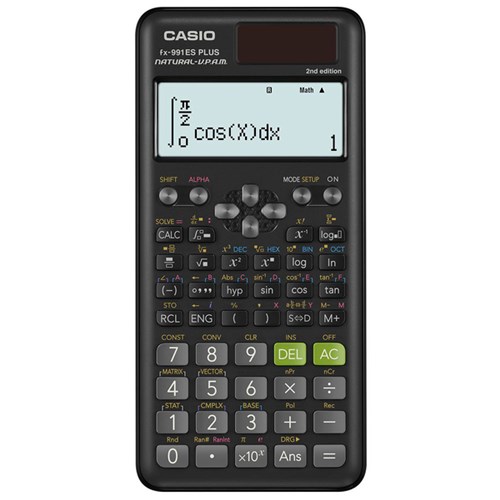
The keyboard is the primary interface through which users interact with the calculator. Unlike a standard QWERTY keyboard, a scientific calculator’s keyboard is highly specialized, featuring a compact array of numerical, operational, and function keys. Beyond the basic arithmetic operators, dedicated keys for trigonometric functions (sin, cos, tan), logarithmic functions (log, ln), powers (x^y), roots (√x), and constants (π, e) are standard.
Many keys serve multiple functions, accessed via “shift” or “alpha” keys, allowing for a compact design while providing a vast array of capabilities. The layout is ergonomically designed for intuitive access to frequently used functions. Modes (e.g., DEG/RAD/GRAD for angle units, FIX/SCI/NORM for display format) are also critical, allowing users to tailor the calculator’s behavior to specific problems or preferences. The tactile feedback of the keys is also important, ensuring accurate input and preventing errors.
Output Interface: The Display Screen
The display screen is where the calculator communicates results and input expressions back to the user. Historically, this was a simple single-line Liquid Crystal Display (LCD) showing only numbers. Modern scientific calculators, however, boast multi-line, dot-matrix LCDs capable of displaying complex expressions as they would appear in a textbook – a feature often called “Natural Display” or “WriteView.” This enhancement significantly improves readability and reduces transcription errors, particularly when dealing with fractions, roots, and complex equations.
Advanced scientific calculators, especially graphing calculators, feature larger, higher-resolution screens that can plot graphs of functions, display tables of values, and even show matrices. The resolution and backlighting (if present) are key technical specifications that enhance usability, particularly in varying light conditions. The display controller chip manages what appears on the screen, translating the CPU’s output into visual pixels.
Power Source: Batteries and Solar Panels
For portability and independence, scientific calculators rely on internal power sources. Most use standard disposable batteries (AA, AAA, or button cells) that are easily replaceable. To extend battery life and reduce environmental impact, many models incorporate small solar panels. These panels can provide primary power in brightly lit environments or act as a backup, trickle-charging an internal capacitor or supplementing battery power. This hybrid power system ensures reliability even when batteries are low or in specific test-taking environments where battery changes might be restricted. Power management circuits are crucial for maximizing battery longevity, implementing automatic shut-off features to conserve energy when the calculator is idle.
The Enclosure and Connectivity Ports
The calculator’s plastic enclosure is more than just a case; it’s designed to be robust and durable, protecting the internal electronics from drops, spills, and the rigors of daily use. The design also considers ergonomics, ensuring a comfortable grip and key access.
While many scientific calculators are standalone devices, some advanced models feature connectivity ports. USB ports are becoming increasingly common, allowing for data transfer (e.g., programs, matrices, data sets) to and from computers, firmware updates, and sometimes even direct printing of results. Some older or specialized models might have proprietary ports for connecting to sensors or other educational tools. These ports extend the calculator’s functionality, integrating it into a broader digital ecosystem for learning and analysis.
The Software Engine: Firmware and Mathematical Functions

Beyond its robust hardware, the true power of a scientific calculator lies in its sophisticated software—specifically, its firmware. This embedded software dictates every aspect of the calculator’s operation, from processing keystrokes to executing complex algorithms.
The Operating System and Firmware
The firmware is the calculator’s operating system and core application software, permanently stored in its ROM. It’s a highly specialized, stripped-down OS optimized for mathematical computation and user interaction via a limited set of inputs and outputs. The firmware manages all internal processes: interpreting key presses, rendering output on the display, allocating memory, and executing the various mathematical functions.
It’s responsible for the user interface, menu structures, and ensuring the calculator behaves predictably and reliably. Like computer operating systems, calculator firmware can sometimes be updated by the manufacturer to fix bugs, improve performance, or add new features, especially in more advanced graphing or programmable models. These updates ensure the calculator remains relevant and functional over time.
Essential Mathematical Functions: From Algebra to Calculus
The core strength of a scientific calculator lies in its extensive library of pre-programmed mathematical functions. These go far beyond basic arithmetic to include:
- Trigonometry: Sine, cosine, tangent, and their inverse functions (arcsin, arccos, arctan) are fundamental for geometry, physics, and engineering. Calculators allow easy switching between degrees, radians, and grads.
- Logarithms and Exponentials: Natural logarithms (ln), common logarithms (log base 10), and their inverse exponential functions (e^x, 10^x) are crucial for growth, decay, and scaling problems.
- Roots and Powers: Calculating square roots (√x), cube roots (³√x), and nth roots, as well as raising numbers to any power (x^y), are fundamental operations.
- Factorials, Permutations, and Combinations: These functions are essential in probability, statistics, and discrete mathematics, allowing rapid calculation of possible arrangements and selections.
- Fractions and Decimal Conversion: Modern calculators can input and display fractions directly, simplifying calculations and reducing errors when working with exact values, alongside easy conversion to and from decimal forms.
Each of these functions is implemented as an efficient algorithm within the firmware, delivering high precision and speed.
Advanced Computational Capabilities: Statistics, Complex Numbers, and Matrices
For higher-level mathematics and scientific research, scientific calculators offer even more sophisticated capabilities:
- Statistics: They can perform univariate and bivariate statistical analysis, calculating mean, median, mode, standard deviation, variance, sum of squares, and linear regression coefficients. Users can input data sets and quickly derive key statistical measures.
- Complex Numbers: Many scientific calculators handle complex numbers (numbers involving the imaginary unit ‘i’ or ‘j’) in both rectangular and polar forms, performing arithmetic operations, powers, and conversions between forms. This is vital in electrical engineering and advanced physics.
- Matrices: Advanced models can store, display, and perform operations on matrices (addition, subtraction, multiplication, determinant, inverse, transpose), which are crucial in linear algebra, computer graphics, and engineering simulations.
- Vector Calculations: Some calculators also support 2D and 3D vector calculations, including dot products and cross products.
These capabilities transform the calculator into a mini-computational powerhouse, capable of solving problems that once required mainframe computers or extensive manual work.
Programmability and Graphing Functions
The pinnacle of scientific calculator functionality often includes programmability and graphing.
- Programmability: Many scientific calculators allow users to store custom formulas or short sequences of operations as programs. This is incredibly useful for repetitive calculations, allowing users to define a function once and then apply it to various inputs. Some models even support basic programming languages, turning them into mini-computers for simple automation tasks.
- Graphing Functions: Graphing calculators, a specialized subset of scientific calculators, can plot functions on a coordinate plane. Users can input equations, and the calculator will generate a visual representation, allowing for analysis of roots, intercepts, asymptotes, and overall function behavior. Features like zooming, tracing, and finding intersections or maxima/minima are standard, making them invaluable tools for calculus and pre-calculus courses.
Beyond the Basics: Modern Features and Future Trends
The scientific calculator continues to evolve, incorporating features that enhance user experience, connectivity, and educational utility, even as its core purpose remains steadfast.
Enhanced User Experience: Natural Display and Intuitive Menus
Modern scientific calculators prioritize an intuitive user experience. The “Natural Display” or “MathPrint” feature, which renders mathematical expressions and symbols exactly as they appear in textbooks (e.g., stacked fractions, square roots with full radicands), has become a standard. This reduces cognitive load and helps prevent input errors. Furthermore, menu-driven interfaces, often with clear icons and logical categories, simplify navigation through the calculator’s extensive functions, making even complex operations accessible to users who might not memorize every key combination. Solver functions, which allow users to input equations and have the calculator solve for a specific variable, further streamline problem-solving.
Connectivity and Data Transfer: Bridging the Digital Divide
The increasing demand for integrated learning and data sharing has led to the inclusion of connectivity features in many scientific calculators. USB ports, as mentioned, allow for direct connection to computers for transferring programs, data, and even screenshots of the display. This facilitates classroom instruction, project work, and the archiving of important calculations. Some calculators can also connect to external sensors (e.g., for data collection in science experiments) or even integrate with educational software platforms, bridging the gap between physical calculation and digital analysis. The “exam mode” feature, common in graphing calculators, restricts connectivity and advanced functions to comply with standardized testing regulations, balancing utility with academic integrity.
Environmental Considerations and Durability
Manufacturers are increasingly focusing on environmental responsibility and product longevity. Energy efficiency, driven by low-power processors and hybrid solar/battery systems, minimizes the ecological footprint. The robust construction of scientific calculators, often featuring impact-resistant casings and protective slide covers, is designed to withstand the rigors of student life and professional fieldwork, ensuring a long operational lifespan and reducing electronic waste. The choice of materials and assembly processes also contributes to the overall sustainability of these devices.

The Future of Scientific Calculators: Integration and Specialization
The future of the scientific calculator likely involves a balance of integration and specialization. While smartphones and educational apps can replicate many calculator functions, the dedicated scientific calculator offers unparalleled reliability, precision, and focus—especially in exam settings where other devices are prohibited. We may see further integration with cloud-based learning platforms, allowing for seamless sharing of problems and solutions. Specialized calculators tailored for specific fields (e.g., financial calculators for business, advanced engineering calculators with discipline-specific functions) will continue to thrive. The core “what’s in” will remain a powerful, dedicated processor running sophisticated mathematical firmware, but the surrounding ecosystem of connectivity, display technology, and user interface will continue to evolve, ensuring the scientific calculator remains a vital tool in the technological landscape for years to come.
aViewFromTheCave is a participant in the Amazon Services LLC Associates Program, an affiliate advertising program designed to provide a means for sites to earn advertising fees by advertising and linking to Amazon.com. Amazon, the Amazon logo, AmazonSupply, and the AmazonSupply logo are trademarks of Amazon.com, Inc. or its affiliates. As an Amazon Associate we earn affiliate commissions from qualifying purchases.