
In an increasingly interconnected digital world, managing one’s online presence extends beyond simply creating accounts to include the responsible act of offboarding them when they are no longer needed. For users of financial software, this process takes on added significance due to the sensitive nature of the data involved. Intuit, a giant in financial technology, offers a suite of products ranging from personal finance management (Mint) to tax preparation (TurboTax) and small business accounting (QuickBooks). Deciding to close an Intuit account, whether due to a change in financial strategy, a switch to a competitor, or simply digital decluttering, requires a systematic approach.

This guide delves into the technical intricacies of deleting an Intuit account, focusing on the steps, considerations, and implications within the broader context of digital security and data management. It’s not merely about clicking a button; it’s about understanding the ecosystem, safeguarding your data, and ensuring a clean break from a platform that holds some of your most private information. As a critical tutorial in digital hygiene, mastering account deletion for services like Intuit is an essential skill for anyone navigating the modern digital landscape.
Understanding Intuit’s Ecosystem and Account Deletion Complexities
Intuit has built an extensive ecosystem of financial tools designed to streamline various aspects of personal and business finance. While incredibly powerful and convenient, this interconnectedness can introduce layers of complexity when it comes to account deletion. It’s crucial to approach the process with a clear understanding of how these services interrelate and what responsibilities fall on you as the user.
The Interconnectedness of Intuit Services
A single Intuit ID often serves as the gateway to multiple Intuit products. This means that if you have used TurboTax for your annual taxes, QuickBooks for your small business, and Mint for personal budgeting, they might all be linked under one overarching Intuit account. When you initiate an account deletion request, it’s vital to clarify whether you are deleting a specific product’s data or the entire Intuit ID and all associated services. Intuit’s systems are designed for convenience, but this can sometimes lead to confusion when users intend to sever ties completely. Understanding this foundational structure is the first step toward a successful offboarding process, as the scope of your deletion request will dictate the specific actions required and the impact on your various financial activities.
Key Considerations Before You Delete
Before embarking on the deletion process, a thorough pre-deletion audit is indispensable. The financial nature of Intuit’s products means that simply clicking ‘delete’ without preparation can have significant, long-lasting repercussions.
Firstly, data backup is paramount. For QuickBooks users, this means exporting all financial records, invoices, reports, and client data. For TurboTax users, it’s crucial to download and securely store copies of all past tax returns, W-2s, 1099s, and any supporting documentation, as these are often required for future tax filings or audits. Mint users should export transaction histories, budget data, and net worth reports. These exports are not merely for record-keeping but can be critical if you need to migrate data to a new financial tool or provide historical context for financial planning.
Secondly, assess tax implications and audit risks. Deleting an account containing tax preparation data might not erase Intuit’s legal obligation to retain certain records for a specified period, but it will remove your direct access. Ensure you have independent copies of everything. If you are in the middle of a tax year or anticipate an audit, it is generally advisable to wait until these processes are fully resolved and all necessary documents are secured before considering deletion.
Thirdly, review active subscriptions and connected services. Confirm that any recurring subscriptions tied to your Intuit account are canceled independently or transferred to a new account, if applicable. Furthermore, Intuit products often connect to bank accounts, credit cards, investment portfolios, and other third-party financial institutions. Deleting your Intuit account might sever these connections, but it’s wise to manually verify with your financial institutions that no unintended links or data sharing persist after the Intuit account closure. Failing to address these points can lead to lost data, missed tax deadlines, or disruptions in your financial management workflow.
Legal and Regulatory Obligations: Data Retention
It’s an important insight for users to recognize that “deleting” an account, especially with financial services, rarely equates to instantaneous and complete erasure of all associated data from the company’s servers. Intuit, like other financial technology providers, is subject to a complex web of legal and regulatory requirements, particularly concerning data retention. Laws such as the Sarbanes-Oxley Act, various anti-money laundering (AML) regulations, and tax codes often mandate that companies retain financial transaction data, user records, and communication logs for specified periods, sometimes extending several years.
This means that while your account may be deactivated and your access removed, Intuit may still be legally obliged to hold onto certain subsets of your data for compliance purposes. The company’s privacy policy will typically outline these retention periods and the types of data affected. Understanding this nuance is crucial for managing expectations and for appreciating that while you are exercising your right to digital offboarding, the full obliteration of your digital footprint from a service provider’s backend is often a more gradual process dictated by legal frameworks rather than instantaneous user command. Always review Intuit’s specific data retention policy before proceeding with account deletion to understand the precise implications for your historical data.
The Step-by-Step Process for Initiating Account Deletion
While the exact steps can sometimes vary based on recent UI updates or the specific Intuit product in question, the general pathway to deleting an Intuit account follows a predictable pattern. This section provides a generalized guide to navigate the technical process, emphasizing commonalities across the Intuit ecosystem.
Accessing Your Account Settings
The first logical step is to log into your Intuit account. Navigate to the primary Intuit website (e.g., intuit.com) and use your Intuit ID and password to access your dashboard. If you primarily use a specific product like QuickBooks Online, TurboTax, or Mint, log in through that product’s interface. Once logged in, look for common navigation elements such as “Settings,” “Account,” “Profile,” “My Account,” or an icon typically represented by a gear, a human silhouette, or a dropdown menu near your name in the top-right corner. This is your gateway to managing account details, subscriptions, and, crucially, privacy and security settings.
Locating the Deletion Request Option
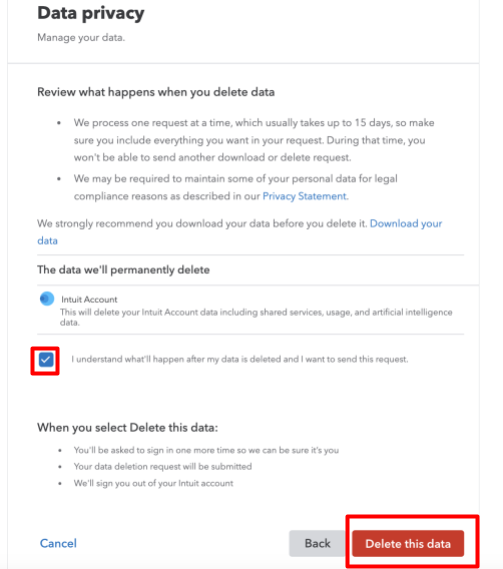
Within your account settings, the option to delete or close your account is usually nested under “Privacy,” “Security,” “Data & Privacy,” or a similarly named section. Companies often do not make this option immediately obvious, requiring users to navigate through a few layers. Look for phrases like “Close Account,” “Delete Account,” “Manage Data,” or “Privacy Dashboard.” Some companies might require you to submit a formal request through a dedicated support portal or contact form rather than offering a direct button within the settings. It’s not uncommon to find that Intuit may prompt you with options to deactivate or temporarily suspend an account before presenting the permanent deletion option, aiming to retain users. Be prepared to be firm in your intention to fully delete.
The Verification Process
For security reasons, and to confirm the legitimacy of the deletion request, Intuit will almost certainly initiate a rigorous verification process. This typically involves:
- Re-authentication: You may be asked to re-enter your password.
- Two-Factor Authentication (2FA): If you have 2FA enabled, you will need to provide a code sent to your registered phone or email, or generated by an authenticator app. This is a critical security layer to prevent unauthorized account closures.
- Security Questions: You might be asked to answer a series of security questions you set up previously.
- Email Confirmation: Often, a confirmation email will be sent to your registered email address, requiring you to click a link to finalize the deletion request. This ensures that the person attempting to delete the account has access to the associated email.
This multi-layered verification is designed to protect your sensitive financial data from being inadvertently or maliciously deleted. Do not proceed unless you are certain you wish to permanently delete the account.
Specific Nuances for Different Intuit Products
While the core steps remain, different Intuit products may have specific considerations:

- QuickBooks Online: For small business users, deleting QuickBooks involves not just personal data but critical business records. Before deletion, ensure all necessary financial reports (P&L, Balance Sheet, Cash Flow), invoices, customer data, vendor details, and payroll information are exported. Consider the implications for tax filings, financial audits, and continuity of business operations. If you’re an accountant, ensure all client data is transferred or secured appropriately.
- TurboTax: This product holds extremely sensitive tax data. Before deleting, download and securely store all prior-year tax returns (PDF copies) and all supporting documents. Confirm that you have independent copies of everything needed for future reference or potential IRS inquiries. Intuit often retains some historical tax data for compliance, but your direct access will be severed.
- Mint: As a personal finance aggregator, Mint holds a historical snapshot of your financial life. Export all transaction data, budget summaries, net worth reports, and any customized insights you’ve generated. While Mint doesn’t hold direct financial accounts, its aggregation of data points can be valuable for personal financial planning and trend analysis, making backup crucial.
In all cases, remember that the goal is not just to close the account but to ensure you retain access to your own historical data in a secure, independent format.
Post-Deletion: What Happens to Your Data and Digital Footprint?
The moment you click “confirm deletion,” the immediate impact is the removal of your access to the Intuit account. However, the subsequent journey of your data and the true extent of your digital footprint’s erasure is a more nuanced process. Understanding what happens post-deletion is vital for complete digital offboarding.
Data Retention Policies
As previously discussed, Intuit’s data retention policies are governed by legal and regulatory frameworks. Even after you initiate deletion, your data isn’t instantly vaporized. Instead, it enters a grace period where it might be marked for deletion but remains recoverable for a short time (often 30-90 days), allowing for accidental deletion recovery. Following this, certain categories of data, especially those related to financial transactions, tax records, or customer service interactions, will be archived and retained for periods mandated by law (e.g., 7 years for tax records in many jurisdictions). Other less critical data may be truly purged. It’s crucial to differentiate between your access being removed and the data being completely erased from Intuit’s systems. Always consult Intuit’s specific privacy policy for the most accurate and up-to-date information regarding their retention practices.
Impact on Connected Services
Intuit products frequently integrate with a myriad of third-party services, including banks, credit card companies, investment firms, payroll providers, and other financial apps. When you delete your Intuit account, these connections are typically severed. However, it’s prudent to independently verify the disconnection from the third-party side. Log into your banking or investment portals and review any linked apps or authorized data-sharing connections. Ensure that no residual permissions or data streams inadvertently persist. While Intuit’s deletion process aims for a clean break, cross-verification with connected services adds an extra layer of security and ensures complete data disengagement.
Data Portability and Export Options
Before initiating deletion, the importance of exporting your data cannot be overstated. Intuit generally provides options to download your data in common formats (e.g., CSV, PDF) for products like QuickBooks, TurboTax, and Mint. This capability, rooted in principles of data portability, allows you to take your financial history with you. For QuickBooks, this might involve exporting general ledger reports, customer lists, and vendor data. For TurboTax, it’s downloading all filed tax returns. For Mint, it’s transaction histories and budget summaries. By exporting, you ensure continuity of your financial records, facilitate migration to new platforms, and maintain crucial backups for legal or personal reference, irrespective of Intuit’s retention policies or your future service choices.
Confirming Account Closure
Once you have completed the deletion process and navigated any grace periods, you will typically receive a final confirmation email from Intuit. This email serves as official notification that your account has been closed. It’s a good practice to retain this email for your records. Additionally, attempt to log in to the account a few days or weeks later. If the login fails or you receive a message indicating the account no longer exists, it confirms the closure from a user-facing perspective. This final verification step provides peace of mind that your digital offboarding from Intuit has been successfully executed.
Best Practices for Digital Account Management and Security
Beyond the specific steps for deleting an Intuit account, this process highlights broader principles of digital account management and security. Proactive engagement with your digital footprint is essential in safeguarding your privacy and financial well-being.
Regular Digital Housekeeping
Just as you might declutter your physical space, regular digital housekeeping is a crucial practice. Periodically review all your online accounts, assessing which ones you still use, which are redundant, and which hold sensitive information. Deleting unused accounts, especially those linked to financial services, reduces your exposure to data breaches and simplifies your digital life. This habit prevents the accumulation of dormant accounts that could become liabilities if compromised.
Data Backup Strategies
The Intuit deletion process underscores the critical importance of regular data backups. Whether it’s financial records, personal documents, photos, or emails, always maintain independent copies of your essential digital assets. Utilize cloud storage services with strong encryption, external hard drives, or a combination of both. A robust backup strategy ensures that you are never fully reliant on a single service provider for the preservation of your irreplaceable data, empowering you to switch services or delete accounts without fear of data loss.
Understanding Privacy Policies
Before signing up for any online service, and certainly before deleting one, make it a practice to read and understand its privacy policy and terms of service. These documents, though often lengthy, detail how your data is collected, used, shared, and retained. A clear understanding of these policies empowers you to make informed decisions about your digital interactions, knowing what rights you have and what obligations the service provider upholds concerning your information.
The Importance of Strong Passwords and 2FA
Basic digital security measures remain foundational. Always use strong, unique passwords for each of your online accounts, ideally generated by a password manager. Enable two-factor authentication (2FA) wherever possible, especially for financial services like Intuit. 2FA adds a critical layer of security, making it exponentially harder for unauthorized individuals to access your accounts even if they somehow obtain your password. These simple yet effective practices are the bedrock of secure digital account management.
Conclusion: Empowering Your Digital Autonomy
Deleting an Intuit account is more than just a technical chore; it’s an exercise in digital autonomy and responsible data management. In an era where personal information is a valuable commodity and cybersecurity threats are ever-present, taking control of your digital footprint is paramount. This comprehensive guide, rooted in technological best practices, equips you with the knowledge and steps necessary to navigate the offboarding process for Intuit’s various financial tools.
By meticulously backing up your data, understanding Intuit’s interconnected ecosystem, diligently following the deletion steps, and being aware of post-deletion data retention, you ensure a clean and secure exit. Furthermore, by embracing broader digital housekeeping, robust backup strategies, a critical understanding of privacy policies, and unwavering commitment to strong passwords and 2FA, you empower yourself to manage all your online accounts with confidence and security. Your digital well-being hinges on your ability to not only create and use online services but also to effectively and securely disengage when the time comes.
aViewFromTheCave is a participant in the Amazon Services LLC Associates Program, an affiliate advertising program designed to provide a means for sites to earn advertising fees by advertising and linking to Amazon.com. Amazon, the Amazon logo, AmazonSupply, and the AmazonSupply logo are trademarks of Amazon.com, Inc. or its affiliates. As an Amazon Associate we earn affiliate commissions from qualifying purchases.