
For any modern business, understanding and managing finances is paramount to success. QuickBooks Online (QBO) has cemented its position as one of the leading cloud-based accounting solutions, offering a suite of tools designed to streamline financial operations for businesses of all sizes. However, before committing to any financial tool, a crucial question arises: how much does QuickBooks Online cost? This isn’t just about a monthly subscription fee; it’s about evaluating the investment in the context of your business’s financial health, operational efficiency, and long-term growth. This article will delve into the various pricing tiers, potential additional costs, and the overall financial value proposition of QuickBooks Online, ensuring you can make an informed decision for your business’s financial future.

Understanding the QuickBooks Online Ecosystem and Its Value Proposition
QuickBooks Online is more than just an expense tracker; it’s a comprehensive financial management platform. Its popularity stems from its ability to centralize and simplify complex financial tasks, making it an indispensable tool for business owners who want to maintain robust financial control and insight.
More Than Just Bookkeeping: An Essential Financial Tool
At its core, QuickBooks Online provides robust bookkeeping functionalities, but its true value extends far beyond basic ledger entries. It acts as a central hub for various financial activities crucial for business sustainability and growth. From managing cash flow through invoicing and expense tracking to monitoring profitability via detailed reports, QBO empowers business owners to take a proactive stance on their finances. It helps in categorizing transactions, reconciling bank accounts, and preparing essential financial statements like profit and loss reports and balance sheets, all of which are vital for understanding a company’s financial standing and making strategic decisions. Without such a tool, these processes can be time-consuming, prone to error, and costly in terms of labor or external accounting fees.
Why Small Businesses Choose QuickBooks Online for Financial Management
Small businesses, in particular, often grapple with limited resources and the need for efficient financial management without the overhead of complex enterprise-level systems. QuickBooks Online addresses this by offering an intuitive interface coupled with powerful features tailored for smaller operations. Its cloud-based nature means accessibility from anywhere, fostering flexibility in managing finances. For entrepreneurs, this translates to more time focusing on core business activities rather than manual financial reconciliation. QBO’s ability to integrate with various other financial apps and services also creates a seamless ecosystem, further enhancing efficiency. Moreover, its scalability means that as a business grows and its financial complexities increase, QBO can adapt, minimizing the need for disruptive and costly transitions to entirely new systems. This long-term suitability makes it a financially savvy choice for many startups and growing enterprises.
A Detailed Breakdown of QuickBooks Online Plans and Pricing
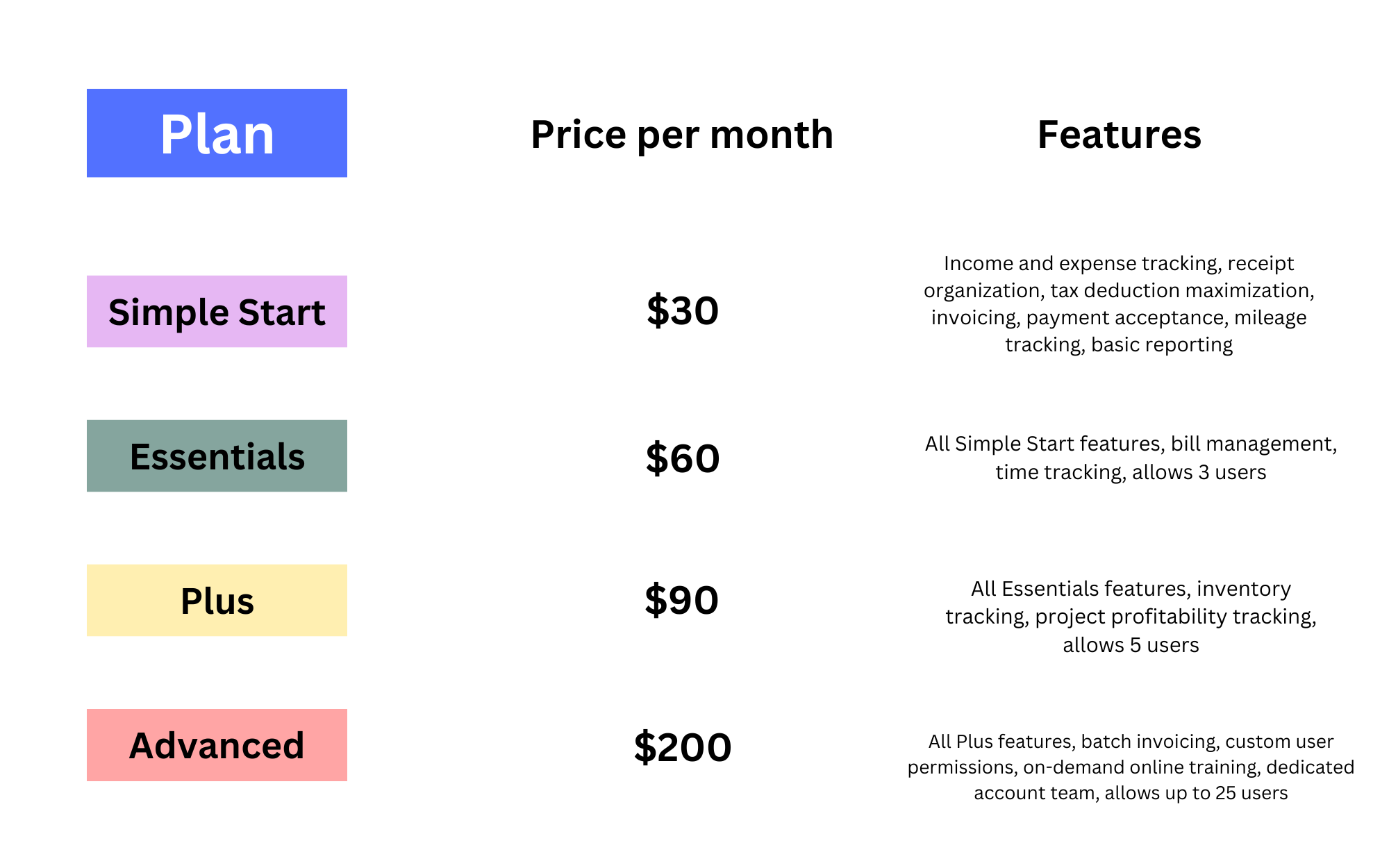
QuickBooks Online offers several subscription tiers, each designed to cater to different stages of business growth and varying financial management needs. Understanding these tiers is crucial for selecting a plan that aligns with your current budget and functional requirements without overpaying for unnecessary features.
Simple Start: The Foundation for Basic Financial Tracking
The Simple Start plan is the most basic and typically the most affordable entry point into the QuickBooks Online ecosystem. It’s ideal for sole proprietors, freelancers, and very small businesses with straightforward financial tracking needs. This plan provides essential features such as sending invoices and estimates, tracking income and expenses, connecting bank accounts, and running basic financial reports. It’s perfect for those who primarily need to organize their financial records for tax purposes and get a basic overview of their cash flow. However, it usually supports only one user, which can be a limitation for businesses planning to grow or delegate financial tasks. The financial benefit here is significant cost savings for businesses that don’t need advanced functionalities, offering a solid foundation for financial organization.
Essentials: Growing Businesses and Enhanced Financial Control
As businesses expand, their financial management requirements often become more complex. The Essentials plan steps up to meet these needs, offering all the features of Simple Start plus significant enhancements. Key additions include the ability to manage and pay bills from vendors, generate more detailed financial reports, and grant access to up to three users. This plan is well-suited for small businesses with employees or contractors, those who need to track accounts payable more rigorously, or those requiring more collaborative financial management. The added functionalities provide greater financial control and deeper insights into profitability and expenditures, justifying the increased cost for businesses at this stage. It helps prevent late payment penalties and offers better oversight of financial commitments.
Plus: Comprehensive Financial Management for Expanding Operations
The Plus plan is QuickBooks Online’s most popular offering, catering to businesses with more intricate financial operations, particularly those dealing with inventory or project-based work. Building upon the Essentials plan, Plus includes robust inventory tracking, enabling businesses to monitor stock levels, costs, and sales margins directly within their accounting system. It also offers project profitability tracking, allowing businesses to assign income and expenses to specific projects, providing critical data for pricing strategies and resource allocation. With up to five users, it supports a broader team for financial collaboration. For businesses managing physical goods or undertaking client projects, the Plus plan’s advanced features provide invaluable financial intelligence, helping to optimize inventory levels, control project costs, and ultimately enhance overall profitability. This investment directly impacts operational efficiency and financial foresight.
Advanced: Enterprise-Level Financial Solutions for Complex Needs
The Advanced plan is designed for larger small to mid-sized businesses that require enterprise-level features, greater automation, and sophisticated financial reporting. This top-tier plan includes everything in Plus, along with enhanced customization options for financial reports, batch invoicing and expense management, and dedicated account management. It also supports up to 25 users, making it suitable for larger teams with complex approval workflows. Businesses benefiting from this plan often have higher transaction volumes, more diverse revenue streams, and a greater need for in-depth financial analytics to drive strategic decision-making. While it comes with a higher price tag, the Advanced plan offers substantial financial efficiency gains through automation, detailed insights, and scalability, providing a powerful financial infrastructure for complex business environments.
Add-Ons and Hidden Costs: Beyond the Monthly Subscription
While the core subscription covers a wide range of features, it’s important to be aware of potential additional costs for specialized functionalities.
- Payroll Services: QuickBooks Payroll is a robust add-on that integrates seamlessly with your accounting, simplifying wage calculations, tax filings, and direct deposits. The cost varies based on the number of employees and the level of service required (basic, enhanced, or full-service). This is a significant financial investment but often justifies itself by ensuring compliance and saving considerable administrative time.
- QuickBooks Payments: This service allows businesses to accept credit card and bank transfer payments directly through QuickBooks invoices, speeding up cash flow. While essential for many businesses, it involves transaction fees, which are an additional operational cost.
- QuickBooks Live Bookkeeping: For businesses that need professional assistance but aren’t ready for a full-time in-house bookkeeper, QuickBooks Live offers certified bookkeepers to categorize transactions, reconcile accounts, and prepare financial reports. This service is a significant additional expense but can be invaluable for ensuring accurate financial records and compliance, potentially saving more in accountant fees or avoided errors.
- Third-Party App Integrations: While many apps integrate for free, some specialized applications linked to QBO might have their own subscription fees. It’s crucial to factor these into your overall financial tools budget.
Understanding these potential add-ons ensures a holistic view of the total financial commitment to QuickBooks Online.
Maximizing Your Financial Return on Investment with QuickBooks Online
Investing in QuickBooks Online is not merely an expense; it’s a strategic financial decision designed to yield tangible returns through efficiency, accuracy, and informed decision-making. To truly maximize this investment, businesses must strategically utilize the platform’s capabilities.
Strategic Plan Selection: Matching Your Business’s Financial Stage
The most fundamental step in maximizing ROI is choosing the right plan. Opting for an Advanced plan when a Simple Start plan suffices is an unnecessary financial drain. Conversely, trying to squeeze complex operations into a basic plan can lead to inefficiencies, errors, and ultimately, higher costs in terms of time and potential rework. Businesses should honestly assess their current financial needs: How many transactions do they process? Do they manage inventory? How many users need access? Do they need project costing? By matching the plan’s features directly to their operational requirements and financial scale, businesses can ensure they are paying for exactly what they need, optimizing their financial outlay from day one. This proactive approach prevents both overspending and under-equipping.
Leveraging Financial Reports for Better Business Decisions
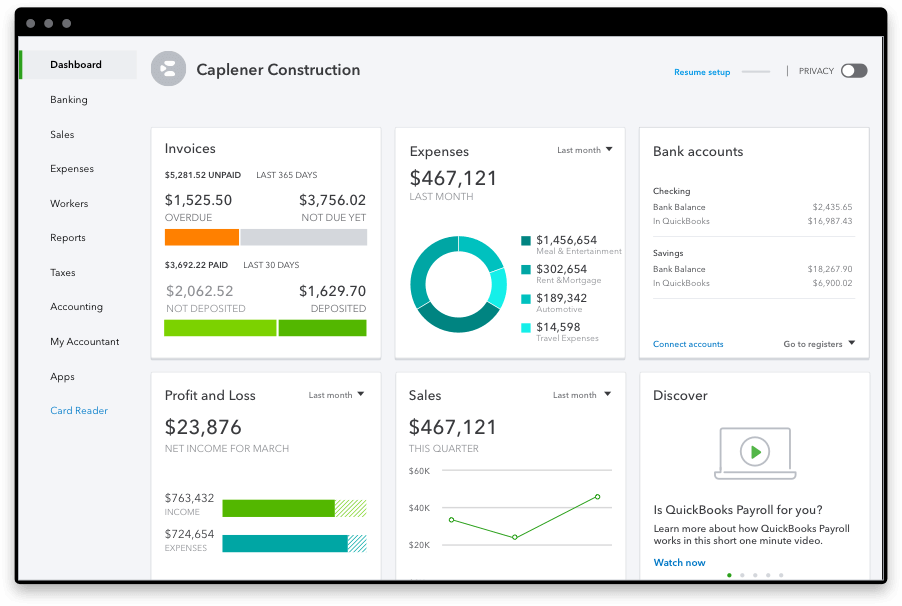
One of QuickBooks Online’s most powerful features for financial management is its extensive reporting capabilities. Beyond basic profit and loss statements, QBO can generate reports on cash flow, accounts receivable aging, sales by customer, expenses by vendor, and more. Actively reviewing these reports provides critical insights into the financial health and performance of the business. For instance, an accounts receivable report can highlight overdue invoices, prompting action to improve cash flow. A sales by customer report can identify top clients, informing marketing and retention strategies. By regularly analyzing this financial data, business owners can identify trends, forecast future performance, make data-driven decisions about pricing, budgeting, and investments, and pinpoint areas for cost reduction. The insights derived from these reports directly contribute to improved financial performance and strategic growth.
Streamlining Tax Preparation and Compliance Costs
Tax season can be a significant source of stress and expense for businesses. QuickBooks Online streamlines the entire process by maintaining accurate, categorized financial records throughout the year. All income and expense data are readily available, making it significantly easier to prepare necessary documents for tax filings. This organized approach reduces the time and effort required, whether you handle taxes yourself or work with an accountant. For businesses that employ external tax professionals, clean and accurate QBO data can lead to lower accounting fees, as the accountant spends less time organizing and categorizing information. Furthermore, by ensuring proper categorization and complete records, QBO helps businesses remain compliant with tax regulations, minimizing the risk of costly penalties or audits. This reduction in administrative burden and potential compliance costs represents a substantial financial return.
The Long-Term Financial Benefits of Cloud-Based Bookkeeping
The cloud-based nature of QuickBooks Online offers several long-term financial advantages. Firstly, accessibility from anywhere at any time provides unprecedented flexibility for business owners and financial teams, enabling efficient work regardless of location. This can reduce the need for physical office infrastructure for financial management, leading to cost savings. Secondly, data security is paramount in financial management. QBO provides robust security measures, regular backups, and disaster recovery protocols, protecting sensitive financial data from loss or breaches, which could otherwise result in significant financial and reputational damage. Thirdly, the continuous updates and maintenance handled by Intuit mean businesses always have access to the latest features and security patches without additional IT costs or manual software installations. This inherent scalability and reliability contribute to a lower total cost of ownership over time, making it a sound long-term financial investment compared to traditional desktop software or manual systems.
Cost-Saving Strategies and Special Offers for QuickBooks Online
While the value proposition of QuickBooks Online is clear, smart financial planning also involves exploring ways to optimize the cost of your subscription. Several strategies can help businesses reduce their initial outlay and ongoing expenses.
Taking Advantage of Introductory Discounts and Promotions
Intuit, the creator of QuickBooks, frequently offers introductory discounts and promotional pricing for new subscribers. These can range from a significant percentage off the monthly subscription for a few months (e.g., 50% off for the first three months) to discounted annual plans. For businesses just starting out or those transitioning from other systems, taking advantage of these limited-time offers can result in substantial initial savings. It’s always wise to check the QuickBooks Online website directly or inquire with sales representatives about any current promotions before committing to a plan. These introductory savings provide a valuable financial buffer as you integrate QBO into your operations.
Annual Subscriptions vs. Monthly Payments: A Financial Comparison
QuickBooks Online typically offers two payment options: a monthly subscription or an annual subscription. While monthly payments provide flexibility, opting for an annual subscription often comes with a significant discount. For businesses with stable cash flow and a clear long-term commitment to QuickBooks Online, paying upfront for a year can result in considerable savings compared to paying month-to-month. This financial comparison is crucial for budgeting. For instance, if an annual plan costs 20% less than 12 monthly payments combined, it’s a direct saving that impacts your bottom line, provided your financial projections support the upfront expenditure.
The Value of Professional Advice for QuickBooks Integration
While the idea of paying for professional advice might seem like an added cost, engaging with a QuickBooks ProAdvisor or a certified accountant experienced in QBO can be a significant cost-saving measure in the long run. A professional can help you:
- Choose the Right Plan: An expert can assess your specific business needs and recommend the most cost-effective and feature-appropriate plan, preventing you from overpaying for unnecessary features or choosing a plan that leads to inefficiencies.
- Optimal Setup: Correct initial setup of your chart of accounts, integrations, and preferences is critical. Errors during setup can lead to inaccurate financial data, requiring costly corrections later or even misinformed business decisions. A ProAdvisor ensures your system is configured to maximize efficiency and accuracy from the start.
- Training and Best Practices: Understanding how to use QBO effectively prevents errors and maximizes efficiency. A professional can provide tailored training and guidance on best practices for data entry, reconciliation, and reporting, which saves time and potential troubleshooting costs down the line.
- Tax Optimization: Accountants can leverage QBO’s capabilities to optimize your tax position, ensuring all eligible deductions are captured and compliance is maintained, potentially leading to significant tax savings.
By investing in professional guidance upfront, businesses can avoid costly mistakes, streamline their financial processes, and ensure they are getting the maximum financial benefit from their QuickBooks Online subscription.
In conclusion, understanding “how much does QuickBooks Online cost” is a multi-faceted inquiry. It encompasses not just the various subscription tiers and potential add-ons but also the immense financial value it brings to a business through enhanced efficiency, accurate reporting, tax preparation streamlining, and long-term data security. By carefully evaluating your business’s specific financial needs, strategically selecting the appropriate plan, and actively utilizing its features for insightful financial analysis, QuickBooks Online transforms from a mere expense into a pivotal investment that fosters sound financial management, drives informed decision-making, and supports sustainable growth. Ultimately, the true cost of QuickBooks Online is defined by the financial advantages it delivers, making it an indispensable tool for modern business finance.
aViewFromTheCave is a participant in the Amazon Services LLC Associates Program, an affiliate advertising program designed to provide a means for sites to earn advertising fees by advertising and linking to Amazon.com. Amazon, the Amazon logo, AmazonSupply, and the AmazonSupply logo are trademarks of Amazon.com, Inc. or its affiliates. As an Amazon Associate we earn affiliate commissions from qualifying purchases.