
In an increasingly digitized world, managing our travel plans often means interacting with complex software platforms and intricate user interfaces. For many, Expedia stands as a cornerstone in this digital travel ecosystem, offering a vast array of booking options for flights, hotels, cars, and activities. However, the convenience of digital booking can sometimes be overshadowed by the apprehension of digital cancellation, especially when plans change unexpectedly. Understanding the technological underpinnings and navigating the specific functionalities of Expedia’s platform for cancellations is crucial for a smooth and stress-free experience. This guide delves into the tech-centric aspects of cancelling a trip on Expedia, exploring everything from user interface design to data security and algorithmic policy interpretations.
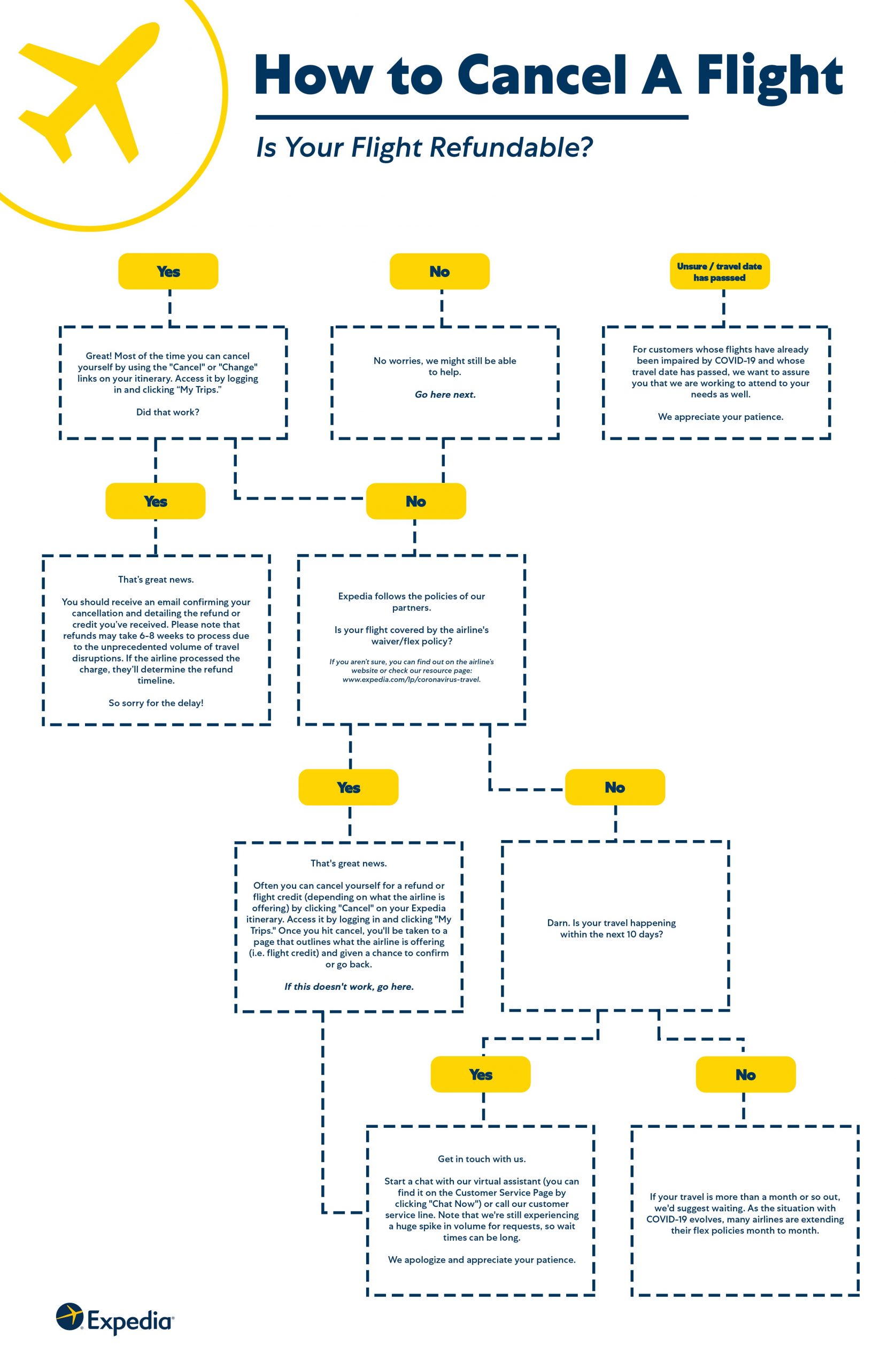
Navigating the Digital Cancellation Landscape
Cancelling a trip on Expedia is more than just a simple click; it’s an interaction with a sophisticated piece of travel software. The efficiency and success of your cancellation hinge on understanding how Expedia’s platform is structured and how it processes user requests.
Understanding Expedia’s Platform Architecture for Bookings
Expedia’s platform is a complex web of interconnected services, integrating data from countless airlines, hotels, car rental companies, and activity providers. When you book a trip, you’re not just creating an entry in an Expedia database; you’re triggering a series of transactions and data exchanges with third-party systems. This distributed architecture means that cancellation isn’t always an instantaneous, isolated event within Expedia’s own system. Instead, it often requires Expedia to communicate with and receive confirmation from multiple external partners, which can introduce delays or specific policy restrictions. The user interface (UI) you interact with is designed to abstract this complexity, but understanding it helps manage expectations during the cancellation process.
The Role of Digital Itineraries and User Accounts
Your Expedia account serves as your central digital hub for all travel-related data. Each booking is meticulously cataloged within your “My Trips” section, forming a digital itinerary that acts as the authoritative record of your reservations. This digital itinerary isn’t just a summary; it’s a dynamic data object that stores booking details, confirmation numbers, and, crucially, the specific cancellation policies associated with each component of your trip. The robustness of this account system ensures that all relevant data is aggregated in one secure place, enabling self-service modifications and cancellations without needing to directly contact each individual service provider. The accuracy and accessibility of this digital record are paramount for a successful cancellation.
Initial Digital Checks: Policy Visibility and Real-time Updates
Before initiating any cancellation, the first tech-savvy step is to digitally review the cancellation policies embedded within your specific itinerary. Expedia’s platform is designed to present these policies clearly, often categorized by “Refundable,” “Non-refundable,” or “Partially Refundable.” These classifications are not static; they are often dynamically loaded based on the current date, time, and specific booking rules dictated by the supplier. Real-time updates mean that a policy that was “free to cancel” a month ago might incur fees today due to approaching deadlines. The platform’s algorithms are constantly evaluating these conditions, presenting you with the most current status. Utilizing the platform’s search and filter functions within your itinerary can quickly highlight these critical details, saving time and potential frustration.
Step-by-Step Digital Cancellation Process
Executing a cancellation on Expedia involves a series of interactions with the platform’s user interface, each designed to guide you through the process while ensuring data integrity and user confirmation.
Accessing Your Expedia Account and Itineraries
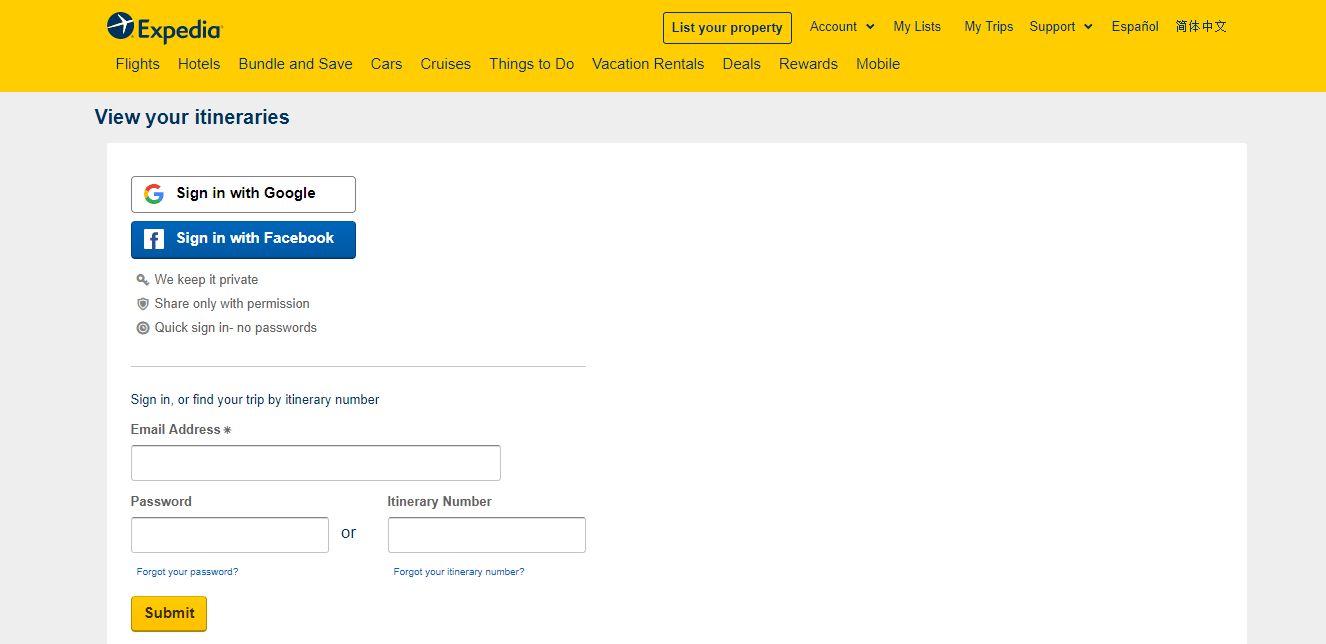
The journey begins by logging into your Expedia account. This is a critical security step, ensuring that only the authorized user can access and modify sensitive travel data. Expedia employs various digital security measures, including multi-factor authentication (MFA) and secure socket layer (SSL) encryption, to protect your login credentials and personal information. Once logged in, navigate to the “My Trips” section, typically found in the main menu or a prominent dashboard area. This section is a testament to effective database management and UI design, presenting all your active and past bookings in an organized, easily searchable format. Selecting the specific trip you wish to cancel will load its detailed digital itinerary.
Identifying Cancellation Options within the User Interface
Within the detailed trip itinerary, you’ll need to locate the specific cancellation options. These are usually clearly labeled buttons or links, such as “Cancel Trip,” “Change/Cancel,” or “Manage Booking.” The precise location and wording might vary slightly depending on the type of booking (e.g., flight, hotel package, standalone hotel) and the device you’re using (desktop site vs. mobile app). UI/UX designers at Expedia prioritize discoverability for such critical actions. Sometimes, cancellation options might be nested under a “Details” or “Options” menu to maintain a clean interface. Pay close attention to any warnings or conditions presented alongside these options, as they often contain crucial information about fees or non-refundability.
Executing the Cancellation: Button Clicks and Confirmation Screens
Once you’ve identified and clicked the cancellation option, Expedia’s system will typically guide you through a confirmation sequence. This often involves:
- Reviewing Policy Details: A summary of the cancellation policy, including any potential fees or non-refundable amounts, is displayed. This is the system’s way of ensuring you are fully aware of the financial implications before proceeding.
- Confirmation Checkbox/Button: You’ll usually be required to explicitly confirm your understanding and agreement to the terms, often by checking a box or clicking a final “Confirm Cancellation” button. This double-check mechanism is a common practice in digital transactions involving financial impact, serving both as a user safeguard and a legal record.
- Processing and System Acknowledgment: Upon final confirmation, Expedia’s backend systems initiate the cancellation process. This involves communicating with the respective travel suppliers. A digital confirmation screen typically appears, acknowledging that your cancellation request has been received.
Troubleshooting Common Digital Hiccups (e.g., page errors, login issues)
Even with robust software, digital platforms can encounter transient issues. If you experience page errors, infinite loading screens, or difficulty logging in during the cancellation process, consider these tech-focused troubleshooting steps:
- Clear Browser Cache and Cookies: Corrupted local data can interfere with website functionality.
- Try a Different Browser or Device: This helps determine if the issue is browser-specific or device-specific.
- Check Internet Connection: A stable connection is vital for secure digital transactions.
- Disable Browser Extensions: Some extensions (e.g., ad blockers) can inadvertently block website scripts.
- Contact Expedia Support: If persistent tech issues prevent you from canceling online, their support team can manually process the cancellation, often using internal tools that bypass common user-facing UI problems.
Decoding Cancellation Policies: A Tech Perspective
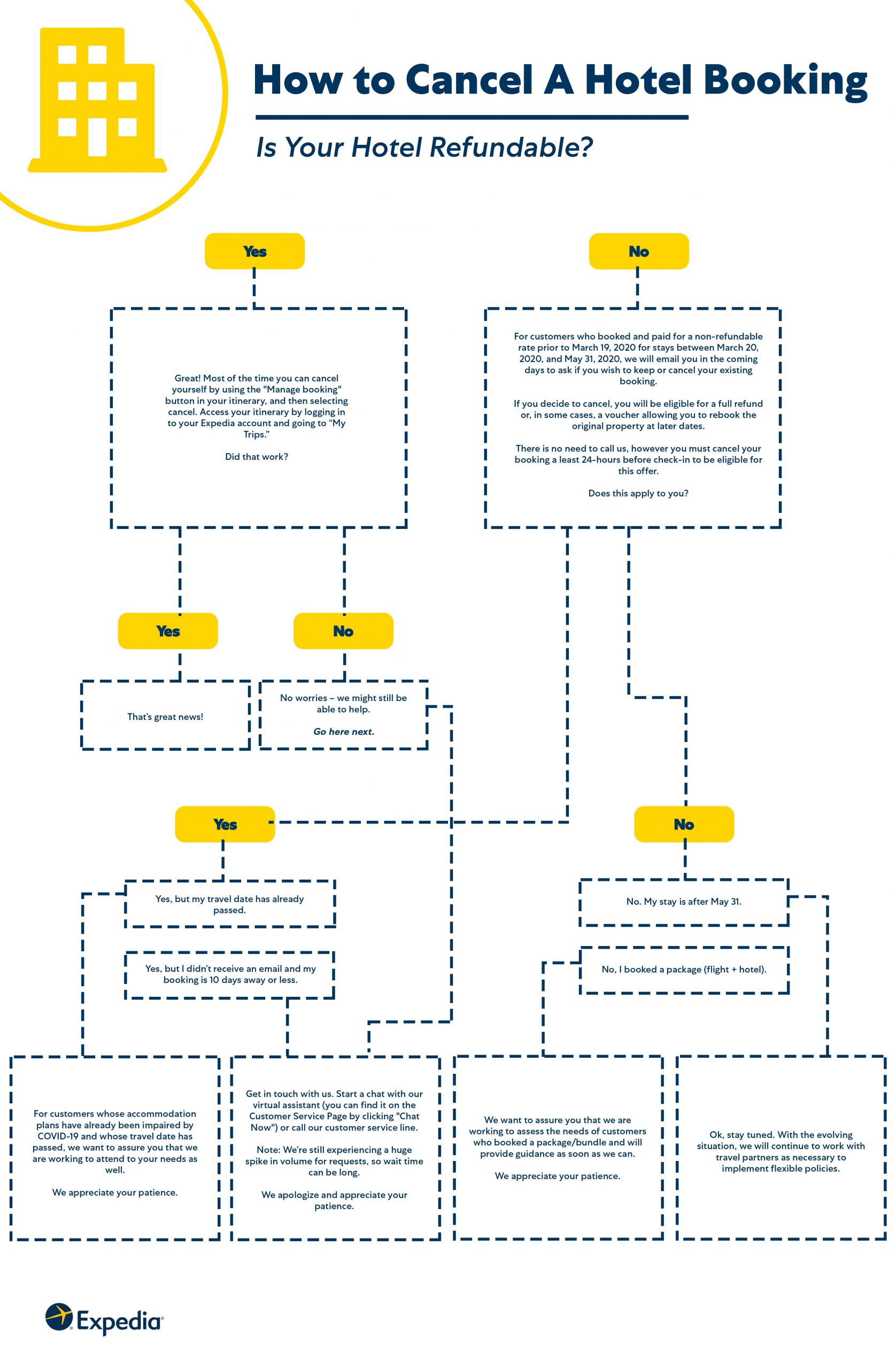
The intricacies of cancellation policies are often more deeply rooted in technology than meets the eye, driven by algorithms and data integration.
Algorithm-Driven Refund Calculations and Dynamic Pricing Impacts
Expedia doesn’t manually calculate your refund; sophisticated algorithms do. These algorithms factor in the original booking terms, the current date and time relative to your travel dates, the specific supplier’s rules, and sometimes even dynamic pricing models. For instance, if you booked a non-refundable flight that later became eligible for a partial refund due to an airline schedule change, Expedia’s system would process that algorithmic adjustment. The platform’s ability to instantly present the refund amount is a testament to its powerful computational backend, which can process complex rulesets in real-time. This algorithmic approach ensures consistency and speed but can also make policy interpretation feel opaque to the user.
Differentiating Supplier vs. Expedia Policies: Data Integration Challenges
One of the most significant tech challenges in travel cancellations is the distinction between Expedia’s general policies and the specific policies of individual suppliers (airlines, hotels). Expedia acts as an aggregator and a booking intermediary. While it has its own terms of service, the ultimate cancellation and refund rules often originate from the supplier whose service you purchased. Expedia’s platform must seamlessly integrate and display these diverse, often conflicting, external policies. Data integration issues, or differences in how policies are coded by various suppliers, can sometimes lead to discrepancies or require manual intervention from Expedia’s support team when automated systems can’t reconcile complex scenarios. This highlights the importance of Expedia’s sophisticated API integrations with thousands of travel partners.
Leveraging Digital Tools for Policy Interpretation (e.g., FAQs, Chatbots)
To assist users in understanding these complex policies, Expedia offers various digital support tools. The extensive FAQ section is a searchable database of common queries, using keyword matching algorithms to provide relevant answers. More advanced is the use of AI-powered chatbots. These chatbots can interpret natural language queries, pull information from Expedia’s vast knowledge base, and even access specific details about your booking to provide personalized policy interpretations. While not always perfect, these digital assistants represent a significant leap in leveraging AI and machine learning to democratize access to complex information, offering immediate, 24/7 support that was once only available through human agents.
Post-Cancellation Digital Management and Security
The cancellation process doesn’t end with a click; proper digital management and security protocols are essential to ensure the cancellation is complete and your data remains protected.
Verifying Cancellation Through Digital Confirmations and Email Notifications
Upon successful cancellation, Expedia’s system will typically provide immediate digital confirmation on the screen. This confirmation should include a cancellation ID or reference number, which is vital for any future correspondence. Equally important are the automated email notifications that follow. These emails serve as official, timestamped records of your cancellation. Always retain these digital confirmations in a secure folder, as they are your primary proof of the transaction. The integrity of these digital records is paramount for dispute resolution and financial tracking.
Data Privacy and Security Considerations Post-Cancellation
Even after a trip is canceled, your personal data remains within Expedia’s systems for a period, as per their data retention policies and legal obligations. It’s crucial to understand Expedia’s commitment to data privacy. They employ robust cybersecurity measures, including encryption, access controls, and regular security audits, to protect your personal identifiable information (PII) and financial details. While you cannot immediately delete all your data post-cancellation, you can review your privacy settings within your account. Be wary of phishing attempts that might follow a cancellation, where malicious actors try to impersonate Expedia to steal your information under the guise of “refund processing.” Always verify the sender’s email address and look for official Expedia domains.
Monitoring Refund Status within the Expedia App/Website
For refundable cancellations, monitoring the refund status is the final digital step. Expedia typically provides a mechanism within your “My Trips” or “Account” section to track the status of your refund. This digital tracker shows whether the refund has been processed by Expedia, sent to your bank, and when you can expect it to appear on your statement. The timeline for refunds can vary, often depending on the original payment method and the processing times of intermediary financial institutions. This digital transparency empowers users to proactively monitor their financial transactions without needing to repeatedly contact customer service, showcasing the benefits of integrated financial tracking features within consumer software.
Future-Proofing Your Travel Tech Experience
As technology evolves, so too will the ways we manage our travel. Adopting best practices and understanding emerging features can enhance your future travel tech experience.
Best Practices for Digital Booking Management
To minimize future cancellation hassles, cultivate smart digital booking habits. Always save digital copies of your booking confirmations. Utilize calendar integrations offered by Expedia (or other apps) to add trip details directly to your digital calendar, complete with policy deadlines. Regularly review your “My Trips” section for any discrepancies or updates. Consider using password managers for secure login credentials and enable multi-factor authentication for an extra layer of digital security. These practices leverage existing technology to create a more resilient and less stressful travel planning process.
Leveraging Advanced Features for Flexible Travel (e.g., flexible filters, price alerts)
Expedia and similar platforms are continuously enhancing their features to offer more flexibility. When booking, actively use “flexible” filters to search for flights and accommodations with lenient cancellation policies. Set up “price alerts” to monitor fare changes; while not directly cancellation-related, it highlights the dynamic, data-driven nature of travel booking that influences when and how you might choose to cancel and rebook. Understanding these advanced features means using the software to your advantage, moving beyond basic booking to strategic travel management.
The Evolution of Cancellation Features and AI Assistance
The future of travel tech promises even more sophisticated cancellation tools. We can anticipate AI-powered personal travel assistants that proactively alert you to potential cancellation windows or better alternatives based on predictive analytics. Enhanced chatbot capabilities might allow for seamless, conversational cancellations without navigating complex menus. Blockchain technology could even play a role in creating immutable records of bookings and cancellations, streamlining dispute resolution. As these technologies mature, the digital process of managing and cancelling travel will likely become even more intuitive, personalized, and efficient, further embedding travel planning within our digitally interconnected lives.
In conclusion, cancelling a trip on Expedia is fundamentally a technological interaction. By understanding the platform’s architecture, navigating its user interface with confidence, decoding algorithmic policies, and maintaining digital security, users can transform a potentially stressful situation into a manageable digital task. As travel tech continues to advance, our ability to control and adapt our plans through these sophisticated digital tools will only grow, making informed digital literacy an indispensable skill for the modern traveler.
aViewFromTheCave is a participant in the Amazon Services LLC Associates Program, an affiliate advertising program designed to provide a means for sites to earn advertising fees by advertising and linking to Amazon.com. Amazon, the Amazon logo, AmazonSupply, and the AmazonSupply logo are trademarks of Amazon.com, Inc. or its affiliates. As an Amazon Associate we earn affiliate commissions from qualifying purchases.