
For many entrepreneurs, freelancers, small business owners, and individuals with significant income not subject to withholding, navigating the world of quarterly estimated tax payments can feel like a complex puzzle. Unlike traditional employees who have taxes automatically deducted from each paycheck, these individuals are responsible for proactively estimating and remitting their tax liability throughout the year. The “online” aspect of making these payments has transformed a potentially cumbersome process into a streamlined, efficient operation, offering convenience and greater control.
This comprehensive guide will demystify quarterly tax payments, walk you through the essential steps for making them online, highlight key deadlines, and provide best practices to ensure you remain compliant and avoid unnecessary penalties. Embracing online payment methods not only simplifies your financial management but also contributes to greater accuracy and better record-keeping.

Understanding Quarterly Tax Payments
Before diving into the mechanics of online payments, it’s crucial to grasp the fundamental principles behind quarterly estimated taxes. This system is the IRS’s way of ensuring that taxpayers pay their income tax as they earn or receive income during the year, rather than waiting until the annual tax deadline.
Who Needs to Pay Quarterly Taxes?
The requirement to pay estimated taxes quarterly applies to individuals, including sole proprietors, partners, and S corporation shareholders, if they expect to owe at least $1,000 in tax. Corporations generally must pay estimated tax if they expect to owe $500 or more in tax. This typically includes:
- Self-Employed Individuals: Freelancers, independent contractors, consultants, and small business owners whose primary income is not subject to employer withholding.
- Gig Workers: Individuals earning income through platforms like ridesharing, food delivery, or online marketplaces.
- Investors: Those with significant income from dividends, interest, capital gains, or rental properties.
- Retirees: Individuals receiving pension or annuity income who haven’t elected to have enough tax withheld.
- Anyone with Insufficient Withholding: Employees who find their W-2 withholdings don’t cover their total tax liability, often due to a second job, significant investment income, or inaccurate W-4 forms.
Essentially, if you anticipate having a tax liability that isn’t substantially covered by traditional payroll withholding, quarterly payments are your responsibility.
The “Pay-as-You-Go” System
The U.S. tax system operates on a “pay-as-you-go” principle. This means you are expected to pay taxes throughout the year as you earn income. For employees, this is handled through payroll withholding. For others, it’s managed via estimated tax payments. Failing to pay enough tax throughout the year, either through withholding or estimated payments, can result in penalties for underpayment, even if you eventually pay all your taxes by the April deadline. The purpose of this system is to prevent a massive, unmanageable tax bill at year-end and ensure a steady revenue stream for the government.
Estimating Your Tax Liability
Accurately estimating your tax liability is perhaps the most challenging, yet critical, step. It requires foresight into your income and expenses for the upcoming year.
- Review Prior Year’s Returns: Your previous year’s tax return (Form 1040) is an excellent starting point. It provides a baseline for your income, deductions, and credits.
- Project Current Year’s Income: Consider all sources of income: self-employment earnings, investment income, rental income, etc. Be realistic about your earning potential.
- Account for Deductions and Credits: Factor in any business expenses, itemized deductions you plan to take, and eligible tax credits (e.g., child tax credit, education credits). These reduce your taxable income and, consequently, your tax liability.
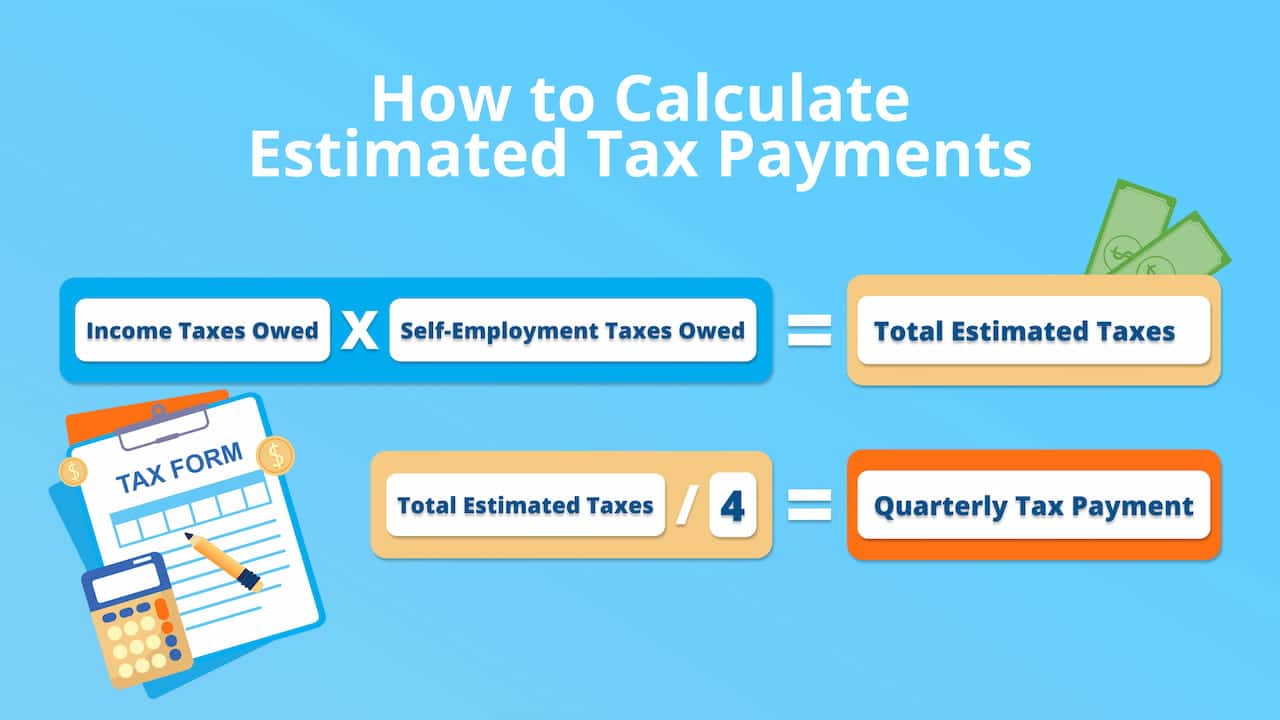
- Use IRS Form 1040-ES: The IRS provides Form 1040-ES, Estimated Tax for Individuals, which includes a worksheet to help you calculate your estimated tax.
- Adjust as Needed: Your income and expenses may fluctuate throughout the year. It’s perfectly acceptable, and often necessary, to revise your estimates for subsequent quarters if your financial situation changes significantly.
A common “safe harbor” rule allows you to avoid penalties if you pay at least 90% of your current year’s tax liability, or 100% of your previous year’s tax liability (110% if your Adjusted Gross Income was over $150,000), whichever is smaller.
Preparing for Online Quarterly Payments
Once you understand your obligation and have estimated your tax, the next step is to prepare for making those payments online. The digital landscape offers several convenient and secure methods.
Gathering Necessary Information
Before you sit down to make your payment, ensure you have all the pertinent details at hand. This usually includes:
- Your Taxpayer Identification Number: Your Social Security Number (SSN) or Individual Taxpayer Identification Number (ITIN) for individuals, or your Employer Identification Number (EIN) for businesses.
- Your Previous Year’s Tax Information: While not strictly necessary for the payment itself, having your prior year’s tax return nearby can help verify information and confirm which tax year you’re paying for.
- Your Estimated Payment Amount: The exact dollar figure you determined from your calculations.
- Your Bank Account Information: The routing number and account number for the checking or savings account you wish to use for the payment.
Choosing the Right Online Payment Method
The IRS offers multiple secure ways to pay your estimated taxes online. The primary options are:
- IRS Direct Pay: A free, secure way to pay your taxes directly from your checking or savings account. No registration is required.
- Electronic Federal Tax Payment System (EFTPS): A free service provided by the U.S. Department of the Treasury. This is particularly useful for those who make frequent federal tax payments, offering more robust scheduling and tracking features. It requires enrollment.
- Credit/Debit Card or Digital Wallet: You can pay through third-party payment processors who charge a small fee. This option offers convenience and potentially earns rewards if using a credit card, but the fee should be weighed against these benefits.
- Tax Software/Professional: Many tax software programs (e.g., TurboTax, H&R Block) allow you to make estimated payments directly through their platform. If you use a tax professional, they can often facilitate these payments for you.
Setting Up Your Accounts
For IRS Direct Pay, no advance setup is needed; you simply enter your details each time. However, if you opt for EFTPS, you’ll need to enroll:
- EFTPS Enrollment: Visit www.eftps.gov and click “Enroll.” You’ll provide personal and bank account information. The IRS will mail you a Personal Identification Number (PIN) to the address associated with your taxpayer ID (SSN or EIN), which typically takes 5-7 business days. You cannot make payments until you receive and activate this PIN. Once activated, you can schedule payments up to 365 days in advance.
Regardless of your chosen method, ensure your bank account details are correct to avoid rejected payments and potential fees.
Step-by-Step Guide to Online Quarterly Tax Payments
Let’s walk through the process for the most common online payment methods.
Using IRS Direct Pay
IRS Direct Pay is favored for its simplicity and lack of registration.
- Access the Service: Go to www.irs.gov/payments/direct-pay.
- Select Payment Type: Choose “Estimated Tax” as the reason for payment.
- Verify Identity: For security, you’ll need to verify your identity using information from a prior tax return. This typically involves your SSN/ITIN, date of birth, filing status, and prior year’s adjusted gross income (AGI) or a prior year’s PIN.
- Enter Payment Details: Input the tax year for which the payment applies (e.g., 2024 for 2024 estimated taxes), the payment amount, and your bank account information (routing and account numbers).
- Review and Confirm: Carefully review all details before submitting. You’ll receive a confirmation number immediately upon submission. It’s crucial to save this number for your records. You may also receive an email confirmation.

Navigating EFTPS
EFTPS offers more robust features, especially for regular users.
- Log In: Go to www.eftps.gov and log in using your EIN/SSN, PIN, and password.
- Initiate Payment: Select “Make a Payment.”
- Choose Tax Type: For estimated taxes, select “Form 1040ES.”
- Enter Payment Details: Input the tax period (e.g., 2024) and the payment amount. You can choose a payment date up to 365 days in the future.
- Review and Submit: Double-check all information, especially the payment date and amount. Submit the payment.
- Confirmation: You will receive an EFTPS confirmation number immediately. Record this number. EFTPS also allows you to view your payment history and schedule.
Exploring Other Payment Options
- Credit/Debit Card or Digital Wallet: Through IRS-authorized payment processors (listed on the IRS website), you can use major credit cards, debit cards, or digital wallets. Be aware of the processing fees, which typically range from 1.87% to 2.29% for credit cards and a flat fee (e.g., $2.20) for debit cards. This method is convenient but can be more expensive.
- Tax Software Integration: If you use tax preparation software, it often has a built-in function to calculate and submit estimated tax payments directly to the IRS, simplifying the process by linking your tax calculations to the payment gateway.
- Tax Professional Assistance: Your tax advisor can often make these payments on your behalf through their professional tax software, ensuring accuracy and timely submission.
Important Deadlines and Best Practices
Staying on top of deadlines and maintaining good habits are key to avoiding penalties and stress.
Key Quarterly Payment Dates
The IRS designates four payment periods, each with a specific deadline. These deadlines are typically:
- Quarter 1 (Jan 1 to March 31): Payment due April 15
- Quarter 2 (April 1 to May 31): Payment due June 15
- Quarter 3 (June 1 to Aug 31): Payment due September 15
- Quarter 4 (Sept 1 to Dec 31): Payment due January 15 of the next year
If a deadline falls on a weekend or holiday, the deadline shifts to the next business day. It’s important to remember these dates and plan your payments accordingly.
Automating and Scheduling Payments
One of the greatest advantages of online payment systems like EFTPS is the ability to schedule payments in advance.
- Set Reminders: Use calendar reminders or financial management apps to alert you a week or two before each deadline, giving you ample time to prepare.
- Future-Date Payments: For EFTPS users, schedule all four quarterly payments at the beginning of the year based on your initial estimate. You can always log back in and modify or cancel future payments if your income or deductions change. This proactive approach ensures you never miss a deadline.
Record Keeping and Verification
Meticulous record-keeping is vital for peace of mind and for tax time.
- Save Confirmation Numbers: For every online payment, save the confirmation number provided by IRS Direct Pay, EFTPS, or the third-party processor.
- Print Receipts: Print or save digital copies of your payment confirmations.
- Check Bank Statements: Verify that the payment successfully debited from your bank account.
- Maintain a Log: Keep a simple spreadsheet or document detailing each payment: date, amount, method used, and confirmation number. This will be invaluable when preparing your annual tax return.
Adjusting Estimates
Life is unpredictable, and so are incomes and expenses.
- Review Regularly: Periodically (e.g., before each payment deadline), review your income and expense projections.
- Update as Needed: If you have a significantly better or worse quarter than anticipated, or if major life changes occur (marriage, birth of a child, new large expense), revise your estimated tax for the remaining quarters. This can help you avoid underpayment penalties or overpaying. You don’t need to amend previous payments; simply adjust future ones.
Avoiding Common Pitfalls and Ensuring Accuracy
Even with the convenience of online payments, certain errors can lead to issues.
Penalties for Underpayment or Late Payments
The IRS can impose penalties if you don’t pay enough tax throughout the year or if you pay late.
- Underpayment Penalty: This applies if you pay less than 90% of your current year’s tax or 100% (or 110% for high earners) of your prior year’s tax, whichever is smaller. The penalty is calculated based on the underpayment amount and the period it was unpaid.
- Late Payment Penalty: This applies if you miss a quarterly deadline.
- How to Avoid: Utilize the safe harbor rules, make timely and accurate payments, and adjust your estimates throughout the year. If you find yourself in a situation where you might owe a penalty, consider increasing your payments for the remaining quarters.
Double-Checking Information
A single typo can cause significant headaches.
- Account Numbers: Always double-check your bank account and routing numbers. An incorrect digit can lead to a rejected payment or funds going to the wrong place.
- Amounts: Confirm the payment amount matches your calculated estimate.
- Tax Year: Ensure you’re applying the payment to the correct tax year. It’s common to accidentally select the wrong year, especially when dealing with the final payment for the previous year (due January 15th) and the first payment for the current year (due April 15th).
Seeking Professional Guidance
While online tools make tax payments more accessible, complex financial situations may warrant professional help.
- When to Consult a Tax Advisor: If your income sources are highly varied, you have significant deductions or credits, or your business structure is complex, a qualified tax professional can provide tailored advice. They can help accurately estimate your tax liability, determine the best payment strategies, and represent you if there are any IRS inquiries.
- Benefits of Professional Help: A tax advisor can save you time, reduce stress, and potentially identify deductions or credits you might have overlooked, ultimately ensuring compliance and optimizing your tax position.
In conclusion, making quarterly tax payments online is a highly efficient and secure method for fulfilling your tax obligations. By understanding who needs to pay, preparing thoroughly, utilizing the online platforms correctly, and adhering to best practices and deadlines, you can navigate the estimated tax system with confidence and ease, avoiding penalties and maintaining sound financial health for yourself or your business.
aViewFromTheCave is a participant in the Amazon Services LLC Associates Program, an affiliate advertising program designed to provide a means for sites to earn advertising fees by advertising and linking to Amazon.com. Amazon, the Amazon logo, AmazonSupply, and the AmazonSupply logo are trademarks of Amazon.com, Inc. or its affiliates. As an Amazon Associate we earn affiliate commissions from qualifying purchases.