
The frustration of not being able to install an older version of Adobe Photoshop is a common pain point for many creative professionals and enthusiasts. Whether you’re clinging to a familiar workflow, working with legacy files, or encountering compatibility issues with newer software, the inability to access your preferred Photoshop version can be a significant roadblock. This article delves into the reasons behind these installation challenges and explores potential solutions, drawing upon the interconnectedness of technology, brand strategy, and the financial implications of software choices.
The Evolving Landscape of Software and Why Older Versions Become Problematic
Software, especially complex applications like Adobe Photoshop, is not static. It’s a constantly evolving product, driven by technological advancements, security imperatives, and business strategies. Understanding this evolution is key to grasping why installing older versions can become problematic.
Shifting Technologies and Operating System Dependencies
At its core, software relies on the underlying operating system (OS) and hardware it runs on. As operating systems like Windows and macOS are updated, they introduce new frameworks, security protocols, and architectural changes. Older software versions, designed for earlier OS iterations, often struggle to interface with these newer environments.
- API Deprecations: Application Programming Interfaces (APIs) are the bridges that allow different software components to communicate. When an OS vendor updates their system, they may deprecate or remove older APIs that older software versions depend on. This can lead to crashes, errors, or outright failure to launch. For example, a Photoshop version from the early 2000s might have relied on specific graphics rendering APIs that are no longer supported in modern macOS or Windows versions.
- Driver Incompatibility: Graphics drivers, sound drivers, and other hardware-specific drivers are also crucial for software performance. Newer OS versions often come with updated drivers that are optimized for current hardware. Older Photoshop versions might not be compatible with these updated drivers, leading to issues with performance, display rendering, or even system instability.
- Security Patches and Vulnerabilities: Older software versions, by definition, have not received the latest security updates. This makes them more vulnerable to malware, viruses, and other cyber threats. Operating systems are designed with robust security measures that can sometimes conflict with the less secure architecture of older applications, leading to installation blocks or runtime errors as the OS tries to protect itself.
Adobe’s Licensing and Distribution Model Evolution
Adobe’s business model has undergone a significant transformation, moving from perpetual licenses to a subscription-based Creative Cloud model. This shift has a direct impact on the availability and installability of older Photoshop versions.
- End of Support for Perpetual Licenses: Adobe no longer sells perpetual licenses for Photoshop. Instead, they offer subscription plans through Creative Cloud. This means that older versions, typically associated with perpetual licenses, are no longer officially supported or readily available for download through legitimate channels.
- Account-Based Licensing: The Creative Cloud model relies on an Adobe ID for authentication and licensing. When you subscribe, your access is tied to your account, and the Creative Cloud Desktop app manages your installations. This system is designed to provide access to the latest versions and certain older versions as deemed appropriate by Adobe. Older versions that predate this model or were part of discontinued product suites might not be easily accessible even with a current subscription.
- The “Why” Behind the Change: From a business perspective, Adobe’s shift to a subscription model offers several advantages:
- Recurring Revenue: Predictable revenue streams allow for consistent investment in research and development.
- Faster Innovation: Regular updates and new features can be rolled out more frequently to subscribers.
- Streamlined Updates: Users generally have access to the latest tools and security patches without having to purchase new versions.
- Brand Consistency and Control: Adobe maintains greater control over its product ecosystem, ensuring a more unified user experience and brand identity.
Legal and Licensing Considerations
Attempting to acquire and install older versions of Photoshop outside of Adobe’s authorized channels can also lead to legal and licensing complications.
- Piracy and Unauthorized Copies: Downloading Photoshop from unofficial sources or using cracked versions is illegal and unethical. These copies often contain malware and can lead to severe legal consequences.
- License Agreements: When you purchase software, you agree to its End User License Agreement (EULA). These agreements typically specify the terms of use, including which versions you are entitled to install and for how long. Attempting to circumvent these terms by installing an unsupported version might violate your EULA.
- Brand Reputation: For businesses, using pirated or unauthorized software can severely damage their brand reputation. Clients and partners increasingly value ethical practices, and using illegal software can lead to loss of trust and business opportunities.
Navigating the Installation Challenges: Strategies and Workarounds
While directly installing a very old version of Photoshop on a modern system can be challenging, there are several strategies and workarounds that users can explore. These solutions range from leveraging Adobe’s provided tools to exploring alternative software.
Accessing Older Versions Through Creative Cloud
For users with an active Creative Cloud subscription, Adobe does offer a way to install certain older versions of Photoshop. This is Adobe’s official and recommended approach for accessing legacy software.
-
The Creative Cloud Desktop App: The Creative Cloud Desktop application is your primary portal for managing your Adobe software.
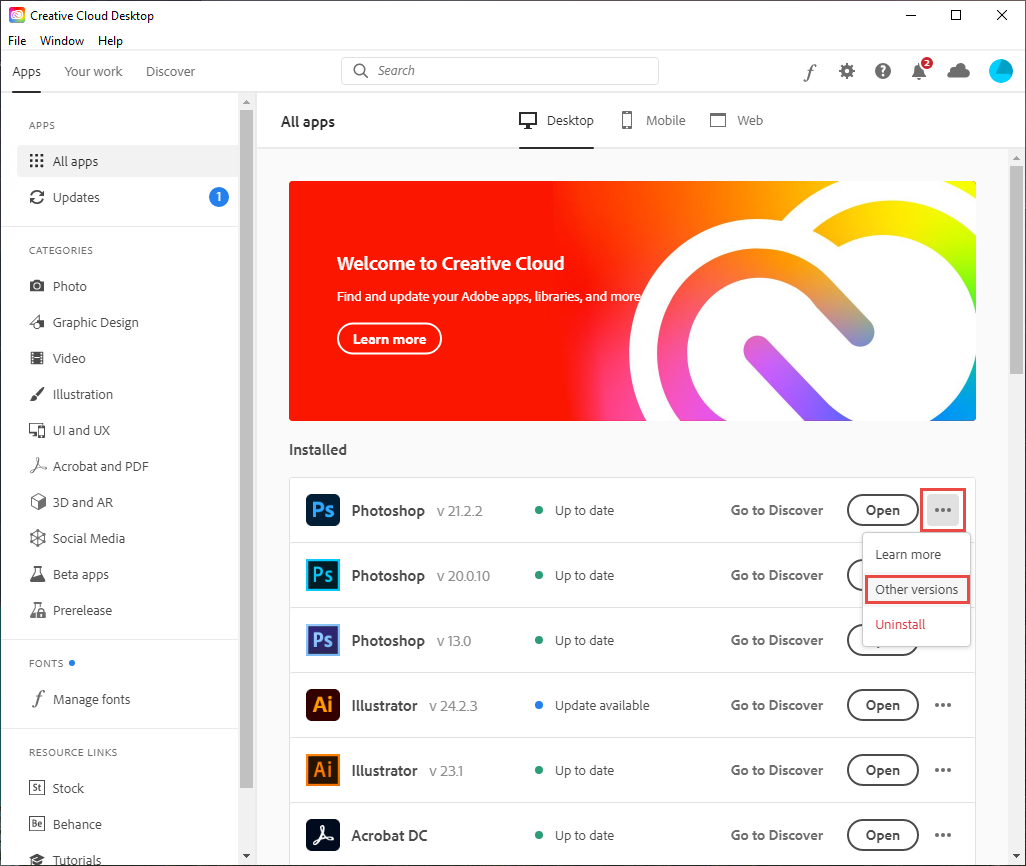
- Open the Creative Cloud Desktop App: Launch the app on your computer.
- Navigate to “All Apps”: Find the “All Apps” section, which lists all available Adobe applications.
- Find Photoshop: Locate Photoshop in the list.
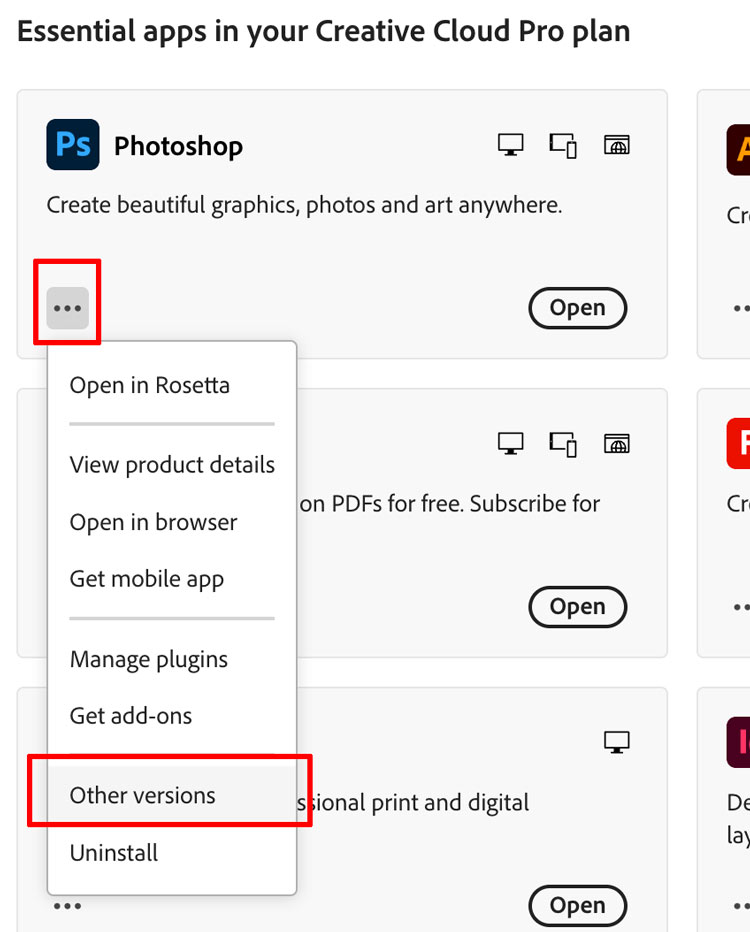
- Click “Install” or the Down Arrow: Next to the “Install” button for Photoshop, you’ll often see a small down arrow or a dropdown menu. Click this.
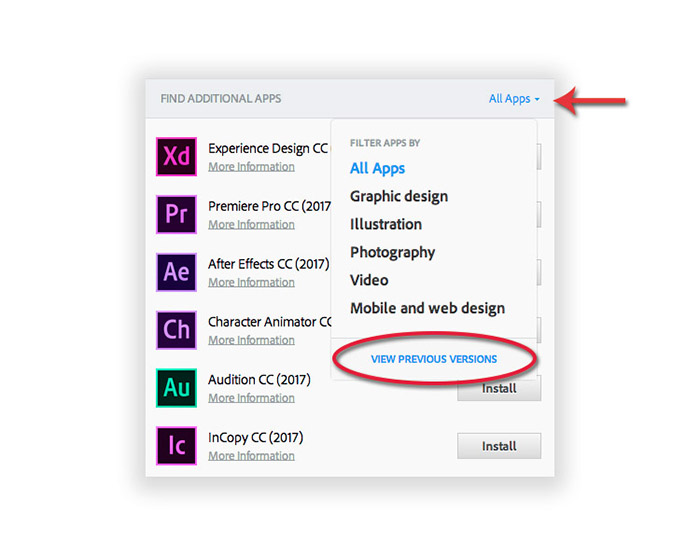
- Select “Other Versions”: From the dropdown menu, choose “Other versions.”
- Browse Available Versions: You will then see a list of previous versions of Photoshop that Adobe makes available for download. Select the specific version you need and click “Install.”
-
Limitations of “Other Versions”: It’s important to note that Adobe does not make all past versions available. They typically offer a selection of the most recent older versions that are still reasonably compatible with current operating systems and that they can support to a degree. Very old versions (e.g., Photoshop 7, CS2) are generally not offered through this channel.
-
System Requirements: Even when installing an older version through Creative Cloud, always check the system requirements for that specific version. It might still have limitations on newer operating systems.
Exploring Alternatives for Legacy Workflow and File Compatibility
If you absolutely need to work with a specific older version that isn’t available through Creative Cloud, or if you’re encountering persistent compatibility issues, you might need to consider alternative approaches.
Virtualization and Emulation
Virtualization allows you to run an older operating system within your current OS. This creates an isolated environment where older software can function as if it were on its original hardware.
- Virtual Machine Software: Programs like VMware Workstation Player (Windows), VMware Fusion (macOS), or Oracle VirtualBox (cross-platform) enable you to create virtual machines.
- Installing an Older OS: You would need to obtain a legitimate license and installation media for an older operating system (e.g., Windows 7, an older macOS version).
- Installing Photoshop within the VM: Once the older OS is set up in the virtual machine, you can then install your desired older version of Photoshop within that virtual environment.
- Pros: This offers the highest chance of success for running very old software.
- Cons: It requires significant technical knowledge, additional licensing for the OS, and can be resource-intensive, impacting performance. It also means you’re running an OS that may no longer receive security updates, posing a risk if connected to the internet.
Using Software with Broad Compatibility or Alternative Features
Sometimes, the need for an older Photoshop version stems from a specific feature or workflow that newer versions have changed or removed. In such cases, exploring other software might be a more practical long-term solution.
- Affinity Photo: This is a popular, one-time purchase alternative to Photoshop that offers a comprehensive suite of editing tools and has a strong reputation for performance and compatibility with modern systems. Many users who found themselves unable to install older Photoshop versions have successfully transitioned to Affinity Photo.
- GIMP (GNU Image Manipulation Program): A free and open-source raster graphics editor. While its interface differs from Photoshop, it offers a powerful set of tools and is actively developed, ensuring compatibility with current operating systems.
- Specialized Older File Converters: If your primary concern is opening and saving older Photoshop file formats (.PSD) for compatibility with other users, there are specialized tools and plugins designed for this purpose. Some applications can import and export PSD files with varying degrees of fidelity.
The Financial and Brand Implications of Software Choices
The decision to use older software is not just a technical one; it carries financial and brand implications that are worth considering.
- Cost of Legacy Software: While older versions might seem “free” if you already own them, the cost of maintaining them can be hidden. This includes the potential cost of older hardware, the time spent troubleshooting compatibility issues, and the security risks associated with unsupported software. For businesses, the risk of data breaches or reputational damage due to security vulnerabilities can far outweigh the cost of a subscription to current software.
- Brand Image and Professionalism: For freelancers and agencies, the software used can reflect on their brand. While clients might not scrutinize your Photoshop version, they do expect professionalism, reliability, and security. Using outdated or potentially unstable software can, consciously or unconsciously, convey an image of being behind the curve. Investing in current, supported software demonstrates a commitment to efficiency and security, reinforcing a strong brand image.
- Productivity and Efficiency: Modern software versions are often optimized for newer hardware and workflows, leading to increased productivity. New features can streamline tasks, automate processes, and offer performance enhancements. Sticking to older software, while familiar, might be hindering your overall efficiency and ability to adopt new creative techniques.
Conclusion: Balancing the Old with the New
The inability to install an old version of Photoshop is a symptom of the dynamic and ever-evolving nature of technology. Adobe’s strategic shift in licensing models and the continuous updates to operating systems create a landscape where older software gradually becomes unsupported and difficult to integrate.
While the desire to maintain familiar workflows or handle legacy files is understandable, it’s crucial to acknowledge the underlying reasons for these installation hurdles. For those with active Creative Cloud subscriptions, the “Other Versions” option within the desktop app is the most straightforward and legitimate method for accessing older Photoshop iterations. However, for truly ancient versions or persistent issues, virtualization offers a more complex but viable solution.
Ultimately, the decision of whether to pursue older software or adopt newer tools involves a careful consideration of technical feasibility, financial implications, and brand perception. Embracing current software, or exploring robust alternatives, often provides a more secure, efficient, and future-proof path for creative endeavors. By understanding the trade-offs, individuals and businesses can make informed decisions that align with their long-term goals and maintain a strong presence in the ever-advancing digital world.
aViewFromTheCave is a participant in the Amazon Services LLC Associates Program, an affiliate advertising program designed to provide a means for sites to earn advertising fees by advertising and linking to Amazon.com. Amazon, the Amazon logo, AmazonSupply, and the AmazonSupply logo are trademarks of Amazon.com, Inc. or its affiliates. As an Amazon Associate we earn affiliate commissions from qualifying purchases.