
The digital landscape we navigate daily is a complex tapestry woven with intricate processes, many of which operate behind the scenes, largely unnoticed by the average user. Among these silent architects of our computing experience is the “Windows Modules Installer Worker.” This seemingly innocuous process, often appearing in Task Manager, can sometimes spark curiosity, or even concern, especially when it begins consuming significant system resources. Understanding its purpose and function is key to appreciating the smooth operation of your Windows operating system and to troubleshooting potential performance issues.

At its core, the Windows Modules Installer Worker, also known by its executable name TiWorker.exe, is a fundamental component of Windows responsible for managing and installing updates, features, and hotfixes for the operating system and its various applications. Think of it as the dedicated, diligent installer and uninstaller for your Windows ecosystem. It plays a vital role in ensuring your system remains secure, stable, and up-to-date, patching vulnerabilities, introducing new functionalities, and resolving bugs. While its primary function is beneficial, its resource utilization can sometimes lead to questions about its identity and impact. This article will delve into the intricacies of the Windows Modules Installer Worker, exploring its responsibilities, how it operates, and what to do when it becomes a bottleneck in your system’s performance.
The Essential Role of Windows Modules Installer Worker in System Health
The Windows Modules Installer Worker is not an optional background application; it is an integral part of the Windows Update service and the Component Based Servicing (CBS) infrastructure. Its existence is directly tied to the continuous evolution and maintenance of your Windows operating system. Without this worker process, your computer would be susceptible to security threats due to unpatched vulnerabilities, experience performance degradations from unresolved bugs, and miss out on valuable new features that Microsoft rolls out periodically.
Managing System Updates and Features
The primary mandate of TiWorker.exe is to handle the installation and uninstallation of Windows updates. This includes everything from critical security patches and cumulative updates to feature updates that introduce significant new functionalities or major overhauls to the operating system. When Windows Update checks for available updates, downloads them, and prepares for installation, the Windows Modules Installer Worker is the engine that drives this process. It meticulously applies the downloaded files, integrates them into the operating system’s core components, and ensures that these changes are implemented correctly.
Furthermore, this worker process is also responsible for managing optional features that you can enable or disable within Windows. These can range from accessibility tools and developer features to specific Windows components that might not be enabled by default. When you decide to turn on or off such a feature through the Control Panel or Settings app, the Windows Modules Installer Worker is summoned to perform the necessary modifications to your system.
Ensuring System Stability and Security
In the ever-evolving landscape of cybersecurity, constant vigilance is paramount. Microsoft regularly releases security updates to combat new threats and protect users from malicious attacks. The Windows Modules Installer Worker is at the forefront of this defense, ensuring that these vital security patches are applied promptly and efficiently. By keeping your system updated, you significantly reduce your exposure to malware, ransomware, and other cyber threats that exploit known vulnerabilities.
Beyond security, TiWorker.exe contributes to overall system stability. Updates often include fixes for bugs and performance issues that may have been discovered after the initial release of an operating system or application. The worker process diligently implements these fixes, aiming to prevent crashes, application malfunctions, and unexpected behavior, thereby contributing to a smoother and more reliable computing experience.
The Component Based Servicing (CBS) Connection
The Windows Modules Installer Worker is intricately linked to the Component Based Servicing (CBS) architecture. CBS is a fundamental Windows technology that manages the installation and management of system components. It allows for the granular installation, modification, and uninstallation of various software components that make up the Windows operating system. The Windows Modules Installer Worker acts as the primary interface for interacting with and manipulating these components, ensuring that updates and feature changes are applied in a consistent and manageable manner. This modular approach to servicing is what allows Windows to be updated and maintained effectively without requiring a complete reinstallation for every minor change.
Why Does Windows Modules Installer Worker Consume High CPU and Disk Usage?
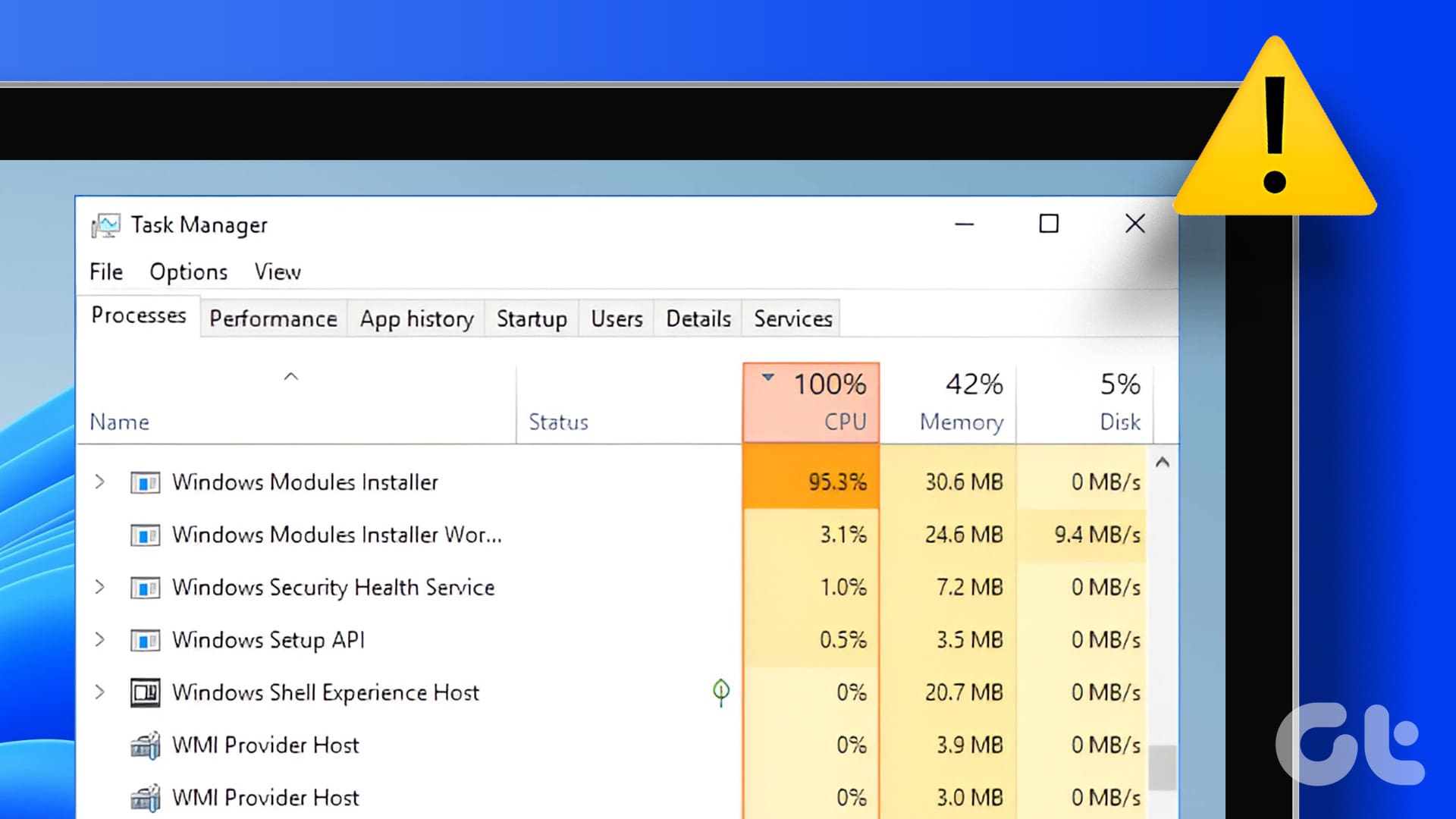
It’s not uncommon for users to notice the Windows Modules Installer Worker process (TiWorker.exe) actively consuming a noticeable portion of their CPU or disk resources. This spike in activity, while sometimes alarming, is often a normal part of its operation and is usually temporary. Several factors can contribute to this increased resource utilization.
The Process of Installing Updates
The most common reason for high resource usage by the Windows Modules Installer Worker is, unsurprisingly, the installation of Windows updates. When new updates are downloaded and prepared for installation, the worker process needs to decompress files, verify their integrity, integrate them into the system, and often requires restarting certain services or even the entire operating system. This can be a computationally intensive task, especially for large cumulative updates or feature upgrades. During these periods, you might observe elevated CPU activity and significant disk read/write operations as the system works to apply the changes.
Corrupted System Files or Update Packages
In some instances, the Windows Modules Installer Worker might get stuck in a loop or exhibit prolonged high resource usage if there are issues with corrupted system files or problematic update packages. If an update package is downloaded incorrectly or if critical system files that the installer relies on are damaged, TiWorker.exe might repeatedly attempt to fix or reinstall them, leading to sustained high resource consumption. This can also happen if a previous update installation was interrupted or failed midway.
Background Scans and Component Servicing
Beyond active installations, the Windows Modules Installer Worker can also perform background scans and maintenance tasks related to the Component Based Servicing (CBS) system. These tasks might involve checking the integrity of installed components, preparing for future updates, or cleaning up temporary files left over from previous installations. While these are typically less resource-intensive than active installations, they can sometimes manifest as noticeable background activity, particularly if the system is under other heavy loads.
Conflicts with Third-Party Software
Occasionally, conflicts between the Windows Modules Installer Worker and certain third-party software can lead to unexpected behavior and resource spikes. Antivirus software, system optimization tools, or other applications that deeply integrate with the operating system might interfere with the normal operation of TiWorker.exe, causing it to consume more resources than usual as it tries to navigate or resolve these conflicts.
Troubleshooting and Managing Windows Modules Installer Worker Issues
While the Windows Modules Installer Worker is a vital system process, encountering persistent or excessive resource consumption can be frustrating. Fortunately, there are several steps you can take to troubleshoot and manage potential issues. It’s important to approach these troubleshooting steps systematically and to avoid making drastic changes without understanding their implications.
Allowing Updates to Complete and System Restarts
The most straightforward solution to high resource usage by TiWorker.exe is often patience. If you notice it working hard, check if Windows is in the process of installing updates. If it is, allow the process to complete. This can sometimes take a considerable amount of time, especially on older hardware or for large updates. Ensure your computer remains powered on and connected to the internet until the installation is finished. A system restart after updates have been installed can also resolve many temporary performance anomalies.
Running the Windows Update Troubleshooter
Microsoft provides built-in troubleshooters designed to diagnose and fix common Windows issues, including those related to Windows Update. The Windows Update Troubleshooter can help identify and resolve problems that might be preventing updates from installing correctly or causing the Windows Modules Installer Worker to behave erratically. You can find this troubleshooter by navigating to Settings > Update & Security > Troubleshoot > Additional troubleshooters, and then selecting “Windows Update.”
Verifying System File Integrity
Corrupted system files can be a root cause for issues with TiWorker.exe. You can use the System File Checker (SFC) tool to scan for and repair any damaged system files. To do this, open Command Prompt as an administrator (search for “cmd,” right-click, and select “Run as administrator”) and type sfc /scannow followed by pressing Enter. This process can take some time, but it’s a crucial step in ensuring the integrity of your Windows installation.
Checking for Disk Errors
Issues with your hard drive or SSD can also impact system processes like the Windows Modules Installer Worker. Running a disk check can identify and repair file system errors on your drives. To do this, open File Explorer, right-click on the drive you want to check (usually C:), select “Properties,” go to the “Tools” tab, and under “Error checking,” click “Check.”
Disabling or Pausing Windows Updates (with Caution)
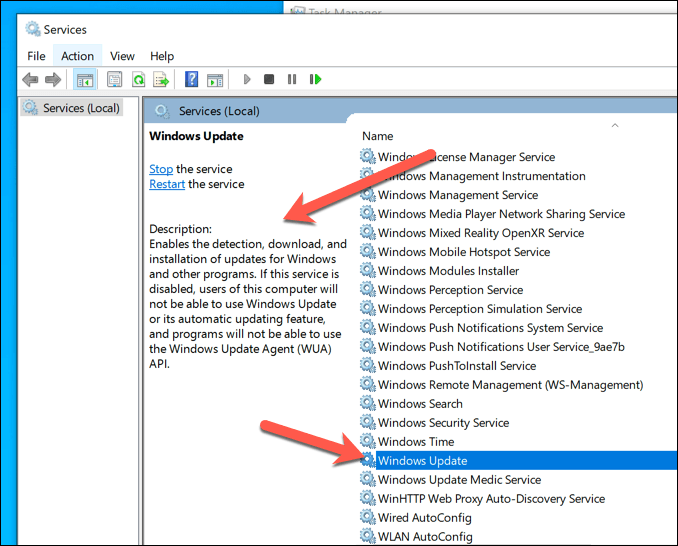
In situations where TiWorker.exe is causing severe performance degradation and you need immediate relief, you can temporarily disable or pause Windows Updates. However, it is strongly recommended to do this only as a temporary measure and to re-enable updates as soon as possible to maintain system security and stability. Disabling Windows Update can be done through the Services console (search for “services.msc,” find “Windows Update,” right-click, and select “Stop,” then set its Startup type to “Disabled”) or through Group Policy Editor for Pro and Enterprise editions. Remember to re-enable it once the issue is resolved or a fix is available.
Understanding the Context of Resource Usage
It’s important to reiterate that the Windows Modules Installer Worker is a critical system component. Its activity, even if it leads to high resource usage, is often a sign of your system actively working to keep itself secure and functional. Unless the process is consuming excessive resources continuously without any apparent system updates or maintenance occurring, or if it’s preventing your system from functioning, it’s usually best to let it do its job. Monitoring its activity and understanding when it’s active can help you differentiate between normal operation and genuine issues requiring intervention.
In conclusion, the Windows Modules Installer Worker (TiWorker.exe) is a silent but essential guardian of your Windows operating system. It works tirelessly behind the scenes to ensure your system receives the latest security patches, feature enhancements, and bug fixes. While its resource consumption can sometimes be noticeable, understanding its role and the potential causes for its activity empowers you to manage your system effectively and maintain a secure and stable computing environment. By following the troubleshooting steps outlined above, you can address any performance concerns and ensure this crucial worker continues to perform its vital tasks unimpeded.