
In today’s digitally saturated world, subscription services have become an integral part of our daily lives, delivering everything from streaming entertainment to productivity software. SiriusXM, with its vast array of ad-free music, talk radio, and exclusive content, holds a prominent place among these offerings, captivating millions of listeners across North America. However, just as easily as we subscribe, there often comes a time when we need to unsubscribe. Whether it’s to manage a budget, streamline digital clutter, or simply because your listening habits have changed, understanding the technical process of canceling a digital subscription like SiriusXM is a crucial skill for any modern consumer. This guide delves into the specific steps and broader technological context of managing and ultimately canceling your SiriusXM subscription, ensuring a smooth and informed exit from the service.
Understanding the Digital Subscription Landscape
Before diving into the specifics of SiriusXM, it’s insightful to consider the broader environment of digital subscriptions. Our lives are increasingly interwoven with various platforms, each requiring its own form of technical interaction and management.
The Ubiquity of Subscription Services
The rise of the subscription economy has transformed how we consume media and access software. From Netflix and Spotify to Adobe Creative Cloud and Microsoft 365, companies have embraced recurring revenue models, providing continuous access to services rather than one-time purchases. This shift offers convenience and constant updates but also introduces a new layer of digital administrative tasks for users. SiriusXM fits perfectly into this paradigm, offering a service that, once activated, seamlessly integrates into your vehicle or smart devices. The underlying technology – cloud infrastructure, user authentication systems, and automated billing – makes these services incredibly accessible but also necessitates clear technical pathways for managing them.
Challenges of Managing Digital Accounts
While the convenience of subscriptions is undeniable, managing multiple digital accounts can present challenges. Auto-renewal, often a default setting, means services can continue billing you long after their perceived value has diminished. Forgotten login credentials, differing cancellation policies, and opaque navigation within user interfaces can complicate the process of disengagement. For tech-savvy users, these are minor hurdles, but for others, they can lead to frustration and unintended charges. The design of cancellation pathways within digital platforms is a critical aspect of user experience (UX) design, often balancing ease of use with business retention strategies. Understanding these technical and design considerations helps demystify the process.
Why Cancellations Matter in the Tech Ecosystem
Beyond the immediate financial implications, the ability to easily cancel a digital service is a cornerstone of user control and digital hygiene. It empowers consumers to dictate their own digital footprint, manage data privacy, and ensure that only services actively desired are consuming resources (both financial and digital). From a technological perspective, a transparent and functional cancellation process reflects well on a company’s commitment to user experience and ethical digital practices. It demonstrates that the platform values user autonomy over retention at all costs, contributing to a healthier overall digital ecosystem where users feel empowered rather than trapped by their subscriptions.
Step-by-Step Guide to Canceling SiriusXM Online
For many, the most straightforward and often preferred method for managing digital services is online. SiriusXM provides an online portal for account management, and understanding its navigation is key.
Preparation: Gathering Necessary Information
Before you begin the online cancellation process, ensure you have the following information readily available. This will streamline the technical steps and prevent unnecessary delays:
- SiriusXM Account Number: This unique identifier helps locate your subscription details quickly. It can usually be found on your billing statements or by logging into your account.
- Login Credentials: Your username (often your email address) and password for your SiriusXM online account. If you’ve forgotten them, be prepared to use the “Forgot Password” functionality, which typically involves email verification.
- Associated Email Address: The email linked to your account is crucial for password resets and receiving cancellation confirmations.
- Payment Information (if applicable): While not always required for cancellation, having the credit card or payment method details associated with the account can sometimes help verify your identity.
Navigating the SiriusXM Website
The SiriusXM website is the primary digital interface for managing your subscription. Here’s a general pathway, though exact menu labels may vary slightly over time due to website updates:
- Access the Official Website: Open your web browser and navigate to the official SiriusXM website (usually siriusxm.com).
- Log In: Locate the “Login” or “My Account” button, typically found in the top right corner of the homepage. Enter your username and password. If you encounter login issues, utilize the “Forgot Password” link and follow the prompts. This process usually involves receiving a reset link via email, which is a standard security protocol for digital accounts.
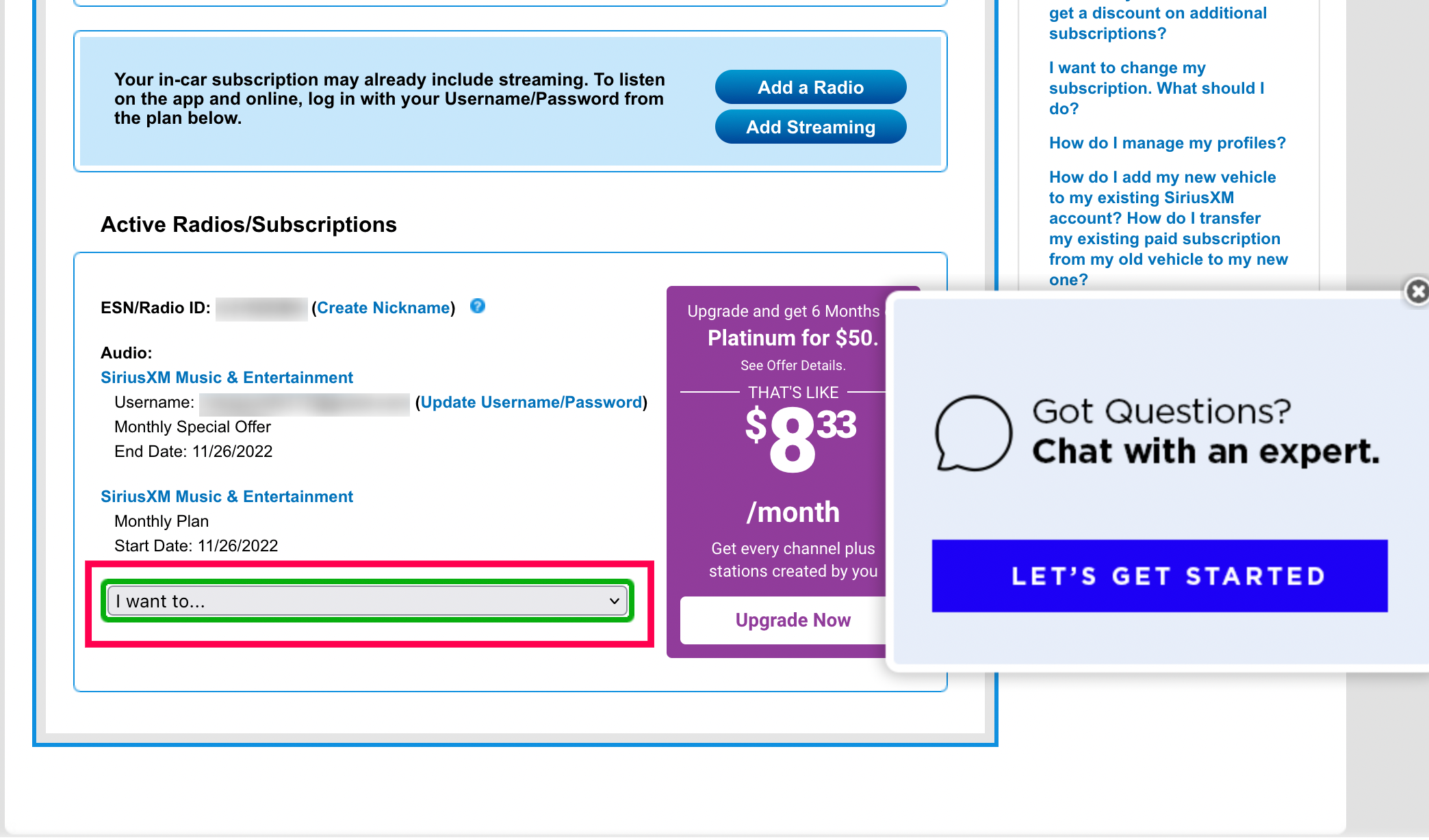
- Find Account Management: Once logged in, look for a section labeled “My Account,” “Manage Subscription,” “Manage Services,” or similar. This is your digital hub for all subscription-related actions.
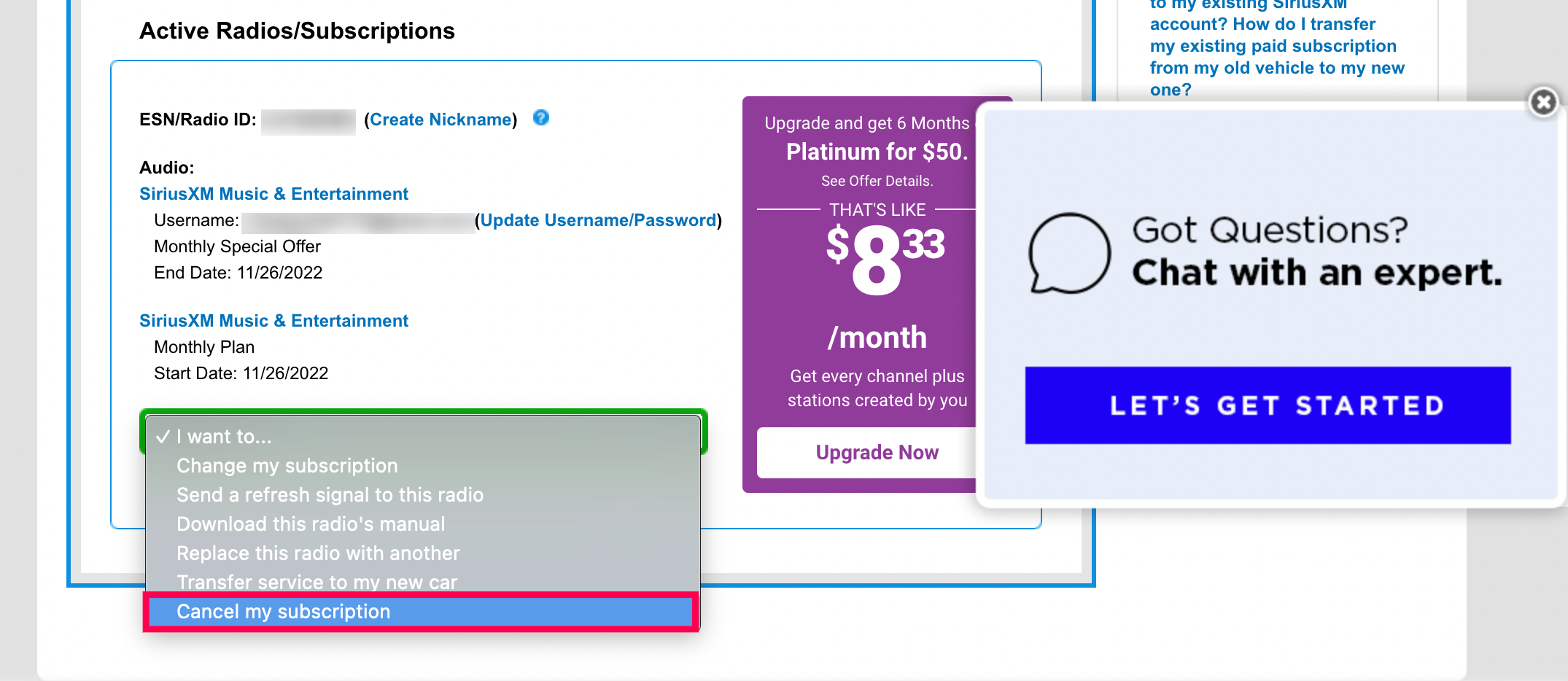
- Locate Cancellation Options: Within the account management section, you’ll need to find the specific link or button related to cancellation. This might be under “Subscriptions,” “Plans & Billing,” or directly labeled “Cancel Subscription.” Companies sometimes place these options in less obvious locations as a retention strategy, requiring users to navigate deeper into the interface.
The Cancellation Process Explained
Once you’ve found the cancellation option, the actual process usually involves a few more steps:
- Initiate Cancellation: Click the “Cancel Subscription” or equivalent button.
- Retention Offers: Be prepared for potential retention offers. Many subscription services, including SiriusXM, will present options to downgrade your plan, pause your subscription, or offer a discounted rate to keep you as a customer. These are algorithmic attempts to retain your business and are part of the digital customer journey. You will likely need to explicitly decline these offers to proceed with full cancellation.
- Reason for Cancellation: You may be asked to provide a reason for canceling. While optional, providing feedback can sometimes help companies improve their services. This data point is collected and analyzed by product teams to understand user churn.
- Confirm Cancellation: After navigating through any retention offers and providing feedback, you will typically reach a final confirmation screen. Read this carefully to ensure you are indeed canceling your entire subscription and not just a specific package or trial.
- Finalize: Click the final “Confirm Cancellation” or “Submit” button.
Verifying Your Cancellation
The last and most crucial step in any digital cancellation process is verification.
- Email Confirmation: You should receive an email confirming your cancellation. This email is your digital receipt and proof that the process was completed. Keep this email for your records.
- Account Status Check: Log back into your SiriusXM account a few hours or a day later to verify that your subscription status has changed to “Canceled” or “Inactive.” If it still shows as active, there may have been a technical hiccup, and you’ll need to re-engage the process or contact support.

Alternative Methods and Technical Considerations
While online cancellation is often the easiest, other methods exist, and technical nuances can sometimes complicate the process.
Canceling via Phone Support
If you encounter difficulties with the online portal, prefer direct human interaction, or wish to discuss specific account details not easily managed online, phone support is an alternative:
- Locate Support Number: Find the customer service phone number on the SiriusXM website.
- Call and Navigate IVR: Be prepared for an Interactive Voice Response (IVR) system, which will guide you through menu options. Listen carefully to select the correct option for “Account Management” or “Cancellations.”
- Speak with a Representative: Once connected to a representative, clearly state your intention to cancel. Have your account details ready for verification.
- Address Retention Efforts: Similar to online, the representative may offer retention deals. Be firm in your decision if you wish to proceed with cancellation.
- Confirm Details: Before ending the call, ensure the representative confirms your cancellation and clarifies the effective date. Request an email confirmation of your cancellation for your records.
Dealing with Account Issues and Technical Glitches
Technical difficulties can arise during any digital process. Common issues include:
- Login Problems: Incorrect credentials, locked accounts, or forgotten passwords are the most frequent hurdles. Use the built-in password recovery tools.
- Website Errors: Occasionally, a website might experience downtime or specific page errors. If this happens, try again later or clear your browser’s cache and cookies.
- Subscription Not Showing: If your subscription isn’t visible in your account, it might be linked to a different email address or payment method. Verify all possible linked accounts.
- Third-Party Subscriptions: If you subscribed to SiriusXM through a third-party platform (e.g., Apple App Store, Google Play, Amazon), the cancellation process must be initiated through that specific platform’s subscription management interface, not directly through SiriusXM. This is a crucial technical distinction, as the billing relationship is with the third-party provider.
The Role of Payment Processors (e.g., Apple, Google Play)
When you subscribe to services like SiriusXM through app stores, the billing and subscription management are handled by the app store’s infrastructure.
- Apple App Store: On iOS devices, go to Settings > [Your Name] > Subscriptions. Find SiriusXM and manage it there.
- Google Play Store: On Android devices, open the Google Play Store app > Menu > Payments & subscriptions > Subscriptions. Find SiriusXM and manage it.
- Amazon: If subscribed via Amazon, manage your subscriptions through your Amazon account settings on their website.
Understanding these distinctions is vital, as attempting to cancel directly with SiriusXM when your subscription is managed by Apple, for example, will be futile.
Best Practices for Digital Subscription Management
Beyond the immediate need to cancel SiriusXM, adopting broader best practices for managing all your digital subscriptions can save time, money, and reduce digital clutter.
Proactive Subscription Audits
Regularly review all your digital subscriptions. Set a quarterly or semi-annual reminder to list every service you pay for. This helps identify services you no longer use, duplicates, or those whose value proposition has diminished. This proactive approach prevents “subscription creep” and ensures you’re only paying for active, valued services. Many personal finance apps or browser extensions can help track these, acting as technical aids for financial oversight.
Utilizing Password Managers and Financial Tools
Technology offers tools to help manage subscriptions more effectively:
- Password Managers: Services like LastPass, 1Password, or Bitwarden securely store your login credentials, making it easy to access and manage accounts without remembering dozens of passwords. They also flag weak or reused passwords, enhancing your digital security.
- Subscription Management Apps/Features: Some banking apps or dedicated third-party apps (e.g., Truebill, Rocket Money) can identify and list your recurring subscriptions based on your banking transactions, providing a clear overview and sometimes even facilitating cancellations directly through their interface. These tools leverage API integrations with banks to monitor your spending habits.
Understanding Terms of Service and Cancellation Policies
Before subscribing, take a moment to review the Terms of Service, particularly the sections pertaining to billing, auto-renewal, and cancellation policies. While often lengthy, this digital contract outlines your rights and obligations. Knowing the cancellation window, refund policies, and effective dates can prevent surprises down the line and equip you with the knowledge to navigate the process confidently. This technical documentation is designed to protect both the user and the provider.
Data Privacy and Account Deactivation
Canceling a subscription primarily stops billing. If you’re concerned about your data, consider whether you also need to fully delete or deactivate your account. Many services have separate processes for full account deletion, which permanently removes your personal data from their servers. Check SiriusXM’s privacy policy or support pages for information on data retention and account deletion procedures if this is a concern for you. This goes beyond mere subscription management to encompass broader digital privacy and data governance.
Conclusion
Canceling a SiriusXM subscription, while a specific task, serves as an excellent case study in effective digital subscription management. By understanding the underlying technical processes, navigating online portals, being aware of alternative methods, and leveraging best practices, users can exert greater control over their digital lives. Whether you’re utilizing the step-by-step online guide, engaging with phone support, or relying on third-party app store management, the key is to be informed and persistent. In an era dominated by recurring digital services, mastering the art of cancellation is not just about saving money; it’s about digital empowerment, ensuring that your tech ecosystem truly serves your needs, without unnecessary entanglements or overlooked charges. Proactive management of your digital subscriptions is a crucial skill in maintaining a healthy and controlled technological footprint.
aViewFromTheCave is a participant in the Amazon Services LLC Associates Program, an affiliate advertising program designed to provide a means for sites to earn advertising fees by advertising and linking to Amazon.com. Amazon, the Amazon logo, AmazonSupply, and the AmazonSupply logo are trademarks of Amazon.com, Inc. or its affiliates. As an Amazon Associate we earn affiliate commissions from qualifying purchases.