
In the ever-evolving landscape of digital services, Amazon Prime stands as a colossal ecosystem, weaving together e-commerce, entertainment, and a suite of digital conveniences into a single, comprehensive membership. For many, it has become an indispensable part of their online lives, offering everything from expedited shipping to a vast library of streaming content. This guide is designed to walk you through the technical intricacies of joining Amazon Prime, ensuring a smooth onboarding process and empowering you to fully leverage its diverse features across various platforms and devices. We will delve into the underlying technology that powers this membership, from account creation to advanced management, all within the framework of digital access and user experience.

Understanding Amazon Prime’s Ecosystem and Core Services
Before diving into the mechanics of joining, it’s crucial to grasp the technological breadth of what Amazon Prime encompasses. It’s far more than just a delivery service; it’s a digital hub designed to integrate seamlessly into your daily routine, powered by Amazon’s robust infrastructure and vast network of services. Understanding these components will clarify why the joining process is a gateway to such a multifaceted digital experience.
The Digital Hub: Prime Video, Music, and Gaming
At its core, Prime offers a significant digital entertainment package. Prime Video provides access to thousands of movies and TV shows, including Amazon Originals, all streamable on demand. This service relies on sophisticated content delivery networks (CDNs) and adaptive bitrate streaming technologies to ensure smooth playback across varying internet speeds and devices. Users interact with this content via dedicated apps on smart TVs, mobile devices, gaming consoles, and web browsers, each optimized for its respective platform.
Amazon Music Prime offers ad-free access to millions of songs and thousands of curated playlists and stations. This service leverages cloud-based music libraries and personalized recommendation algorithms, allowing users to stream or download music for offline listening. The underlying technology ensures secure digital rights management (DRM) while providing a user-friendly interface for music discovery and playback.
For gamers, Prime Gaming (formerly Twitch Prime) integrates with the popular streaming platform Twitch, offering free games, in-game content, and a free channel subscription every month. This service highlights the cross-platform capabilities of Prime, bridging the gap between digital retail, entertainment, and interactive online communities.
E-commerce Enhancements: Shipping and Exclusive Deals
Perhaps the most recognized benefit, Prime’s e-commerce enhancements are built upon a formidable logistics and data infrastructure. Free Two-Day Shipping (and often faster options like same-day or one-day delivery in eligible areas) is a logistical marvel, relying on advanced warehouse automation, optimized delivery routes, and a massive fleet. From a technical perspective, this involves complex algorithms for inventory management, demand forecasting, and real-time package tracking, all accessible to the user via the Amazon app and website.
Beyond speed, Prime members gain early access to Lightning Deals and exclusive discounts, often during major sales events like Prime Day. This is facilitated by sophisticated data analytics that identify purchasing patterns and tailor offers to members, creating a personalized shopping experience. The backend systems manage immense transactional loads, ensuring that these time-sensitive deals are processed efficiently and fairly.
Beyond the Basics: Cloud Storage and Reading Benefits
Prime membership also extends into other digital domains. Amazon Photos provides unlimited full-resolution photo storage in the cloud, along with 5 GB for videos. This service leverages Amazon S3 (Simple Storage Service), a highly scalable and durable cloud storage infrastructure, ensuring your memories are securely backed up and accessible from anywhere. Automatic syncing features across devices exemplify its technological convenience.
For readers, Prime Reading offers a rotating selection of free e-books, magazines, and comics from a diverse catalog. This digital library is accessible via Kindle e-readers, Fire tablets, and the free Kindle app for iOS and Android. The technology behind Prime Reading manages digital content licensing, user library synchronization, and the seamless delivery of content to various reading devices.
Navigating the Onboarding Process: Step-by-Step Enrollment
Joining Amazon Prime is a straightforward digital process, primarily managed through the Amazon website or mobile applications. This section details the technical steps involved, from initial account creation to selecting your membership type and confirming your digital access.
Initial Account Setup: The Amazon Foundation
To join Prime, you first need an Amazon account. If you don’t already have one, the process involves providing basic personal information and setting up secure login credentials.
- Visit Amazon.com or open the Amazon app: Navigate to the main Amazon website or download the Amazon Shopping app from your device’s app store (Google Play Store for Android, Apple App Store for iOS).
- Create Your Account: Look for “Hello, Sign in” or similar prompts. Click or tap on “New customer? Start here.”
- Provide Details: You’ll be asked for your name, email address, and to create a secure password. Amazon’s systems use robust encryption protocols to protect your personal data during transmission and storage.
- Verify Your Account: An email or SMS verification step often follows, ensuring the contact information is valid and linking your device to your new account. This is a crucial security measure to prevent unauthorized access.
Selecting Your Membership Type: Full, Student, or EBT/Medicaid
Amazon offers several Prime membership tiers, each tailored to specific demographics and offering different pricing structures. Understanding these options is key to choosing the right digital package for your needs.
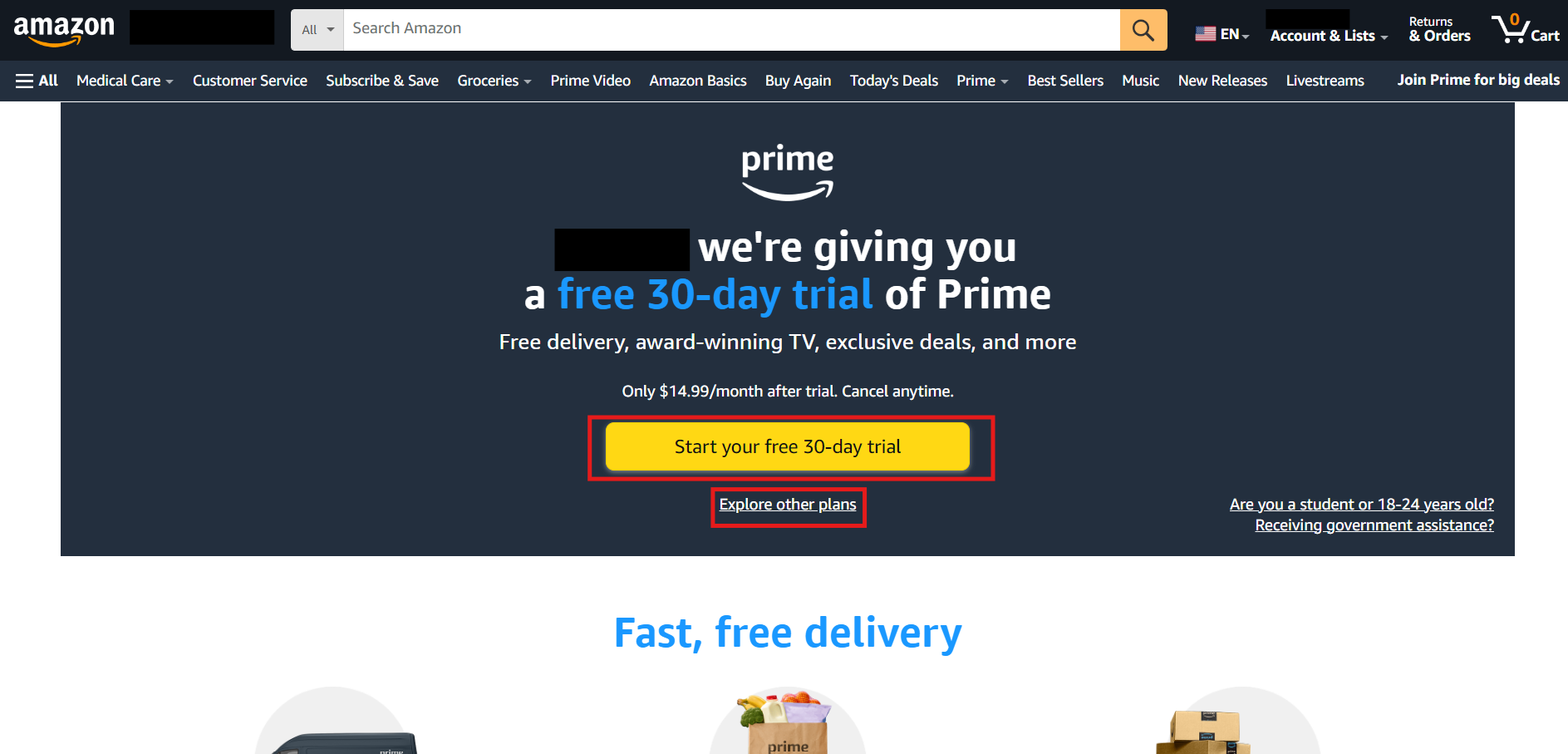
- Standard Prime Membership: This is the full-featured membership, typically offered with a monthly or annual subscription. You can initiate a free trial (usually 30 days) to experience the services before committing financially. During the trial, you gain full access to all Prime benefits, allowing you to test the streaming quality, delivery speed, and overall user experience.
- Prime Student: For eligible university students, Amazon offers a discounted Prime membership, often with an extended free trial period. The technical verification process for student status typically involves providing a valid university email address (.edu domain) or other verifiable student credentials, which Amazon’s systems cross-reference with educational databases.
- Prime Access (EBT/Medicaid Recipients): Amazon also provides a reduced-cost Prime membership for qualifying individuals receiving government assistance. Verification for this program usually involves submitting proof of eligibility, such as a valid EBT card number or Medicaid documentation. This data is handled with strict privacy protocols, ensuring sensitive information is securely transmitted and verified.
To select your membership:
- Navigate to the Prime section of the Amazon website or app (often found under the main menu or a dedicated “Try Prime” banner).
- Choose your preferred plan and follow the on-screen prompts. The system will guide you through the specific verification steps if you choose a discounted plan.
Payment and Confirmation: Securing Your Digital Access
The final stage of joining involves setting up your payment method and confirming your subscription.
- Add Payment Method: You’ll need a valid credit card, debit card, or other accepted payment method (e.g., Amazon gift card balance). Your payment information is processed through secure payment gateways, utilizing industry-standard encryption (like SSL/TLS) to protect your financial data. Amazon does not store your full card number directly on its servers after the initial tokenization.
- Review and Confirm: Before finalizing, you’ll be presented with a summary of your chosen plan, billing cycle, and total cost. Review this information carefully.
- Start Membership/Free Trial: Once confirmed, your Prime membership will instantly activate. You will receive a confirmation email detailing your subscription start date, renewal date, and how to manage your membership. This email serves as your digital receipt and proof of access.
Leveraging Prime’s Features Across Devices
A key strength of Amazon Prime is its ubiquitous availability across a multitude of devices. This cross-platform compatibility is a testament to sophisticated app development, API integration, and cloud infrastructure, ensuring a consistent user experience regardless of how you access the service.
Mobile Access: Prime Apps for iOS and Android
Mobile devices are central to the Prime experience. Dedicated apps for iOS and Android provide full access to Prime Video, Amazon Music, Amazon Shopping, and Amazon Photos.
- Download and Installation: Users download these apps from their respective app stores. The apps are optimized for mobile interfaces, offering intuitive navigation and touch-friendly controls.
- Seamless Login: Once logged into one Amazon app on a device, often other Amazon apps on the same device can leverage that authentication, streamlining access.
- Offline Functionality: Many Prime apps, particularly Prime Video and Amazon Music, offer the capability to download content for offline viewing or listening. This feature relies on local device storage and content encryption to manage digital rights.
Streaming on Smart TVs and Media Players
Prime Video is a cornerstone of home entertainment, accessible on virtually every major smart TV brand (e.g., Samsung, LG, Sony), streaming devices (e.g., Roku, Fire TV Stick, Apple TV, Chromecast), and gaming consoles (PlayStation, Xbox).
- App Integration: Smart TVs and media players come with pre-installed Prime Video apps or allow easy download. These apps are specifically developed for TV interfaces, often supporting remote control navigation and high-definition/4K streaming.
- Device Registration: Upon first use, you typically link your TV or media player to your Amazon account by entering a code on a web browser or scanning a QR code. This device registration process securely authenticates your hardware with your Prime membership.
- Network Optimization: These devices automatically adjust streaming quality based on your internet speed and bandwidth, ensuring the best possible viewing experience without buffering.
Desktop Experience: Web Browser Functionality
For those who prefer a larger screen or a traditional computing environment, the full suite of Prime benefits is accessible via any modern web browser.
- Dedicated Portals: Amazon.com serves as the central portal for shopping and membership management. Prime Video, Amazon Music, and Prime Reading each have dedicated web interfaces designed for desktop use.
- Plugin-Free Streaming: Modern web browsers support HTML5 video playback, eliminating the need for external plugins, making streaming seamless.
- Keyboard and Mouse Integration: The desktop experience allows for precise navigation and search functionalities, ideal for managing large digital libraries or complex shopping carts.
Managing Your Prime Membership: Tech-Savvy Control
Once you’ve joined, effectively managing your Prime membership is essential for a seamless experience. Amazon provides a robust set of digital tools to control your subscription, payment methods, and sharing options.
Accessing Membership Settings and Renewal Options
All aspects of your Prime membership are controlled through your Amazon account settings, accessible via both the website and the mobile app.
- Navigate to “Your Account”: On the Amazon website, hover over “Hello, [Your Name] Account & Lists” and select “Your Account.” In the app, tap the menu icon and then “Your Account.”
- Manage Prime Membership: Locate the “Prime” or “Prime membership” section. Here, you’ll find detailed information about your current plan, billing date, and renewal status.
- Payment Method Updates: You can update your payment method, add new cards, or remove old ones. Amazon’s system securely integrates with your financial institutions to process these changes.
- Auto-Renewal Settings: You have the option to turn off automatic renewal if you prefer to manually renew or cancel before the next billing cycle. This feature gives you full control over your subscription commitment.
- Cancel Membership: Should you decide Prime is no longer for you, the cancellation process is straightforward and typically involves a few clicks within the membership management section. Amazon’s system will guide you through the steps and confirm your cancellation.
Family Sharing: Extending Prime Benefits
Prime offers the “Amazon Household” feature, allowing you to share select Prime benefits with other adults and children. This technological sharing mechanism extends digital access to multiple users under a single subscription.
- Set Up Household: In your Prime membership settings, look for the “Amazon Household” option.
- Invite Members: You can invite up to one additional adult and up to four children/teens. The invited adult will need their own Amazon account.
- Benefit Sharing: Shared benefits typically include Prime Video, Prime Reading, Amazon Photos, and shipping benefits. Access to Prime Music and some exclusive deals may remain exclusive to the primary account holder depending on the specific terms. The system manages these permissions and access rights securely.
Troubleshooting Common Access Issues
Even with robust technology, occasional issues can arise. Understanding common troubleshooting steps can quickly restore your Prime access.
- Login Issues: Ensure you’re using the correct email and password. If forgotten, utilize the “Forgot password” link, which employs secure password reset protocols (e.g., email verification, SMS codes).
- Streaming Problems:
- Internet Connection: Verify your internet connection is stable and fast enough for streaming. Use a speed test tool to check bandwidth.
- App/Browser Updates: Ensure your Prime Video app or web browser is updated to the latest version. Outdated software can cause compatibility issues.
- Device Restart: A simple restart of your streaming device or router can often resolve temporary glitches.
- Clear Cache/Data: For apps, clearing the cache or application data can fix persistent issues without deleting personal settings (though you might need to log back in).
- Billing Discrepancies: Review your order history and subscription details. If issues persist, Amazon’s customer service, often accessible via chat or phone, can investigate billing system records.
The Future of Prime: Integrating New Technologies
Amazon Prime is not a static service; it’s continuously evolving, driven by Amazon’s relentless pursuit of innovation and integration of cutting-edge technologies. The future of Prime promises even deeper technological integration and more personalized experiences.
Voice Control and Smart Home Integration (Alexa)
The integration of Prime services with Alexa, Amazon’s AI-powered virtual assistant, is already extensive and set to expand further. Members can use voice commands to control Prime Video playback, reorder items from their Prime shopping list, or access Prime Music through Echo devices and other Alexa-enabled smart home gadgets. This seamless interaction leverages advanced natural language processing (NLP) and voice recognition technologies, making Prime an integral part of the connected home ecosystem. Future developments are likely to enhance proactive suggestions and personalized routines based on Prime usage patterns.
Personalized Recommendations through AI
Amazon’s prowess in artificial intelligence and machine learning is evident across all its services. For Prime, this means increasingly sophisticated recommendation engines for products, movies, music, and books. These AI models analyze vast amounts of user data – viewing habits, purchase history, search queries – to predict preferences and suggest relevant content or products. As AI continues to advance, Prime recommendations will become even more nuanced and predictive, anticipating user needs even before they are explicitly expressed.

Enhanced Security and Privacy Features
With the increasing reliance on digital services, the security and privacy of user data are paramount. Amazon is continually investing in advanced encryption, multi-factor authentication (MFA), and anomaly detection systems to protect Prime member accounts. Future enhancements may include more sophisticated biometric authentication methods, advanced privacy controls allowing users finer-grained management of their data, and real-time security alerts powered by AI to detect and mitigate potential threats. The commitment to digital security will remain a core tenet as Prime evolves, safeguarding the trust users place in the platform.
Joining Amazon Prime is more than just signing up for a service; it’s entering a vast, technologically advanced ecosystem designed to streamline various aspects of modern digital life. By understanding the underlying tech and navigating the onboarding and management processes with confidence, members can unlock the full potential of Prime and ensure a robust, secure, and highly convenient digital experience.
aViewFromTheCave is a participant in the Amazon Services LLC Associates Program, an affiliate advertising program designed to provide a means for sites to earn advertising fees by advertising and linking to Amazon.com. Amazon, the Amazon logo, AmazonSupply, and the AmazonSupply logo are trademarks of Amazon.com, Inc. or its affiliates. As an Amazon Associate we earn affiliate commissions from qualifying purchases.