
In an increasingly fragmented digital media landscape, accessing your favorite television channels can sometimes feel like navigating a complex maze of streaming services, apps, and hardware. For fans of critically acclaimed dramas like The Walking Dead, Better Call Saul, and Mad Men, finding the most efficient and reliable ways to watch AMC is a common quest. This guide delves into the technological pathways available to viewers, dissecting the myriad options from traditional live TV streaming to on-demand platforms, ensuring you can enjoy AMC’s compelling content with optimal clarity and convenience.
Understanding AMC’s Digital Ecosystem: Beyond the Traditional Cable Box
The journey to watching AMC today extends far beyond the conventional cable subscription. AMC Networks, the parent company, has strategically diversified its distribution, embracing digital platforms to reach a wider audience. This diversification introduces both flexibility and a degree of complexity, requiring viewers to understand the different services and their technological underpinnings.
The Nuance of AMC vs. AMC+
A critical distinction for any AMC enthusiast is understanding the difference between the linear AMC channel and the premium streaming service AMC+.
- AMC Channel: This refers to the traditional television channel, which broadcasts content on a fixed schedule. Accessing this usually requires a subscription to a cable TV provider or a live TV streaming service that carries the channel. Technologically, it’s about receiving a broadcast signal (digital, satellite, or internet-streamed live feed).
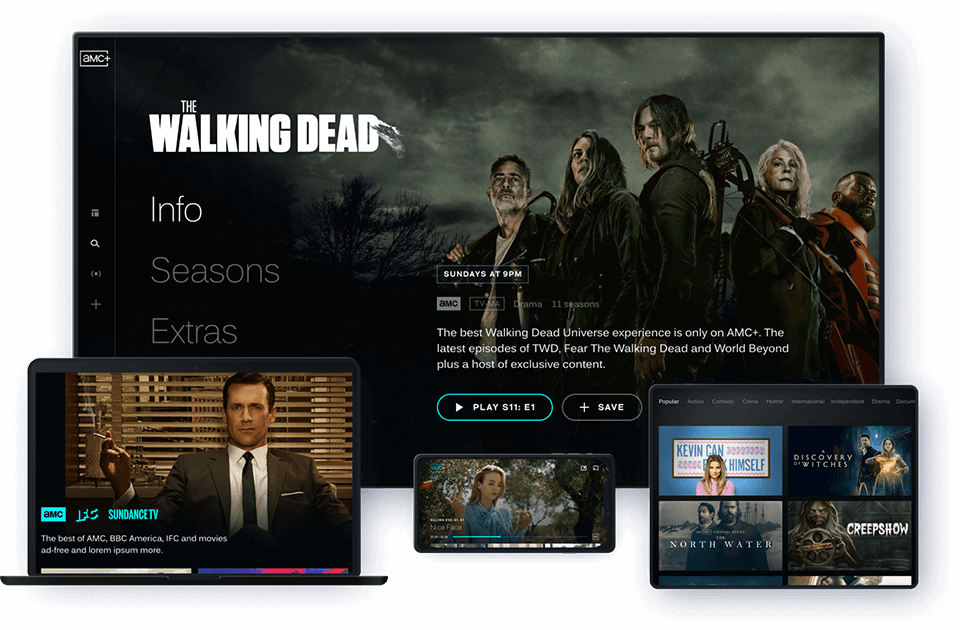
- AMC+: This is AMC Networks’ dedicated subscription video-on-demand (SVOD) service. It offers a vast library of AMC’s current and past programming, exclusive original series, ad-free access to new episodes typically a week before their linear broadcast, and content from sister channels like Shudder, SundanceNow, and IFC Films Unlimited. From a technology standpoint, AMC+ is a pure over-the-top (OTT) streaming application, delivered directly to internet-connected devices. It operates on a different technological premise than receiving a live broadcast, relying on adaptive bitrate streaming protocols to deliver content on demand.
Recognizing these differences is fundamental to choosing the right viewing strategy, as each offers distinct technological access points and content libraries.
The Role of Streaming Platforms and Device Compatibility
Modern viewing is heavily reliant on streaming platforms and the devices that support them. Whether it’s a smart TV, a dedicated streaming stick, a gaming console, or a mobile phone, the underlying technology of these platforms dictates the user experience. AMC’s digital offerings are designed to be widely compatible, utilizing common operating systems and app frameworks (e.g., Android TV, Roku OS, Apple’s tvOS, iOS, Android mobile). This broad compatibility ensures that viewers are not locked into proprietary hardware, promoting accessibility across a diverse range of consumer electronics.
Live TV Streaming Services: The Cord-Cutter’s Cable Replacement
For those who desire the experience of watching live television channels, including AMC, without the commitment of a traditional cable or satellite contract, live TV streaming services present a robust technological solution. These services leverage internet protocol television (IPTV) technology to deliver live broadcast feeds over the internet, mimicking the linear TV experience while offering enhanced digital features.
Key Players and Their Tech Stacks
Several prominent live TV streaming services carry the AMC channel, each with its own technological strengths, user interface (UI), and device compatibility.
- Sling TV: Known for its budget-friendly tiering, Sling TV utilizes a streamlined interface optimized for various devices. Its technology allows for flexible package customization, enabling users to add specific channel bundles, including those that feature AMC. Sling TV’s reliance on cloud-based DVR functionality is a key tech feature, allowing recordings without physical storage.
- Philo: Positioned as an entertainment-focused, lower-cost option, Philo delivers a strong lineup of lifestyle and entertainment channels, including AMC. Its technological focus is on simplicity and affordability, offering unlimited cloud DVR and concurrent streams, a boon for households with multiple viewers and devices.
- YouTube TV: Google’s entry into the live TV streaming space boasts a robust and intuitive user interface, excellent device compatibility, and an industry-leading unlimited cloud DVR. Leveraging Google’s extensive infrastructure, YouTube TV offers reliable streaming performance and seamless integration with other Google services.
- Hulu + Live TV: Combining Hulu’s extensive on-demand library with live TV channels, this service offers a comprehensive entertainment package. Its technology integrates both live and on-demand content seamlessly within a single app, providing a unified viewing experience. Enhanced cloud DVR and premium add-ons are also integral tech features.
- DIRECTV STREAM: This service caters to a broader audience, including those seeking a more traditional channel lineup akin to satellite TV. Its technology supports a wide range of devices and offers a customizable channel package structure, including the ability to bundle with other streaming services.
- FuboTV: Primarily known for its sports coverage, FuboTV also includes a strong selection of entertainment channels, often including AMC, depending on the regional package. Its streaming technology is optimized for high-quality video, catering to sports enthusiasts who prioritize picture fidelity, and includes advanced DVR functionalities.
When evaluating these services, tech-savvy users should consider factors such as streaming resolution (e.g., support for 1080p, 4K where applicable), the reliability of their streaming infrastructure, the user experience of their apps across different operating systems, and the advanced features like cloud DVR capacity, number of simultaneous streams, and offline viewing capabilities.
On-Demand Access to AMC Content: The Power of Streaming Libraries
Beyond live broadcasts, a significant portion of AMC’s appeal lies in its rich library of on-demand content. This form of access, enabled by advanced streaming protocols and digital rights management (DRM) technologies, offers unparalleled flexibility, allowing viewers to watch what they want, when they want.
Direct Subscription via AMC+ App and Website
The most direct technological pathway to AMC’s on-demand content is through an AMC+ subscription. This can be accessed via:
- Dedicated AMC+ Apps: Available on a vast array of streaming devices (Roku, Amazon Fire TV, Apple TV, Google Chromecast, Smart TVs from Samsung, LG, Vizio, etc.), mobile devices (iOS, Android), and gaming consoles (Xbox). These apps are developed to provide a seamless user interface, personalized recommendations, and reliable streaming performance across different platforms.
- AMC+ Website: Viewers can also access the full library directly through a web browser on a desktop or laptop computer. This relies on standard web technologies (HTML5 video players, secure login protocols) to deliver content.
The technology behind AMC+ involves content delivery networks (CDNs) to ensure low latency and high-quality streaming globally, adaptive bitrate streaming to adjust video quality based on internet speed, and robust DRM to protect copyrighted content.
AMC+ as an Add-on Channel
Recognizing user preferences for consolidating subscriptions, AMC+ is also available as an add-on channel through major digital video platforms:
- Amazon Prime Video Channels: Subscribers to Amazon Prime can add AMC+ directly within the Prime Video ecosystem. This leverages Amazon’s extensive streaming infrastructure and integrated billing, offering a cohesive viewing experience within a familiar app interface.
- Apple TV Channels: Similarly, Apple device users can subscribe to AMC+ directly through the Apple TV app. This integration provides a unified library of content, personalized recommendations powered by Apple’s algorithms, and consistent UI/UX across Apple’s ecosystem.
- Roku Channel: Roku device owners can also subscribe to AMC+ through The Roku Channel, further simplifying content access and billing management within the Roku platform.
- Other Platforms: Google Play and some cable providers also offer AMC+ as a premium add-on, each utilizing their respective technological frameworks for subscription management and content delivery.
These integrations are technologically significant as they allow for centralized billing and often a more streamlined user experience, reducing the need to switch between multiple apps and login credentials.
Provider On-Demand Libraries and Digital Purchases
Many traditional cable and live TV streaming providers offer an on-demand library where current and past AMC programming can be accessed. This usually requires authentication through the provider’s website or app. Additionally, individual episodes or full seasons of AMC shows can be purchased digitally through various video-on-demand (VOD) platforms like Amazon Prime Video, Apple TV, Google Play, Vudu, and others. This “buy-to-own” model provides permanent digital copies, accessible across a user’s linked devices, utilizing cloud locker technologies.
Hardware and Software for Optimal Viewing: Maximizing Your AMC Experience
The quality of your AMC viewing experience is heavily influenced by the hardware and software you employ. Optimizing these components ensures smooth streaming, high-fidelity audio-visuals, and an enjoyable user journey.
Choosing the Right Streaming Devices
The cornerstone of any modern streaming setup is the dedicated streaming device.
- Streaming Sticks/Boxes (Roku, Amazon Fire TV, Apple TV, Google Chromecast with Google TV): These devices offer the most convenient and feature-rich way to access streaming apps, including AMC+. They come with dedicated remote controls, robust operating systems, and often support advanced features like 4K HDR playback and voice control. Their internal processors and Wi-Fi chipsets are designed for efficient streaming, handling multiple codecs and internet bandwidth variations.
- Smart TVs: Many modern smart TVs (Samsung Tizen, LG webOS, Android TV, Roku TV) come with AMC+ and various live TV streaming apps pre-installed or available for download. These integrate streaming capabilities directly into the display, reducing cable clutter. Performance depends on the TV’s internal processor and memory.
- Gaming Consoles (Xbox, PlayStation): These powerful machines often double as excellent media centers, supporting a wide array of streaming apps. Their robust hardware can handle high-resolution streaming and provide a smooth user interface.
- Mobile Devices (Smartphones, Tablets): For on-the-go viewing, iOS and Android apps for AMC+ and live TV services are essential. These apps are optimized for touch interfaces and smaller screens, leveraging mobile network capabilities (Wi-Fi, 4G, 5G) for streaming.
Internet Connectivity: The Unsung Hero
A stable and sufficiently fast internet connection is paramount. For standard definition streaming, 3-5 Mbps is generally adequate. For HD content (720p/1080p), 5-8 Mbps is recommended. For 4K UHD streaming, a consistent 20-25 Mbps is essential. Wi-Fi network quality, including router placement and frequency bands (2.4GHz vs. 5GHz), also significantly impacts performance, with a wired Ethernet connection offering the most stable and fastest experience for stationary devices. Modern routers with Wi-Fi 6 or 6E technology can further enhance multi-device streaming performance.
Display and Audio Technology
For a truly immersive experience, consider your display and audio setup.
- 4K HDR Displays: Many AMC shows, especially newer productions and those on AMC+, are available in 4K Ultra HD and High Dynamic Range (HDR) formats. Utilizing a compatible 4K HDR TV and streaming device can significantly enhance picture quality, offering greater detail, contrast, and color vibrancy.
- Sound Systems: From soundbars to full home theater setups, an external audio system can dramatically improve the viewing experience, particularly for AMC’s cinematic dramas. Support for surround sound formats like Dolby Digital or Dolby Atmos through compatible streaming devices and audio receivers adds another layer of immersion.
Troubleshooting Common Viewing Issues: A Tech User’s Guide
Even with the best setup, occasional technical glitches can occur. Understanding common problems and their solutions empowers viewers to quickly resolve issues and get back to their shows.
Buffering and Playback Interruptions
This is almost always related to internet connectivity or network congestion.
- Check Internet Speed: Use an online speed test tool on your streaming device or a connected computer.
- Restart Router/Modem: A simple reboot can often resolve network issues.
- Reduce Network Traffic: Disconnect other devices consuming bandwidth or pause large downloads.
- Optimize Wi-Fi: Move closer to the router, switch to the 5GHz band (if available), or consider a wired Ethernet connection.
- Clear App Cache: For persistent issues within an app, clearing its cache can remove corrupt data.
App Crashes and Freezes
Software bugs or memory issues can cause apps to misbehave.
- Restart the App: Force close and reopen the app.
- Restart the Device: A full reboot of your streaming device can clear system memory and resolve conflicts.
- Update App/Device Firmware: Ensure both the AMC+ app (or your live TV streaming app) and your streaming device’s operating system are running the latest versions. Updates often include bug fixes and performance improvements.
- Reinstall App: If issues persist, uninstalling and then reinstalling the app can fix corrupted installations.
Login and Authentication Problems
Security protocols and credential management are crucial.
- Verify Credentials: Double-check your username and password. Use a password manager to avoid typos.
- Reset Password: If you’ve forgotten your password, use the “forgot password” feature provided by the service.
- Check Subscription Status: Ensure your subscription is active and there are no billing issues.
- Re-authenticate Provider: For live TV streaming apps, you might need to re-authenticate with your TV provider credentials, especially if your password or provider account status has changed.

Geo-restrictions and VPNs
Some AMC content or streaming services may be geo-restricted, meaning they are only accessible from specific geographic locations. While VPNs (Virtual Private Networks) can technically circumvent these restrictions by routing your internet traffic through servers in different locations, it’s important to note:
- Service Provider Policies: Many streaming services actively block VPN usage, as it can violate licensing agreements. Using a VPN might lead to a blocked connection or account suspension.
- Performance Impact: VPNs can introduce latency and reduce streaming speeds, potentially causing buffering or lower video quality.
- Technical Setup: Setting up a VPN for streaming requires technical understanding, often involving installing VPN software on your device or configuring it at the router level.
Watching AMC has evolved into a highly customizable digital experience. By understanding the technological landscape of live TV streaming, on-demand platforms, suitable hardware, and common troubleshooting techniques, viewers can confidently navigate the options to enjoy AMC’s acclaimed programming on their preferred devices, ensuring an optimal and uninterrupted viewing journey.
aViewFromTheCave is a participant in the Amazon Services LLC Associates Program, an affiliate advertising program designed to provide a means for sites to earn advertising fees by advertising and linking to Amazon.com. Amazon, the Amazon logo, AmazonSupply, and the AmazonSupply logo are trademarks of Amazon.com, Inc. or its affiliates. As an Amazon Associate we earn affiliate commissions from qualifying purchases.