
The way we consume television has undergone a monumental shift in the last two decades. Gone are the days when a cable box and a fixed programming schedule were the only options. Today, “streaming TV” has become the ubiquitous answer for flexible, on-demand, and often more cost-effective entertainment. If you’ve ever found yourself asking, “How can I stream TV?” this guide is designed to demystify the process, from understanding the core technology to selecting the best services and hardware for your needs. We’ll explore the vast landscape of digital entertainment, empowering you to cut the cord and customize your viewing experience.
Understanding the Fundamentals of TV Streaming
At its core, TV streaming is the delivery of video content over the internet, rather than through traditional broadcast signals, cable lines, or satellite dishes. This fundamental difference unlocks a world of possibilities, offering unparalleled convenience and choice.
What is TV Streaming?
Unlike traditional television, which broadcasts content at a scheduled time, streaming allows you to access a library of content on-demand or watch live channels delivered through your internet connection. Think of it like a digital video library that’s always open, combined with a customizable live TV grid. When you stream, data packets containing video and audio information are continuously sent from a server to your device, where they are reassembled and played in real-time. This “stream” of data enables instant playback without needing to download the entire file first.
The benefits of this model are manifold:
- On-Demand Access: Watch what you want, when you want it, pausing, rewinding, or fast-forwarding as you please.
- Live TV Options: Many services now offer live feeds of popular channels, often including local affiliates, sports, and news.
- Portability: Stream on virtually any internet-connected device, whether you’re at home, commuting, or traveling.
- Cost-Effectiveness: Often more affordable than traditional cable packages, especially if you curate your subscriptions.
- Personalization: Algorithms learn your preferences, suggesting content tailored to your tastes.
Essential Requirements for a Seamless Streaming Experience
Before diving into the world of streaming services and devices, it’s crucial to ensure you have the foundational elements in place for an optimal viewing experience.
-
High-Speed Internet Connection: This is the absolute bedrock of streaming. Without sufficient bandwidth, you’ll experience frustrating buffering, pixelated images, and dropped connections.
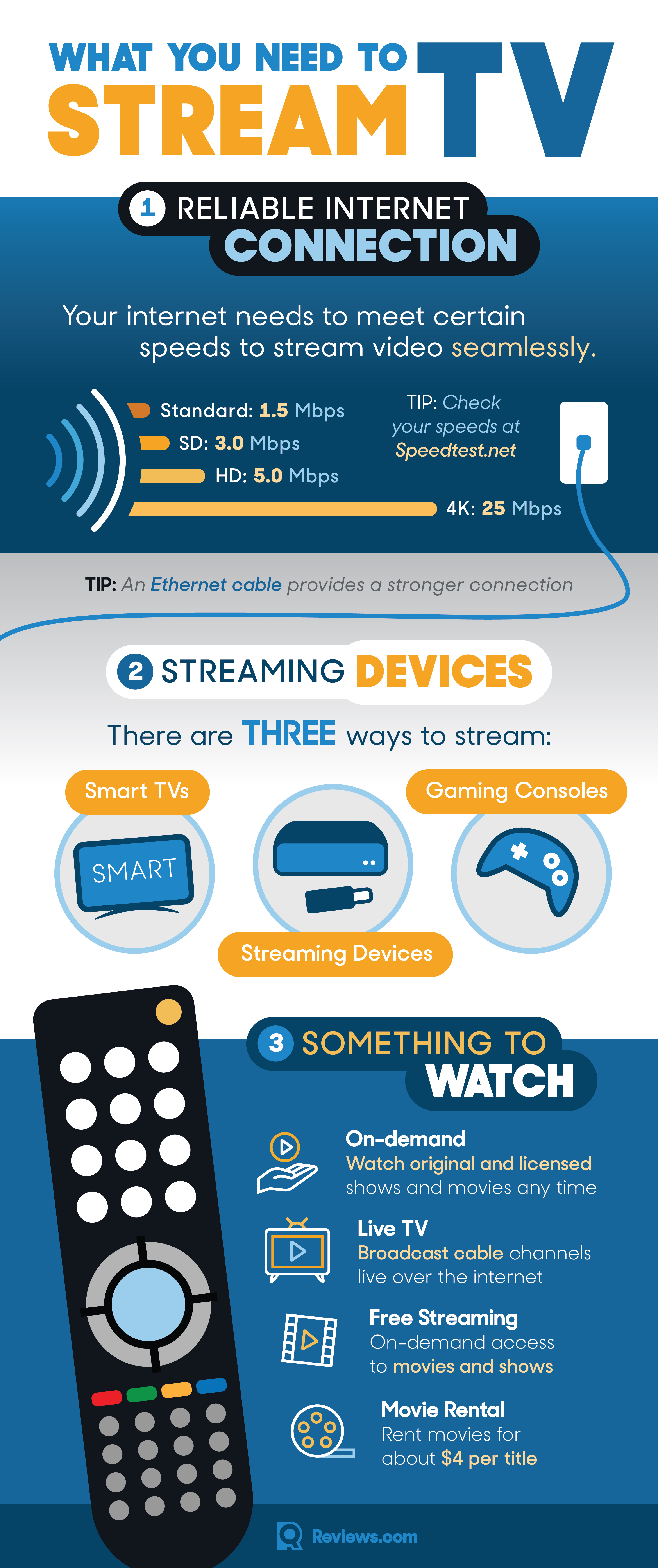
- Minimums: For standard definition (SD) content, 3-5 Mbps (megabits per second) is typically sufficient.
- Recommended: For high-definition (HD) streaming, 5-10 Mbps per stream is advised.
- Optimal: For 4K Ultra HD (UHD) and HDR content, you’ll need at least 25 Mbps per stream, with 50-100 Mbps or more recommended for households with multiple users or devices.
- Tip: If your internet speed is low, consider upgrading your plan or optimizing your home network (more on this later).
-
Compatible Streaming Device: You need a device that can receive and decode the streaming signal.
- Smart TVs: Many modern TVs have built-in streaming apps and operating systems (e.g., Roku TV, Google TV, WebOS, Tizen).
- Dedicated Streaming Players: Devices like Roku sticks, Amazon Fire TV sticks, Apple TV, Google Chromecast, or NVIDIA Shield.
- Computers/Laptops: Stream directly through web browsers or desktop apps.
- Mobile Devices: Smartphones and tablets are perfect for on-the-go streaming.
- Gaming Consoles: PlayStation and Xbox consoles support a wide array of streaming apps.
-
A Subscription to a Streaming Service: While some free options exist, most premium content requires a paid subscription. These services host the actual content you want to watch.
Navigating the Landscape of Streaming Services
The sheer volume of streaming services can be overwhelming. They generally fall into two main categories: on-demand video services and live TV streaming services, with a growing number of free options as well.
On-Demand Video Streaming Services (SVOD)
These are the titans of the streaming world, offering vast libraries of movies, TV shows, and original programming that you can watch anytime. They typically operate on a subscription video-on-demand (SVOD) model.
- Netflix: The pioneer, known for its extensive library of original series (“Stranger Things,” “The Crown”), movies, and licensed content across various genres.
- Amazon Prime Video: Included with an Amazon Prime membership, it offers a solid selection of original content (“The Boys,” “The Marvelous Mrs. Maisel”), movies, and the option to rent or buy additional titles.
- Disney+: A family-friendly powerhouse featuring content from Disney, Pixar, Marvel, Star Wars, and National Geographic.
- Hulu: Primarily focused on current and past seasons of network TV shows, alongside a growing slate of original programming (“The Handmaid’s Tale”). It also offers a bundle with Disney+ and ESPN+.
- Max (formerly HBO Max): Home to HBO’s critically acclaimed series (“Succession,” “House of the Dragon”), Warner Bros. movies, DC content, and a diverse library from the WarnerMedia vault.
- Peacock: Offers a mix of NBCUniversal content, including classic shows (“The Office”), movies, and live sports. It has both free and premium tiers.
- Paramount+: Features content from CBS, Paramount Pictures, Nickelodeon, MTV, and original series like “Star Trek” spin-offs.
- Apple TV+: Apple’s premium content offering, focused entirely on high-quality original series and movies (“Ted Lasso,” “Severance”).
Live TV Streaming Services (vMVPD)
For those who still want the experience of watching live television channels without a cable subscription, “virtual Multichannel Video Programming Distributors” (vMVPDs) are the answer. These services mimic traditional cable packages, often including local channels, sports, and news.
- YouTube TV: Offers a comprehensive lineup of major network channels, sports, news, and entertainment, often with unlimited cloud DVR storage.
- Hulu + Live TV: Combines Hulu’s extensive on-demand library with a wide selection of live channels, including local broadcasts. It often comes bundled with Disney+ and ESPN+.
- Sling TV: Known for its customizable, à la carte approach, allowing subscribers to choose smaller channel bundles focused on specific genres (e.g., sports, news, entertainment).
- FuboTV: Heavily focused on sports, offering a wide array of sports channels alongside general entertainment and news.
- DirecTV Stream: Offers various packages with a strong lineup of entertainment, news, and sports channels, often including regional sports networks.
Free Streaming Services
Don’t have a budget for subscriptions? A growing number of ad-supported free streaming services offer a surprising amount of content, perfect for casual viewing or discovering new favorites.
- Pluto TV: Offers hundreds of “channels” designed to mimic a traditional TV guide, showing movies and TV shows 24/7, all ad-supported.
- Tubi: A vast library of movies and TV shows across many genres, including cult classics and independent films, entirely free with ads.
- Freevee (formerly IMDb TV): Amazon’s free, ad-supported service with a mix of movies, TV series, and some original content.
- The Roku Channel: Available on Roku devices and web browsers, offering a mix of live channels and on-demand movies and TV shows.
- Peacock Free: The basic tier of Peacock, offering a selection of shows, movies, and news with ads.
Choosing the Right Streaming Hardware
Once you’ve decided on your internet speed and potential streaming services, the next step is selecting the right device to bring that content to your screen. The choice often comes down to convenience, budget, and desired features.
Smart TVs
Many modern televisions come equipped with built-in internet connectivity and pre-installed streaming apps. These “Smart TVs” offer a seamless, integrated experience without the need for additional external devices.
- Pros: Convenience, fewer cables, often have dedicated buttons on the remote for popular services.
- Cons: Operating system updates can sometimes be slow or stop after a few years, app selection might be limited compared to dedicated devices, and the interface might not be as snappy.
- Operating Systems: Common Smart TV platforms include Roku TV, Google TV (Android TV), LG’s webOS, and Samsung’s Tizen OS.
Dedicated Streaming Devices
These external gadgets plug into your TV’s HDMI port and provide a dedicated interface for accessing streaming apps. They are often more powerful, receive more frequent updates, and offer a wider range of app support than most Smart TVs.
- Roku Devices (Roku Express, Streaming Stick, Ultra): Known for their user-friendly interface, vast channel store (app selection), and affordability. Excellent for simplicity and broad compatibility.
- Amazon Fire TV Devices (Fire TV Stick Lite, 4K Max, Cube): Integrate deeply with Amazon’s ecosystem, offer Alexa voice control, and prioritize Prime Video content. The Fire TV Cube can also control other home theater devices.
- Apple TV (HD, 4K): A premium option, offering a sleek interface, tight integration with Apple’s ecosystem (Apple Arcade, Apple Music, AirPlay), and excellent performance.
- Google Chromecast with Google TV: Combines the casting functionality of traditional Chromecasts with a full remote and an intuitive Google TV interface that aggregates content from various services.
- NVIDIA Shield TV (Tube, Pro): A high-end device aimed at enthusiasts, offering powerful performance for 4K streaming, AI upscaling, and robust local media server capabilities, often favored by Plex users and Android gamers.
Other Streaming Options
Beyond dedicated streaming players and Smart TVs, several other devices can serve as capable streaming hubs.
- Gaming Consoles: Both PlayStation (PS4, PS5) and Xbox (Xbox One, Series X/S) support a wide array of major streaming apps, making them versatile entertainment centers.
- Computers/Laptops: Connect a laptop to your TV via an HDMI cable, or simply watch directly on the computer screen. This offers the most flexibility for web-based content and niche services.
- Smartphones and Tablets: Perfect for personal viewing on the go. Many apps allow casting content to compatible TVs (e.g., via Chromecast or AirPlay) for a larger screen experience.
Optimizing Your Streaming Experience
Having the right equipment and subscriptions is just the beginning. A few key optimizations can significantly enhance your streaming quality and overall enjoyment.
Enhancing Your Home Network
A strong and stable internet connection is paramount. Here’s how to ensure your home network is up to snuff:
- Wi-Fi vs. Ethernet: For critical streaming devices (like your main TV’s streaming player), a wired Ethernet connection is always superior to Wi-Fi. It’s faster, more stable, and less prone to interference. If wiring isn’t feasible, ensure your Wi-Fi signal is strong.
- Router Placement: Position your Wi-Fi router in a central location, away from obstructions like thick walls, large appliances, and other electronics that might cause interference.
- Mesh Wi-Fi Systems: For larger homes or properties with Wi-Fi dead zones, a mesh Wi-Fi system can create a seamless, strong signal throughout your entire space.
- Router Upgrade: If your router is old, consider upgrading to a newer model that supports modern Wi-Fi standards (e.g., Wi-Fi 6 or 6E) for better speeds and efficiency.
- QoS (Quality of Service): Some routers offer QoS settings, allowing you to prioritize network traffic for streaming devices, ensuring they get the bandwidth they need.
Understanding Video Quality (SD, HD, 4K UHD, HDR)
Video quality significantly impacts your viewing experience and internet data usage.
- SD (Standard Definition): Typically 480p resolution. Lower quality, consumes less data. Good for older content or very slow connections.
- HD (High Definition): Typically 720p or 1080p resolution. The standard for most modern viewing. Requires moderate bandwidth.
- 4K UHD (Ultra High Definition): 2160p resolution. Four times the pixels of 1080p, offering incredible detail. Requires a 4K compatible TV, streaming device, and robust internet speed (25+ Mbps).
- HDR (High Dynamic Range): Not a resolution, but an enhancement to color and contrast, making brights brighter and darks darker for a more vibrant, lifelike image. Requires an HDR-compatible TV, device, and content.
Streaming in higher qualities consumes significantly more data. Be mindful if you have a data cap on your internet plan.
Managing Subscriptions and Costs
Cutting the cord can save money, but “subscription creep” is a real phenomenon.
- Audit Regularly: Periodically review all your streaming subscriptions. Are you actively using them? Cancel those you’re not.
- Rotate Services: Instead of subscribing to everything at once, consider rotating services. Subscribe to one for a month or two, binge its content, then cancel and switch to another.
- Bundles: Many companies offer bundles (e.g., Disney+/Hulu/ESPN+) that can be cheaper than subscribing to each individually.
- Ad-Supported Tiers: Many services now offer cheaper, ad-supported tiers. If you don’t mind a few commercials, this can significantly reduce costs.
- Free Trials: Take advantage of free trials to test out services before committing to a subscription.
Troubleshooting Common Streaming Issues
Even with the best setup, issues can arise. Here are quick fixes for common problems:
- Buffering:
- Check your internet speed (use an online speed test).
- Reboot your router and modem.
- Close other apps or devices consuming bandwidth.
- If using Wi-Fi, try moving closer to the router or using an Ethernet connection.
- Temporarily lower the streaming quality.
- App Crashes or Freezes:
- Close and restart the app.
- Clear the app’s cache (check your device settings).
- Update the app to the latest version.
- Reboot your streaming device.
- If persistent, uninstall and reinstall the app.
- Picture/Sound Problems:
- Check all HDMI cables for secure connections.
- Ensure your TV and streaming device are set to the correct video and audio outputs.
- Update your streaming device’s firmware.
The Future of TV Streaming
The streaming landscape is dynamic and constantly evolving. We can anticipate continued innovation in several areas:
- Personalization and AI: More sophisticated algorithms will deliver even more tailored content recommendations.
- Interactive Content: Experiments with choose-your-own-adventure narratives and interactive experiences will likely expand.
- Seamless Integration: Expect even greater synergy between devices, allowing you to seamlessly pick up where you left off on different screens.
- The Rise of FAST Channels: Free Ad-supported Streaming TV (FAST) channels, which mimic linear TV but are delivered over the internet, will continue to grow, offering more choice for budget-conscious viewers.
- Consolidation and Fragmentation: While new services continue to emerge, we may also see more mergers and acquisitions as companies vie for market share, potentially leading to fewer, but larger, bundles.

Conclusion
Streaming TV has irrevocably changed how we watch television, offering unparalleled flexibility, choice, and often, better value than traditional cable. By understanding the fundamentals of internet speed, navigating the diverse array of streaming services, selecting the right hardware, and optimizing your home network, you can craft a personalized entertainment hub that perfectly suits your preferences and budget. The answer to “How can I stream TV?” is no longer a simple one, but it is an empowering one – giving you the keys to a vast, on-demand universe of digital content, truly putting you in control of your viewing experience. Embrace the freedom, explore the possibilities, and enjoy the future of television, today.
aViewFromTheCave is a participant in the Amazon Services LLC Associates Program, an affiliate advertising program designed to provide a means for sites to earn advertising fees by advertising and linking to Amazon.com. Amazon, the Amazon logo, AmazonSupply, and the AmazonSupply logo are trademarks of Amazon.com, Inc. or its affiliates. As an Amazon Associate we earn affiliate commissions from qualifying purchases.