
In an increasingly digital world, peer-to-peer payment applications have revolutionized how we send and receive money. Among these, Venmo stands out as a prevalent platform, simplifying transactions between friends, family, and even for small business exchanges. Its intuitive interface and social features have made it a go-to choice for millions. However, for new users or those looking to deepen their understanding, the process of effectively accepting money on Venmo can sometimes warrant a closer look. This comprehensive guide delves into the technological nuances and practical steps involved, ensuring you can seamlessly receive funds and manage your digital balance with confidence and security.

Understanding the Fundamentals of Receiving Funds via Venmo
Before diving into the specifics of accepting payments, it’s crucial to grasp the foundational technical aspects of how Venmo operates as a payment gateway. The app is designed for user convenience, but an informed approach enhances both efficiency and security.
The Venmo Account and Setup Process
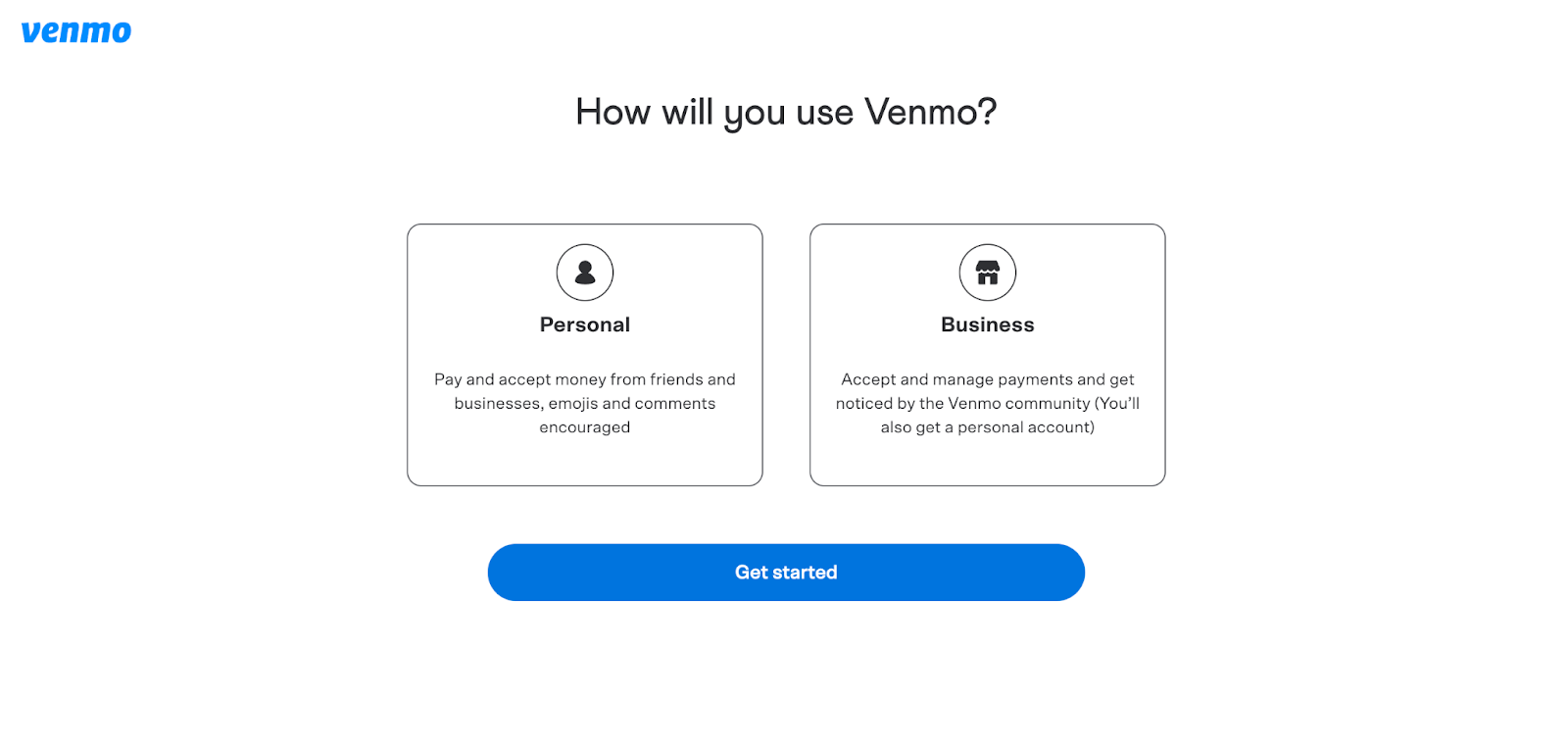
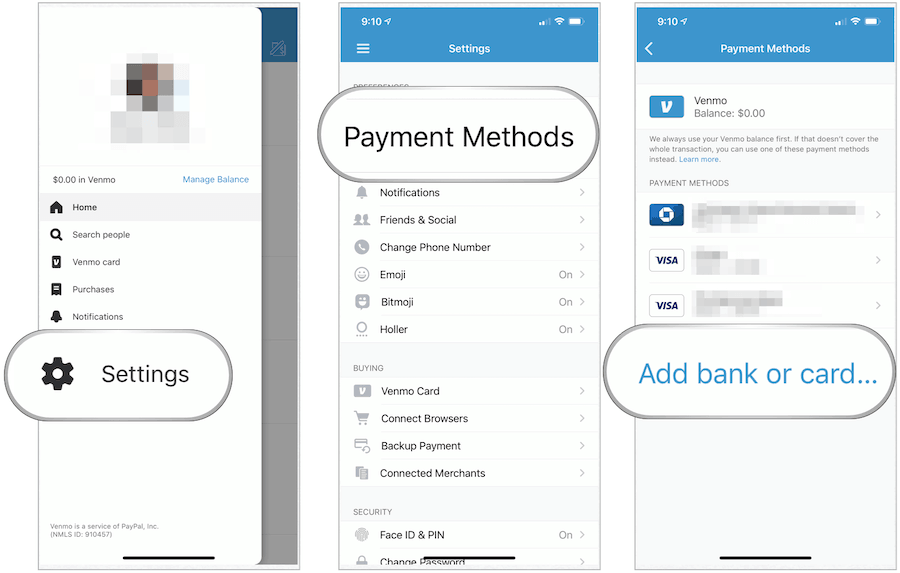
The journey to accepting money on Venmo begins with setting up a robust and verified account. This involves downloading the Venmo application from your device’s respective app store (iOS or Android) and proceeding through a guided registration process. You’ll be prompted to create a unique username, which serves as your primary identifier for receiving payments. Critically, Venmo requires users to link a valid U.S. bank account or a debit card for transactions. This linkage is not just for sending money; it’s fundamental for withdrawing funds you receive. The platform employs various verification steps, including confirming your phone number and email address, and potentially requiring identity verification (e.g., Social Security Number) for higher transaction limits or access to specific features. These technical safeguards are paramount for maintaining the integrity of the payment system and complying with financial regulations. Without a properly set up and verified account, certain receiving functionalities, especially transferring funds to your bank, may be restricted.
How Venmo Notifications Work
Once a payment is initiated towards your Venmo account, the application employs a multi-channel notification system to alert you. The primary method is an in-app push notification, which immediately appears on your device, detailing the sender’s name, the amount received, and any accompanying note. Simultaneously, Venmo typically dispatches an email notification to the address linked to your account, providing a similar summary of the transaction. For users who have opted in, SMS text messages can also serve as an alert mechanism. These real-time notifications are a critical technical feature, providing instant confirmation that funds have been sent to your account. Understanding the notification hierarchy ensures you’re always aware of incoming transactions, minimizing delays in confirmation and allowing for prompt management of your balance. It’s advisable to ensure your device’s notification settings for the Venmo app are enabled to receive these critical alerts.
Key Terminology: Pending vs. Completed Transactions
When funds are sent to your Venmo account, they typically undergo a processing phase, which can manifest as either a “pending” or “completed” status. A completed transaction signifies that the funds have been successfully credited to your Venmo balance and are available for use or transfer. This is the most common status for standard peer-to-peer payments. However, certain scenarios might lead to a pending transaction. This status often indicates that Venmo is reviewing the payment, perhaps due to factors such as a new sender, an unusually large amount, or activity that triggers the platform’s automated fraud detection protocols. During a pending state, the funds are not yet fully available in your balance. While rare for typical user-to-user transfers, understanding these statuses is crucial for managing expectations and knowing when your funds are genuinely accessible within the Venmo ecosystem. The app’s interface clearly displays the status, providing transparency into the processing of your digital payments.
Managing Your Received Funds on Venmo
Successfully receiving funds is only the first step; effectively managing them within the Venmo application is equally important. The platform offers several mechanisms to monitor and confirm incoming payments, ensuring you have full control over your digital assets.
Automatic Acceptance of Payments
One of Venmo’s most user-friendly features is the automatic acceptance of payments. Unlike some traditional payment systems that require manual approval, funds sent to your Venmo username, linked phone number, or email address are typically deposited directly into your Venmo balance without any manual intervention on your part. This streamlined process leverages the app’s underlying technology to instantly credit your account upon a successful send from the payer. This automatic system relies on the sender providing accurate recipient details. If a sender uses a username that doesn’t exist, for example, the transaction will fail. Therefore, ensuring your Venmo profile information (username, linked phone, email) is correct and up-to-date is vital for consistent, automatic payment acceptance. This seamless crediting enhances the overall user experience, making peer-to-peer transactions feel instantaneous and effortless.
Locating Received Payments in Your Feed
After a payment has been automatically accepted, the Venmo app provides a clear and intuitive way to locate and verify these transactions. Your primary point of reference is the “Feed” section within the app, which serves as a chronological record of all your Venmo activity. The main feed shows public and friend transactions, while your personal transaction history (often accessible via your profile icon or a dedicated ‘You’ tab) provides a comprehensive list of all payments you’ve sent and received. Each entry details the sender, the amount, the date, and any note attached to the payment. Reviewing this transaction history is a critical technical function for reconciliation and confirmation. It allows you to quickly cross-reference notifications with actual entries, ensuring that every expected payment has indeed been credited to your account. This digital ledger is an essential tool for financial oversight within the Venmo ecosystem.
Understanding Payment Status and Potential Holds
While most Venmo payments are instantaneous, there are specific technical and security scenarios that can lead to a payment being temporarily held or reviewed. Venmo employs sophisticated algorithms and compliance mechanisms to detect unusual activity. For instance, receiving a very large sum from a brand-new Venmo account, or multiple payments in quick succession that deviate from your typical transaction patterns, might trigger a temporary hold. During a hold, the funds will appear in your transaction history as “pending” and will not be available in your balance for immediate use or transfer. Venmo typically notifies both the sender and recipient if a payment is being reviewed, often requesting additional information or simply stating that the review process is underway. This is a vital security feature designed to protect both users from potential fraud or unauthorized access. While it can cause minor delays, understanding that these mechanisms are in place for your protection is key. Such holds are usually resolved within a few business days, after which the funds become fully available.
Accessing and Utilizing Your Venmo Balance
Once funds have been successfully received and credited to your Venmo balance, you have several options for how to access and utilize them. Venmo’s infrastructure supports various methods, catering to different user preferences for spending or transferring funds.
Keeping Money in Your Venmo Balance
A primary option for received funds is to simply keep them within your Venmo balance. This acts as a digital wallet within the application. Many users opt for this method if they frequently send money to others via Venmo, as having a positive balance allows for immediate payments without needing to draw from a linked bank account or debit card. The funds held in your Venmo balance are readily available for subsequent Venmo transactions, offering a seamless experience for ongoing peer-to-peer payments. While conveniently stored within the app, it’s important to remember that Venmo balances are not FDIC-insured, unlike traditional bank accounts. Therefore, while useful for everyday transactions, it’s generally advised not to store excessively large sums in your Venmo balance for extended periods.
Transferring Funds to Your Bank Account
For those who prefer to consolidate their funds in a traditional banking institution, Venmo offers a straightforward process for transferring money from your Venmo balance to your linked bank account. There are generally two transfer options:
- Standard Transfer: This is a free service that typically takes 1 to 3 business days for the funds to appear in your bank account. The transfer process involves initiating the request within the Venmo app, selecting the amount, and confirming the linked bank account. Venmo’s backend systems then process the request and interface with the ACH network to complete the transfer.
- Instant Transfer: For a small fee (typically 1.75% of the transferred amount, with a minimum fee of $0.25 and a maximum fee of $25), Venmo provides an instant transfer option. This utilizes faster payment networks to deposit funds into eligible debit card-linked bank accounts, usually within minutes, even on weekends and holidays. This technological advancement offers unparalleled speed for urgent access to funds, making it a valuable feature for many users. Understanding the associated fees and the technical limitations (e.g., linked debit card requirement for instant transfers) is crucial when choosing your transfer method.
Using the Venmo Debit Card or Credit Card
Venmo further integrates its digital balance into the broader financial ecosystem through its branded payment cards. The Venmo Debit Card allows users to directly spend the money held in their Venmo balance wherever Mastercard is accepted. This card is physically issued and linked directly to your Venmo account, providing a tangible way to access your digital funds for in-store purchases, online shopping, and ATM withdrawals. It bypasses the need for bank transfers, making your Venmo balance immediately liquid. Similarly, the Venmo Credit Card, issued by Synchrony Bank, offers rewards and integrates with the Venmo app for transaction tracking and management, though it operates as a traditional credit product and doesn’t directly draw from your Venmo balance (instead, rewards might be redeemable for Venmo credit). These card products exemplify Venmo’s expansion beyond a simple P2P app into a comprehensive financial tool, leveraging existing payment network technologies to extend the utility of your digital balance.
Enhancing Security and Troubleshooting Common Issues
While Venmo is designed for ease of use, maintaining vigilance over security and knowing how to troubleshoot common technical issues are paramount for a safe and effective experience when accepting money.
Verifying Sender and Payment Details
A critical technical best practice for receiving payments is to meticulously verify the sender’s identity and the payment details. Always double-check the sender’s Venmo username to ensure it matches the person you expect to receive money from. Fraudulent actors might attempt to impersonate friends or businesses using similar-looking usernames. Additionally, review the payment amount and any attached notes. If a payment arrives unexpectedly or with an unclear note, it’s prudent to contact the supposed sender through a separate, trusted communication channel (e.g., phone call, text message) to confirm the legitimacy of the transaction before taking any action. Venmo’s platform allows users to report suspicious activity, but proactive verification is your first line of defense against potential scams or errors.
Dealing with Payment Errors or Unauthorized Transactions
Despite Venmo’s robust architecture, technical glitches or human errors can occur. If you receive an incorrect payment (e.g., wrong amount, sent by mistake), Venmo’s features allow you to refund the payment to the sender. This can usually be done directly from the transaction details within the app. However, if you suspect an unauthorized transaction (a payment you didn’t expect from an unknown source, potentially fraudulent), it’s crucial to act swiftly. First, do not spend the funds. Immediately report the transaction to Venmo’s support team through the app’s help section. Venmo has dispute resolution processes and fraud detection systems in place that can investigate and potentially reverse unauthorized payments, protecting your account from malicious activity. Providing detailed information about the suspicious transaction aids in the investigation process.
Leveraging Venmo’s Privacy Settings
Venmo includes robust privacy settings that allow you to control the visibility of your transactions, which is an important aspect of digital security and personal data management. By default, many Venmo transactions are visible to your friends or even the public, depending on your settings. While this “social feed” aspect is a unique feature, you have the technical capability to adjust the privacy level of each transaction. When receiving money, you can choose to make the transaction “Public,” “Friends,” or “Private.” Setting transactions to “Private” ensures that only you and the sender can view the details. Regularly reviewing and adjusting your default privacy settings, accessible through the app’s settings menu, helps protect your financial activity from unwanted public exposure. This level of control over your digital footprint is a key technical feature for personalized user experience.
Contacting Venmo Support
For complex technical issues, payment disputes that you can’t resolve directly, or concerns about your account’s security, contacting Venmo’s customer support is essential. The Venmo app typically includes a “Get Help” or “Contact Us” section, which guides you through various support channels, including in-app messaging, email, or phone support during business hours. When contacting support, be prepared to provide specific details about the transaction, your account, and the nature of the issue. Venmo’s support team is equipped to address technical malfunctions, investigate suspicious activity, assist with account recovery, and clarify policy questions that impact your ability to accept and manage funds. Utilizing these dedicated support channels ensures that you receive expert assistance for any challenges encountered within the Venmo platform.
Best Practices for a Smooth Venmo Experience
Maximizing your experience with Venmo, particularly concerning receiving funds, involves adhering to certain best practices that enhance both functionality and security. These are largely technical considerations that contribute to seamless digital interactions.
Keeping Your App and Account Information Updated
The foundation of a smooth Venmo experience lies in maintaining an up-to-date application and accurate account information. Regularly checking for and installing the latest versions of the Venmo app from your device’s app store ensures you benefit from the newest features, security patches, and bug fixes. Outdated app versions can lead to technical glitches, payment failures, or vulnerabilities. Similarly, keeping your linked bank accounts, debit cards, phone number, and email address current within your Venmo profile is crucial. If your primary contact details or financial links expire or become invalid, it can disrupt your ability to receive notifications, transfer funds, or even log in to your account. This diligent maintenance ensures the underlying technical infrastructure of your Venmo experience remains robust and reliable.
Understanding Venmo’s Terms of Service and Limits
Venmo operates under a specific set of Terms of Service, which outline the rules, acceptable uses, and technical limitations of the platform. For users accepting money, understanding these terms is vital. For example, Venmo imposes transaction limits on both sending and receiving funds, which can vary based on your account verification status. Unverified accounts typically have lower limits compared to fully verified accounts. Additionally, Venmo’s terms specify what types of transactions are prohibited (e.g., certain commercial activities without a business profile, gambling). While primarily a P2P service, Venmo does offer business profiles for eligible merchants, which come with different fee structures and features for accepting payments for goods and services. Being aware of these technical and regulatory boundaries prevents unexpected issues, such as payments being flagged or rejected due to exceeding limits or violating service terms.
Utilizing QR Codes for In-Person Transactions
Venmo has embraced QR code technology to further streamline in-person transactions, offering a contactless and efficient method for accepting payments. Within the Venmo app, users can generate a unique personal QR code that others can scan to quickly send them money. This eliminates the need to verbally share usernames or phone numbers, reducing the chance of manual entry errors. To accept money via QR code, you simply open your Venmo app, navigate to the QR code scanner/generator (often found via the ‘Scan’ icon), and present your personal QR code to the payer. The payer then scans your code, inputs the amount, and sends the payment directly to your account. This technological convenience is particularly useful in social settings, small informal sales, or events where speed and accuracy are paramount. It represents a secure and fast alternative to traditional payment request methods.
Conclusion
Accepting money on Venmo is generally a straightforward process, designed with user convenience at its core. By understanding the foundational technical aspects of account setup, diligently monitoring notifications and transaction statuses, and effectively utilizing the various options for managing your balance, you can ensure a seamless experience. Moreover, adopting best practices for security—such as verifying sender details, understanding privacy settings, and keeping your application updated—is crucial for safeguarding your digital finances. Venmo’s robust platform, when navigated with an informed approach, empowers users to efficiently manage their peer-to-peer payments, making it an indispensable tool in our interconnected digital economy.
aViewFromTheCave is a participant in the Amazon Services LLC Associates Program, an affiliate advertising program designed to provide a means for sites to earn advertising fees by advertising and linking to Amazon.com. Amazon, the Amazon logo, AmazonSupply, and the AmazonSupply logo are trademarks of Amazon.com, Inc. or its affiliates. As an Amazon Associate we earn affiliate commissions from qualifying purchases.