
The annual ritual of filing income tax, once a paper-laden chore, has undergone a significant transformation in the digital age. Online tax filing has emerged as the preferred method for millions, offering unparalleled convenience, efficiency, and often, greater accuracy. Understanding this shift and mastering the online process is not just about compliance; it’s about taking control of a crucial aspect of personal finance with modern tools.
Understanding the Shift to Digital Tax Filing
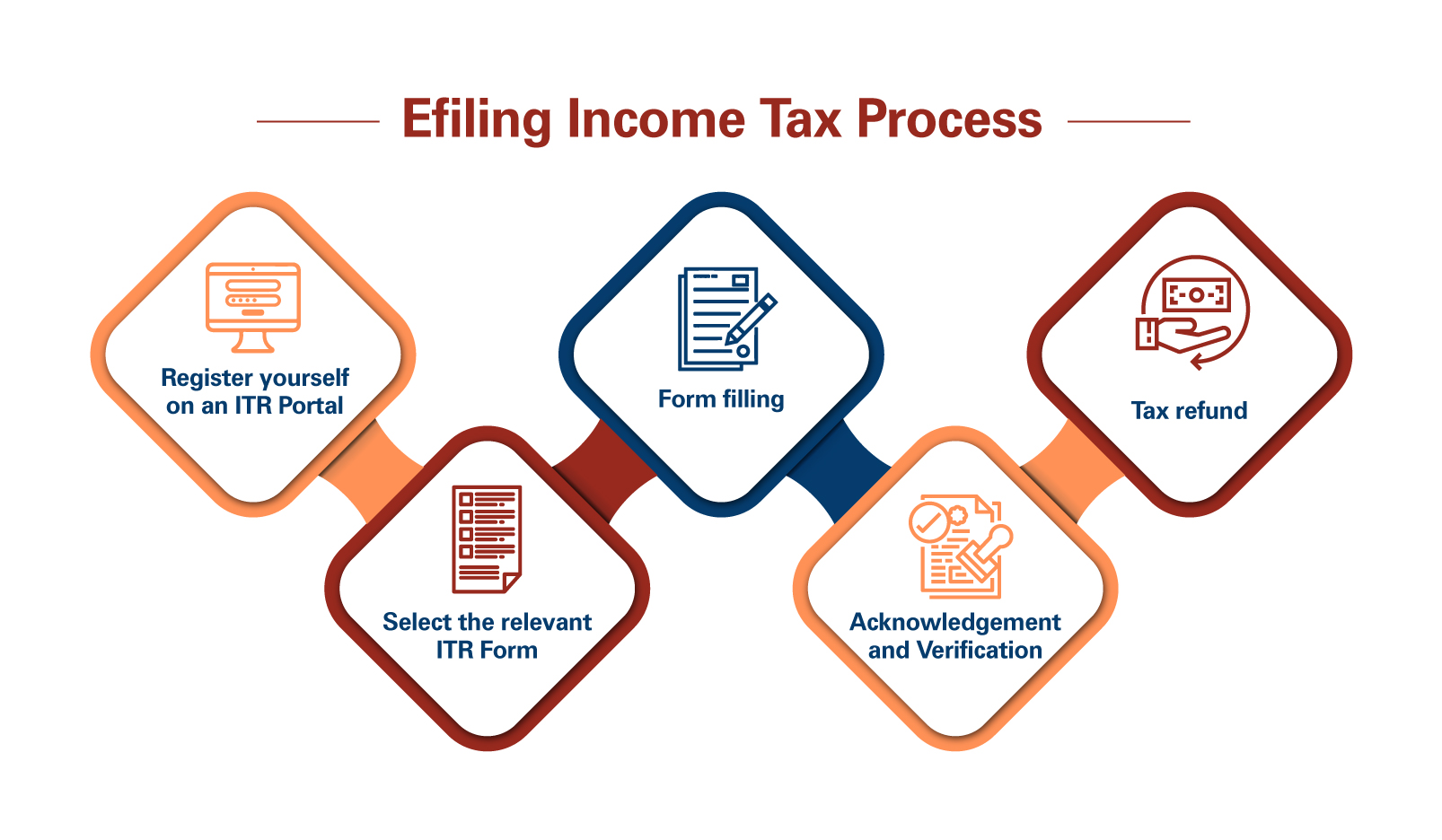
The move from physical forms and postal services to secure digital platforms represents a monumental leap in financial administration. Governments worldwide have actively encouraged this transition, recognizing the benefits for both taxpayers and revenue agencies. For individuals, it streamlines a process that can often feel daunting, turning it into a manageable task completed from the comfort of one’s home.
The Benefits of Online Submission
Online tax filing offers a compelling array of advantages that make it an attractive option for virtually all taxpayers. Foremost among these is convenience. Taxpayers can file at any time of day or night, without being constrained by office hours or geographical locations. This flexibility is invaluable for busy professionals, entrepreneurs, and anyone juggling multiple responsibilities.
Efficiency is another key benefit. Digital platforms often pre-fill certain information based on previous filings or integrated financial data, significantly reducing manual data entry. Furthermore, the processing time for online returns is typically much faster than for paper submissions, leading to quicker refunds for those eligible. The automated calculations minimize human error, which can prevent costly mistakes and subsequent audits. Instant confirmation of submission also provides peace of mind, knowing that the return has been received.
Essential Preparations Before You Begin
While online filing simplifies the process, proper preparation remains paramount. Gathering all necessary financial documents beforehand is the cornerstone of a smooth and accurate tax submission. Begin by collecting all income statements, such as W-2s (for employees), 1099 forms (for independent contractors, investment income, or certain other payments), and K-1s (for partnership or S-corp income).
Beyond income, compile documentation for any deductions or credits you plan to claim. This could include mortgage interest statements (Form 1098), student loan interest statements, records of medical expenses, charitable contributions, childcare costs, education expenses, and property tax payments. If you incurred business expenses or had significant investment activity, ensure all relevant records, including purchase and sale dates, are at hand. Having these documents organized and readily accessible will save time and prevent last-minute scrambling when you begin entering data into the online platform. It’s also wise to have a copy of your previous year’s tax return, as it can serve as a valuable reference for certain recurring information.
Navigating the Online Tax Filing Platforms
The digital landscape for tax filing is diverse, offering various platforms to suit different needs and complexities. Choosing the right tool and understanding its functionalities are crucial steps towards a successful submission.
Choosing the Right Software or Portal
The first decision involves selecting the appropriate online filing method. Many countries offer a free government-run portal designed for direct filing, often suitable for simpler tax situations. These portals ensure direct submission to the tax authority and can be a good starting point for those with straightforward income and limited deductions.
Alternatively, a wide array of commercial tax software packages are available, ranging from free basic versions to premium tiers with advanced features. Popular options often include comprehensive guidance, step-by-step interviews, and support for more complex financial scenarios such as self-employment income, rental properties, or extensive investment portfolios. When choosing, consider your financial complexity, your budget, and the level of guidance you require. Research reviews, compare features, and look for software that offers robust error-checking and audit support. Ensure the chosen platform is approved by your country’s tax authority to guarantee secure and legitimate submission.
Step-by-Step Data Entry
Once you’ve selected your platform, the actual data entry process typically follows a logical, guided sequence. Most online tax software utilizes an interview-style format, asking you a series of questions about your financial year.
- Personal Information: Start by entering basic details like your name, address, Social Security Number (or equivalent taxpayer identification number), and filing status (e.g., single, married filing jointly).
- Income: Proceed to input all sources of income. The software will guide you through sections for W-2 wages, 1099 income (from freelancing, investments, etc.), and any other earnings. You will typically enter the figures exactly as they appear on your official documents.
- Deductions and Credits: This is where you can potentially reduce your taxable income or your tax liability directly. The software will prompt you for common deductions like student loan interest, health savings account (HSA) contributions, and itemized deductions (if applicable and greater than the standard deduction). It will also ask about eligibility for various credits, such as child tax credit, education credits, or energy-efficient home improvement credits. Be thorough here, as missing eligible deductions or credits can lead to overpayment of taxes.
- Review and Finalize: After entering all data, the software will perform calculations and generate your preliminary tax return. It’s imperative to thoroughly review every section before proceeding.
Leveraging Automated Features and Calculators
One of the most powerful aspects of online tax software is its array of automated features and calculators. These tools are designed to simplify complex calculations and minimize manual errors.
Automated Calculators: The software instantly calculates your gross income, adjusted gross income (AGI), taxable income, and ultimately, your final tax liability or refund. It applies the correct tax rates, considers all deductions, and computes credits, eliminating the need for you to manually navigate intricate tax tables.
Error Checking and Audit Risk Assessment: Most reputable platforms include built-in error checkers that flag potential mistakes, omissions, or inconsistencies in your data entry. For example, if you claim a deduction that seems unusually high for your income level, the software might prompt you to double-check. Some advanced versions even offer an “audit risk assessment,” providing an estimate of how likely your return is to be flagged for further review based on certain entries. This feature can be invaluable for proactively correcting issues before submission.
Import Features: Many platforms allow you to directly import data from financial institutions, such as banks and brokerages, for W-2s, 1099s, and investment statements. This capability significantly reduces manual data entry, saving time and dramatically improving accuracy by ensuring figures are transferred without transcription errors. Some even allow you to import data from last year’s return if you used the same software, pre-filling much of your personal information. Leveraging these automated tools not only speeds up the process but also instills confidence in the accuracy of your final submission.

Ensuring Accuracy and Security
While online filing offers efficiency, diligence in verifying information and safeguarding your financial data is paramount. Errors can lead to delays or penalties, and security breaches can have severe financial consequences.
Double-Checking Your Information
Before hitting the submit button, dedicate ample time to a comprehensive review of your entire tax return. Go beyond merely glancing at the summary. Cross-reference every figure entered into the software with your original source documents (W-2s, 1099s, receipts for deductions). Pay close attention to:
- Personal details: Ensure your name, Social Security Number (or equivalent), address, and filing status are correct.
- Income figures: Verify that all income sources, from wages to investment gains, are accurately reflected.
- Deductions and credits: Confirm that you have claimed all eligible deductions and credits and that the amounts match your supporting documentation. Over-claiming can invite scrutiny, while under-claiming means you’re paying more tax than legally required.
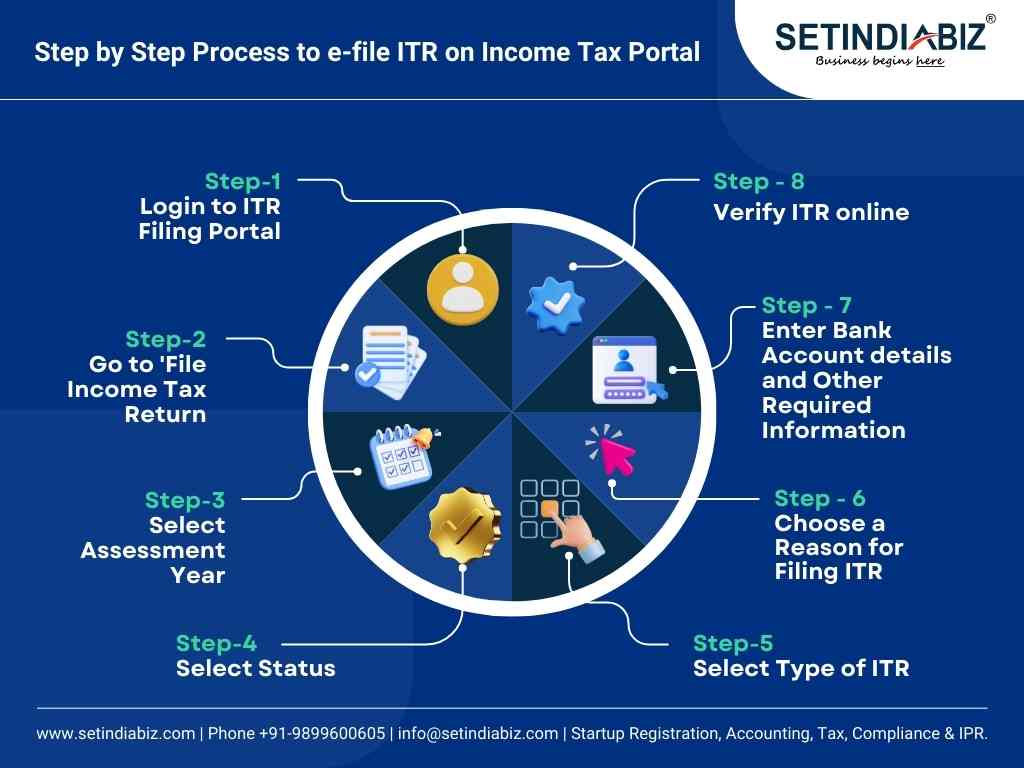
- Bank account information: If you expect a refund via direct deposit, double-check the routing and account numbers. An incorrect digit can delay your refund or send it to the wrong account.
Many online tax software programs provide a final summary or a print-ready version of your return. Use this comprehensive document for your final verification, ideally after taking a short break to approach it with fresh eyes.
Understanding Digital Signatures and Verification
Once your return is finalized and reviewed, you will need to “sign” it digitally. This process typically involves an electronic signature, which is legally binding. For many, this is done by entering a Personal Identification Number (PIN) created for e-filing, or by providing specific information from your previous year’s tax return, such as your Adjusted Gross Income (AGI). This serves as a secure method to verify your identity and confirm that you authorize the submission.
It’s critical to keep your e-filing PIN secure, just as you would any other financial password. If your identity verification fails, your return will be rejected, requiring you to resubmit after correcting the issue. Always follow the specific instructions provided by your chosen software or the tax authority’s portal for digital signature and verification to ensure a successful submission.
Protecting Your Financial Data
Filing taxes online involves transmitting sensitive personal and financial information, making digital security a critical concern. Employing robust security practices is essential to protect yourself from identity theft and fraud.
- Use Strong Passwords: Create unique, complex passwords for your tax software account and any government portals. Combine uppercase and lowercase letters, numbers, and symbols, and avoid easily guessable information.
- Enable Two-Factor Authentication (2FA): If available, activate 2FA for an added layer of security. This often involves a code sent to your phone or email, in addition to your password, to verify your identity.
- Use Secure Networks: Always file your taxes from a private, secure internet connection. Avoid public Wi-Fi networks (e.g., in coffee shops or airports) as they are often unsecured and vulnerable to eavesdropping.
- Beware of Phishing Scams: Tax season is a prime time for scammers. Be highly suspicious of unsolicited emails, texts, or calls claiming to be from the tax authority or tax software providers, especially if they ask for personal information or demand immediate payment. Tax authorities typically initiate contact via mail for official matters.
- Keep Software Updated: Ensure your operating system, web browser, and tax software are always updated to the latest versions. Updates often include critical security patches that protect against new vulnerabilities.
- Secure Your Computer: Use reputable antivirus software and a firewall to protect your computer from malware and unauthorized access. Regularly scan your system for threats.
By adhering to these security measures, you significantly reduce the risk of your financial data being compromised during the online tax filing process.
What Happens After You File?
The process doesn’t end the moment you click “submit.” Understanding the subsequent steps, from confirmation to managing refunds or payments, is crucial for comprehensive financial planning.
Confirmation and Record Keeping
Upon successful submission of your online tax return, you will typically receive an immediate confirmation from the tax software or government portal. This initial confirmation indicates that your return has been received. Shortly after, you should receive a second, more official confirmation directly from the tax authority (often via email or within the portal) stating that your return has been accepted. This acceptance is critical, as it signifies that your filing has been processed and is free of major structural errors.
It is absolutely vital to save digital copies of your accepted tax return and all supporting documents. Create a dedicated folder on your computer or cloud storage for these files. Additionally, printing a physical copy for your records is a wise practice. Maintain these records for at least three years from the date you filed the original return or two years from the date you paid the tax, whichever is later, as this is the general statute of limitations for audits in many jurisdictions.
Understanding Refunds and Payments
If your calculations indicate you are due a refund, the online filing process often expedites its delivery. Direct deposit is the quickest and most secure method to receive your refund, usually processed within a few weeks of acceptance. You can often track the status of your refund online through the tax authority’s website using your taxpayer identification number and the amount of your expected refund.
Conversely, if you owe additional tax, online filing platforms typically provide various payment options. These can include direct debit from your bank account, credit card payments (though these often incur a processing fee), or the ability to print a payment voucher to mail with a check. Be mindful of the payment deadline, which usually coincides with the filing deadline, to avoid penalties and interest charges. If you cannot pay the full amount by the deadline, contact the tax authority to discuss payment plans or extensions to avoid further financial repercussions.
Common Pitfalls and How to Avoid Them
Even with the ease of online filing, several common mistakes can arise.
- Incorrect Personal Information: A misspelled name, wrong Social Security Number, or incorrect bank account details can cause significant delays or rejection. Always double-check these critical fields.
- Missing Income or Deductions: Forgetting to include a W-2 or 1099, or overlooking an eligible deduction, can lead to an inaccurate return. Ensure all financial documents are gathered and accounted for.
- Wrong Filing Status: Choosing the incorrect filing status (e.g., single instead of head of household) can significantly impact your tax liability or refund. Review the criteria for each status carefully.
- Ignoring Estimated Taxes: If you are self-employed or have significant income not subject to withholding, failing to pay estimated taxes quarterly can result in penalties. Online tools can help calculate and remind you about these payments.
- Falling for Scams: As mentioned, tax season sees a surge in phishing attempts. Never click suspicious links or share sensitive information in response to unsolicited communications.
By being meticulous, utilizing the available features of online filing software, and understanding the aftermath of submission, taxpayers can navigate the income tax process efficiently and confidently, solidifying their personal financial management.
aViewFromTheCave is a participant in the Amazon Services LLC Associates Program, an affiliate advertising program designed to provide a means for sites to earn advertising fees by advertising and linking to Amazon.com. Amazon, the Amazon logo, AmazonSupply, and the AmazonSupply logo are trademarks of Amazon.com, Inc. or its affiliates. As an Amazon Associate we earn affiliate commissions from qualifying purchases.