
The annual ritual of tax filing, once a daunting paper-and-pencil endeavor, has been fundamentally transformed by technology. E-filing, or electronic filing, has emerged as the standard, offering unparalleled efficiency, accuracy, and accessibility. For anyone navigating the complexities of their personal or business finances, understanding how to effectively leverage these digital tools is no longer a luxury but a necessity. This guide delves into the technological underpinnings and practical steps of e-filing, focusing on the software, security, and digital processes that make modern tax preparation a streamlined experience.
The Digital Transformation of Tax Filing
The shift from manual paper submissions to electronic filing represents one of the most significant technological advancements in financial administration. What began as a niche option for tax professionals has evolved into a user-friendly, secure, and often free service accessible to millions. This evolution has been driven by continuous improvements in software design, internet infrastructure, and robust digital security protocols.
Understanding E-Filing: More Than Just a Click
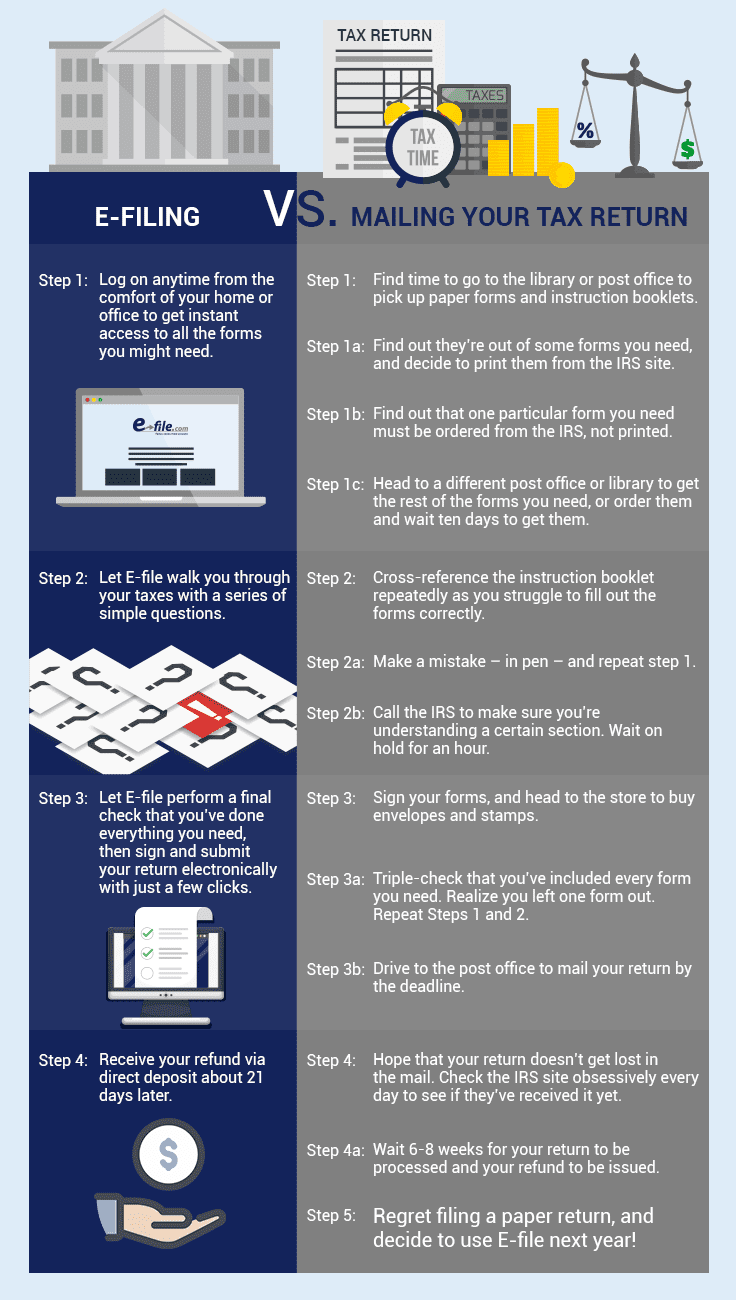
At its core, e-filing is the process of submitting tax returns electronically to the relevant tax authority (such as the IRS in the United States) via the internet. This isn’t just about scanning a paper form; it involves dedicated software or online platforms that guide users through data entry, perform complex calculations, identify potential deductions or credits, and validate information against tax laws before secure digital transmission.
The technical architecture behind e-filing relies on secure servers, data encryption, and standardized protocols (like XML) to ensure that sensitive financial information is transmitted accurately and privately. When you “e-file,” you’re essentially interacting with a sophisticated application that serves as an intermediary, translating your inputs into the required format for government systems, performing checks, and facilitating a secure handshake for submission. This involves robust validation engines that catch common errors before submission, significantly reducing the chances of rejection or audit triggered by clerical mistakes. The system isn’t just a conduit; it’s an intelligent processing unit that streamlines a complex regulatory requirement through technological automation.
The Technological Edge: Speed, Accuracy, and Accessibility
The advantages of e-filing are largely rooted in its technological design. Speed is paramount: electronic submissions are processed significantly faster than paper returns, leading to quicker acknowledgments and, for those expecting a refund, expedited deposits. This acceleration is a direct result of automated data processing, eliminating the delays associated with manual sorting, data entry, and physical mail transit.
Accuracy is another key technological benefit. E-filing software incorporates complex algorithms and real-time error checking capabilities. As you input data, the software flags potential inconsistencies, missing information, or mathematical errors. This proactive error detection drastically reduces the likelihood of mistakes that could lead to delays, penalties, or the need for amended returns. The software acts as an intelligent assistant, cross-referencing your inputs with prevailing tax regulations and computational logic to ensure compliance.
Furthermore, e-filing enhances accessibility. With an internet connection and a device, individuals can prepare and submit their taxes from virtually anywhere, at any time. This flexibility is a direct outcome of cloud-based platforms and intuitive user interfaces that abstract away much of the underlying complexity, making sophisticated tax preparation tools available to a broad audience without requiring specialized accounting knowledge. Features like mobile app support and integrated help functions further lower the barrier to entry, empowering more people to manage their tax obligations independently.
Navigating the E-Filing Landscape: Choosing Your Digital Partner
The market for e-filing solutions is diverse, offering a range of options from desktop software to web-based platforms, each with its own set of features, pricing models, and technical specifications. Selecting the right digital partner involves evaluating these technical attributes to ensure compatibility with your needs and comfort level.
Software Solutions vs. Online Platforms: A Feature Comparison
The primary distinction lies between downloadable desktop software and browser-based online platforms.
Desktop Software (e.g., TurboTax Desktop, H&R Block Tax Software):
- Technical Control: Users download and install the software directly onto their computer. This often provides more granular control over data storage (locally on your machine) and processing.
- Offline Access: Once installed, you can often work on your return offline, syncing updates when an internet connection is available.
- Performance: Processing speeds can sometimes be faster as calculations are performed locally, leveraging your computer’s resources.
- Updates: Requires periodic software updates to incorporate new tax laws and security patches. These are typically pushed by the vendor.
- Compatibility: Must be compatible with your operating system (Windows, macOS).
Online Platforms (e.g., TurboTax Online, H&R Block Online, FreeTaxUSA):
- Accessibility: Accessible from any internet-connected device with a web browser. No installation required.
- Cloud-Based Storage: Your data is stored securely on the provider’s servers, accessible from anywhere.
- Automatic Updates: The platform is continuously updated by the provider, ensuring you’re always using the latest version with current tax laws and security features without manual intervention.
- Real-time Collaboration: Some platforms offer features for real-time collaboration with tax professionals.
- System Agnosticism: Works on any operating system as long as you have a compatible web browser.
The choice often comes down to a trade-off between local control and ubiquitous accessibility. For users with complex tax situations who prefer to keep data strictly local and leverage powerful desktop processing, software might be preferred. For most users prioritizing convenience, automatic updates, and multi-device access, online platforms are typically more suitable.
Key Technical Considerations for Platform Selection (Security, Integration, UX)
Beyond the basic software vs. online distinction, several technical factors should guide your selection:
- Security Architecture: Investigate the platform’s security protocols. Look for end-to-end encryption (TLS/SSL), robust firewall protection, regular security audits (e.g., SOC 2 compliance), and strong data anonymization practices. Multi-factor authentication (MFA) should be a standard offering. Understand where and how your data is stored and backed up.
- Data Integration Capabilities: Does the platform offer direct import features? Many solutions can securely connect to financial institutions (banks, brokerages, payroll providers) to automatically import W-2s, 1099s, and other investment statements. This minimizes manual data entry errors and saves significant time. Consider if it integrates with other financial software you use (e.g., QuickBooks for business filers).
- User Experience (UX) and Interface Design: A well-designed, intuitive interface is crucial. Look for clear navigation, logical workflows, contextual help, and mobile responsiveness. An engaging UX reduces frustration and the likelihood of errors, making a complex process feel manageable. Evaluate the clarity of questions, the ease of inputting data, and the visual feedback provided by the interface.
- Error Checking and Validation Engine: Assess the sophistication of the built-in error detection system. Does it provide clear explanations for flagged issues and suggest corrective actions? Advanced platforms use AI and machine learning to identify potential deductions you might miss or flag unusual entries that could trigger IRS scrutiny.
- Technical Support Channels: What kind of technical support is offered? Look for multiple channels like live chat, phone support, and a comprehensive knowledge base. Test the responsiveness and helpfulness of their support, as technical issues can arise.
A Step-by-Step Technical Guide to E-Filing
The e-filing process, while varying slightly between platforms, generally follows a consistent technical workflow designed to ensure accuracy and secure submission.
Pre-Filing Setup: Data Gathering and Account Creation
Before you even start inputting numbers, the initial phase involves preparing your digital workspace. This means gathering all necessary digital documents: W-2s, 1099s (for interest, dividends, independent contractor income), 1098s (for mortgage interest), healthcare statements, charitable contribution records, and any other relevant financial documentation. Organize these digitally in a secure folder on your computer or cloud storage.
Next, you’ll need to create an account on your chosen e-filing platform. This involves setting up a strong, unique password and, crucially, enabling multi-factor authentication (MFA) if available. MFA adds an essential layer of security by requiring a second verification method (like a code sent to your phone) beyond just your password. Ensure your email address and phone number on file are current and secure.

The Data Entry Phase: Leveraging Automated Features and Imports
This is where the software truly shines. Most platforms guide you through a series of questions, prompting you for specific information. Rather than simply typing numbers, look for and utilize automated data import features. Many platforms allow you to:
- Upload PDF documents: Some software can scan and extract data from uploaded W-2s or 1099s using Optical Character Recognition (OCR) technology.
- Connect directly to financial institutions: Provide secure access credentials (encrypted) to your bank, broker, or employer to pull W-2, 1099, and 1098 data directly into your return. This not only saves time but also virtually eliminates transcription errors.
- Import prior-year data: If you used the same software last year, it can often import personal information and carry forward relevant data points, like depreciation schedules or carryover losses, streamlining the process.
As you enter data, the platform’s validation engine constantly checks for errors, missing information, and potential inconsistencies. Pay close attention to any warnings or alerts from the software and resolve them before proceeding. This real-time feedback loop is a critical technical advantage over manual filing.
Review and Submission: Digital Signatures and Confirmation Protocols
Once all data is entered, the software will perform a comprehensive review, often simulating an IRS audit by checking for logical inconsistencies and common red flags. This final review typically highlights potential errors, suggests overlooked deductions, and allows you to confirm all information.
The submission process itself is entirely digital. You will electronically “sign” your return, usually by entering your prior-year adjusted gross income (AGI) or a personal identification number (PIN) provided by the IRS. This serves as your digital signature, authenticating your submission.
After you click “submit,” the platform securely transmits your encrypted tax data to the tax authority. Within minutes or hours, you should receive a digital confirmation email or message indicating that your return has been “accepted” or “rejected.” An “accepted” status means the tax authority’s systems have successfully received and validated the format of your return. A “rejected” status indicates a technical issue (e.g., incorrect Social Security number, duplicate filing) that requires correction and re-submission. It’s crucial to save or print this acceptance confirmation for your records.
Securing Your Financial Data in the Digital Realm
The electronic nature of e-filing necessitates a strong focus on digital security. Your tax return contains some of your most sensitive personal and financial data, making it a prime target for cybercriminals. Protecting this information is paramount.
Understanding Encryption and Data Privacy Standards
Reputable e-filing platforms employ robust encryption standards to protect your data both in transit and at rest. When your data travels between your device and the platform’s servers, it should be protected by Transport Layer Security (TLS) or Secure Sockets Layer (SSL) protocols, indicated by “https://” in the web address and a padlock icon. This encrypts the data, making it unreadable to unauthorized parties if intercepted.
Data at rest (stored on the platform’s servers) should also be encrypted using advanced algorithms (e.g., AES-256). Furthermore, platforms should adhere to stringent data privacy standards and regulations (e.g., GDPR, CCPA, specific IRS security requirements) that dictate how your data is collected, stored, processed, and shared. Always review a platform’s privacy policy to understand their practices.
Multi-Factor Authentication and Account Protection
Multi-factor authentication (MFA) is one of the most effective security measures you can implement. By requiring a second form of verification (like a code from an authenticator app, a text message, or a biometric scan) in addition to your password, MFA significantly reduces the risk of unauthorized access, even if your password is compromised. Always enable MFA on your e-filing account and any linked email accounts.
Additionally, always use strong, unique passwords for your e-filing account. Avoid using easily guessable information or reusing passwords from other sites. Consider using a reputable password manager to generate and store complex passwords. Be vigilant against phishing attempts; never click on suspicious links or provide login credentials in response to unsolicited emails or messages.
Post-Filing Digital Hygiene: Storing Records Securely
Even after your return is accepted, digital security remains crucial. Download and securely store a copy of your completed tax return and all supporting documents. Do not rely solely on the platform to retain these; local backups are essential.
Consider these digital hygiene practices:
- Encrypted Storage: Store your digital tax records in an encrypted folder on your computer or in a reputable, encrypted cloud storage service.
- External Drives: Use an external hard drive with encryption for offline backups.
- Regular Backups: Implement a regular backup strategy for all your important digital documents, including tax records.
- Secure Deletion: If you dispose of old devices, ensure you perform a secure wipe to prevent data recovery.
- Account Logout: Always log out of your e-filing platform when finished, especially if using a public or shared computer.
Troubleshooting Common E-Filing Tech Hurdles
Despite the sophistication of e-filing systems, technical issues can occasionally arise. Knowing how to diagnose and resolve these common hurdles can save you time and frustration.
Error Codes and Validation Issues: A Technical Approach
The most frequent technical issue involves error codes or validation messages during data entry or upon attempted submission. These are the software’s way of telling you there’s an inconsistency or missing piece of data.
- Read Carefully: Don’t just dismiss an error message. Read it thoroughly. It often specifies the form, line number, or data field where the issue lies.
- Contextual Help: Most platforms provide contextual help for error codes. Click on the error message or a nearby “help” icon to get more detailed explanations and suggested fixes.
- Cross-Reference Documents: If an error points to incorrect information (e.g., AGI, SSN), cross-reference it with your official documents (e.g., previous year’s return, Social Security card).
- System Glitches: Occasionally, an error might be due to a temporary glitch in the software. Try clearing your browser’s cache and cookies, restarting your browser, or even trying a different browser.
Connectivity and Platform Performance Tips
Internet connectivity issues or slow platform performance can disrupt your e-filing process.
- Stable Connection: Ensure you have a stable and strong internet connection. If using Wi-Fi, be close to your router or consider a wired connection.
- Browser Updates: Keep your web browser updated to the latest version. Older browsers may have compatibility issues or security vulnerabilities.
- Clear Cache & Cookies: Regularly clear your browser’s cache and cookies. Accumulated data can slow down web applications.
- Disable Extensions: Temporarily disable browser extensions or ad-blockers, as they can sometimes interfere with website functionality.
- System Resources: Close other demanding applications on your computer to free up system resources, especially if you’re using an older machine.
Getting Technical Support: When and How to Engage
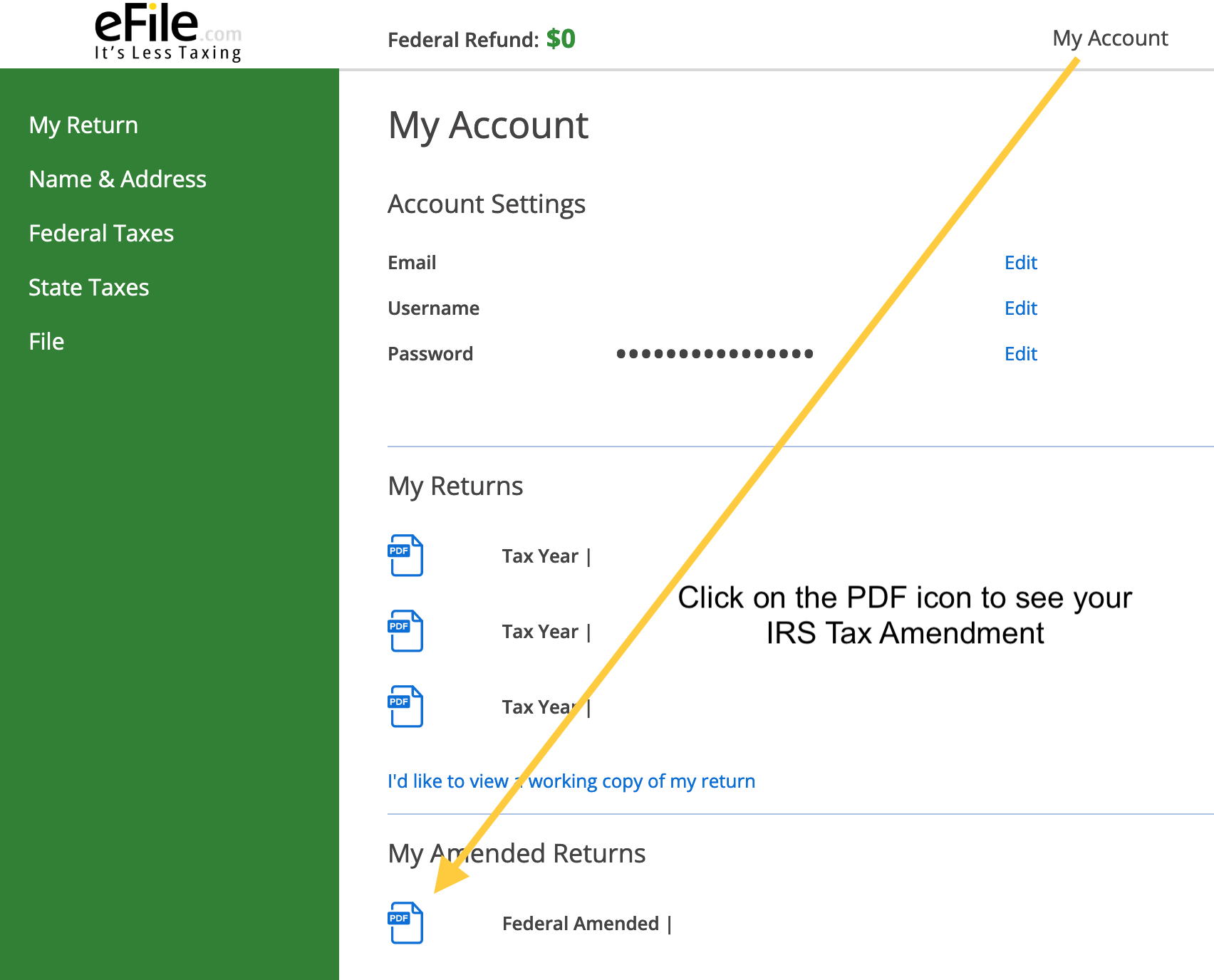
If you encounter a persistent technical issue that you cannot resolve independently, it’s time to engage the platform’s technical support.
- Document the Problem: Before contacting support, clearly document the issue. Note the exact error message, what you were doing when it occurred, and any troubleshooting steps you’ve already tried.
- Use Specific Channels: Utilize the designated technical support channels (live chat, phone, email) provided by the e-filing vendor. Avoid seeking support via general social media, as it may not be secure or official.
- Be Patient and Clear: Clearly explain your issue to the support agent. Be patient, as they may need to guide you through steps or escalate your case.
- Security Verification: Be prepared to verify your identity. Reputable support teams will never ask for your full password but may ask for account details or security answers.
E-filing taxes is a testament to how technology can simplify and secure complex processes. By understanding the underlying digital mechanisms, selecting appropriate tools, and practicing diligent digital hygiene, individuals can navigate their tax obligations with confidence and efficiency in the digital age.
aViewFromTheCave is a participant in the Amazon Services LLC Associates Program, an affiliate advertising program designed to provide a means for sites to earn advertising fees by advertising and linking to Amazon.com. Amazon, the Amazon logo, AmazonSupply, and the AmazonSupply logo are trademarks of Amazon.com, Inc. or its affiliates. As an Amazon Associate we earn affiliate commissions from qualifying purchases.