
In an increasingly digital financial landscape, managing your money efficiently and seamlessly is paramount. Platforms like Venmo have revolutionized how individuals send, receive, and manage funds for everyday transactions, making them an indispensable tool in modern personal finance. Understanding how to effectively fund your Venmo account is the first step toward leveraging its full potential, from splitting dinner bills with friends to accepting payments for services rendered. This guide delves into the various methods available to replenish your Venmo balance, offering insights into each process and highlighting their implications for your overall financial management strategy.
Understanding Your Venmo Balance and Its Utility in Personal Finance
Before diving into the mechanics of adding funds, it’s crucial to grasp what a Venmo balance represents and why maintaining one can be advantageous. Your Venmo balance is essentially a digital wallet within the app, holding funds that you can use for payments, transfer to your bank account, or spend using a Venmo Card. It acts as a convenient intermediary, bridging your traditional banking ecosystem with the swift, social payment features Venmo offers.
The Role of Venmo in Modern Personal Finance
Venmo has transcended its initial role as a simple peer-to-peer payment app to become a significant player in the broader personal finance toolkit. For many, it’s the go-to platform for managing shared expenses, receiving small reimbursements, or even conducting micro-transactions for casual services. Its immediate nature and social feed aspects make financial interactions less formal and more integrated into daily life. From a financial perspective, Venmo can help track specific spending categories (if disciplined), manage cash flow for social activities, and even facilitate quick savings for short-term goals by keeping certain funds separate from your main bank account. This digital pocket of funds offers flexibility and speed, reducing reliance on physical cash or slower bank transfers for routine transactions.
Why Maintain a Venmo Balance?
Maintaining a positive Venmo balance offers several practical benefits. Firstly, it allows for instant payments within the Venmo ecosystem without needing to draw directly from a linked bank account or debit card for each transaction. This can be particularly useful if you’re frequently sending money to others and prefer to keep those transactions separate from your primary banking records. Secondly, for those who utilize the Venmo Debit Card or Venmo Credit Card, having a balance means immediate access to those funds for purchases wherever Mastercard or Visa (respectively) are accepted, often with rewards or cashback benefits that are directly deposited back into your Venmo account. Thirdly, it provides a buffer. Funds in your Venmo balance are readily available, which can be convenient for unexpected small expenses or impulse purchases without impacting your primary bank account balance instantly. Lastly, for users who accept payments for goods or services, maintaining a balance streamlines the revenue collection process, keeping business-related funds consolidated within the platform before a larger transfer to a business bank account.
Direct Methods for Funding Your Venmo Account
The most straightforward ways to put money into your Venmo account involve directly linking a financial institution. These methods offer reliability and are typically used for intentional transfers to top up your balance.
Linking and Transferring from Your Bank Account
This is perhaps the most common and robust method for funding your Venmo account. Linking your bank account creates a direct pipeline for funds, allowing you to transfer money from your checking or savings account directly to your Venmo balance.
The process typically involves:
- Verification: Venmo requires you to verify your bank account, usually through Plaid (a third-party service that securely connects financial accounts) or by making small deposit/withdrawal tests (micro-deposits) to your bank account. Plaid offers instant verification, while micro-deposits can take 1-3 business days. This security measure ensures that you are the legitimate owner of the bank account.
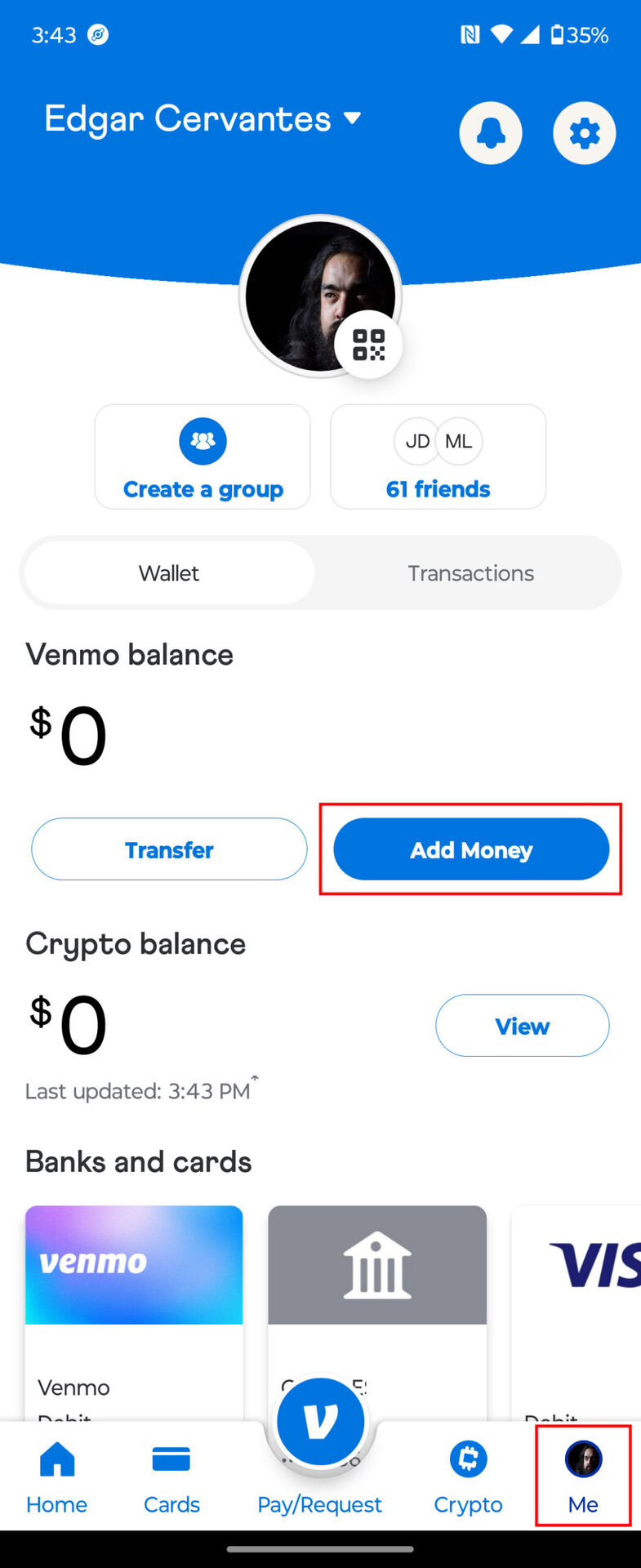
- Initiating a Transfer: Once verified, navigate to the “Manage Balance” or “Add Money” section within the Venmo app. You’ll specify the amount you wish to transfer and confirm the linked bank account as the source.
- Processing Time: Transfers from a bank account to Venmo are generally free but can take 1-3 business days to clear and appear in your Venmo balance. This is similar to standard Automated Clearing House (ACH) transfers. For larger sums or less frequent top-ups, this method is ideal due to its cost-effectiveness and direct nature. It’s crucial for robust financial planning, allowing you to allocate specific amounts from your primary banking to your Venmo wallet for controlled spending.
Adding Funds with a Debit Card
While often used for direct payments to others, a debit card linked to your Venmo account can also be used to add funds to your Venmo balance. This method offers greater speed, though it sometimes comes with a fee.
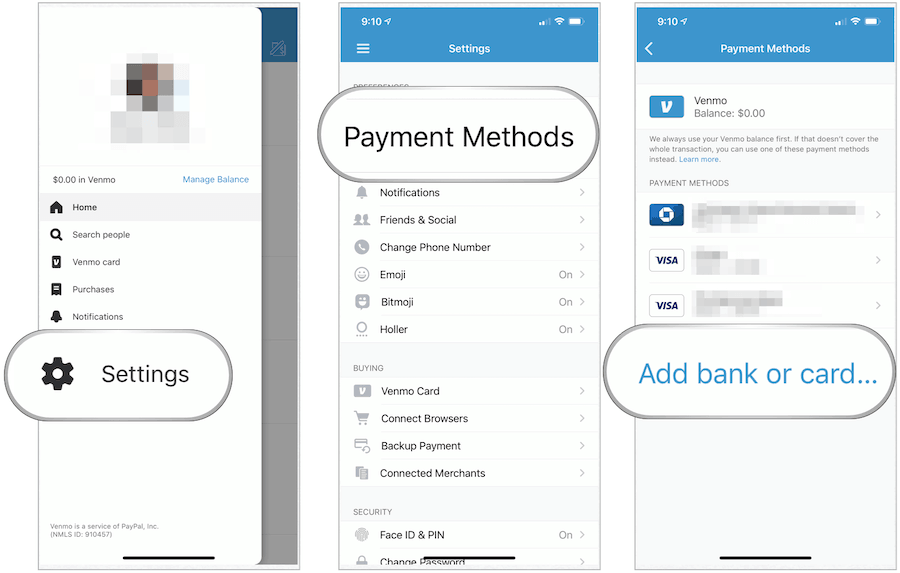
- Linking Your Debit Card: Add your debit card details (card number, expiration date, CVV) to your Venmo profile. Similar to bank accounts, this link allows Venmo to draw funds directly.
- Instant Transfer Option: When adding money, you typically have the option for an instant transfer from your debit card. Unlike bank transfers, which rely on ACH, debit card transfers can often process much faster, sometimes within minutes.
- Understanding Fees: While convenient, instant transfers from a debit card to your Venmo balance may incur a small fee (e.g., 1.75% of the transfer amount, with a minimum and maximum fee). This fee compensates for the immediacy of the transaction. For users who prioritize speed and need funds in their Venmo balance immediately, this fee can be a justifiable expense. From a personal finance perspective, it’s important to weigh the cost against the urgency of the need. Regular use of this method for large sums can accumulate significant fees, so strategic planning is key.
Setting Up Direct Deposit to Venmo
For eligible users, Venmo offers the incredibly convenient option of setting up direct deposit. This integrates Venmo even more deeply into your financial ecosystem, allowing a portion or all of your paycheck, government benefits, or other recurring income to be deposited directly into your Venmo balance.
- Accessing Direct Deposit Information: Within the Venmo app, locate the “Direct Deposit” section, often found under “Manage Balance” or “Me.” Here, you’ll find an account and routing number specifically assigned to your Venmo account.
- Providing Information to Your Payer: You’ll provide these Venmo-specific account and routing numbers to your employer’s payroll department, the government agency, or any other source of recurring income. You typically fill out a direct deposit form, specifying the amount or percentage you wish to allocate to Venmo.
- Benefits for Financial Management: Direct deposit into Venmo can be a powerful tool for budgeting and managing specific spending categories. For instance, you could direct a portion of your paycheck to Venmo specifically for social outings, subscriptions, or online purchases, keeping it separate from your main banking funds. This “envelope budgeting” approach, where money is earmarked for specific purposes, is simplified through Venmo’s direct deposit feature. It allows for a proactive approach to funding your digital wallet, ensuring funds are available exactly when you need them without manual transfers.
Indirect and Everyday Ways to Receive Funds on Venmo
Beyond actively transferring money into your account, a significant portion of a user’s Venmo balance is often accumulated through receiving payments from others. These methods highlight Venmo’s core functionality as a peer-to-peer payment platform and its utility in managing shared expenses.
Receiving Payments from Friends and Family
The most common way to get money into your Venmo account is simply by receiving it from other Venmo users. This is Venmo’s primary purpose and the backbone of its popularity.
- Requesting or Being Paid: Friends and family can easily send you money directly through the app. You can also initiate a request for money, making it easy to settle shared expenses like dinner bills, concert tickets, or rent.
- Instant Crediting: When someone sends you money on Venmo, it typically appears in your Venmo balance instantly. There are no fees for receiving standard payments from others (unless it’s a payment for goods or services, which may incur a seller fee for business profiles).
- Social and Financial Integration: This method seamlessly integrates financial transactions into social interactions. For personal finance, it means quicker reimbursements and less awkwardness around shared costs. It encourages a transparent and efficient way to manage group finances without the need for cash or complex calculations.

Accepting Payments for Goods or Services (for Eligible Business Profiles)
For users who sell goods or offer services, Venmo can also serve as a payment gateway. While personal payments are free, business-related transactions come with specific considerations.
- Business Profile Requirement: To accept payments for goods or services, you typically need to set up a Venmo Business Profile. This separates your personal and business transactions and provides features like payment tracking and tax documentation.
- Seller Fees: Venmo charges a seller transaction fee (e.g., 1.9% + $0.10) for payments marked as “for goods or services.” This fee is typically deducted from the amount received.
- Financial Implications for Small Businesses: For small businesses, freelancers, or side hustlers, Venmo offers a convenient, low-barrier-to-entry payment solution. Understanding the fee structure is critical for pricing strategies and profit margins. It’s a pragmatic tool for managing business cash flow, especially for micro-entrepreneurs who need a simple way to get paid without complex merchant accounts.
Leveraging Venmo for Reimbursements and Shared Expenses
Venmo excels at simplifying the often-cumbersome process of splitting costs. From roommates dividing rent and utilities to friends sharing vacation expenses, Venmo streamlines these financial interactions.
- Requesting Specific Amounts: The “Request” feature in Venmo allows you to specify who owes you money and for what purpose, clearly itemizing the expense. This clarity helps in getting reimbursed promptly.
- Group Payments: For more complex shared expenses, Venmo’s group payment features or integrated apps like Splitwise can facilitate splitting costs among multiple individuals, with each person sending their share directly to the organizer’s Venmo account.
- Streamlined Personal Accounting: For individuals who often front money for groups, Venmo ensures that reimbursements are quick and trackable. This reduces the time spent chasing down payments and keeps personal accounts more balanced, preventing one person from holding a significant debt for an extended period. It’s an essential tool for maintaining financial harmony within social circles and managing a common source of fluctuating personal finance.
Optimizing Your Venmo Experience for Financial Management
Beyond simply adding funds, optimizing how you interact with Venmo can significantly enhance your financial management practices. This involves understanding the platform’s features, limitations, and security protocols.
Monitoring Your Balance and Transaction History
Effective financial management hinges on awareness. Venmo provides robust tools to keep track of your money within the app.
- Real-Time Balance Updates: Your Venmo balance is updated in real-time as you receive or send money. Regularly checking this balance is the simplest way to know your available funds.
- Detailed Transaction History: Venmo keeps a comprehensive record of all your transactions, which can be filtered and searched. This history is invaluable for budgeting, reconciling expenses, and identifying any discrepancies. From a personal finance perspective, reviewing your transaction history helps you understand your spending patterns, track reimbursements, and ensure all payments are accounted for. This digital paper trail is much more convenient than sifting through bank statements for small, frequent transactions.
- Exporting Statements: For more detailed financial analysis or tax purposes, Venmo allows users (especially those with business profiles) to download statements, providing an aggregated view of transactions over specific periods.
Understanding Fees and Limits for Transfers
Financial literacy includes understanding the costs and constraints associated with any financial tool. Venmo, like all payment platforms, has its own set of rules regarding fees and transaction limits.
- Fee Awareness: Be mindful of fees for instant transfers (from debit cards or to bank accounts) and for business transactions. While many core Venmo functions are free, these specific services carry a cost that can impact your net funds if not considered. Integrating these potential costs into your budgeting allows for accurate financial projections.
- Transaction Limits: Venmo imposes limits on how much money you can send, receive, and transfer out of your account over various periods (e.g., weekly sending limits, weekly bank transfer limits). These limits are often higher for verified users. Understanding these thresholds is crucial, especially for larger transactions or when relying on Venmo for significant cash flow. If you plan to use Venmo for substantial transfers, it’s wise to verify your identity and confirm your current limits in the app.
- Impact on Cash Flow: These fees and limits directly influence your cash flow management. Strategically choosing when to use instant transfers versus standard transfers, and planning large financial movements around Venmo’s limits, can help you avoid unnecessary costs and ensure funds are available when needed.
Enhancing Security for Your Venmo Funds
Protecting your digital money is paramount. Venmo employs various security measures, but user vigilance is equally important.
- Strong Passwords and Two-Factor Authentication (2FA): Always use a strong, unique password for your Venmo account and enable two-factor authentication. This adds an extra layer of security, requiring a code from your phone in addition to your password for login attempts.
- Monitoring Account Activity: Regularly review your transaction history for any unauthorized activity. Set up notifications to be alerted of every transaction. Promptly report any suspicious activity to Venmo support.
- Beware of Scams: Be educated about common online scams, especially phishing attempts and fake payment notifications. Only send money to people you know and trust, and be cautious of requests for payment for goods or services outside of established business protocols. From a financial security standpoint, personal responsibility in maintaining digital hygiene is as crucial as the platform’s built-in security. Your Venmo balance, like any other financial asset, requires diligent protection.
Strategic Uses of Your Venmo Balance and Conclusion
Effectively funding your Venmo account is just the beginning. The true value lies in how you integrate Venmo into your broader financial strategy, using it as a tool to streamline, organize, and manage your digital money.
Integrating Venmo into Your Budgeting Strategy
Venmo, when used intentionally, can be a powerful complement to your budgeting efforts. By directing specific funds into your Venmo balance, you can create a form of digital envelope budgeting. For instance, you could earmark a certain amount for “social spending” or “online subscriptions” by sending that exact amount to your Venmo balance each month, thereby limiting impulse spending from your main bank account. This segmentation helps in adhering to budget categories and provides a clearer picture of spending in specific areas. The detailed transaction history further aids in tracking these micro-expenditures, allowing for precise budget reconciliation and adjustments.
Maximizing Convenience and Financial Flow
The primary allure of Venmo is its unparalleled convenience. The ability to instantly send and receive money, split bills effortlessly, and even pay at certain merchants directly from your balance greatly enhances financial flow in daily life. Whether it’s quickly paying a friend back for coffee, receiving your share of a group gift, or making a last-minute online purchase, a well-funded Venmo account minimizes friction. This convenience saves time and mental effort, contributing to a less stressful overall financial experience. For those with busy lifestyles, Venmo acts as a nimble financial companion, always ready to facilitate transactions without the need for cash or the delays of traditional bank transfers.
A Seamless Approach to Digital Money Management
Ultimately, knowing how to put money into your Venmo account is about empowering yourself with a seamless approach to digital money management. By understanding and utilizing direct bank transfers, debit card top-ups, direct deposit, and the natural flow of receiving payments from your network, you gain full control over your Venmo balance. This control allows you to optimize your spending, track your finances with greater precision, and integrate a modern payment solution into your personal financial ecosystem effectively. Venmo, when managed strategically, moves beyond being just an app to becoming an integral part of your intelligent financial toolkit, helping you navigate the complexities of digital money with confidence and ease.
aViewFromTheCave is a participant in the Amazon Services LLC Associates Program, an affiliate advertising program designed to provide a means for sites to earn advertising fees by advertising and linking to Amazon.com. Amazon, the Amazon logo, AmazonSupply, and the AmazonSupply logo are trademarks of Amazon.com, Inc. or its affiliates. As an Amazon Associate we earn affiliate commissions from qualifying purchases.