
In the rapidly evolving landscape of digital finance, peer-to-peer payment applications like Cash App have become indispensable tools for managing everyday transactions. Offering unparalleled convenience for sending and receiving money, splitting bills, or even investing, Cash App empowers millions of users. While linking a debit card or bank account is commonplace, understanding the nuances and precise steps involved in linking a credit card can unlock additional flexibility and features. This comprehensive guide will navigate you through the technical process of integrating your credit card with Cash App, explore the implications, and equip you with the knowledge to manage this payment method securely and efficiently within the application’s ecosystem.
Understanding the Role of Credit Cards in Cash App’s Ecosystem
Cash App, developed by Block, Inc., has revolutionized how individuals interact with their money. Beyond its primary function as a peer-to-peer payment service, it offers features such as direct deposit, a debit card (Cash Card), investing in stocks and Bitcoin, and tax filing services. Integrating a credit card into this versatile platform extends its utility, though it comes with specific considerations.
Cash App’s Core Functionality and Payment Methods
At its heart, Cash App is designed for simplicity in financial transactions. Users can send money to friends and family instantly, receive payments, and even manage a balance within the app. To facilitate these actions, Cash App supports several funding sources:
- Debit Cards: The most common method, allowing direct transfers from your bank account.
- Bank Accounts: Linking directly to your bank account for sending and receiving funds.
- Cash App Balance: Money held directly within your Cash App account.
- Credit Cards: The focus of this guide, enabling transactions to be funded via your credit line.
Each method serves a distinct purpose, offering varying levels of speed, cost, and convenience. The choice often depends on the user’s immediate needs and financial strategy.
Why Link a Credit Card? Exploring Practical Applications
While debit cards and bank accounts are the default for fee-free transactions, linking a credit card to Cash App can offer several compelling advantages for specific use cases:
- Emergency Funds: For situations where immediate cash is needed and your debit card or bank account balance is low, a credit card can provide a crucial lifeline, acting as a short-term borrowing tool within the app.
- Convenience and Flexibility: Having multiple payment options linked offers greater flexibility. If one payment method is temporarily unavailable or declined, a credit card serves as an immediate backup.
- Earning Rewards (with caveats): Some users strategically link credit cards that offer rewards points, cashback, or travel miles. While Cash App applies a fee for credit card transactions, careful calculation might reveal a net benefit if the rewards earned outweigh the fee, particularly for high-value transactions or specific card benefits.
- Separating Expenses: Business owners or freelancers might use a business credit card linked to Cash App to keep personal and professional expenses distinct, simplifying accounting and expense tracking.
It’s important to remember that these benefits must be weighed against the associated costs and responsible usage principles.
Important Considerations for Credit Card Use on Cash App
Before proceeding with linking your credit card, it’s crucial to understand the technical and financial implications:
- Transaction Fees: Cash App imposes a 3% fee on transactions funded by a linked credit card. This is a standard practice across many payment apps to offset the processing fees charged by credit card networks. For example, sending $100 via a credit card would incur a $3 fee, meaning the recipient receives $100 but you are charged $103.
- Cash Advances (and how Cash App differs): Traditional cash advances from credit cards typically incur high fees and immediate interest. While Cash App allows you to send money using a credit card, it generally processes these as purchases or payments rather than explicit cash advances, which can impact how your credit card issuer treats the transaction. However, always verify with your credit card provider how such transactions are categorized to avoid unexpected costs.
- Credit Score Impact: Responsible use of a credit card on Cash App (paying off balances on time) should not negatively impact your credit score. However, if using the credit card leads to accumulating debt that you cannot manage, it could affect your credit utilization ratio and payment history.
- No Direct “Cash Out” to Credit Card: You cannot directly “cash out” your Cash App balance to a credit card. Funds can only be sent to a linked debit card or bank account.
These factors underscore the importance of informed decision-making when choosing to integrate a credit card into your Cash App usage.
Step-by-Step Guide to Linking Your Credit Card
Linking a credit card to your Cash App account is a straightforward process, designed for user convenience. By following these steps, you can quickly add a new funding source to your digital wallet.
Prerequisites for Linking
Before you begin, ensure you meet the following basic requirements:
- Active Cash App Account: You must have a verified Cash App account.
- Supported Credit Card: Cash App generally supports Visa, MasterCard, American Express, and Discover credit cards. Prepaid cards are typically not supported, and some corporate cards may also be incompatible.
- Card Information: Have your credit card number, expiration date, and CVV (Card Verification Value, usually a 3 or 4-digit code on the back or front of your card) readily available.
- Billing Address: The billing address associated with your credit card must match the information Cash App has on file for your account or be easily verifiable.
- Sufficient Credit Limit: While not directly a prerequisite for linking, ensure your credit card has an available credit limit for any intended transactions, as Cash App may perform a small authorization charge (which is later reversed) to verify the card.
Navigating the Cash App Interface
The Cash App interface is designed for intuitive navigation. To access the linking section:
- Open the Cash App: Launch the Cash App on your smartphone or tablet.
- Access the Banking Tab: Look for the “Banking” or “My Cash” tab, usually represented by a house icon or your Cash App balance on the bottom navigation bar. Tap this icon to enter your banking overview.
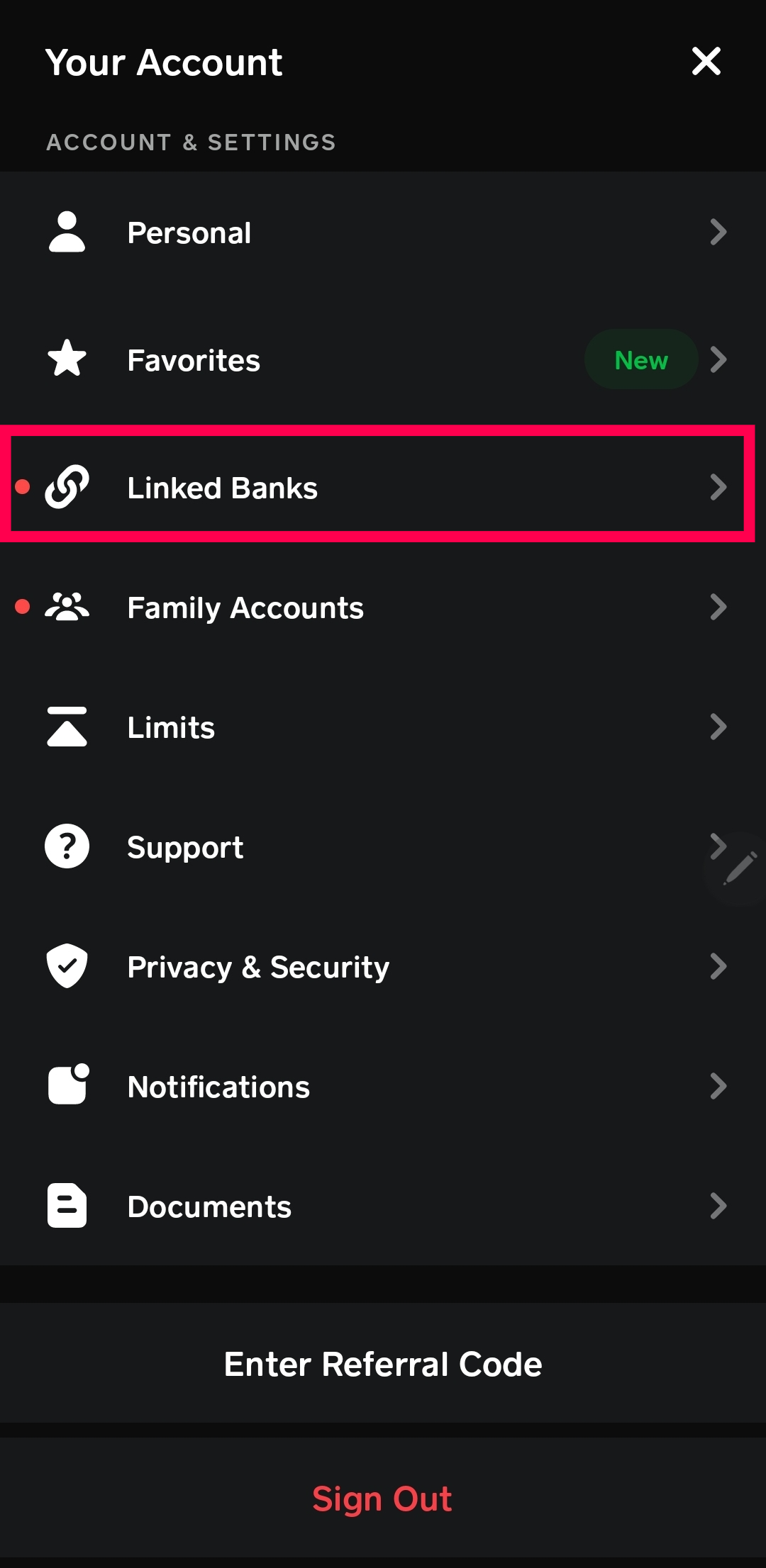
- Locate Linked Banks/Cards: Within the Banking tab, scroll down or look for options like “Linked Banks,” “Link Bank,” “Add Bank,” or “Add Credit Card.” The precise wording might vary slightly with app updates.
The Linking Process: A Detailed Walkthrough
Once you’ve navigated to the correct section, follow these steps to link your credit card:
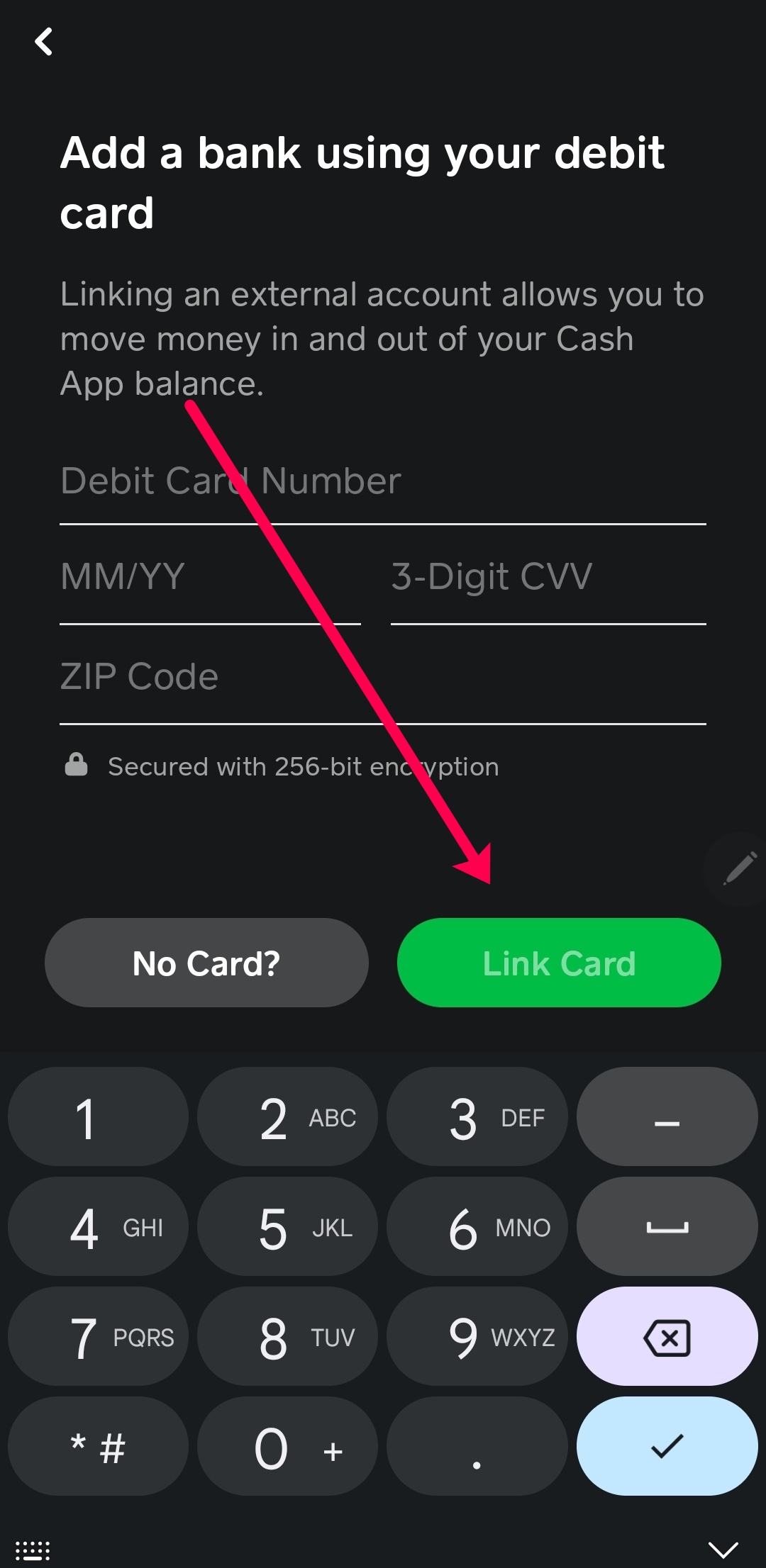
- Initiate Linking: Tap on the option to “Add Bank” or “Link Debit Card” (if no cards are currently linked), and then look for a prompt to “Add Credit Card” if it doesn’t appear immediately. Some versions of the app might directly present “Link a Card” or “Add a Card” and allow you to choose debit or credit during input.
- Enter Credit Card Details: You will be prompted to enter your credit card information:
- Card Number: The 16-digit number on the front of your card.
- Expiration Date: The month and year your card expires.
- CVV/CVC: The 3 or 4-digit security code.
- Provide Name and Billing Information: Enter the exact name as it appears on your credit card. You may also need to confirm or input the billing address associated with the card. This information is crucial for verification purposes.
- Confirm and Verify: After entering all details, tap “Link Card” or “Add Card.” Cash App will attempt to verify the card with your credit card issuer. This usually involves a small, temporary authorization charge (e.g., $1.00), which is reversed once the card is verified.
- Successful Linkage: Upon successful verification, your credit card will be linked to your Cash App account and will appear under your linked payment methods. You can now select it as a funding source for transactions.
Troubleshooting Common Issues
While the process is generally smooth, you might encounter some hiccups:
- Incorrect Card Details: Double-check that the card number, expiration date, CVV, and billing address are entered precisely as they appear on your card and in your bank’s records.
- Unsupported Card Type: Ensure your credit card is a Visa, MasterCard, American Express, or Discover. Prepaid cards or gift cards are usually not supported.
- Network Issues: A poor internet connection can interrupt the linking process. Try again with a stable Wi-Fi or cellular connection.
- Bank Decline: Your bank or credit card issuer might decline the verification attempt due to security protocols or other reasons. Contact your bank to ensure there are no blocks on your card for online transactions.
- App Glitches: If the app is acting unusual, try restarting it or clearing its cache. Ensure your Cash App is updated to the latest version.
- Fraud Protection: If you’ve recently used your card in an unusual way or overseas, your bank might flag the transaction. A quick call to your bank’s fraud department can resolve this.
If problems persist, Cash App’s customer support can provide further assistance.
Managing and Securing Your Linked Credit Card
Beyond the initial linking, responsible digital finance practices involve actively managing and securing your payment methods within Cash App. This ensures both convenience and protection against unauthorized use.
Updating and Removing Linked Cards
Your financial circumstances and card details can change. Cash App provides easy ways to update or remove linked credit cards:
- To Update: If your card expires or you receive a new card with the same account number, you may need to update the expiration date or CVV. Navigate to the “Linked Banks” or “Linked Cards” section, tap on the credit card you wish to update, and look for an “Update” or “Edit” option.
- To Remove: If a credit card is compromised, no longer in use, or you simply prefer not to have it linked, you can remove it. From the “Linked Banks” or “Linked Cards” section, tap on the card, and select “Remove Card” or “Unlink Card.” This action immediately severs the connection between the card and your Cash App account, preventing further transactions.
Regularly reviewing your linked payment methods and removing those no longer needed is a good security practice.
Enhancing Digital Security on Cash App
Linking a credit card introduces a higher financial risk due to its borrowing nature. Therefore, robust security measures are paramount:
- Enable Two-Factor Authentication (2FA): This is perhaps the most critical security step. 2FA requires a second form of verification (e.g., a code sent to your phone) in addition to your password, making unauthorized access significantly harder.
- Use Strong, Unique Passwords: Create a complex password for your Cash App account that differs from passwords used for other online services. Consider using a password manager.
- Be Wary of Phishing Attempts: Cash App will never ask for your login details, PIN, or full credit card number via email, text, or social media. Always verify the sender of communications claiming to be from Cash App.
- Monitor Transaction History: Regularly review your Cash App transaction history for any unfamiliar or unauthorized activity. Most credit card providers also offer real-time transaction alerts.
- Keep Your Device Secure: Use a passcode or biometric lock on your smartphone. Avoid linking cards or making transactions on public Wi-Fi networks, which can be less secure.
- Report Suspicious Activity Immediately: If you suspect unauthorized use of your Cash App account or linked credit card, contact Cash App support and your credit card issuer immediately.
Proactive security habits are your first line of defense against digital threats.
Understanding Cash App’s Security Measures
Cash App itself employs several advanced security features to protect user data and financial information:
- Data Encryption: All sensitive financial information and transactions are encrypted, protecting data as it travels between your device and Cash App’s servers.
- Fraud Detection: Cash App utilizes sophisticated fraud detection algorithms to identify and flag suspicious transactions or account activities, often preventing issues before they arise.
- PCI DSS Compliance: As a payment processor, Cash App adheres to the Payment Card Industry Data Security Standard (PCI DSS), a set of security standards designed to ensure that all companies that process, store, or transmit credit card information maintain a secure environment.
- Account Lockout: Multiple failed login attempts will temporarily lock your account, preventing brute-force attacks.
While Cash App provides robust security infrastructure, user vigilance remains crucial in maintaining a secure financial environment.
Best Practices for Using Credit Cards with Cash App
Leveraging the functionality of a credit card within Cash App effectively requires a strategic approach, particularly concerning fees and financial management.
Mind the Fees: Strategic Usage
The 3% fee for credit card transactions on Cash App is a significant factor. For most day-to-day transfers, especially smaller ones, using a linked debit card or your Cash App balance (which are fee-free) is generally more economical. Reserve credit card usage for:
- Emergencies: When no other fee-free option is immediately available.
- High-Value Transactions (with high rewards): Only if the credit card rewards (cashback, points, miles) genuinely outweigh the 3% fee. Perform a quick calculation: if your card offers 2% cashback, the net cost is 1%. If it offers 5%, you might come out ahead.
- Business Expenses: Where the fee can be justified as a business expense, or the convenience and separation of funds are prioritized.
Avoid using a credit card for routine small transfers where the fee quickly erodes the value of the transaction.
Strategic Use for Rewards Maximization
For those keen on maximizing credit card rewards, integrating Cash App can be part of a broader strategy. However, always verify that transactions made through Cash App using your credit card qualify for rewards points with your specific card issuer. Some issuers may categorize these transactions differently, or exclude them from bonus categories. It’s essential to understand your card’s terms and conditions thoroughly. For instance, if you have a card that offers 5% back on mobile wallet payments, and Cash App qualifies, the 3% fee could result in a net 2% gain. This requires careful consideration and verification.
Budgeting and Tracking Cash App Usage
Integrating credit card use within Cash App necessitates diligent budgeting and expense tracking. As transactions funded by a credit card will appear on both your Cash App activity and your credit card statement, it’s vital to:
- Reconcile Transactions: Regularly cross-reference your Cash App activity with your credit card statements to ensure accuracy and identify any discrepancies.
- Set Spending Limits: If using a credit card for specific purposes, consider setting a personal spending limit within Cash App or monitoring your credit card’s available balance closely.
- Automate Payments: To avoid interest charges, ensure you pay your credit card balance in full and on time. Setting up automatic payments for your credit card can prevent late fees and negative impacts on your credit score.
When to Use Alternatives for Fee-Free Transactions
For the vast majority of personal peer-to-peer payments, utilizing Cash App’s fee-free options is the most financially sound approach.
- Debit Cards: Link your primary debit card for instant, fee-free transfers directly from your bank account.
- Bank Accounts: For larger transfers or adding funds to your Cash App balance, linking your bank account is a reliable, fee-free method.
- Cash App Balance: If you receive money into your Cash App, spending from this balance is also fee-free.
Prioritizing these methods for everyday transactions ensures you maximize the cost-saving benefits of Cash App while reserving credit card usage for strategic or emergency scenarios.

Conclusion
Linking a credit card to Cash App is a powerful feature that enhances the app’s versatility, offering an additional layer of financial flexibility for its users. While the process itself is straightforward and designed for ease of use, understanding the underlying technical aspects, security protocols, and financial implications is paramount. By following the detailed steps for linking, actively managing your payment methods, and adhering to best practices for security and strategic spending, you can harness the full potential of Cash App’s credit card integration. Ultimately, responsible usage, informed by a clear understanding of fees and personal financial goals, will allow you to leverage this technological convenience to its maximum advantage within the dynamic world of digital payments.
aViewFromTheCave is a participant in the Amazon Services LLC Associates Program, an affiliate advertising program designed to provide a means for sites to earn advertising fees by advertising and linking to Amazon.com. Amazon, the Amazon logo, AmazonSupply, and the AmazonSupply logo are trademarks of Amazon.com, Inc. or its affiliates. As an Amazon Associate we earn affiliate commissions from qualifying purchases.