
In today’s fast-paced digital world, managing personal finances has evolved significantly. Traditional banking methods, while still foundational, are increasingly complemented by innovative financial tools that offer unparalleled convenience and speed. Among these, peer-to-peer (P2P) payment applications like Cash App have emerged as indispensable instruments for millions, simplifying everything from splitting dinner bills to receiving payments for casual services. This guide delves into the specifics of requesting money on Cash App, offering a detailed walkthrough and insights into leveraging this powerful tool for your personal financial management.
Understanding Cash App’s Role in Modern Personal Finance
The landscape of personal finance has been dramatically reshaped by technological advancements. Gone are the days when sending or receiving small sums of money required physical cash or cumbersome bank transfers. Financial tools like Cash App have democratized these processes, putting powerful financial capabilities directly into the hands of consumers.
The Rise of Peer-to-Peer Payments
Peer-to-peer (P2P) payment systems allow individuals to transfer funds directly to each other using their mobile devices. This model gained traction due to its inherent convenience, speed, and accessibility, bypassing many of the traditional hurdles associated with banking. The surge in P2P app usage reflects a broader shift in consumer behavior, where instant gratification and digital efficiency are highly valued, particularly in managing everyday finances. Whether it’s friends splitting the cost of a vacation, roommates dividing rent, or freelancers receiving payment for services, P2P platforms have become the go-to solution. They eliminate the need for carrying cash, writing checks, or waiting for bank transfers to clear, integrating financial transactions seamlessly into daily life.
Why Cash App Stands Out
Among the various P2P platforms available, Cash App has carved out a significant niche. Developed by Block, Inc. (formerly Square, Inc.), it distinguishes itself through its user-friendly interface, robust feature set, and integration with a wider financial ecosystem. Beyond basic money transfers, Cash App offers features like direct deposit, a debit card (Cash Card) linked to the app balance, and even the ability to buy and sell Bitcoin and stocks. This multi-faceted approach transforms Cash App from a mere payment tool into a comprehensive personal financial hub. Its simplicity in design belies the depth of its functionalities, making it appealing to a broad demographic, from tech-savvy millennials to those seeking a straightforward alternative to traditional banking. The brand’s focus on accessibility and ease of use has been a key driver of its widespread adoption, making financial interactions less daunting and more immediate.
Core Features for Everyday Financial Management
Cash App’s appeal lies in its integration of multiple financial services within a single, intuitive platform. For everyday users, its core utility extends beyond just sending and requesting money. Users can easily manage their balances, track transaction history, and categorize spending, which are crucial functions for effective personal budgeting. The ability to link external bank accounts for funding and cashing out provides flexibility, while features like the Cash Card empower users to spend their Cash App balance directly, much like a traditional debit card. Furthermore, the platform’s foray into investing with fractional stock purchases and Bitcoin trading has positioned it as a gateway for beginners to explore wealth accumulation, all within the familiar environment of their payment app. This holistic approach to financial management underscores Cash App’s ambition to be more than just a payment service, but a true partner in its users’ financial journeys.
A Step-by-Step Guide to Requesting Funds
Requesting money on Cash App is designed to be straightforward, ensuring that users can quickly and efficiently ask for funds from contacts. The process is intuitive, minimizing friction and making it accessible even for those new to digital financial tools. Understanding each step ensures a smooth and successful transaction.
Initiating Your Request
The journey to requesting money begins with opening the Cash App. Upon launching the application, you’ll land on the main screen, often referred to as the ‘My Cash’ tab or the dollar amount entry screen. Here, the interface is clean and uncluttered, primarily featuring a large numeric keypad. To initiate a request, your first action is to input the desired amount. This is a critical step, as accuracy here prevents subsequent complications. Double-check the figure before proceeding. Once the amount is entered, you’ll notice a prominent button, typically labeled “Request” (or similar), often located next to the “Pay” button. Tapping this “Request” button signals your intention to ask for money and moves you to the next stage of the process. This initial action is the gateway to a secure and efficient financial interaction, setting the stage for detailing your request.
Specifying Amount and Sender
After entering the amount and tapping ‘Request’, the app will prompt you to select the individual or individuals from whom you wish to receive the funds. This step is crucial for ensuring your request reaches the correct party. Cash App typically allows you to select recipients in a few ways:
- From your contacts: If the person is in your phone’s contact list and also uses Cash App, they will likely appear as a suggestion.
- Using their $Cashtag: This is a unique identifier (e.g., $JohnDoe) that Cash App users choose. It’s a reliable way to find and request money from anyone, even if they’re not in your immediate phone contacts.
- Using their phone number or email: These are alternative identifiers linked to their Cash App account.
It is paramount to verify the recipient’s identity at this stage. Mistakes here can lead to requests being sent to the wrong person, creating potential headaches. Confirm their $Cashtag, phone number, or email with the individual directly if you’re unsure. This attention to detail is a fundamental aspect of secure digital financial transactions, minimizing the risk of errors and ensuring your request is directed accurately.
Adding Context with a Memo
Once you’ve specified the amount and selected the sender, Cash App provides an optional but highly recommended field for a “Note” or “Memo.” This feature allows you to add a brief description explaining the purpose of your request. While not mandatory, including a memo significantly enhances clarity and transparency, which are vital components of responsible financial management. For instance, instead of a vague request for “$50,” you could write “For dinner last night” or “Half of the concert tickets.”
This small act of providing context can:
- Prevent misunderstandings: The sender immediately knows why they are being asked for money.
- Aid in record-keeping: Both you and the sender will have a clear digital record of the transaction’s purpose, useful for budgeting and expense tracking.
- Streamline approval: A clear reason often facilitates quicker approval from the sender, as they have all the necessary information upfront.
In the realm of personal finance, clear communication is always beneficial, and the memo feature on Cash App is a prime example of how small details can make a big difference in ensuring smooth and accountable transactions.
Finalizing and Sending Your Request
Having entered the amount, selected the correct sender, and added a descriptive memo, you are now ready to finalize and send your request. At this point, the app will typically display a summary of your request, allowing for a final review. This summary usually includes the amount, the recipient’s name or $Cashtag, and your added note. Take a moment to double-check all details one last time to avoid any errors. Once you are confident that everything is correct, locate and tap the “Request” or “Send Request” button, usually at the bottom of the screen.
Upon tapping, the request is immediately dispatched to the chosen recipient. You will typically receive a confirmation within the app indicating that your request has been sent. The sender will receive a notification on their end, prompting them to review and either approve or decline the request. This final step marks the culmination of the request process, demonstrating Cash App’s efficiency in facilitating rapid digital money interactions. The entire process, from opening the app to sending the request, is designed for maximum speed and minimal effort, embodying the convenience that P2P payment platforms strive to offer.
Managing Your Cash App Requests and Transactions
Sending a request is only one part of the equation; effectively managing your requests and understanding the transaction lifecycle is equally important for maintaining healthy financial habits within the Cash App ecosystem. This involves tracking, handling, and securing your financial interactions.
Tracking Incoming and Outgoing Requests
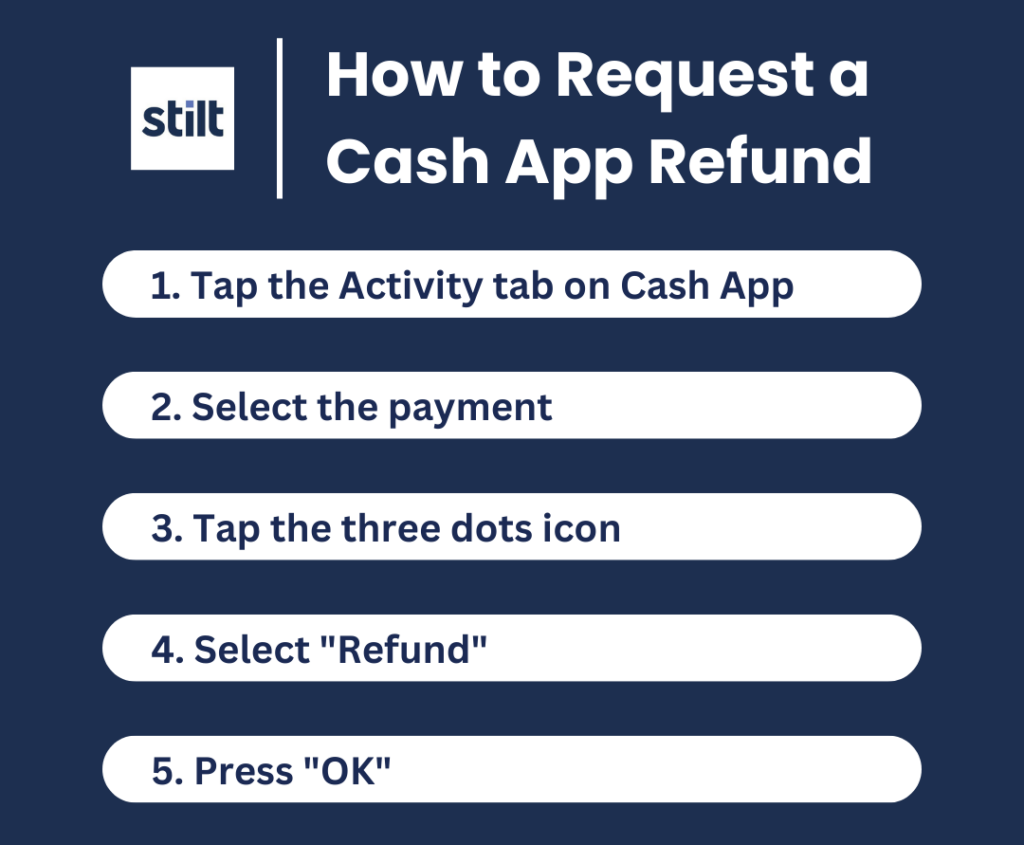
After sending a request, it’s natural to want to track its status. Cash App makes this relatively easy through its activity feed. You can access your transaction history and pending requests by navigating to the “Activity” tab, often represented by a clock icon on the bottom navigation bar. Here, you’ll see a chronological list of all your Cash App interactions, including money sent, money received, and requests.
For requests you’ve sent, the status will typically show as “Pending” until the recipient takes action. Once the recipient approves the request, the funds will be transferred to your Cash App balance, and the status will update to “Completed.” If the recipient declines the request, it will show as “Declined.”
Similarly, if someone sends you a request, it will appear in your activity feed as a pending item, prompting you to review and act upon it. Regularly checking this section is a good financial practice, allowing you to monitor your outstanding requests, confirm incoming funds, and keep a close eye on your overall Cash App activity. It’s your personal ledger within the app, crucial for reconciling your digital finances.

Handling Pending and Declined Requests
Understanding how to respond to and manage pending or declined requests is an essential aspect of using Cash App effectively.
For pending requests you’ve sent:
- Patience is key: Give the recipient a reasonable amount of time to respond.
- Follow up if necessary: If a request remains pending for too long, a gentle reminder through a separate message (outside of Cash App) might be appropriate.
- Canceling a request: If you sent a request in error, or if the funds were paid through another method, you can typically cancel a pending request directly from your activity feed. Find the pending request, tap on it, and look for an option to “Cancel Request.” This is important for correcting mistakes and maintaining accurate financial records.
For pending requests you’ve received: - Review carefully: Always check the amount and the memo to ensure you understand the request’s purpose.
- Approve or decline: If the request is legitimate and you have the funds, you can approve it to send the money. If it’s unfamiliar, incorrect, or you don’t wish to send the money, you can decline it.
For declined requests (sent or received): - Understand the reason: If a request you sent is declined, the sender might provide a reason in the memo or contact you directly. This is an opportunity to clarify or resend if appropriate. If a request you received is declined, it simply means the sender chose not to fulfill it.
Proactive management of these statuses helps maintain clear financial communication and prevents unnecessary confusion or outstanding debts.
Ensuring Transaction Security and Privacy
Security and privacy are paramount when dealing with digital financial tools like Cash App. Users must be proactive in safeguarding their accounts and personal information. Cash App employs various security measures, but user vigilance is the first line of defense.
- Strong Passwords/PINs: Always use a strong, unique PIN for your Cash App transactions and enable any available biometric security features (fingerprint or facial recognition) on your device.
- Two-Factor Authentication (2FA): Enable 2FA for an extra layer of security, typically involving a code sent to your phone or email during login.
- Be Wary of Scams: Never send money or approve requests from unknown individuals or for suspicious purposes. Scammers often impersonate legitimate entities or friends. If something feels off, verify it through an independent channel.
- Protect Your Information: Never share your Cash App PIN, login details, or bank information with anyone. Cash App support will never ask for your PIN.
- Public Wi-Fi Caution: Avoid making financial transactions over unsecured public Wi-Fi networks, as these can be vulnerable to eavesdropping.
- Monitor Activity: Regularly review your Cash App activity feed for any unauthorized transactions. Report any suspicious activity immediately to Cash App support.
By adhering to these security best practices, users can significantly mitigate risks and ensure that their financial interactions on Cash App remain secure and private, fostering trust in their digital money management.
Maximizing Efficiency and Security in Digital Money Requests
While requesting money on Cash App is simple, employing best practices can significantly enhance efficiency, security, and clarity in your financial interactions. These strategies are essential for both casual users and those who frequently rely on the app for various financial needs.
Best Practices for Senders and Requesters
For both parties involved in a Cash App transaction, adhering to certain best practices can prevent misunderstandings and facilitate smoother transfers.
For Requesters:
- Be Specific: Always include a clear and concise memo explaining the purpose of the request. This reduces ambiguity and helps the sender understand why they’re being asked for money.
- Confirm Recipient Details: Before sending a request, ensure you have the correct $Cashtag, phone number, or email for the intended recipient. A typo can send a request to the wrong person, leading to unnecessary complications.
- Communicate Externally: If it’s a significant amount or an unexpected request, consider sending a quick text or message outside of Cash App to let the person know a request is coming. This preemptive communication can prevent confusion or suspicion.
- Request Only What’s Due: Avoid requesting more than what is legitimately owed. This builds trust and maintains good financial relationships.
For Senders (when receiving a request): - Verify Identity and Purpose: Always check who sent the request and review the memo. If you don’t recognize the sender or the purpose is unclear, do not approve it. Contact the requester directly (through a known channel) to verify.
- Check Amount: Ensure the requested amount is correct and aligns with your understanding.
- Fund Availability: Make sure you have sufficient funds in your Cash App balance or linked bank account before approving.
By following these simple guidelines, both parties contribute to a more transparent, efficient, and secure financial environment within the Cash App ecosystem, reinforcing good personal finance habits.
Understanding Limits and Fees
Like most financial tools, Cash App operates with certain limits and, in some cases, fees, which are important for users to understand to manage their finances effectively.
Sending and Receiving Limits: Cash App typically has limits on how much money you can send and receive within certain timeframes (e.g., per week or per month). These limits are often lower for unverified accounts and can be increased by verifying your identity (usually by providing your full name, date of birth, and the last four digits of your Social Security Number). Verified accounts generally have much higher limits, allowing for more substantial transactions. Understanding your account’s specific limits prevents requests from being unexpectedly declined due to exceeding these thresholds.
Fees:
- Standard Transfers: Sending money from your Cash App balance or linked debit card is generally free.
- Credit Card Transfers: If you send money using a linked credit card, Cash App typically charges a 3% fee. This is a crucial point for financial planning, as using a credit card for P2P payments can quickly add up.
- Instant Deposits: While standard deposits from Cash App to your linked bank account are free but take 1-3 business days, instant deposits incur a small fee (typically 0.5% to 1.75%) to expedite the transfer.
- Bitcoin/Stocks: Buying and selling Bitcoin and stocks may involve fees, which are separate from standard money transfers.
- Requesting Money: There are no direct fees for requesting money. The fees apply to the sender if they use a credit card, or to you if you opt for an instant deposit.
Being aware of these limits and potential fees allows users to make informed decisions, optimize their transaction methods, and avoid unexpected charges, thereby maximizing the cost-effectiveness of using Cash App for their financial needs.
Troubleshooting Common Request Issues
Even with a straightforward platform like Cash App, users might occasionally encounter issues when requesting money. Knowing how to troubleshoot these common problems can save time and frustration.
- Request Not Received by Sender:
- Check their internet connection: Ensure the sender has a stable internet connection or cellular data.
- App notifications: Ask them to check their phone’s notification settings to ensure Cash App alerts are enabled.
- Spam/Junk folders: Though less common for in-app requests, ensure they check their Cash App activity tab directly.
- Verify recipient details: Double-check that you sent the request to the correct $Cashtag, phone number, or email. A small typo can cause the request to go to a non-existent account or the wrong person.
- Request Declined:
- Insufficient funds: The most common reason. The sender might not have enough money in their Cash App balance or linked bank account.
- Payment method issue: Their linked debit or credit card might have issues (e.g., expired, insufficient funds, or fraud alert).
- Sender’s decision: The sender might have simply chosen to decline the request for their own reasons.
- Exceeding limits: The sender might have hit their daily/weekly sending limit.
- Technical Glitches:
- App update: Ensure both you and the sender have the latest version of the Cash App installed.
- Restart app/device: Sometimes, simply closing and reopening the app, or restarting the phone, can resolve minor bugs.
- Clear cache: On Android, clearing the app’s cache can sometimes help.
- Cash App status: Check Cash App’s official social media or status page for any widespread outages.
- Contacting Support: If you’ve exhausted all troubleshooting steps and still can’t resolve the issue, contact Cash App Support directly through the app. Provide them with all relevant details, including screenshots if possible.
Proactive troubleshooting and clear communication are key to resolving financial transaction issues efficiently, ensuring your money requests are handled effectively and securely.
Beyond Requests: Integrating Cash App into Your Financial Ecosystem
While requesting and sending money are foundational to Cash App’s utility, the platform’s broader feature set positions it as a more comprehensive financial tool. Integrating these features strategically can significantly enhance your overall personal finance management.
Cash App’s Broader Financial Utility
Cash App has evolved beyond a simple P2P payment service, transforming into a versatile financial platform that caters to a wide array of user needs. Its expanded utility makes it a contender for a central role in an individual’s financial ecosystem.
- Cash Card: The associated debit card, linked directly to your Cash App balance, allows users to spend their funds anywhere Visa is accepted. This feature turns Cash App into a primary spending account for many, facilitating daily purchases without needing to transfer money to an external bank. It also offers “Boosts,” instant discounts at selected merchants, providing tangible savings.
- Direct Deposit: Users can receive their paychecks, tax refunds, or government benefits directly into their Cash App account using unique routing and account numbers. This convenience means funds are often available faster than traditional banks, offering quicker access to critical income streams.
- Investing (Stocks & Bitcoin): Cash App provides an accessible entry point into investing, allowing users to buy and sell fractional shares of stocks with as little as $1. Similarly, it facilitates the buying and selling of Bitcoin, making cryptocurrency accessible to a broader audience without requiring specialized exchanges. This democratizes investing, enabling users to explore wealth growth opportunities directly within their payment app.
- Taxes: While not a full tax preparation service, Cash App has made strides in assisting with tax-related functionalities, particularly for users utilizing their direct deposit feature.
These features collectively empower users to manage their income, spending, and savings, all from a single, integrated application, reducing the need for multiple financial tools.
Strategic Use for Budgeting and Tracking
For individuals focused on improving their personal finance, Cash App can serve as a valuable tool for budgeting and tracking expenses, especially for specific categories of spending.
- Dedicated Spending Account: By routing a portion of your income via direct deposit to Cash App, you can designate it as a dedicated account for certain variable expenses, such as entertainment, dining out, or groceries. This “envelope budgeting” approach helps limit overspending in these areas.
- Transaction History: Cash App’s detailed activity feed acts as a ready-made transaction log. Regularly reviewing this feed can provide insights into spending patterns, helping users identify areas where they might be able to cut back or optimize their expenditures.
- Categorization (Manual): While Cash App doesn’t offer automated categorization like some budgeting apps, the memo feature on requests and payments can be used strategically. By consistently adding descriptive notes (e.g., “#Groceries,” “#Transport”), users can manually review and categorize their spending, making it easier to track against a budget.
- Monitoring Side Hustle Income: For freelancers or those with side hustles, using Cash App for receiving payments can streamline income tracking for tax purposes and general financial oversight.
Integrating Cash App into a broader budgeting strategy requires discipline but can provide a clear, real-time snapshot of specific financial flows, empowering users to make more informed spending and saving decisions.
The Future of Digital Money Management
The evolution of platforms like Cash App offers a glimpse into the future of digital money management. We are moving towards an ecosystem where financial services are increasingly integrated, personalized, and accessible directly from mobile devices.
- Hyper-Personalization: Future iterations will likely offer more tailored financial advice, spending insights, and investment opportunities based on individual user behavior and financial goals.
- Greater Integration: Expect even deeper integration with other aspects of digital life, from e-commerce platforms to smart home devices, allowing for seamless payment experiences across various touchpoints.
- Enhanced Security: As digital transactions become more prevalent, continuous advancements in biometric security, AI-driven fraud detection, and blockchain technology will make transactions even safer.
- Financial Inclusion: These platforms are pivotal in bringing financial services to underserved populations, offering banking alternatives to those without traditional bank accounts.
- Blurred Lines: The distinction between traditional banks, P2P apps, and investment platforms will continue to blur, with apps aiming to be the singular hub for all personal financial needs.
Cash App’s journey from a simple payment app to a multi-faceted financial tool reflects this broader trend. By understanding and strategically utilizing its features, users can not only master the art of requesting money but also position themselves to effectively navigate and benefit from the exciting future of digital money management. It’s an ongoing evolution, promising ever greater convenience, control, and insights into our financial lives.
aViewFromTheCave is a participant in the Amazon Services LLC Associates Program, an affiliate advertising program designed to provide a means for sites to earn advertising fees by advertising and linking to Amazon.com. Amazon, the Amazon logo, AmazonSupply, and the AmazonSupply logo are trademarks of Amazon.com, Inc. or its affiliates. As an Amazon Associate we earn affiliate commissions from qualifying purchases.