
In the evolving landscape of personal finance, digital payment platforms like Cash App have emerged as indispensable tools for managing money. With its integrated debit card, the Cash App Card (also known as the Cash Card) offers a seamless bridge between your digital balance and real-world spending. Understanding how to effectively fund this card is crucial for anyone looking to leverage its convenience for daily transactions, budgeting, or even managing online income. This guide delves into the various methods of adding money to your Cash App Card, outlining each process with professional insight into its financial implications, security considerations, and best practices. Whether you’re a new user or looking to optimize your financial operations within the app, mastering these funding mechanisms is a cornerstone of modern personal finance.
Understanding Your Cash App Card and Its Funding Mechanisms
The Cash App Card is a free, customizable debit card linked directly to your Cash App balance. It allows users to spend the money in their Cash App account anywhere Visa is accepted, both online and in physical stores. This makes it a powerful financial tool, essentially acting as a mobile bank account for many. Before diving into the ‘how-to,’ it’s essential to grasp what the card represents in your personal finance ecosystem and the foundational elements that facilitate its funding.
What is the Cash App Card and Why Fund It?
At its core, the Cash App Card provides liquidity to your Cash App balance. Unlike a traditional bank debit card that draws directly from a checking account, the Cash App Card draws from the funds held within your Cash App account. The primary reasons individuals choose to fund their Cash App Card are manifold:
- Convenience: For quick, everyday purchases without needing to transfer funds to a traditional bank account first.
- Budgeting: Managing a specific budget by only funding the card with a set amount.
- Accessibility: Providing spending power to individuals who may not have traditional bank accounts.
- Receiving Funds: Easily spending money received via peer-to-peer transfers or direct deposits within the app.
- Online Shopping: Securely using a separate digital balance for online transactions, adding an extra layer of security against primary bank accounts.
Key Considerations Before Funding
Before initiating any funding process, several financial considerations are paramount to ensure a smooth and secure experience:
- Verification Status: Cash App has different limits for verified and unverified accounts. Verifying your identity (typically requiring your full name, date of birth, and the last four digits of your SSN) significantly increases funding and spending limits. This is a critical step for serious financial management within the app.
- Linked Accounts: Most funding methods require linking a debit card or bank account. Ensure these are up-to-date and belong to you.
- Fees: While many funding methods are free, some, especially instant transfers from linked debit cards or in-store cash deposits, may incur small transaction fees. Being aware of these helps in managing your personal finance effectively.
- Security: Always ensure you are on a secure network and that your Cash App account has strong security measures enabled (e.g., PIN, Touch ID, or Face ID).
Direct and Digital Methods: Linking Bank Accounts and Receiving Funds
The most common and often quickest ways to put money on your Cash App Card involve digital transfers, either from your own linked bank accounts or through peer-to-peer transactions. These methods highlight the digital wallet’s efficiency and integration with traditional banking.
Funding via Linked Debit Card or Bank Account
Adding money directly from your existing bank account or debit card is perhaps the most straightforward method. This typically involves linking a debit card to your Cash App profile.
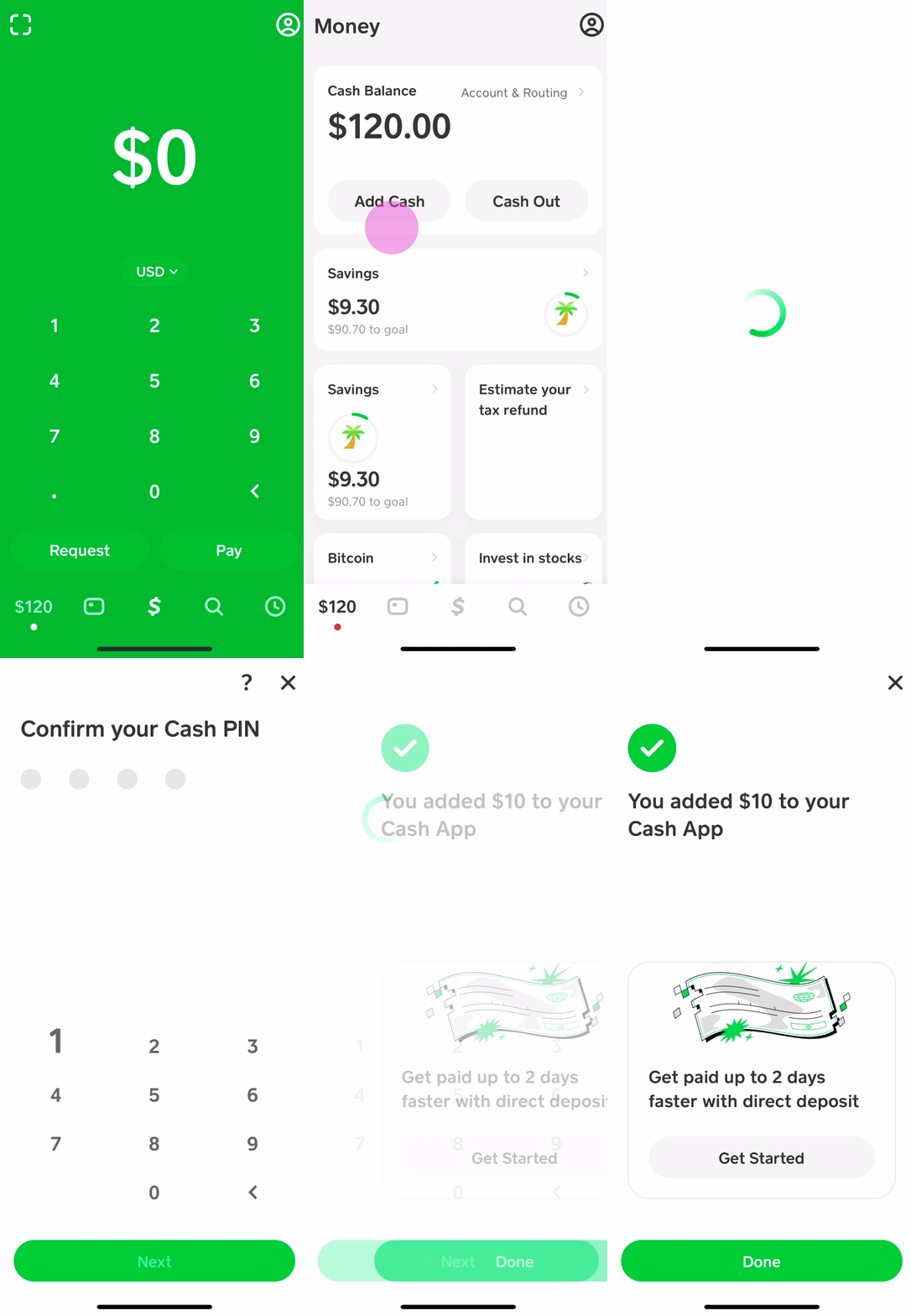
- Link a Debit Card: From the Cash App home screen, tap the banking icon (house or building icon in the bottom left). Select “Link Bank” and follow the prompts to enter your debit card details. Note: Credit cards cannot be used to add money to your Cash App balance, only debit cards linked to checking accounts.
- Add Cash: Once your debit card is linked, tap the banking icon again, then select “Add Cash.”
- Enter Amount: Input the desired amount you wish to add to your Cash App balance.
- Confirm: Confirm the transaction using your PIN or biometrics. The funds are typically available instantly for use with your Cash App Card.
Financial Insight: While convenient, standard transfers from a linked debit card are usually instant and free. However, if you need funds from a linked bank account (not debit card) instantly, Cash App may charge a small fee (e.g., 0.5%–1.75%) for instant deposits, whereas standard transfers take 1-3 business days and are free.
Receiving Money from Other Cash App Users
One of Cash App’s core functionalities is its peer-to-peer payment system. Receiving money from friends, family, or even clients directly populates your Cash App balance, making it instantly available on your Cash App Card.
- Share Your Details: Provide your $Cashtag (your unique Cash App username), phone number, or email associated with your account to the sender.
- Receive Payment: The sender initiates a payment to you.
- Funds Available: Once the sender confirms the transaction, the funds appear in your Cash App balance immediately.
Financial Insight: This method is usually free for both sender and receiver, making it an efficient way to transfer and receive personal funds, or payments for small services.
Leveraging Direct Deposit for Regular Income
For those seeking to use Cash App as a primary financial hub, setting up direct deposit is an excellent option. This allows employers, government benefits, or other regular income sources to be paid directly into your Cash App balance.
- Access Direct Deposit Info: From the banking tab, tap on “Direct Deposit.” Here you’ll find your Cash App routing and account numbers.
- Provide to Payer: Give these details to your employer’s payroll department, government agency (for benefits like unemployment), or any other entity that offers direct deposit.
- Automatic Funding: Your wages or payments will automatically be deposited into your Cash App balance as scheduled, typically becoming available up to two days earlier than many traditional banks.
Financial Insight: This is a powerful feature for managing regular income directly within Cash App, effectively turning it into a primary checking account. There are no fees for direct deposits, making it a cost-effective solution for consistent income streams.
Convenient Cash Deposits: In-Store Options
For individuals who primarily deal in cash or prefer to deposit physical currency, Cash App offers a convenient in-store cash deposit feature. This bridges the gap between the digital and physical realms of finance, ensuring that cash remains a viable funding option.
Locating Participating Retailers for Cash Deposits
Cash App has partnered with various retailers across the United States to facilitate cash deposits.
- Find a Location: In the Cash App, tap the banking icon, then “Add Cash.” You should see an option like “Deposit Paper Money” or “Locations.” Tapping this will display a map or list of nearby participating stores (e.g., Walmart, Walgreens, CVS, 7-Eleven).
- Prepare for Deposit: Ensure you have your physical cash ready and that your phone is charged to access the app.

Step-by-Step Guide to In-Store Cash Deposits
Depositing cash at a retail location is a straightforward process, designed for quick execution.
- Generate Barcode: At the chosen retailer, inform the cashier you wish to deposit money to your Cash App. Open your Cash App, tap the banking icon, “Add Cash,” then “Deposit Paper Money” (or similar phrasing). A unique barcode will be generated on your screen.
- Scan Barcode: The cashier will scan this barcode.
- Hand Over Cash: Give the cashier the exact amount of cash you wish to deposit. Ensure the amount is within Cash App’s daily and weekly limits.
- Confirm Transaction: The cashier will process the deposit. The funds should appear in your Cash App balance almost immediately. You’ll receive an in-app notification confirming the transaction.
Financial Insight: This method is particularly useful for those who receive income in cash or prefer managing physical currency before transferring it to their digital wallet. It eliminates the need for a traditional bank account to deposit cash.
Understanding Limits and Potential Fees
While highly convenient, in-store cash deposits come with specific financial parameters:
- Limits: Cash App imposes limits on how much cash you can deposit daily and weekly. These limits vary and are subject to change, so always check the latest figures within the app. For example, typical limits might be $500 per deposit, $1,000 per day, and $4,000 per week. These limits are also affected by your account verification status.
- Fees: Most participating retailers charge a small service fee for cash deposits (e.g., $1.00 or a percentage of the deposit amount). This fee is usually deducted from the deposited amount or added to it, so factor this into your financial planning. Always confirm the fee with the cashier before completing the transaction.
Maximizing Your Cash App Card Experience: Tips for Financial Management
Beyond merely funding your card, effective financial management within Cash App involves actively monitoring your balance, understanding your transaction history, and safeguarding your funds. These practices transform the Cash App Card from a simple spending tool into a robust component of your personal financial strategy.
Monitoring Your Balance and Transaction History
Keeping a close eye on your Cash App balance and reviewing your transaction history are fundamental for sound financial management.
- Real-time Balance: Your current balance is prominently displayed on the Cash App home screen. Always check this before making a purchase to avoid declined transactions.
- Detailed Transactions: Tap the clock icon on the Cash App home screen to view your activity feed. This shows all incoming funds, outgoing payments, and Cash Card transactions. Regularly reviewing this helps you track spending, identify unauthorized transactions, and reconcile your finances.
- Monthly Statements: Cash App provides monthly statements that can be accessed and downloaded for more comprehensive financial tracking and budgeting purposes.
Setting Up Security Features for Your Funds
Protecting your digital funds is paramount. Cash App offers several security features to help safeguard your money.
- PIN/Touch ID/Face ID: Enable these authentication methods for all transactions and when opening the app. This prevents unauthorized access even if your phone is lost or stolen.
- Cash Card Lock: If your physical Cash Card is lost or stolen, immediately lock it within the app (go to the Cash Card tab and toggle the “Enable Cash Card” off). This instantly prevents any further use of the card.
- Notifications: Enable push notifications for all transactions. This allows you to monitor activity in real-time and quickly identify any suspicious charges.
- Two-Factor Authentication (2FA): Where available, use 2FA for an added layer of security when logging into your account or making significant changes.
- Avoid Scams: Be vigilant against phishing attempts and scams. Cash App will never ask for your PIN or full sign-in code outside of the app.
Troubleshooting Common Funding Issues
Occasionally, you might encounter issues when trying to add money to your Cash App Card. Understanding common problems can help you quickly resolve them and maintain seamless financial flow.
- Declined Transactions: This could be due to exceeding daily/weekly limits, incorrect card details, insufficient funds in the linked bank account, or your bank flagging the transaction as suspicious. Contact your bank or Cash App support if the issue persists.
- Funds Not Appearing: While most deposits are instant, sometimes there might be a slight delay. If funds don’t appear after a reasonable time (e.g., 30 minutes for an in-store deposit), check your activity feed and then contact Cash App support with transaction details.
- Linked Card Issues: Ensure your linked debit card is active and has not expired. If you’ve recently replaced your card, update the details in Cash App.
- Verification Status: If you’re hitting limits, consider completing the identity verification process to increase your transaction ceilings.
Financial Implications: Benefits, Limitations, and Best Practices
Utilizing your Cash App Card for managing funds comes with distinct financial benefits and limitations that users must be aware of. A clear understanding of these aspects allows for more strategic financial planning and ensures you leverage the tool to its fullest potential while mitigating potential risks.
The Advantages of Using Your Cash App Card
From a personal finance perspective, the Cash App Card offers several compelling benefits:
- Instant Access to Funds: Money received or added is typically available immediately, offering unparalleled liquidity for everyday expenses.
- No Monthly Fees: Unlike many traditional bank accounts, Cash App generally doesn’t charge monthly maintenance fees, which can lead to significant savings over time.
- Budgeting Tool: Easily transfer a specific amount to your Cash App balance for a dedicated spending category or period, helping to control discretionary spending.
- “Boosts” for Savings: Cash App offers “Boosts” – instant discounts at specific retailers when using your Cash Card. This feature can lead to tangible savings on regular purchases.
- Accessibility: It provides banking-like services to individuals who may not have access to traditional banking, fostering financial inclusion.
Navigating Fees and Daily/Weekly Limits
While generally cost-effective, being mindful of potential fees and transaction limits is crucial for effective financial management with Cash App:
- Instant Deposit Fees: While standard transfers to your linked bank account are free, instant transfers incur a fee (1.75%, minimum $0.25). Similarly, certain instant funding methods from external accounts might have fees.
- ATM Withdrawal Fees: If you use your Cash Card for ATM withdrawals, Cash App typically charges a $2.50 fee, in addition to any fees imposed by the ATM operator. However, if you receive at least $300 in direct deposits per month, Cash App waives its ATM fee.
- Funding Limits: As discussed, daily and weekly limits apply to adding cash, especially in-store. These limits can impact your ability to fund large purchases or rapidly replenish your balance.
- Spending Limits: Your Cash Card also has daily, weekly, and monthly spending limits. These vary based on your verification status and are in place for security reasons. Always consult the app for your specific limits.
Best Practices for Secure and Efficient Funding
To optimize your experience and safeguard your funds, adopt these best practices:
- Regular Verification: Ensure your account details are always up-to-date and your identity is fully verified to unlock higher limits and enhance security.
- Diversify Funding: While Cash App is convenient, avoid relying solely on it for all your financial needs. Maintain traditional bank accounts for larger savings, investments, and more complex financial transactions.
- Monitor Activity Constantly: Make it a habit to review your transaction history daily or weekly. This quick review can prevent financial mishaps and fraud.
- Understand Terms and Conditions: Periodically review Cash App’s terms of service and fee schedules, as these can change.
- Educate Yourself on Scams: Stay informed about common Cash App scams (e.g., fake giveaways, customer support impersonations) to protect your money.
In conclusion, the Cash App Card is a versatile financial tool, offering numerous ways to fund your digital balance for convenient spending. By understanding its mechanisms, being mindful of fees and limits, and implementing robust security practices, users can effectively integrate it into their personal finance strategy, making money management more accessible and efficient in the digital age.
aViewFromTheCave is a participant in the Amazon Services LLC Associates Program, an affiliate advertising program designed to provide a means for sites to earn advertising fees by advertising and linking to Amazon.com. Amazon, the Amazon logo, AmazonSupply, and the AmazonSupply logo are trademarks of Amazon.com, Inc. or its affiliates. As an Amazon Associate we earn affiliate commissions from qualifying purchases.