
Navigating the SAT’s Calculator Policy: A Tech Deep Dive
The Scholastic Assessment Test (SAT) is a standardized examination that plays a pivotal role in college admissions. While many focus on content mastery, understanding the technological parameters, particularly concerning calculators, is equally crucial. The SAT’s math sections are designed to assess a student’s quantitative reasoning and problem-solving skills, and for a significant portion, an approved calculator serves as an indispensable digital tool. However, the College Board, which administers the SAT, maintains a stringent policy regarding the types of calculators permitted, primarily to ensure fairness, prevent technological advantages, and uphold the integrity of the test.

Ignoring or misunderstanding these tech guidelines can lead to significant setbacks, from having a non-compliant device confiscated to being denied the ability to use a calculator at all. This guide delves into the specifics of what digital calculation tools are acceptable, the technological features that are prohibited, and how to optimally leverage your approved device for maximum performance on test day. It’s not just about having a calculator; it’s about having the right calculator and understanding its capabilities and limitations within the standardized testing environment.
Acceptable Calculator Technologies: Features and Models
The College Board permits specific categories of calculators, each offering varying levels of computational sophistication. Familiarity with these types and their core functionalities is key to selecting the optimal digital assistant for the SAT.
Graphing Calculators: The Powerhouses of Permitted Tech
Graphing calculators are the most advanced type of digital device allowed on the SAT, offering a comprehensive suite of computational, algebraic, and graphical analysis tools. Their utility extends far beyond basic arithmetic, enabling users to visualize functions, solve complex equations, manipulate matrices, and perform statistical regressions. For many students tackling the more challenging problems in the SAT math sections, a graphing calculator is the preferred tech choice due to its efficiency and versatility.
Key features to look for in a SAT-compatible graphing calculator include a robust display for plotting graphs, programmatic functions for solving various mathematical problems, and the ability to handle large datasets for statistical analysis. Popular models that consistently meet College Board requirements include:
- Texas Instruments (TI) Series:
- TI-83 Plus and TI-84 Plus (including CE/Plus CE models): These are industry standards, known for their user-friendly interface, extensive functionality, and widespread use in high school curricula. The CE models offer color displays and rechargeable batteries, enhancing the user experience.
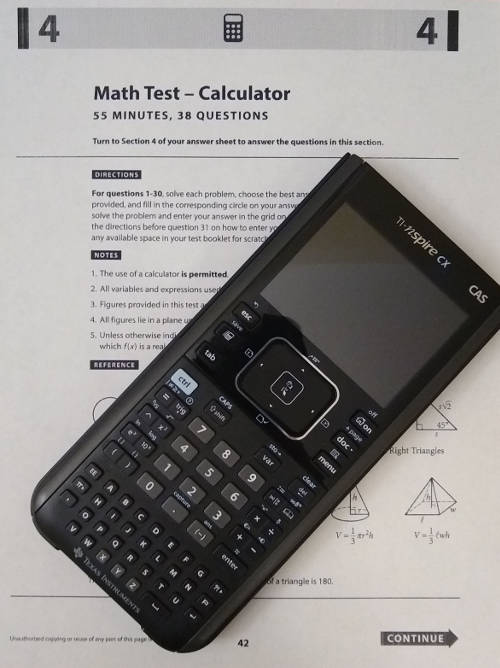
- TI-Nspire CX (non-CAS models): These devices feature an intuitive interface similar to a computer, with advanced graphing and document-based functionality. Crucially, only the non-CAS (Computer Algebra System) versions are permitted. The CAS versions, with their symbolic manipulation capabilities, are strictly prohibited.
- Casio Series:
- Casio fx-CG50 PRIZM: This model boasts a high-resolution color display and robust functionality, rivaling the TI series in its graphing and computational power. It is a strong contender for students seeking an alternative to the TI ecosystem.
- Hewlett-Packard (HP) Series:
- HP Prime (non-CAS models): Similar to the TI-Nspire CX, the non-CAS versions of the HP Prime offer advanced touch-enabled interfaces and powerful computational engines. Again, the CAS-enabled versions are banned.
When selecting a graphing calculator, students should prioritize models that align with their comfort level and existing familiarity, as efficient operation under timed pressure is paramount.
Scientific Calculators: Reliable Workhorses
Scientific calculators represent a middle ground in terms of technological sophistication. They are designed to perform advanced mathematical operations beyond basic arithmetic, including trigonometry (sine, cosine, tangent), logarithms, exponential functions, and complex number calculations. While they lack the graphing capabilities and advanced programming of their graphing counterparts, scientific calculators are perfectly capable of handling the vast majority of problems on the SAT math sections, especially those in the No-Calculator portion (if time allows for review) and many in the Calculator-Permitted section.
These devices are generally more affordable and compact than graphing calculators, making them an excellent budget-friendly tech option. Their simplicity can also be an advantage for students who find the complexity of graphing calculators overwhelming.
Recommended scientific calculators include:
- Texas Instruments (TI) Series:
- TI-30XS MultiView: This model is highly regarded for its multi-line display, allowing users to view input and results simultaneously, enhancing accuracy and ease of use.
- Casio Series:
- Casio fx-991EX ClassWiz: Known for its high-resolution LCD and comprehensive list of functions, including spreadsheet capabilities, which can be useful for certain types of data analysis.
For students who are comfortable with algebra and geometry but don’t heavily rely on graphical analysis, a robust scientific calculator provides all the necessary computational power without the added complexity or cost of a graphing model.
Four-Function Calculators: Basic Digital Tools
Four-function calculators are the simplest form of digital computation device, capable only of addition, subtraction, multiplication, and division. While technically allowed, their utility on the SAT is severely limited. They cannot handle complex fractions, exponents, roots, or trigonometric functions, which are common across both math sections. Using a four-function calculator would place a student at a significant disadvantage, making it an impractical choice for serious test-takers. They are mentioned mainly for completeness rather than as a viable recommendation.
Prohibited Devices and Features: Understanding the Technological Restrictions
To maintain a level playing field and prevent any form of technological unfairness, the College Board explicitly bans certain devices and specific features found in some advanced calculators. Understanding these prohibitions is as critical as knowing what is allowed.
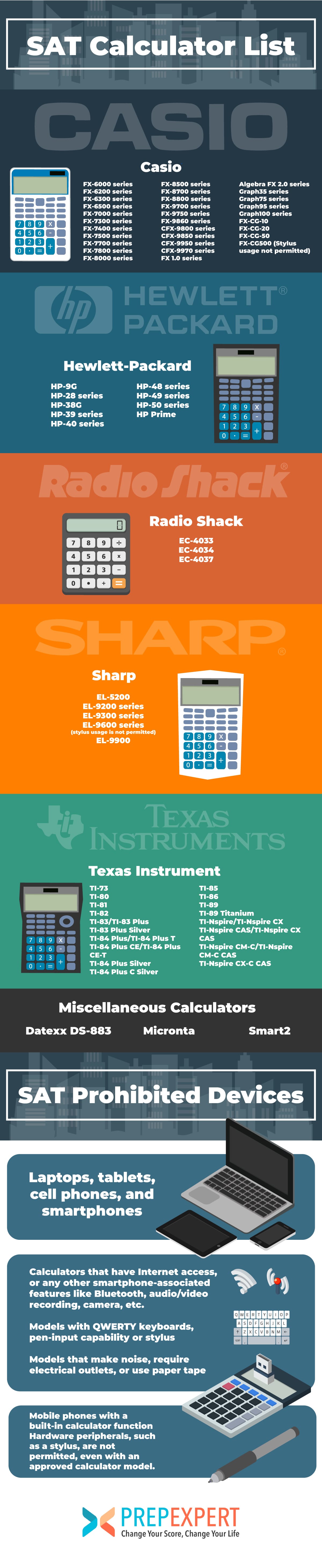
Smart Devices and Communication Capabilities
The most fundamental rule is the absolute prohibition of any device capable of wireless communication, internet access, or recording capabilities. This category unequivocally includes:
- Smartphones, Tablets, Laptops, and Smartwatches: These multi-purpose digital devices are strictly forbidden. Their ability to access external information, communicate, or store extensive data directly compromises test security and fairness.
- Calculators with Wireless Communication Features: Any calculator, regardless of its primary function, that can connect to the internet, communicate with other devices wirelessly (e.g., Bluetooth, Wi-Fi), or make noise is prohibited. This ensures a sterile testing environment focused solely on individual performance.
Calculators with QWERTY Keypads and Computer Algebra Systems (CAS)
Certain advanced calculators, while powerful, are banned due to features that could provide an unfair advantage:
- Calculators with QWERTY (Typewriter-Style) Keypads: Devices like the TI-Nspire CX (CAS version) or the HP Prime (CAS version) typically feature QWERTY keypads. These are prohibited because they resemble computer keyboards, which could facilitate text input, programming, or access to stored notes, thereby undermining the assessment of individual mathematical reasoning.
- Computer Algebra Systems (CAS): Calculators equipped with CAS technology (e.g., TI-Nspire CX CAS, HP Prime CAS) are forbidden. A CAS allows for symbolic manipulation of algebraic expressions, solving equations with variables, and performing advanced calculus operations symbolically rather than numerically. This functionality bypasses the need for students to demonstrate their understanding of algebraic steps, directly conflicting with the SAT’s objective to evaluate problem-solving skills manually or with basic numerical assistance.
Other Prohibited Devices and Features
Beyond communication and advanced symbolic capabilities, other restrictions include:
- Calculators that Make Noise: Any device that emits sound (e.g., beeps, alarms) is disruptive and therefore not allowed.
- Calculators Requiring Electrical Outlets: Devices that need to be plugged into an external power source are impractical and prohibited in a standardized testing environment.
- Pen-Input Devices: Any calculator or device that uses a pen or stylus for input (unless it’s a standard resistive touch screen on an approved model and used solely for navigation) is typically not allowed due to the potential for text or data entry.
The rationale behind these technological restrictions is clear: to ensure every student is assessed purely on their cognitive abilities and learned mathematical skills, without external assistance or technological shortcuts that undermine the test’s validity.
Optimizing Your Calculator Technology for SAT Success
Possessing an allowed calculator is merely the first step. True optimization involves strategic preparation and efficient application of your chosen device.
Pre-Test Preparation: Device Check and Familiarization
Before test day, treat your calculator like any other critical piece of tech. A comprehensive check-up is non-negotiable:
- Battery Life and Replacement: This is paramount. Ensure your calculator has fresh batteries or is fully charged if it uses a rechargeable pack. Bring spare batteries if your model uses disposable ones, or a portable charger if permitted and practical for rechargeable models (though usually not necessary if fully charged). A dead calculator is functionally equivalent to no calculator at all.
- Resetting Memory: Clear all programs, stored data, and previous calculations from your device’s memory. This is often a requirement from the College Board, and it ensures no unauthorized information is stored, preventing any suspicion of cheating. Familiarize yourself with how to perform a full reset on your specific model.
- Hands-on Practice: The SAT is a timed test. Efficiency with your calculator can save precious seconds. Practice extensively with your chosen device, becoming intimately familiar with its button layout, menu navigation, and specific functions relevant to SAT problem types (e.g., statistical functions, solving systems of equations, matrix operations). Develop muscle memory for common operations.
- Understanding Specific Functions: Identify which calculator functions can expedite various problem types. For instance, knowing how to quickly enter and analyze data for linear regressions, use the equation solver, or perform complex fraction calculations can significantly boost your pace.
Strategic Application During the Exam
During the SAT, your calculator is a tool to be wielded strategically, not mindlessly.
- When to Use and When to Avoid: Not every problem on the calculator-permitted section requires a calculator. Sometimes, mental math or simple algebraic manipulation is faster. Over-reliance can lead to input errors or wasted time. Use your judgment to discern when the tech provides a genuine advantage.
- Efficiency Tips: Learn shortcuts specific to your calculator. For example, knowing how to store variables, recall previous answers, or navigate menus quickly can drastically reduce computation time. Utilize parentheses correctly to avoid order-of-operations errors.
- Avoiding Over-Reliance: The calculator is an aid, not a substitute for understanding mathematical concepts. If you find yourself consistently relying on the calculator for every step, it might indicate a gap in your fundamental understanding that needs addressing.
- Troubleshooting Minor Tech Issues: In the rare event of a minor glitch (e.g., display freezing, unexpected error message), know how to perform a quick reset or restart if your model allows. Avoid panic; focus on regaining functionality quickly.
The Rationale Behind the Regulations: Tech Ethics and Fairness
The College Board’s calculator policy is a meticulously crafted framework designed to balance technological utility with the core principles of standardized testing. At its heart, the policy ensures fairness and integrity. By dictating acceptable technology, the College Board guarantees that all test-takers operate on an equal technological footing. No student should gain an unfair advantage due to access to a more powerful, communicative, or symbolically capable device.
The regulations also serve as a bulwark against academic dishonesty. Banning devices with internet access, wireless communication, or advanced programming capabilities minimizes the risk of cheating through external assistance or pre-programmed solutions. As technology evolves, so too do the potential avenues for misuse, and thus, the College Board periodically reviews and updates its policies to address emerging tech challenges. Ultimately, these rules reinforce the SAT’s commitment to providing a valid and reliable measure of a student’s preparedness for college-level work, ensuring that scores genuinely reflect individual merit and acquired skills, rather than the sophistication of their personal computational hardware.
aViewFromTheCave is a participant in the Amazon Services LLC Associates Program, an affiliate advertising program designed to provide a means for sites to earn advertising fees by advertising and linking to Amazon.com. Amazon, the Amazon logo, AmazonSupply, and the AmazonSupply logo are trademarks of Amazon.com, Inc. or its affiliates. As an Amazon Associate we earn affiliate commissions from qualifying purchases.